
1. Pengenalan
This manual provides detailed instructions for the installation, operation, and maintenance of your Pyniro Single Din Car Stereo, Model ZX-US-CLP4C. This unit features a 6.36-inch IPS touchscreen, wired and wireless Apple CarPlay and Android Auto compatibility, Bluetooth connectivity, FM radio, a customizable equalizer, and support for a backup camera. Please read this manual thoroughly before use to ensure proper functionality and safety.
2. Maklumat Keselamatan
- Ensure all wiring is correctly connected and insulated to prevent short circuits or other hazards.
- This car stereo operates on 12-14.4V DC voltage, with a maximum current of 15A. Do not use with 24V systems (e.g., large trucks).
- Sentiasa utamakan pemanduan yang selamat. Jangan kendalikan peranti dengan cara yang mengalihkan perhatian anda dari jalan raya.
- Seek professional assistance for installation if you are unsure about any steps.
3. Kandungan Pakej
Sahkan bahawa semua item terdapat dalam pakej:
- 1 x Single Din Car Stereo Unit
- 1 x Pemutar skru
- 1 x Kabel Kuasa
- 1 x Crowbar
- 1 x Mikrofon
- Skru untuk pemasangan
- 1 x Belakang View Kamera
- 1 x Manual Pengguna

Imej: Selesaiview of the Pyniro Single Din Car Stereo unit, its dimensions, and all included accessories such as the rear camera, power connector, installation tools, external microphone, and user manual.
4. Produk Lebihview
The Pyniro Single Din Car Stereo features a 6.36-inch IPS touchscreen for clear visuals and intuitive control. Key components include a volume knob, USB ports (Type-C for charging, USB-A for flash drives), and an AUX input.
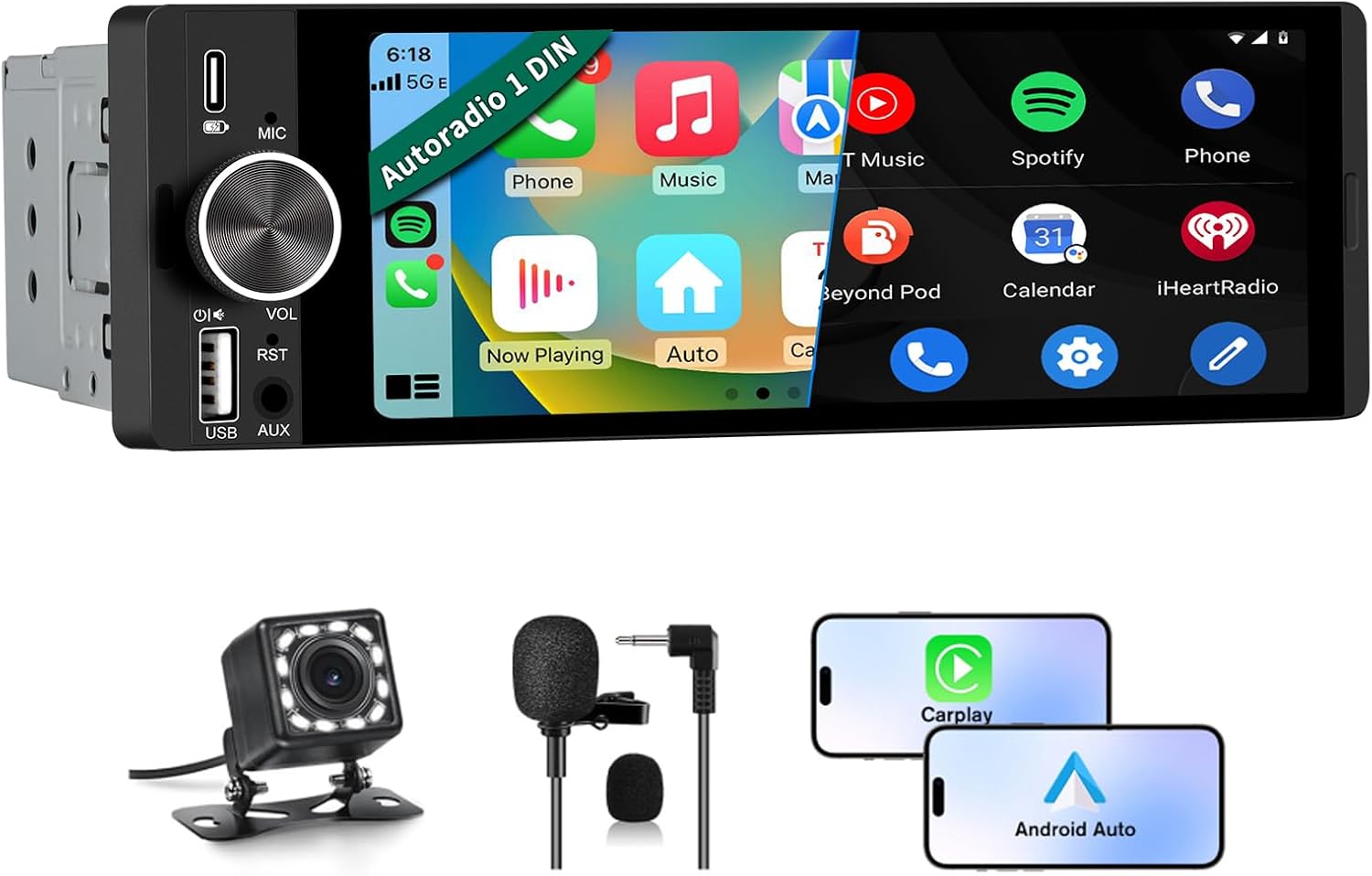
Imej: Depan view of the Pyniro Single Din Car Stereo, highlighting the 6.36-inch IPS touchscreen, physical volume knob, microphone, USB ports, and AUX input.

Image: The Pyniro Single Din Car Stereo integrated into a vehicle dashboard, illustrating its core features such as Apple CarPlay, Android Auto, Bluetooth, DSP, rearview camera support, FM radio, and steering wheel control compatibility.
5. Pemasangan
5.1 Semakan Keserasian
This unit features a standard 1 DIN size. Before installation, refer to the provided dimensions and wiring diagrams to ensure compatibility with your vehicle's dashboard and electrical system. Professional installation is recommended if you are unfamiliar with car audio wiring.
5.2 Sambungan Pendawaian
Proper wiring is crucial for correct operation and to prevent damage. Use the provided wiring harness.
- Yellow Wire (B+): Connect to the positive terminal of the constant current battery (12V). This ensures the memory function works after the car is turned off.
- Black Wire (GND): Connect to the negative terminal of the battery.
- Red Wire (ACC): Connect to the car's ignition switch (ACC) to ensure the stereo turns on and off with the vehicle.
- Wayar Pembesar suara: Connect according to the cable definition diagram (Violet, Violet/Black, Gray, Gray/Black, White, White/Black, Green, Green/Black).
- Parking Sensor Control Wire (Pink): Connect for parking brake detection if applicable.
- Steering Wheel Key Control Wires (Orange, Brown): Connect to your vehicle's steering wheel control wires (KEY1, KEY2) if supported.
- Antena Kuasa Amplifier Power On (Blue): Connect to power an external antenna amppelapis jika digunakan.
- Headlight Detection Wire (Green): Connect to the headlight circuit for automatic display dimming.
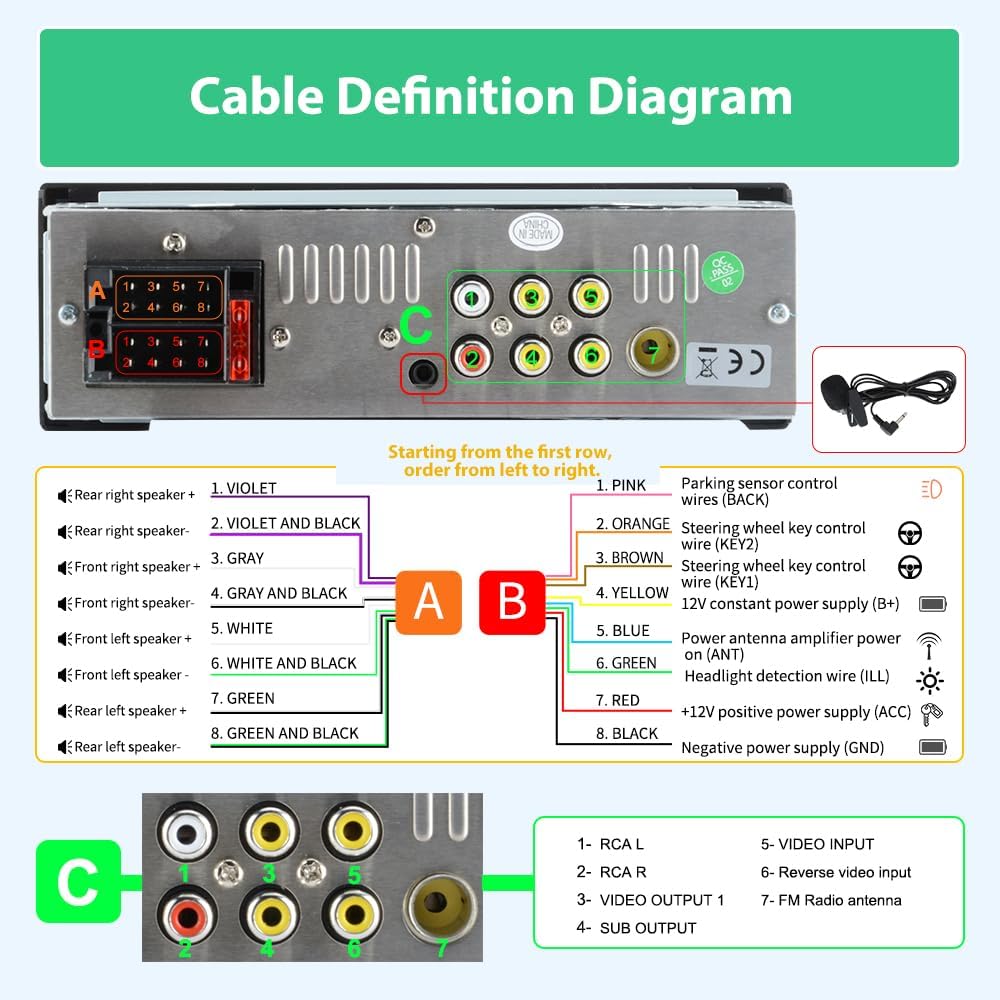
Image: Cable Definition Diagram. This diagram illustrates the wiring connections for the Pyniro car stereo, including speaker outputs, power inputs (B+, ACC, GND), and various control wires like steering wheel controls and parking sensor input.
5.3 Sambungan Kamera Belakang
The included waterproof HD backup camera enhances parking safety. Connect it as follows:
- Connect the camera's video output cable to the "Reverse Video Input" (RCA port 6) on the stereo.
- Connect the camera's red power wire to the positive wire of your car's reverse light.
- Connect the camera's black ground wire to the negative wire of your car's reverse light.
- Connect the trigger wire (usually a thin red wire extending from the RCA cable) to the "BACK" wire of the power harness. This signals the stereo to switch to the rear view apabila terbalik.
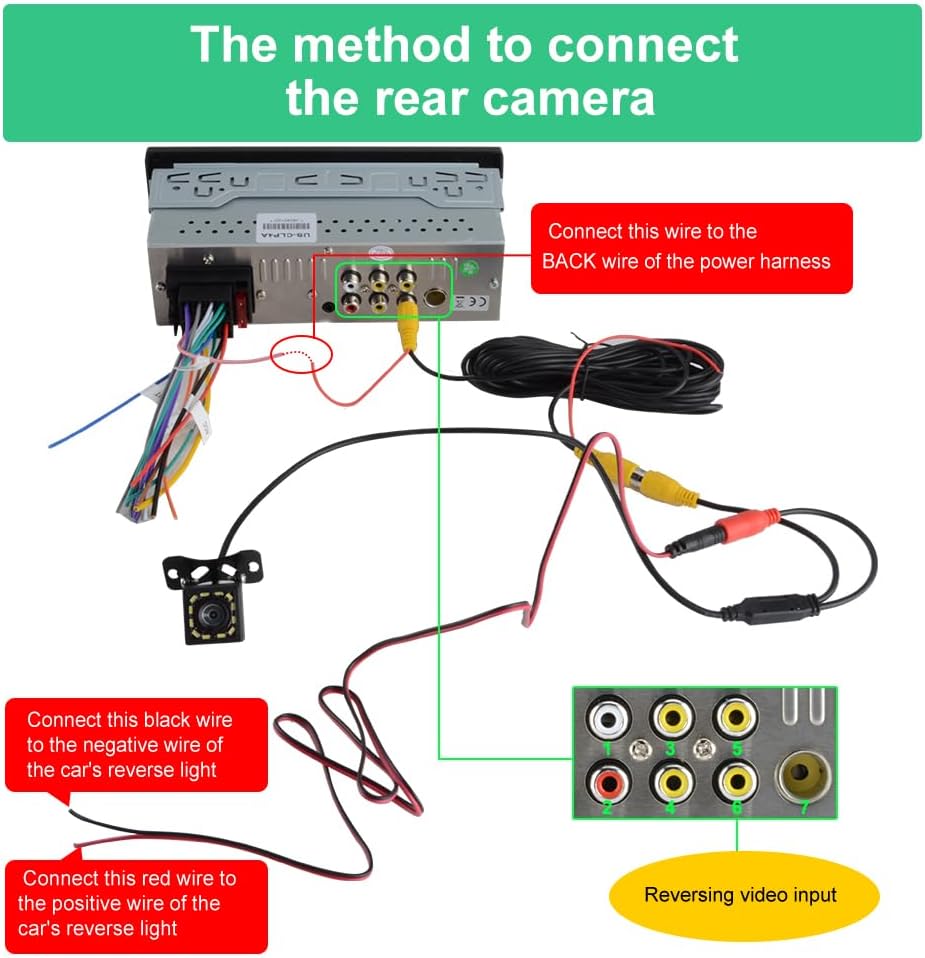
Image: Rear Camera Connection Method. This diagram details the wiring for the backup camera, showing connections to the stereo's video input and the car's reverse light circuit for automatic activation.
6. Persediaan
6.1 Kuasa Awal Hidup
After completing all wiring, turn on your vehicle's ignition. The stereo should power on. If it does not, refer to the troubleshooting section.
6.2 Tetapan Bahasa dan Masa
Navigate through the system settings to set your preferred language, time zone, and date format.
6.3 Berpasangan Bluetooth
To pair your smartphone via Bluetooth:
- On the stereo, go to the Bluetooth menu.
- Dayakan Bluetooth pada telefon pintar anda dan cari peranti yang tersedia.
- Select "Pyniro Car Stereo" (or similar name) from the list on your phone.
- Sahkan kod pasangan jika digesa.
6.4 CarPlay / Persediaan Auto Android
Unit ini menyokong CarPlay dan Android Auto berwayar dan tanpa wayar.
- Sambungan Tanpa Wayar: Ensure Bluetooth is paired. The system will prompt you to enable Wi-Fi for the wireless CarPlay/Android Auto connection. Follow the on-screen instructions.
- Sambungan Berwayar: Connect your smartphone to the stereo's USB-A port using a certified USB cable. The system should automatically detect and launch CarPlay or Android Auto.

Image: CarPlay and Android Auto support. This image shows the stereo screen with both CarPlay and Android Auto interfaces, highlighting features like voice assistant, Bluetooth, rearview camera, maps, and steering wheel controls.
7. Arahan Operasi
7.1 CarPlay dan Android Auto
Once connected, you can access navigation, music, calls, and messages directly on the stereo's touchscreen. Use voice commands (Siri or Google Assistant) for hands-free control.
7.2 Fungsi Bluetooth
After pairing, you can make and receive hands-free calls and stream high-quality audio from your smartphone. The system supports phonebook synchronization.
7.3 Radio FM
Access the FM radio function to tune into your favorite stations. The frequency range is 87.5MHz-108.0MHz.
7.4 Penyama Audio (EQ)
Customize your audio experience using the built-in EQ. Adjust various frequency bands (e.g., 30Hz, 60Hz, 125Hz, 250Hz, 500Hz, 1KHz, 2KHz, 4KHz, 8KHz, 16KHz) to fine-tune the sound to your preference. Presets like Jazz, Classic, Rock, Pop, and Soft are available.

Image: Bluetooth Music & Calls, FM Radio, and EQ Equalizer Function. This image displays the user interfaces for Bluetooth music streaming, FM radio tuning, and the detailed graphic equalizer settings, allowing for personalized audio adjustments.
7.5 Paparan Kamera Sandaran
When the vehicle is shifted into reverse, the system automatically displays the rear view from the connected camera. The camera provides clear 1080P night vision and a wide-angle view.

Imej: Belakang View Reversing Camera Support. The image shows the car stereo displaying the live feed from the backup camera, complete with parking guidelines, and highlights the camera's high definition, night vision, wide viewing angle, and waterproof capabilities.
7.6 USB Type-C Charging and USB-A Port
The Type-C port provides 2.1A fast charging for compatible devices. The USB-A port can be used for connecting flash drives to play media or for wired CarPlay/Android Auto connections.
7.7 Tombol Kelantangan
The intuitive volume knob allows for quick and easy audio adjustments, minimizing driver distraction.
8. Penyelenggaraan
- Clean the touchscreen with a soft, lint-free cloth. Avoid abrasive cleaners.
- Pastikan unit bebas daripada habuk dan kelembapan.
- Ensure all connections remain secure.
9. Penyelesaian masalah
| Masalah | Kemungkinan Punca | Penyelesaian |
|---|---|---|
| Unit tidak dihidupkan. | Incorrect wiring (Yellow, Black, Red wires). | Ensure Yellow (B+) is to constant 12V, Black (GND) to negative, and Red (ACC) to ignition switch. Check fuses. |
| Memory function does not work (settings reset). | Yellow (B+) and Red (ACC) wires are reversed or incorrectly connected. | Ensure the Yellow wire is connected to the positive terminal of the constant current battery. |
| Unit stays on after car is off. | Red (ACC) wire is incorrectly connected to constant power. | Ensure the Red wire is connected to the ACC (car key fob) for proper power management. |
| Tiada bunyi atau kualiti bunyi yang buruk. | Incorrect speaker wiring; EQ settings. | Verify speaker connections. Adjust EQ settings. |
| CarPlay/Android Auto tidak bersambung. | Bluetooth/Wi-Fi issues; faulty USB cable; phone compatibility. | Ensure Bluetooth is on and paired. For wireless, check Wi-Fi. For wired, use a certified USB cable. Restart phone and stereo. |
| Kamera sandaran tidak dipaparkan. | Incorrect camera wiring; faulty camera. | Check video input and trigger wire connections. Ensure camera is receiving power. |
10. Spesifikasi
- Nombor Model: ZX-US-CLP4C
- Saiz Skrin: 6.36 inci
- Jenis Skrin: IPS Touchscreen
- Keserasian: Apple CarPlay (Wired & Wireless), Android Auto (Wired & Wireless)
- Ketersambungan: Bluetooth, RCA, Wi-Fi, USB Type-C (Charging), USB-A (Data/Charging), AUX Input
- Jenis Pengawal: Touch Screen, Steering Wheel Controls (SWC), Physical Buttons
- Mod Keluaran Audio: Stereo
- Bekalan Kuasa: 12-14.4V DC, Max 15A
- Berat Barang: 1.7 paun (0.77 Kilogram)
- Dimensi Pakej: 8.03 x 5.16 x 4.37 inci
- Included Camera: Waterproof HD Backup Camera (1080P Night Vision)
11. Waranti dan Sokongan
Your Pyniro Single Din Car Stereo comes with a Waranti 2 Tahun. This warranty covers component repair or replacement for valid cases.
For technical assistance, troubleshooting, or warranty claims, please contact our dedicated support team:
- Sokongan E-mel: radio-servicio@hotmail.com
- Platform Dalam Talian: Refer to the official Pyniro website for additional resources and online support.
Our 24/7 support team is available to assist you with any inquiries.