
pengenalan
Thank you for choosing the Greenworks 24V Cordless Drill Driver DD345. This manual provides essential information for the safe operation, maintenance, and troubleshooting of your new tool. Please read this manual thoroughly before first use and keep it for future reference.
Maklumat Keselamatan
Sentiasa ikuti langkah berjaga-jaga keselamatan asas untuk mengurangkan risiko kebakaran, kejutan elektrik dan kecederaan diri.
- Pakai Pelindung Mata: Sentiasa pakai cermin mata keselamatan atau cermin mata keselamatan dengan pelindung sisi semasa mengendalikan alatan kuasa.
- Pakai Pelindung Pendengaran: Use hearing protection during extended operation.
- Bahan Kerja Selamat: Always secure the workpiece with clamps atau ragum.
- Pastikan Kawasan Kerja Bersih: Kawasan bersepah mengundang kemalangan.
- Elakkan Persekitaran Berbahaya: Jangan gunakan alatan kuasa dalam damp atau lokasi basah, atau mendedahkannya kepada hujan.
- Store Idle Tools: Apabila tidak digunakan, alat hendaklah disimpan di tempat yang kering, tinggi atau berkunci, jauh dari jangkauan kanak-kanak.
- Do Not Force Tool: The tool will do the job better and more safely at the rate for which it was designed.
- Gunakan Alat yang Betul: Jangan paksa alat kecil atau lampiran untuk melakukan kerja alat tugas berat.
- Berpakaian dengan betul: Jangan memakai pakaian atau perhiasan yang longgar. Mengandungi rambut panjang.
- Mengekalkan Alat Dengan Berhati-hati: Pastikan alat pemotong tajam dan bersih untuk prestasi yang lebih baik dan selamat.
- Alat Putuskan Sambungan: Disconnect the battery pack from the tool when not in use, before servicing, or when changing accessories.
- Semak bahagian yang rosak: Sebelum menggunakan alat selanjutnya, pelindung atau bahagian lain yang rosak hendaklah diperiksa dengan teliti untuk menentukan ia akan beroperasi dengan betul dan melaksanakan fungsi yang dimaksudkan.
- Keselamatan Bateri: Only use Greenworks 24V batteries and chargers. Do not expose batteries to water or extreme temperatures.
Produk Selesaiview
The Greenworks 24V Cordless Drill Driver DD345 is a versatile tool designed for drilling and driving tasks. It features a brushless motor for enhanced efficiency and durability, a 2-speed transmission, and an 18+1 position clutch for precise control.
Imej: Greenworks 24V Cordless Drill Driver DD345. This image highlights key components such as the 1/2" keyless chuck, 18-position clutch, variable speed trigger, cushioned overmold grip, LED worklight, 2 speeds, high-efficiency brushless motor, and belt clip.
Ciri-ciri Utama:
- Motor tanpa berus: Provides increased torque, longer runtime, and extended tool life compared to brushed motors.
- Transmisi 2-Kelajuan: Offers speeds of 0-450 RPM for driving and 0-2000 RPM for drilling.
- Tork 45 Nm: Menyampaikan ampkuasa untuk pelbagai aplikasi.
- Klac Kedudukan 18+1: Allows for precise torque adjustment to prevent over-driving screws or damaging materials.
- 1.27 cm Keyless Chuck: Enables quick and easy bit changes.
- Integrated LED Worklight: Menerangi kawasan kerja yang gelap untuk penglihatan yang lebih baik.
- Reka bentuk ringan dan ergonomik: The 24V brushless drill set weighs only 1.92 kg and can be effortlessly controlled even during prolonged use. The ergonomic, non-slip grip zone ensures high comfort and safe handling.
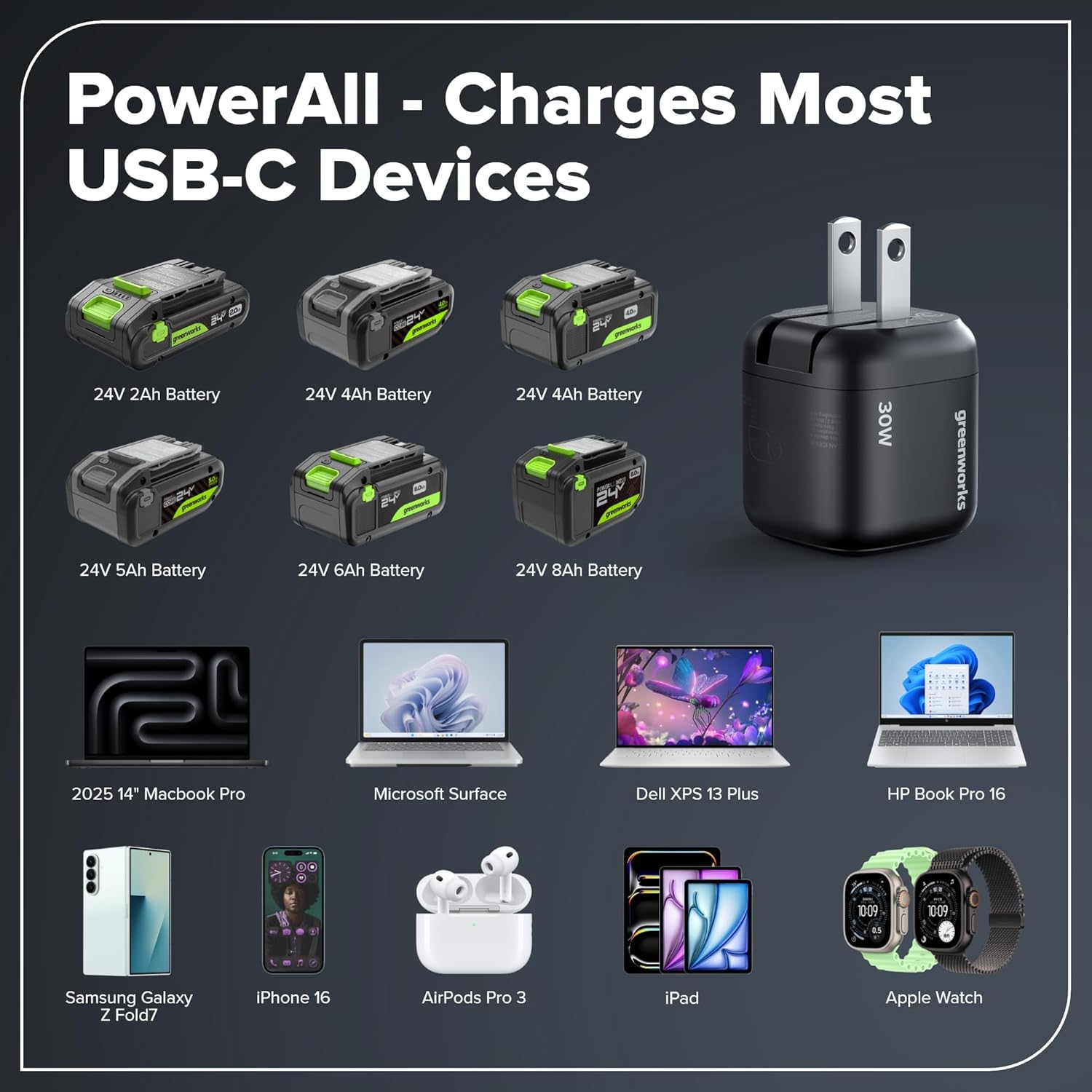
- 2.0Ah USB-C Battery: Offers 20% more power and up to 35% longer runtime than 20V batteries. Supports 65W fast charging and serves as a 12,000 mAh power bank (approx. 2× iPhone 15). With USB-C bidirectional charging for fast charging and recharging.
- 30W USB-C Charger: Included for fast charging of the battery.
Persediaan
1. Mengecas Bateri
The 2.0Ah USB-C battery can be charged using the included 30W USB-C charger. Ensure the battery is fully charged before first use.
- Connect the 30W USB-C charger to a power outlet.
- Connect the USB-C cable to the charging port on the battery.
- Lampu penunjuk bateri akan menunjukkan status pengecasan. Caj penuh ditunjukkan apabila semua lampu pepejal.

Imej: A Greenworks 24V battery connected to a 30W USB-C charger, illustrating the fast charging capability. Charging a 2.0Ah battery takes approximately 110 minutes with the 30W charger.
2. Memasang/Membuang Pek Bateri
- Untuk Memasang: Jajarkan pek bateri dengan port bateri alat dan luncurkannya ke dalam sehingga ia mengklik dengan selamat ke tempatnya.
- Untuk Alih Keluar: Tekan butang pelepas bateri dan luncurkan pek bateri keluar dari alat.
3. Installing Drill Bits/Driver Bits
- Pastikan alat dimatikan dan pek bateri ditanggalkan.
- Putar chuck melawan arah jam untuk membuka rahang.
- Insert the desired drill bit or driver bit into the chuck.
- Twist the chuck clockwise to tighten the jaws securely around the bit. Ensure the bit is centered and firmly held.
Arahan Operasi
1. Memilih Kelajuan
The drill driver has a 2-speed transmission. Use the speed selector switch located on top of the tool:
- Kelajuan 1 (Rendah): 0-450 RPM, ideal for driving screws and applications requiring high torque.
- Kelajuan 2 (Tinggi): 0-2000 RPM, suitable for drilling holes and applications requiring faster speed.
2. Adjusting Torque (Clutch Setting)
The 18+1 position clutch allows you to adjust the torque output. Rotate the torque adjustment collar to the desired setting:
- Tetapan 1-18: For driving screws. Lower numbers for smaller screws and softer materials, higher numbers for larger screws and harder materials.
- Simbol Gerudi: For drilling applications, providing maximum torque.
3. Putaran Maju/Undur
The forward/reverse selector switch is located above the trigger. Push it to the left for forward rotation (drilling/driving) and to the right for reverse rotation (removing screws/bits).
4. Mengendalikan Pemacu Gerudi
- Ensure the battery is installed and the bit is secured.
- Pilih tetapan kelajuan dan tork yang sesuai untuk tugasan anda.
- Letakkan bit pada bahan kerja.
- Squeeze the variable speed trigger to start the tool. The LED worklight will illuminate.
- Sapukan tekanan yang mantap, sekata. Jangan paksa alat.
- Lepaskan picu untuk menghentikan alat.

Imej: A person operating the Greenworks 24V Cordless Drill Driver to drive a screw into a wooden workpiece, demonstrating its power and ease of use.
5. Using the Battery as a Power Bank
The 2.0Ah USB-C battery can also function as a 12,000 mAh power bank to charge other USB-C compatible devices.
- Pastikan bateri dicas.
- Connect your USB-C device (e.g., smartphone, tablet) to the USB-C port on the battery using a compatible cable.
- The battery will begin charging your device.

Imej: The Greenworks 24V battery acting as a PowerAll device, capable of charging various USB-C compatible electronics such as laptops, smartphones, and headphones.
Penyelenggaraan
Penyelenggaraan Am
- Pembersihan: Keep the tool's air vents clean and free of debris to prevent overheating. Use a soft, damp kain untuk membersihkan bahagian luar. Jangan gunakan bahan kimia yang keras.
- Pelinciran: This tool is designed for a long life without additional lubrication.
- Storan Bit: Store drill bits and driver bits in a dry place to prevent rust.
Penjagaan Bateri
- Storan: Simpan bateri di tempat yang sejuk dan kering jauh dari cahaya matahari langsung dan suhu yang melampau.
- mengecas: Do not charge batteries in temperatures below 0°C (32°F) or above 45°C (113°F).
- Pelupusan: Dispose of old batteries responsibly according to local regulations. Do not incinerate.
Menyelesaikan masalah
| Masalah | Kemungkinan Punca | Penyelesaian |
|---|---|---|
| Alat tidak bermula. | Bateri tidak dipasang dengan betul atau dinyahcas. | Pastikan bateri dimasukkan sepenuhnya. Cas bateri. |
| Kehilangan kuasa semasa operasi. | Battery charge is low. Overload. | Recharge the battery. Reduce pressure on the tool. |
| Sedikit tergelincir dalam chuck. | Chuck tidak diketatkan secukupnya. Bit shank kotor atau rosak. | Ketatkan semula chuck dengan kuat. Bersihkan atau ganti bit. |
| Getaran yang berlebihan. | Bent or damaged bit. Loose chuck. | Replace the bit. Ensure chuck is tightened correctly. |
| Bateri tidak dicas. | Charger not connected properly. Faulty charger or battery. | Check connections. Try a different outlet. Contact customer support if problem persists. |
Spesifikasi
| Ciri | Perincian |
|---|---|
| Nombor Model | DD345 |
| Jenama | Greenworks |
| Voltage | 24V |
| Jenis Motor | Tanpa berus |
| Max Torque | 45 Nm |
| Tetapan Kelajuan | 2 (0-450 RPM / 0-2000 RPM) |
| Clutch Positions | 18+1 |
| Saiz Chuck | 1.27 cm Keyless |
| Jenis Bateri | 2.0Ah USB-C (12,000 mAh Powerbank) |
| Jenis Pengecas | USB-C 30W |
| Berat (dengan bateri) | 1.92 kg |
| Dimensi (L x W x H) | 22.3L x 10.3W x 22.8H cm |
| Komponen yang Disertakan | Cordless Drill Kit, 2Ah battery, charger, bag |
Waranti dan Sokongan
Greenworks offers a warranty for this product. Please refer to the official Greenworks website or your purchase documentation for detailed warranty terms and conditions. The availability duration for EU spare parts is 3 years.
For technical support, replacement parts, or warranty claims, please contact Greenworks customer service. Contact information can typically be found on the Greenworks webtapak atau dalam pembungkusan produk anda.
- rasmi Webtapak: www.greenworkstools.eu (atau tapak serantau yang berkaitan)
- Perkhidmatan Pelanggan: Rujuk kepada pembungkusan produk anda atau pegawai rasmi weblaman web untuk maklumat hubungan.