
1. Lebihview
The Roku Select Series HD TV provides a streamlined entertainment experience. This 32-inch 720p HD television integrates the Roku operating system for easy access to streaming content, live TV, and various applications. It features a voice remote for convenient control and includes technologies like Bluetooth Headphone Mode and Dolby Audio for enhanced sound.
Ciri-ciri Utama
- Penstriman Lancar: Fast Wi-Fi and quick app launches for immediate entertainment access.
- Extensive Content: Access to thousands of streaming apps, free movies, shows, and live TV channels.
- Skrin Utama Boleh Disesuaikan: Organize apps and content for personalized viewing.
- Kemas Kini Perisian Automatik: Ensures access to the latest features and applications.
- Integrasi Rumah Pintar: Compatible with Roku Voice, Siri, Alexa, and Google Assistant for voice control. Supports Apple AirPlay for content sharing.
- Clear HD Picture: 720p HD resolution with Roku Smart Picture technology for optimized visuals.
- Jauh Suara: Search, play, and control streaming with voice commands.
- Audio Dipertingkat: Designed for clear speech and louder sound with Dolby Audio technology.
- Mod Fon Kepala Bluetooth: Private listening with wireless headphones.

Image: Roku 32-inch Select Series HD Smart TV with included remote control.
2. Apa yang ada di dalam Kotak
Sahkan bahawa semua komponen hadir sebelum meneruskan persediaan.
- Roku Select Series 32" HD TV
- Penyangga dan skru
- Roku Voice Remote with batteries (2 AAA)
- Kabel Kuasa
- Manual Pengguna (dokumen ini)

Image: Contents of the Roku Select Series TV packaging.
3. Persediaan
3.1 Membongkar
Tanggalkan TV dan semua aksesori daripada pembungkusan dengan berhati-hati. Simpan pembungkusan untuk keperluan pengangkutan atau perkhidmatan pada masa hadapan.
3.2 Memasang Stand
- Letakkan skrin TV ke bawah pada permukaan yang lembut dan bersih untuk mengelakkan calar.
- Jajarkan dirian TV dengan lubang skru di bahagian bawah TV.
- Selamatkan dirian menggunakan skru yang disediakan. Pastikan ia diketatkan dengan kuat.
3.3 Menyambung Peranti
Sambungkan peranti anda ke port yang sesuai di bahagian belakang TV.
- HDMI: Connect up to three HDMI devices (e.g., cable box, gaming console, Blu-ray player) to the HDMI ports.
- USB: Use the USB port for media playback or connecting compatible accessories.
- Optik (S/PDIF): Untuk menyambung ke sistem audio luaran.
- Kabel kuasa: Sambungkan kabel kuasa ke TV dan kemudian ke saluran keluar dinding.
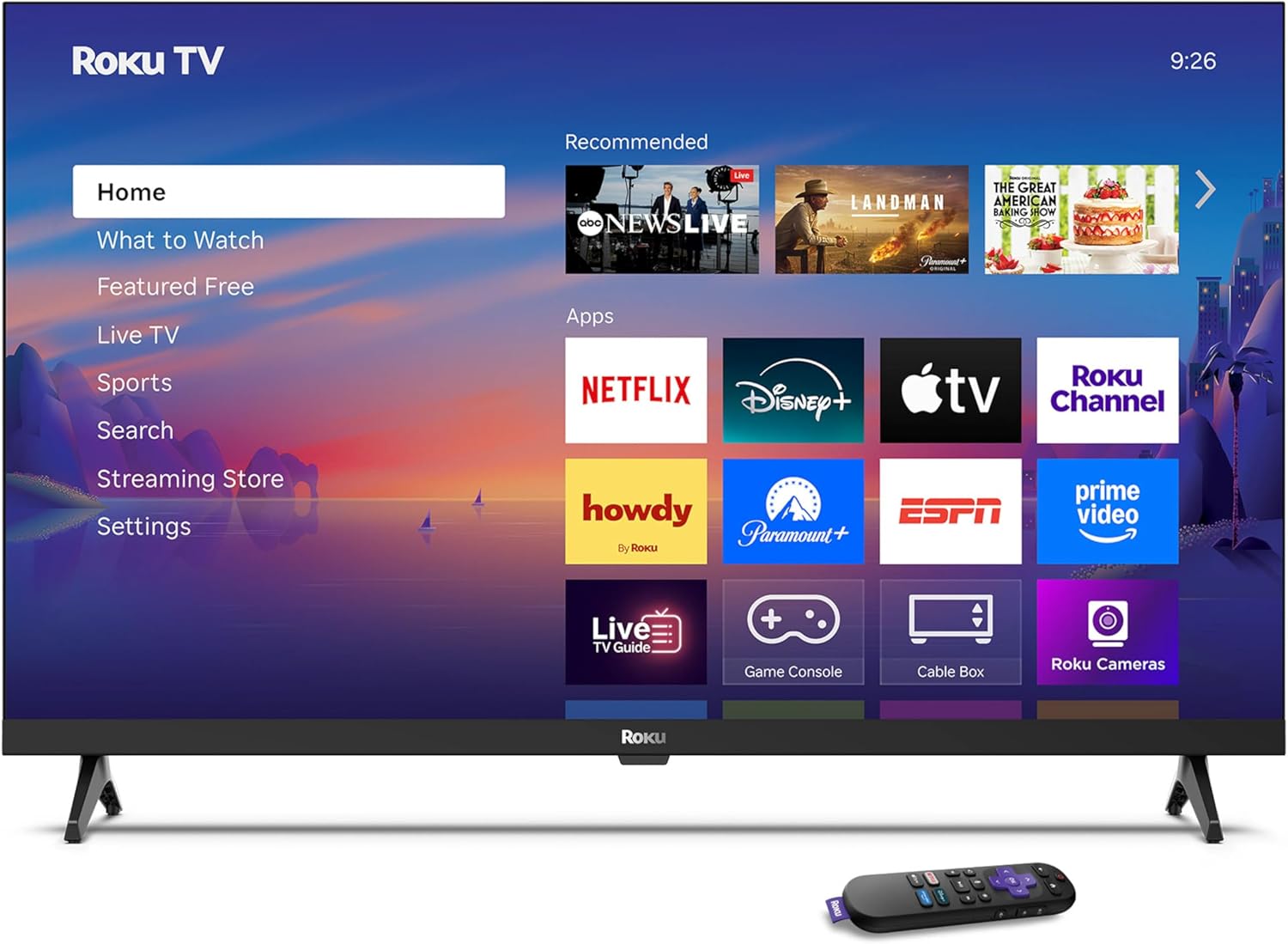
Image: Rear panel connections including HDMI, USB, and optical ports.
3.4 Kuasa Awal Hidup dan Sambungan Rangkaian
- Plug in the TV and press the power button on the remote or TV.
- Follow the on-screen instructions to select your language and connect to your Wi-Fi network.
- Activate your Roku account or create a new one.
Video: Tamatview of the Roku TV operating system, demonstrating its user interface and features. This video is provided by Roku, Inc.
4. Arahan Operasi
4.1 Using the Voice Remote
The Roku Voice Remote allows for intuitive control of your TV and streaming content.
- Carian Suara: Press and hold the voice button and speak your command to search for content, launch apps, or control playback.
- Navigasi: Gunakan pad arah untuk beralih melalui menu dan memilih item.
- Pintasan Apl: Butang khusus menyediakan akses pantas kepada perkhidmatan penstriman popular.

Image: Features of the Roku Voice Remote, highlighting voice control and shortcut buttons.
4.2 Menavigasi Skrin Utama
The Roku Home Screen provides access to all your installed apps, inputs, and settings.
- Rumah: Returns you to the main home screen.
- Apa yang perlu ditonton: Discover recommended content.
- TV langsung: Access free live television channels.
- Kedai Penstriman: Browse and add new streaming channels.
- tetapan: Adjust TV and system preferences.

Image: The Roku TV home screen interface.
4.3 Adjusting Picture and Sound Settings
Sesuaikan anda viewpengalaman dalam dan mendengar melalui menu tetapan.
- Mod Gambar: Select from predefined modes like Standard, Vivid, Sports, or Movie. Roku Smart Picture automatically optimizes settings.
- Mod Suara: Pilih sound profiles or enable features like Night Mode for reduced volume fluctuations.
- Mod Fon Kepala Bluetooth: Pair your wireless headphones for private audio.

Image: Picture mode settings on the Roku TV.

Image: Bluetooth Headphone Mode in use.

Image: Dolby Audio technology for clear sound.
5. Penyelenggaraan
5.1 Membersihkan Skrin
Untuk membersihkan skrin TV, lap perlahan-lahan menggunakan kain lembut, kering dan bebas bulu. Untuk kesan degil, lap perlahan-lahanampLap kain dengan air atau larutan pembersih yang selamat untuk skrin. Elakkan menggunakan bahan kimia yang keras atau bahan yang kasar.
5.2 Kemas Kini Perisian
Your Roku TV automatically receives software updates when connected to the internet. These updates provide new features, performance improvements, and bug fixes. Ensure your TV remains connected to the internet for optimal performance.
6. Penyelesaian masalah
If you encounter issues with your Roku TV, refer to the following common solutions:
- Tiada Kuasa: Pastikan kabel kuasa dipasang dengan selamat pada kedua-dua TV dan salur keluar elektrik yang berfungsi. Cuba outlet lain.
- Tiada Gambar/Bunyi: Verify that the correct input source is selected. Check all cable connections (HDMI, audio). Restart the TV by unplugging it for 30 seconds and plugging it back in.
- Alat Jauh Tidak Berfungsi: Replace the AAA batteries in the remote. Ensure there are no obstructions between the remote and the TV. For voice remote issues, re-pair the remote if necessary (refer to Roku support for specific steps).
- Isu Sambungan Rangkaian: Restart your Wi-Fi router and modem. Go to the TV's settings menu, then Network, and try reconnecting to your Wi-Fi network.
- Apl Tidak Memuatkan/Ranap: Try restarting the app. If the issue persists, remove the app from the home screen, restart the TV, and then re-add the app from the Streaming Store.
7. Spesifikasi
| Ciri | Perincian |
|---|---|
| Saiz Skrin | 32 Inci |
| Teknologi Paparan | LED |
| Resolusi | 720p |
| Kadar Segar Semula | 60 Hz |
| Ciri Khas | Bluetooth Headphone Mode, Dolby Audio, Voice Remote |
| Teknologi Ketersambungan | Bluetooth, WiFi |
| Jumlah Port HDMI | 3 |
| Jumlah Port USB | 1 |
| Input Audio | HDMI |
| Sistem Operasi | OS Roku |
| Jenis Pemasangan | Lekap Meja, Lekap Dinding |
| Pemasangan VESA Standard | 200 x 200 mm |
| Dimensi Produk (D x W x H) | 7"D x 28.3"W x 18.3"H |
| Berat Barang | 7.5 paun |
| Nombor Model | 32R2D5 |
| UPC | 829610008974 |
8. Maklumat Waranti
8.1 Waranti Terhad
Roku warrants the hardware against defects in materials and workmanship under normal use for a period of one (1) year from the date of purchase ("Warranty Period"). If Roku determines that the device’s hardware is defective during the Warranty Period, Roku’s sole obligation, and your exclusive remedy, will be to either repair or replace the unit with either a new or rebuilt device, at its option. This warranty applies if the product is used in accordance with the provided documentation.
8.2 Polisi Pemulangan
You may return a device for any reason:
- Within thirty (30) days from the date of purchase from Roku.
- Within the applicable return period if purchased from an authorized reseller or distributor.
Additional details regarding product returns can be found on the Roku support site.
9. Sokongan
For further assistance, troubleshooting guides, and frequently asked questions, please visit the official Roku support webtapak: