
1. Pengenalan
The Timekettle W4 Pro AI Interpreter Earbuds provide real-time, bidirectional voice translation for over 40 languages and 93 accents. Designed for global communication, these earbuds facilitate seamless interactions in various scenarios, including travel, business meetings, and personal conversations. Key features include triple-mic noise cancellation, AI-powered meeting summaries, and offline translation capabilities.
2. Persediaan
2.1 Kandungan Pakej
Your Timekettle W4 Pro package includes:
- Timekettle W4 Pro Earbuds (Left and Right)
- Kes Pengecasan
- Kabel Pengecasan USB Jenis-C
- Sakit telinga (S, M, L)
- Manual Pengguna
2.2 Mengecas
Before first use, fully charge the earbuds and charging case. The charging case extends total usage to 18 hours, with up to 6 hours of continuous translation per charge for the earbuds.
- Sambungkan kabel USB Jenis-C ke port pengecasan pada bekas dan sumber kuasa.
- The battery indicator on the case will show charging status.
2.3 App Download & Bluetooth Pairing
The Timekettle W4 Pro earbuds require the Timekettle app for full functionality. Download the app from Google Play Store or Apple App Store.
- Open the Timekettle app and allow necessary permissions (Bluetooth, location).
- Select the earbuds model (W4 Pro) within the app.
- Remove the earbuds from the charging case. They will automatically enter Bluetooth pairing mode. The indicator light will flash green once to indicate they are powered on.
- In your phone's Bluetooth settings, select "Timekettle W4 Pro" to connect. If not paired within 5 minutes, earbuds will automatically power off.

Image: Timekettle W4 Pro Earbuds and Charging Case. The image shows the two earbuds and their compact charging case, highlighting their sleek design.
2.4 Memakai Fon Telinga
Choose the correct size eartips for the best fit and seal. The W4 Pro features an open-ear design for comfort during extended use.
Video: Demonstration of how to properly wear the Timekettle W4 Pro earbuds for optimal comfort and sound.
3. Mod Operasi
The Timekettle app offers several translation modes to suit different communication needs:
3.1 Simul Mode (One-on-One)
Designed for natural, bidirectional conversations between two people. Both parties wear an earbud and speak their native language, with real-time translation delivered to the other person's ear.

Image: Two individuals engaged in a conversation, each wearing a Timekettle W4 Pro earbud, demonstrating the bidirectional simultaneous translation feature.
3.2 Listening Mode
Place your phone near a speaker, and the earbuds will translate spoken content into your chosen language. Ideal for lectures or presentations.
3.3 Speaker Mode
Similar to Listening Mode, but the translated audio is played through your phone's speaker, allowing multiple people to hear the translation.
3.4 Touch Mode
Each person wears an earbud. Tap your earbud to speak, and the translation will be delivered to the other person's earbud. This mode is useful for controlled, turn-based conversations.
3.5 Media & Call Translation
The W4 Pro allows real-time translation of media content and phone calls. This feature ensures clear communication during video meetings, foreign content consumption, or unexpected international calls.
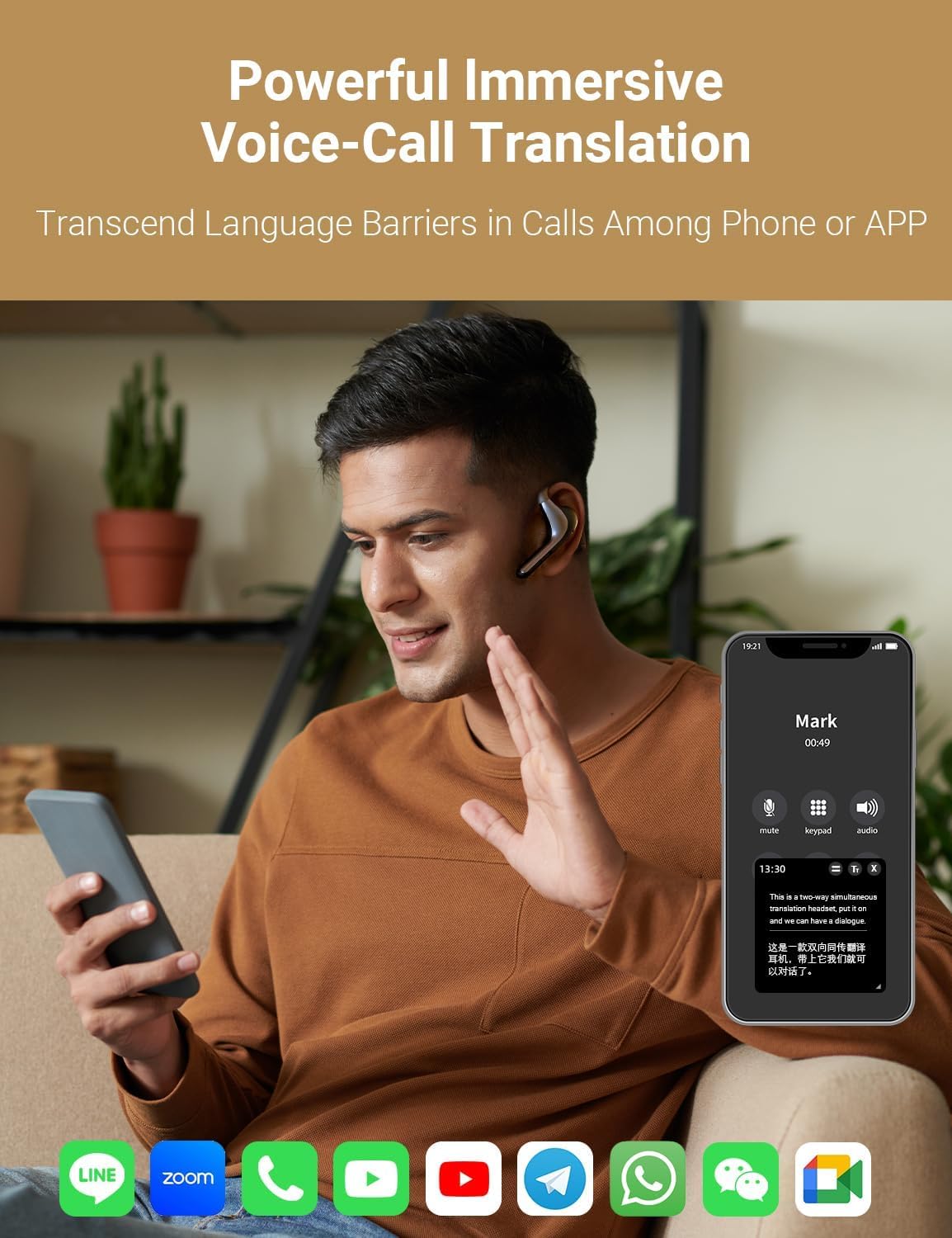
Image: A man wearing a Timekettle W4 Pro earbud, engaged in a phone call with real-time translation displayed on his smartphone screen.
Video: Demonstration of the Timekettle W4 Pro's telephone video translation feature, showing real-time subtitles during a call.
3.6 AI Meeting Assistant (Listen & Play Mode)
This mode enhances multilingual meetings by allowing seamless switching between listening and speaking. It records sessions, extracts key points, and generates AI Memos for easy follow-up.
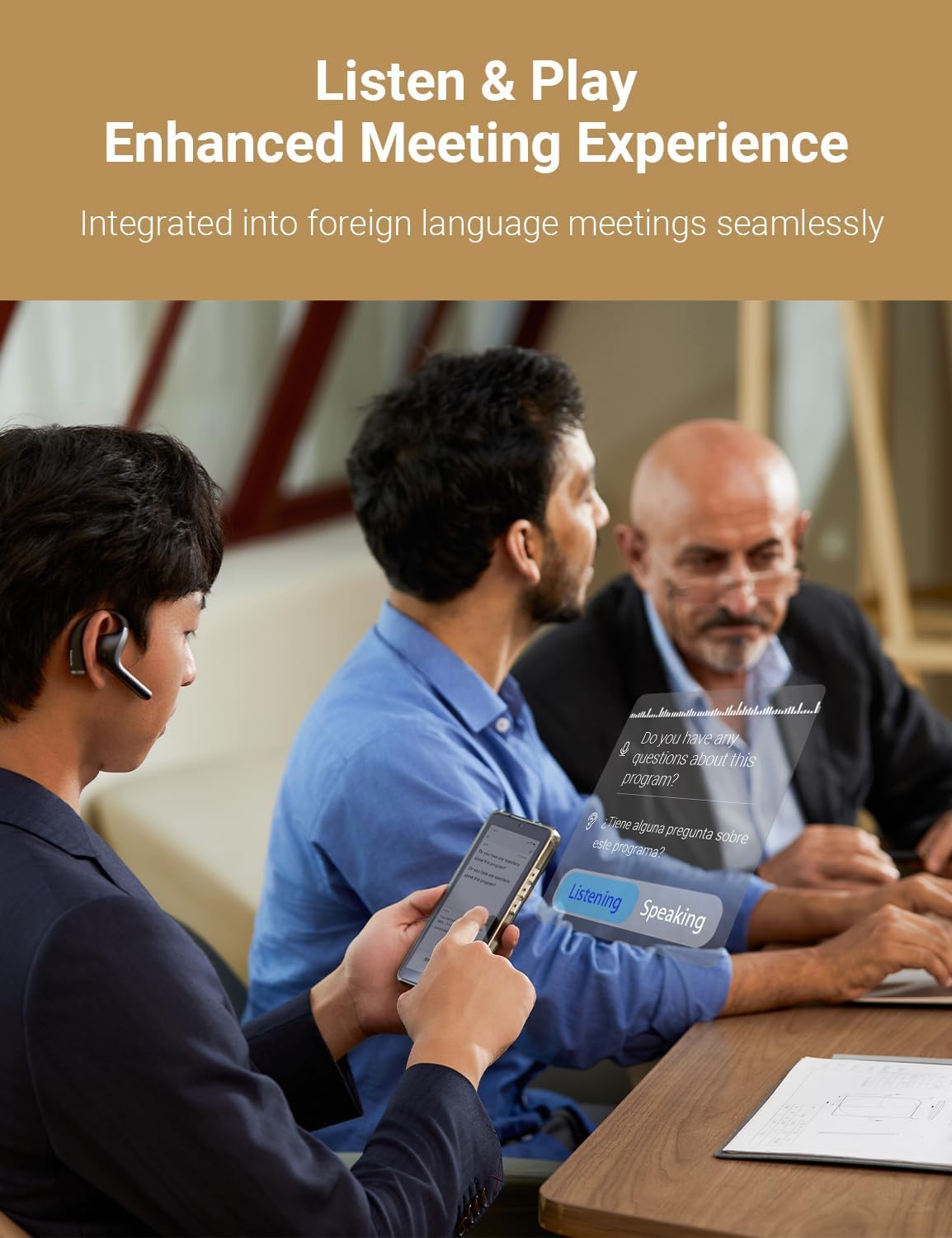
Image: Individuals in a business meeting utilizing the Timekettle W4 Pro's Listen & Play mode, with translated text appearing as augmented reality overlays.
Video: Selesaiview of the W4 Pro AI Conference Summary feature, showing how meeting notes and key takeaways are generated.
3.7 Terjemahan Luar Talian
The W4 Pro supports offline translation for 13 language pairs across 8 major languages, including English to Spanish, Chinese, French, German, and Japanese. Download offline language packs via the app in advance.
Video: Demonstration of the W4 Pro's offline translation capabilities, highlighting its use without an internet connection.
4. Features & Technology
4.1 Liputan Bahasa
The W4 Pro supports 40+ languages and 93 accents, ensuring broad communication capabilities.
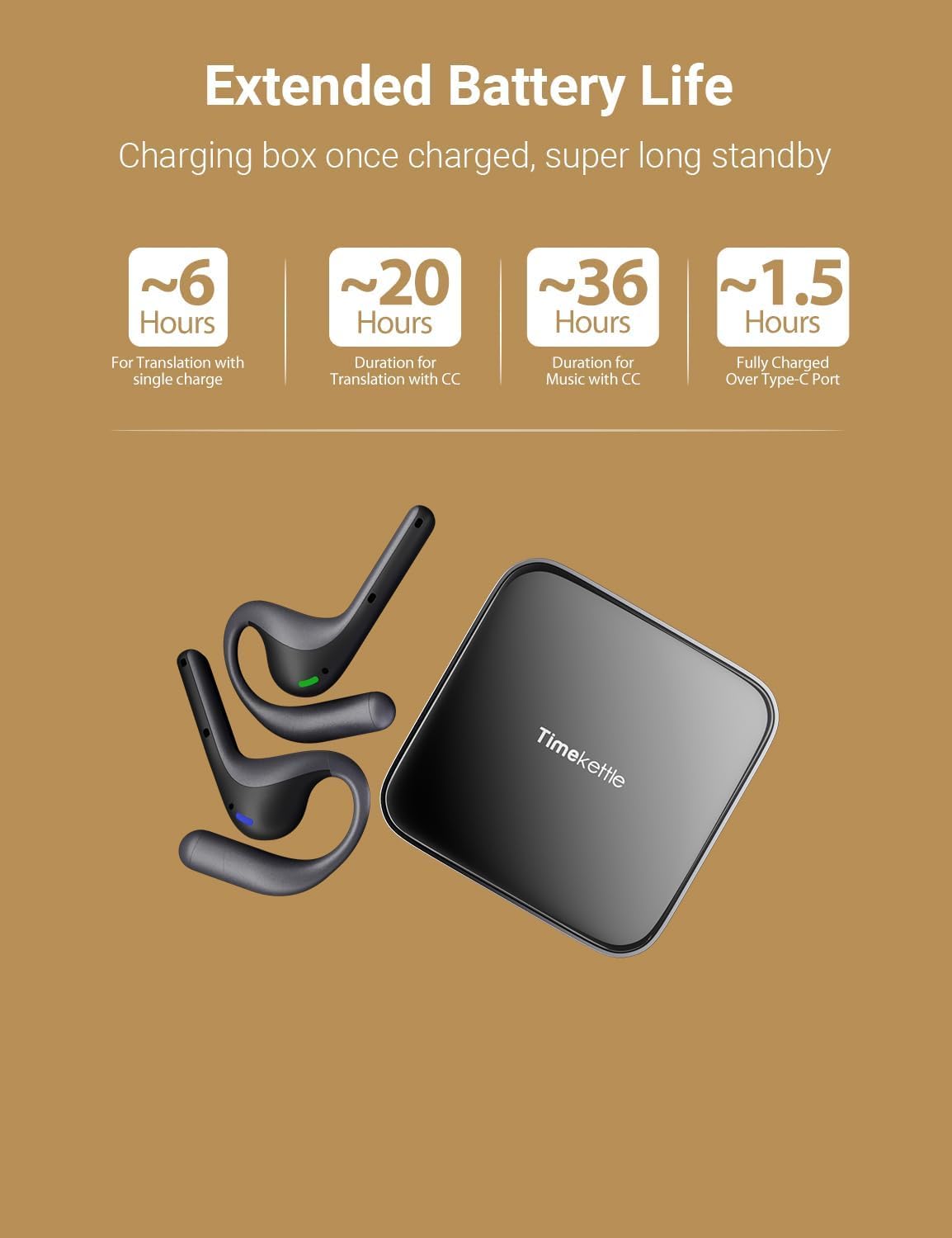
Image: Visual representation of the 40+ languages and 93 accents supported by the Timekettle W4 Pro, with flags of various countries in the background.
4.2 Triple-Mic Noise Cancellation
Equipped with three microphones and vector-based noise reduction, the W4 Pro filters out ambient noise, ensuring clear and accurate voice pickup for precise translations.
4.3 Open-Ear Design
The open-ear design provides all-day comfort, avoiding in-ear pressure and promoting hygiene for shared use.
4.4 Melanjutkan Hayat Bateri
Enjoy up to 6 hours of continuous translation on a single charge, with the charging case extending total usage to 18 hours. Standby time is up to one year.

Image: Infographic detailing the extended battery life of the Timekettle W4 Pro, showing 6 hours of use per charge and 18 hours with the charging case.
4.5 Babel OS 2.0
Powered by Timekettle's self-developed Babel OS 2.0, the earbuds offer faster, clearer, and smarter translation with BoostClean noise isolation and TurboFast 4-channel processing.
4.6 Privasi Data
The W4 Pro is GDPR and FERPA compliant, ensuring secure data protection and confidentiality in all communications.
Video: Tayangan video pengenalanasing the Timekettle W4 Pro AI Interpreter Earbuds and their key features.
5. Penyelenggaraan
To ensure the longevity and optimal performance of your Timekettle W4 Pro earbuds, follow these maintenance guidelines:
- Pembersihan: Lap fon telinga dan bekas pengecas secara berkala dengan kain lembut, kering dan tidak berbulu. Elakkan penggunaan bahan kimia yang keras atau bahan yang melelas.
- Storan: Store the earbuds in their charging case when not in use to protect them from dust, moisture, and physical damage. Keep them in a cool, dry place away from direct sunlight and extreme temperatures.
- mengecas: Use only the provided USB Type-C cable for charging. Avoid overcharging by disconnecting once fully charged.
6. Penyelesaian masalah
If you encounter issues with your Timekettle W4 Pro earbuds, refer to the following common solutions:
- Isu Berpasangan: Ensure Bluetooth is enabled on your device and the earbuds are removed from the charging case. If pairing fails, try restarting your device and the earbuds.
- Tiada Bunyi/Kualiti Audio Teruk: Check the volume levels on your device and the earbuds. Ensure the earbuds are properly seated in your ears. Clean any debris from the earbud speakers.
- Translation Inaccuracy: Ensure a stable internet connection (for online modes). Speak clearly and at a moderate pace. Update the Timekettle app and earbud firmware to the latest versions.
- Bateri Tidak Dicas: Verify the charging cable and adapter are working correctly. Ensure the charging contacts on the earbuds and case are clean and free of obstructions.
- Apl Tidak Menjawab: Close and restart the Timekettle app. If the issue persists, reinstall the app.
7. Spesifikasi
| Ciri | Perincian |
|---|---|
| Dimensi Produk | 3.28 x 3.29 x 1.64 inci |
| Berat Barang | 14.9 auns |
| Bateri | 3 bateri Lithium Polimer diperlukan (termasuk) |
| Bahasa yang Disokong | 40+ languages, 93 accents |
| Terjemahan Luar Talian | 13 language pairs across 8 major languages |
| Masa Terjemahan Berterusan | Sehingga 6 jam (earbud), 18 jam (dengan bekas pengecas) |
8. Waranti dan Sokongan
Timekettle W4 Pro earbuds typically come with a manufacturer's warranty. Please refer to the product packaging or the official Timekettle website for specific warranty terms and conditions. Amazon offers a 30-day refund/replacement policy for this product.
For customer support, you can reach Timekettle Tech directly:
- e-mel: support@timekettle.co
- telefon: +1 (833) 491-1328 (Support languages: English/Español)


