
1. Pengenalan
This manual provides instructions for the BROMECH Digital Commercial Scale, model BPT01AA-200. This high-capacity, high-precision postal scale is designed for various applications, including industrial use, small businesses, and home shipping. It features a durable stainless steel platform, a separate LCD display, and convenient functions like Tare and Hold.

Image: BROMECH Digital Commercial Scale with its separate display unit.
2. Maklumat Keselamatan
- Jangan bebankan penimbang melebihi kapasiti maksimumnya iaitu 200 kg (440 lb).
- Place the scale on a stable, flat surface to ensure accurate measurements.
- Elakkan mendedahkan penimbang kepada suhu, kelembapan atau cahaya matahari langsung yang melampau.
- Jauhkan penimbang daripada medan elektromagnet yang kuat.
- Do not immerse the scale or its display unit in water.
- Use only the specified AAA batteries or Type-C charging cable for power.
3. Kandungan Pakej
Sahkan bahawa semua item terdapat dalam pakej:
- BROMECH Digital Commercial Scale Platform
- Separate LCD Display Unit
- Coiled Cable (connecting platform to display)
- 2 x Bateri AAA
- Kabel Pengecasan Jenis-C
- Manual Pengguna (dokumen ini)
4. Persediaan
- Buka Pembungkusan Skala: Keluarkan semua komponen dari pembungkusan dengan berhati-hati.
- Letakkan Platform: Position the stainless steel weighing platform on a firm, level surface.
- Connect the Display: Connect the coiled cable from the weighing platform to the separate LCD display unit.
- Bekalan Kuasa:
- Pemasangan Bateri: Open the battery compartment on the back of the display unit and insert the 2 AAA batteries, ensuring correct polarity.
- Kuasa USB-C: Alternatively, connect the Type-C charging cable to the display unit and a suitable USB power source (adapter not included).

Imej: Terperinci view of the LCD display unit, showing the battery compartment and connection port.

Image: Illustration of the two power supply methods: 2 AAA batteries and Type-C USB charging.
- Display Placement: The separate display can be placed on a desktop or mounted on a wall for convenience.
5. Arahan Operasi
The display unit features four buttons: Power (ON/OFF), Unit (U), Hold (H), and Tare (T).
Video: Quick start guide demonstrating basic operations like power on/off, unit conversion, tare, and hold functions.
- HIDUP/MATI Kuasa: Tekan ke kuasa butang untuk menghidupkan atau mematikan penimbang.
- Penukaran Unit: Tekan ke U button to cycle through available units: kilograms (kg), pounds (lb), ounces (oz), and pounds:ounces (lb:oz).

Image: The scale's high-precision sensor and unit conversion options (kg, lb, oz, lb:oz).
- Fungsi Tare: The Tare function allows you to subtract the weight of a container, so you only measure the net weight of its contents.
- Letakkan bekas kosong di pelantar.
- Tekan ke T (Tare) button. The display will reset to zero.
- Add items to the container to measure their net weight.

Image: Step-by-step demonstration of using the Tare function to measure net weight.
- Fungsi Tahan: The Hold function locks the displayed weight, which is useful for large or irregularly shaped items that might obscure the display.
- Place an item on the platform.
- Tekan ke H (Hold) button. The weight will be locked on the display.
- You can now remove the item, and the weight will remain displayed for easy reading.
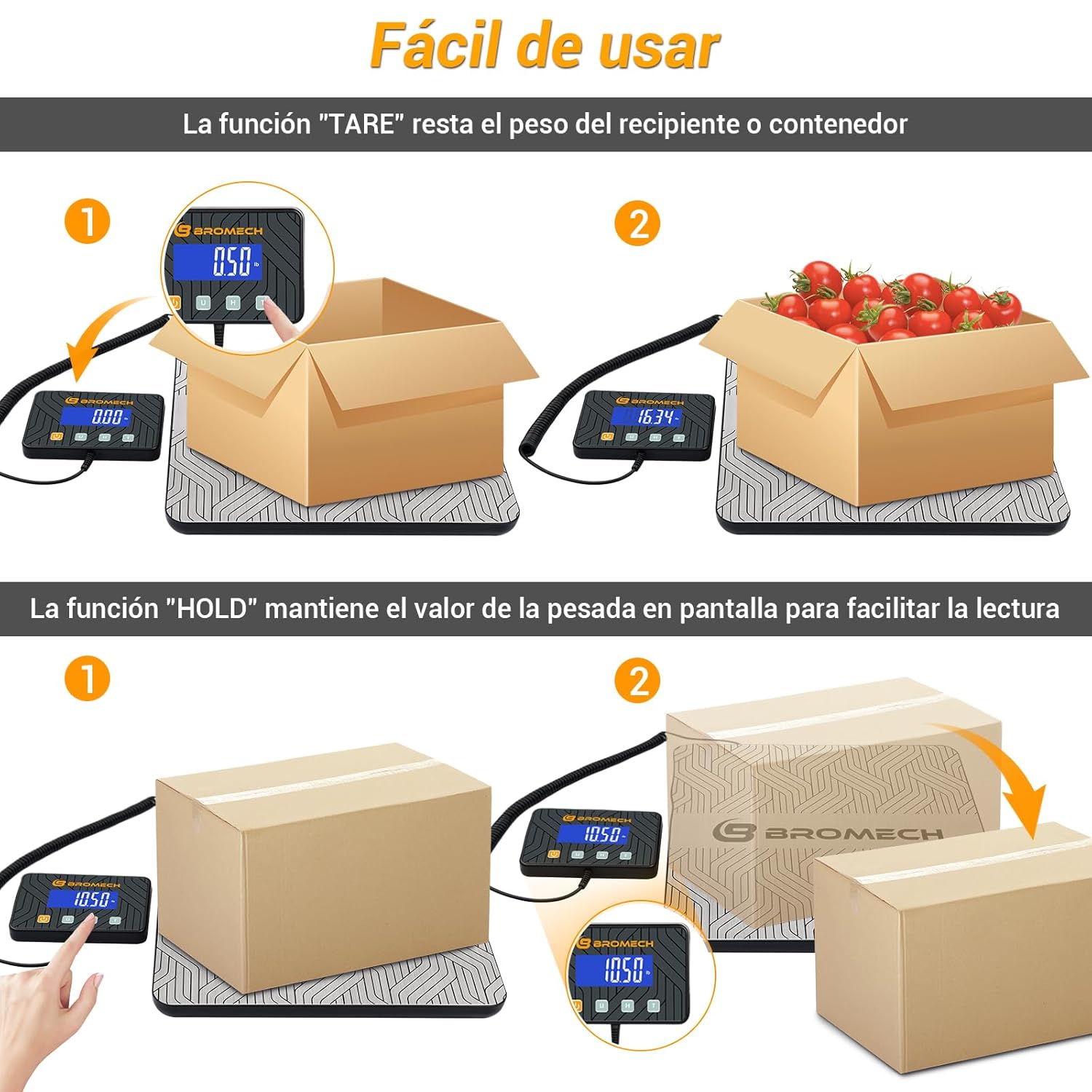
Image: Visual explanation of both Tare and Hold functions for accurate and easy measurements.

Image: Step-by-step demonstration of using the Hold function to retain weight readings.
6. Penyelenggaraan
To ensure the longevity and accuracy of your BROMECH Digital Commercial Scale, follow these maintenance guidelines:
- Pembersihan: Lap platform keluli tahan karat dan unit paparan dengan kain lembut,amp kain. Jangan gunakan pembersih yang melelas atau rendam dalam air.
- Storan: When not in use, store the scale in a dry, cool place. The compact design allows for easy storage of the display unit under the platform.

Image: The scale's compact design allows for easy storage of the display unit when not in use.
- Penggantian Bateri: Replace AAA batteries when the low battery indicator appears on the display.
- Elakkan Kesan: Do not drop the scale or subject it to heavy impacts, as this can damage the internal sensors.
7. Penyelesaian masalah
Jika anda menghadapi masalah dengan penimbang anda, rujuk masalah dan penyelesaian biasa berikut:
| Masalah | Kemungkinan Punca | Penyelesaian |
|---|---|---|
| Skala tidak dihidupkan | Low or dead batteries; Power cable disconnected | Replace batteries or connect Type-C power cable. Ensure connections are secure. |
| Bacaan tidak tepat | Scale not on a flat surface; Overloaded; External vibrations | Place on a stable, level surface. Do not exceed 200kg. Avoid vibrations during measurement. |
| "Lo" dipaparkan | Penunjuk bateri rendah | Replace batteries or connect to Type-C power. |
| "Err" displayed | Amaran berlebihan | Buang berat berlebihan dengan segera untuk mengelakkan kerosakan. |

Image: Display indicators for low battery ("Lo") and overload ("Err").
8. Spesifikasi
| Ciri | Perincian |
|---|---|
| Jenama | BROMECH |
| Model | BPT01AA-200 |
| Kapasiti Berat Maksimum | 200 kg (440 lb) |
| Precision / Division | 10g (0.01 kg / 0.35 oz / 0.02 lb) |
| Berat Minimum | 0.04 kg (0.08 lb) |
| Unit Pengukuran | kg, lb, oz, lb:oz |
| Jenis Paparan | LCD (Separate) |
| bahan | Pelantar Keluli Tahan Karat |
| Sumber Kuasa | 2 x AAA Batteries (Included), Type-C USB Cable |
| Berat Produk | 1.9 Kilogram |
| Penggunaan yang Disyorkan | Shipping, Freight, Small Business, Warehouse, Home Use |

Image: Visual representation of the scale's high precision, capacity (220 kg / 440 lb), division (0.01 kg), and minimum weight (0.04 kg).
9. Waranti & Sokongan
For warranty information and customer support, please refer to the documentation included with your purchase or contact BROMECH customer service directly. Keep your purchase receipt as proof of purchase.