pengenalan
This document provides instructions for the Generic replacement infrared remote control, model Easytry11735. This remote is designed to be compatible with various Nordmende 4K LED UHD HDTV Android TV models, including ND39S3400T, ND55KFS5700T, ND32S4100M, ND39N2400T, NMT32DFHD, ND32S3400, ND32S4000T, and ND24S3400T.
Please ensure your current remote control matches the appearance of the remote shown in this manual for optimal compatibility. This replacement remote operates via infrared (IR) technology and typically requires no special setup or programming.
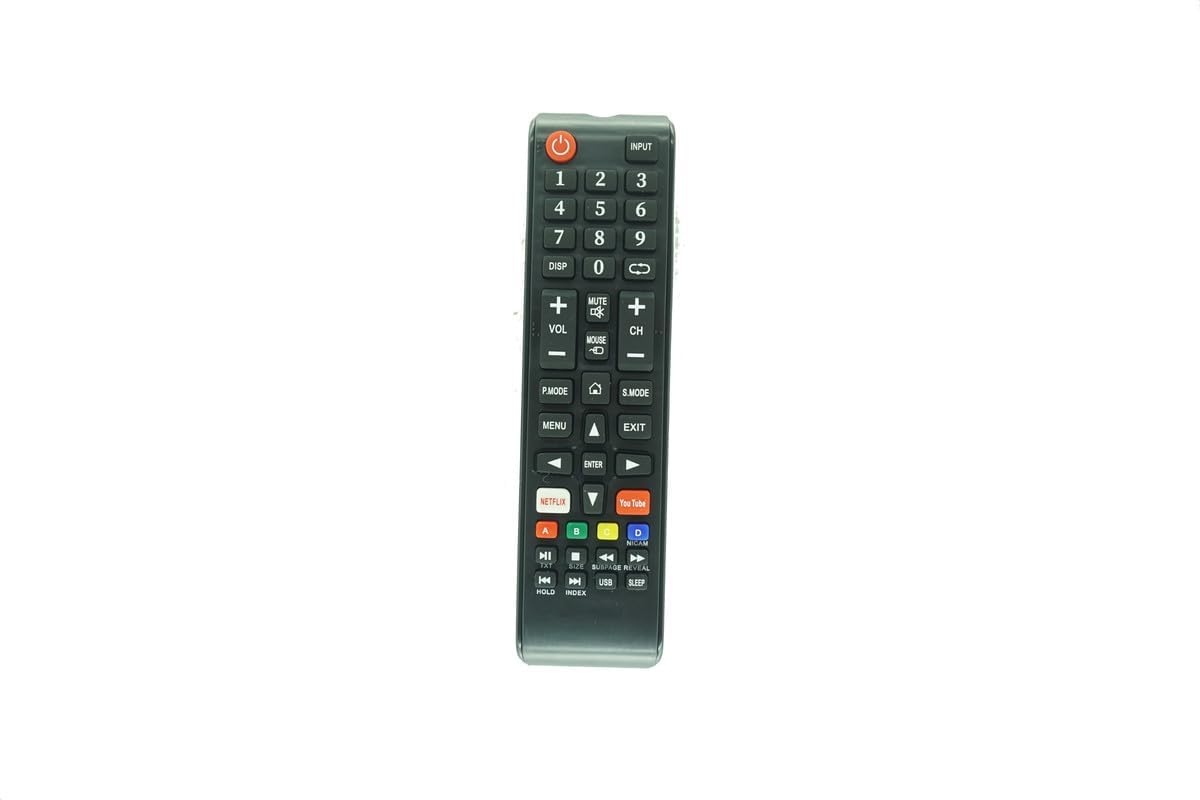
Imej: Depan view of the replacement remote control, showing all buttons.
Persediaan
1. Pemasangan Bateri
Alat kawalan jauh memerlukan dua bateri AAA (tidak disertakan). Ikuti langkah berikut untuk memasangnya:
- Cari penutup petak bateri di belakang alat kawalan jauh.
- Tekan ke bawah pada tab dan luncurkan penutup ke bawah untuk membuka petak.
- Masukkan dua bateri AAA, pastikan terminal positif (+) dan negatif (-) sejajar dengan tanda di dalam petak.
- Luncurkan penutup petak bateri kembali ke tempatnya sehingga ia berbunyi dengan selamat.

Image: Back of the remote control with the battery cover removed, showing the two AAA battery slots.
2. Penggunaan Awal
This remote control is designed as an infrared replacement and typically does not require any programming or setup. Once batteries are installed, it should function directly with compatible Nordmende TV models. Point the remote directly at your television's IR sensor.
Arahan Operasi
Familiarize yourself with the buttons on your remote control. Below is a general guide to common functions:
- kuasa (●): Menghidupkan atau mematikan TV.
- Input: Selects the input source (HDMI, AV, etc.).
- Butang Nombor (0-9): Pilih saluran secara terus.
- VOL +/-: Melaraskan tahap kelantangan.
- CH +/-: Changes the channel up or down.
- HILANGKAN: Membisukan atau menyahredamkan bunyi TV.
- HILANGKAN: Displays on-screen information.
- MENU: Mengakses menu utama TV.
- EXIT: Keluar dari menu atau fungsi semasa.
- MASUK: Confirms a selection in menus.
- Butang Anak Panah (Atas, Bawah, Kiri, Kanan): Navigasi melalui menu dan pilihan.
- S.MODE (Sound Mode): Cycles through sound presets.
- P.MODE (Picture Mode): Cycles through picture presets.
- NETFLIX / YouTube: Direct access buttons for these streaming services.
- Kawalan Main Semula: Play, Pause, Stop, Fast Forward, Rewind, Next/Previous Track for media playback.
Note: Some advanced functions or specific buttons may not be fully compatible or may operate differently than your original remote, as this is a replacement unit.
Penyelenggaraan
1. Penggantian Bateri
Replace batteries when the remote's response becomes sluggish or stops working. Always replace both AAA batteries at the same time with new ones. Do not mix old and new batteries, or different types of batteries.
2. Pembersihan
Untuk membersihkan alat kawalan jauh, lap perlahan-lahan menggunakan kain lembut dan kering. Untuk kotoran degil, lap sedikitampen kain dengan air. Elakkan menggunakan bahan kimia yang keras, pembersih yang melelas, atau kelembapan berlebihan, kerana ini boleh merosakkan alat kawalan jauh.
3. Penyimpanan
Simpan alat kawalan jauh di tempat yang sejuk dan kering jauh dari cahaya matahari langsung dan suhu yang melampau. Jika alat kawalan jauh tidak akan digunakan untuk tempoh yang lama, adalah disyorkan untuk mengeluarkan bateri untuk mengelakkan kebocoran.
Menyelesaikan masalah
- Jauh tidak bertindak balas:
- Periksa sama ada bateri dipasang dengan betul dengan kekutuban yang betul.
- Gantikan bateri lama dengan bateri AAA baharu.
- Pastikan tiada halangan antara alat kawalan jauh dan sensor IR TV.
- Confirm you are pointing the remote directly at the TV.
- Some functions do not work or work differently:
- This is a replacement remote. While it is broadly compatible, it may not replicate all functions of your original TV remote exactly.
- Refer to your TV's original manual for specific functions if needed.
- Remote does not work with my TV model:
- Verify that your TV model is listed as compatible in the product description.
- Ensure your original remote control has the same appearance as this replacement remote. If your model is not included or the remote looks different, it may not be compatible.
Spesifikasi
| Jenama | Generik |
| Nombor Model | Easytry11735 |
| Peranti Serasi | Nordmende Televisions (Specific models listed in Introduction) |
| Jenis Penyambung | Inframerah (IR) |
| Bateri Diperlukan | 2 x AAA (tidak termasuk) |
| Komposisi Sel Bateri | Alkali (disyorkan) |
| warna | Hitam |
Sokongan
For further assistance or inquiries regarding compatibility, please contact the seller directly. Ensure you provide your TV's exact model number and a description of the issue for efficient support.
Penjual: Easytry123