
1. Pengenalan
This manual provides essential information for the installation, operation, and maintenance of your PNY NVIDIA GeForce RTX 5060 Epic-X ARGB OC Triple Fan Graphics Card. This graphics card is designed to deliver high-performance visuals and computing power, leveraging NVIDIA Blackwell architecture, DLSS 4, and advanced cooling technologies.

Figure 1: PNY NVIDIA GeForce RTX 5060 Epic-X ARGB OC Triple Fan Graphics Card
2. Apa yang ada di dalam Kotak
Sahkan bahawa semua komponen hadir sebelum meneruskan pemasangan:
- PNY NVIDIA GeForce RTX 5060 Graphics Card
- NVIDIA App (Software download required)
- Panduan Mula Pantas (Dokumen ini)

Figure 2: Retail packaging for the PNY NVIDIA GeForce RTX 5060 Graphics Card
3. Spesifikasi
| Ciri | Perincian |
|---|---|
| Pemproses bersama Grafik | NVIDIA GeForce RTX 5060 |
| Jenama | PNY |
| Saiz RAM Grafik | 8 GB |
| Kelajuan Jam GPU | 2280 MHz |
| Antara Muka Keluaran Video | DisplayPort, HDMI |
| Jenis RAM Grafik | GDDR7 |
| Peranti Serasi | Desktop |
| Resolusi Paparan Maksimum | 7680x4320 |
| Antara Muka Kad Grafik | PCI-Express x8 |
| Kelajuan Jam Memori | 2280 MHz |
| Bilangan Peminat | 3 |
| Pemproses Video | NVIDIA |
| Nama Model | RTX 5060 8GB |
| Berat Barang | 1.01 Kilogram |
4. Persediaan dan Pemasangan
Before installing your new graphics card, ensure your system's power supply meets the recommended wattage and that your motherboard has a compatible PCI-Express x8 slot. Power off your computer and disconnect all cables before opening the case.
- Sediakan Sistem Anda: Power down your computer, unplug it from the wall, and open the side panel of your PC case.
- Tanggalkan Kad Grafik Lama (jika berkenaan): If you are replacing an existing graphics card, carefully unmount it from the PCIe slot and disconnect any power cables.
- Install the RTX 5060: Align the graphics card with an available PCI-Express x8 slot on your motherboard. Press down firmly until it clicks into place. Secure the card to the case with screws.
- Sambungkan Kuasa: Connect the necessary PCIe power cables from your power supply to the graphics card. Refer to your power supply and graphics card documentation for specific power connector requirements.
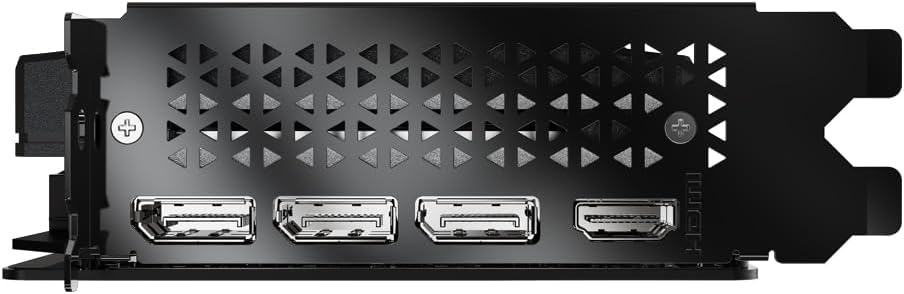
- Close Case and Connect Display: Close your PC case, reconnect all cables, and connect your display to one of the graphics card's DisplayPort or HDMI outputs.
- Pasang Pemacu: Power on your computer. Once Windows loads, download and install the latest NVIDIA drivers from the official NVIDIA webtapak (www.nvidia.com/drivers).

Rajah 3: Depan view of the PNY NVIDIA GeForce RTX 5060 Graphics Card with triple fans.

Figure 4: DisplayPort and HDMI outputs on the graphics card.

Figure 5: Dimensions of the PNY RTX 5060, highlighting its compact 2-slot design suitable for SFF PCs.
5. Mengendalikan Kad Grafik Anda
Your PNY NVIDIA GeForce RTX 5060 graphics card is equipped with advanced features to enhance your gaming and creative workflows.
5.1. NVIDIA Technologies
- DLSS 4: Deep Learning Super Sampling uses AI to boost frame rates and generate high-quality images. Enable DLSS in supported games for improved performance.
- Refleks NVIDIA: Optimizes the graphics pipeline to reduce system latency, providing faster reaction times in competitive games.
- Studio NVIDIA: Accelerates creative applications with world-class drivers and exclusive tools for AI-assisted workflows.
Gambar 6: Lebihview of NVIDIA Blackwell Architecture features, including Tensor Cores, Ray Tracing Cores, DLSS 4, and Reflex.
5.2. PNY VelocityX Software
The PNY VelocityX software allows you to fine-tune your graphics card's performance, monitor its status, and customize its ARGB lighting. Download it from the official PNY webtapak.
- Overclocking: Adjust core clock, memory clock, power target, and thermal target to maximize performance.
- Kawalan Kipas: Customize fan speeds with automatic or manual settings to balance cooling and noise levels.
- Pencahayaan ARGB: Personalize the Epic-X ARGB lighting with various effects, colors, and brightness levels.

Figure 7: Screenshot of the PNY VelocityX software interface, displaying performance metrics and overclocking controls.

Figure 8: Visual representation of the Epic-X ARGB Lighting 2.0 features, showing customizable LED lighting zones.
Video 1: PNY GeForce RTX 50 Series GPU with VelocityX. This video demonstrates the features and customization options available through the PNY VelocityX software for your graphics card.
6. Penyelenggaraan
Penyelenggaraan yang betul memastikan jangka hayat dan prestasi optimum kad grafik anda.
6.1. Sistem Penyejukan
The PNY RTX 5060 features advanced cooling technology:
- Open Aluminum Backplate: Improves ventilation for better performance and stability.
- Mod Stealth: Fans stop when GPU temperature falls below 50°C for silent operation during light loads.
- Ultra-dense Heat Fins: Maximizes heat dissipation.
- Improved Axial-Fans: Dual-ball bearings and redesigned blades push up to 15% more airflow.

Figure 9: Diagram illustrating the Advanced Cooling Technology, including the open aluminum backplate, stealth mode, ultra-dense heat fins, and improved axial fans.
6.2. Pembersihan
Regularly clean dust from the graphics card fans and heatsink using compressed air. Ensure the computer is powered off and unplugged before cleaning.
7. Penyelesaian masalah
If you encounter issues with your graphics card, try the following steps:
- Tiada Output Paparan: Ensure the display cable is securely connected to the graphics card and monitor. Verify the graphics card is properly seated in the PCIe slot and all power cables are connected.
- Isu Pemandu: Uninstall existing graphics drivers using Display Driver Uninstaller (DDU) in Safe Mode, then perform a clean installation of the latest drivers from NVIDIA's webtapak.
- Masalah Prestasi: Check GPU temperatures using monitoring software (e.g., PNY VelocityX) to ensure it's not overheating. Verify your power supply unit (PSU) meets the minimum wattage requirements for your system, especially if you have other power-hungry components.
- Ketidakstabilan/Ranap Sistem: Ensure your system's BIOS/UEFI is up to date. Test the graphics card in another compatible system if possible to rule out other component issues.
8. Waranti dan Sokongan
Your PNY NVIDIA GeForce RTX 5060 Graphics Card comes with a Waranti 3 tahun. For technical support, driver downloads, and further product information, please visit the official PNY webtapak atau hubungi perkhidmatan pelanggan mereka.
PNY Official Webtapak: www.pny.com
PNY Store on Amazon: PNY Store