
pengenalan
This manual provides essential information for the setup, operation, and maintenance of your new Generic Replacement Remote Control. This remote is designed to be a direct replacement for various AUNA DisGo Box speaker systems, including models 100, 2100, 10033685, 10033686, 10030725, 10030726, and 10032598.
The remote control is pre-programmed and requires no additional setup or coding. Simply insert the batteries, and it will be ready for immediate use with your compatible speaker system.
Persediaan
1. Pemasangan Bateri
Alat kawalan jauh memerlukan dua (2) bateri AAA (not included). Please purchase new batteries from a local store before proceeding.
- Cari petak bateri di belakang alat kawalan jauh.
- Luncurkan penutup petak bateri ke bawah atau mengikut arah yang ditunjukkan oleh anak panah untuk membukanya.
- Insert two AAA batteries, ensuring the positive (+) and negative (-) terminals align correctly with the markings inside the compartment. Incorrect insertion can prevent the remote from functioning.
- Gantikan penutup petak bateri dengan menggelongsorkannya semula ke tempatnya sehingga ia berbunyi dengan selamat.

Figure 1: Battery compartment with cover removed, showing slots for two AAA batteries.
2. Penggunaan Awal
Once batteries are correctly installed, the remote control is ready for use. No programming or pairing is required. Point the remote directly at your AUNA DisGo Box speaker system and press the desired function button.
Arahan Operasi
The remote control provides full functionality for your compatible AUNA DisGo Box speaker system. Below is a general overview of the buttons and their functions.
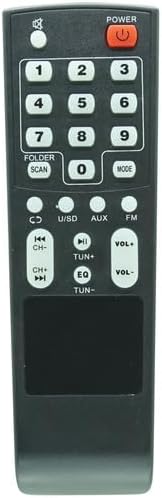
Rajah 2: Depan view alat kawalan jauh.
- KUASA: Turns the speaker system on or off.
- Butang Nombor (0-9): Used for direct track selection, radio station input, or other numerical inputs depending on the speaker system's mode.
- FOLDER / SCAN: Navigates through folders or initiates a scan function (e.g., for FM radio).
- ARAHAN: Switches between different input modes (e.g., Bluetooth, USB, SD, AUX, FM, CD).
- CD / U/SD / AUX / FM: Direct selection buttons for specific input sources.
- Previous/Next Track (|<</>>|): Skips to the previous or next track/file.
- Play/Pause (>||): Memainkan atau menjeda main balik audio.
- VOL+ / VOL-: Meningkatkan atau mengurangkan kelantangan induk.
- EQ: Kitaran melalui pratetap penyamaan.
- TUN+ / TUN-: Adjusts radio frequency up or down.
For specific functions and advanced operations, please refer to the original user manual of your AUNA DisGo Box speaker system.
Penyelenggaraan
Penggantian Bateri
If the remote control's range decreases or it becomes unresponsive, it is likely time to replace the batteries. Follow the battery installation steps outlined in the "Setup" section.
Pembersihan
To clean the remote control, gently wipe it with a soft, dry cloth. Do not use liquid cleaners, abrasive materials, or solvents, as these can damage the remote's surface or internal components.
Menyelesaikan masalah
- Jauh tidak bertindak balas:
- Ensure new batteries are correctly installed with the correct polarity.
- Check if there are any obstructions between the remote control and the speaker system's infrared receiver.
- Make sure you are within the effective range of the speaker system's IR receiver.
- Verify that the speaker system is powered on.
- Beberapa fungsi tidak berfungsi:
- Confirm that your specific AUNA DisGo Box model is listed as compatible. If you are unsure, please contact the seller for verification.
- Ensure the speaker system is in the correct mode for the function you are trying to use (e.g., pressing track skip buttons while in FM radio mode might not work).
Jika masalah berterusan selepas mengikuti langkah-langkah ini, sila hubungi penjual untuk bantuan lanjut.
Spesifikasi
| Ciri | Perincian |
|---|---|
| ASIN | B0F8NQNH7W |
| Bateri Diperlukan | 2 bateri AAA (tidak termasuk) |
| Pengeluar | Generik |
| Jenama | Generik |
| Ciri Khas | No additional programming required |
| warna | As shown (Black) |
| Bilangan Maks Peranti yang Disokong | 1 (Specific AUNA DisGo Box Speaker System) |
| Peranti Serasi | AUNA DisGo Box 100, 2100, 10033685, 10033686, 10030725, 10030726, 10032598 Speaker Systems |
Waranti dan Sokongan
Specific warranty information for this replacement remote control is not provided in this manual. For details regarding warranty coverage, returns, or technical support, please refer to the purchase documentation or contact the seller directly through the platform where the product was purchased.
If you are unsure about compatibility with your device, it is recommended to contact the seller before purchase or for troubleshooting assistance.