
pengenalan
This document provides instructions for the Generic replacement infrared (IR) remote control, designed for use with specific portable air conditioner models, including Goodhome Malay fdp26-3032zpr5, Euker 12000BTU-EK-1, and Euker 8000BTU-EK-2. This remote is intended as a direct replacement for your original remote control. Please ensure your current remote matches the appearance of the remote shown in this manual for compatibility.
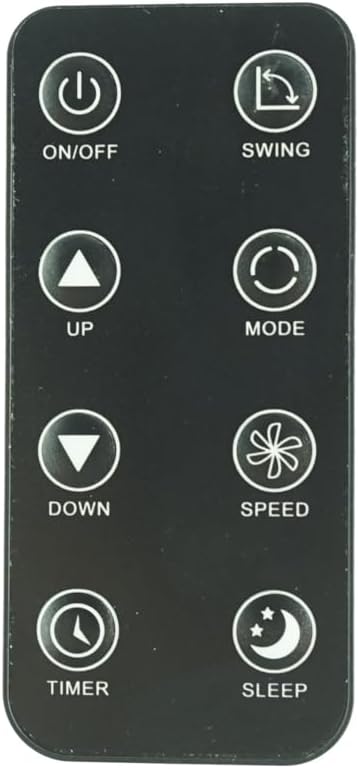
Rajah 1: Depan view of the Replacement Remote Control. This image displays the remote's layout, including buttons for ON/OFF, SWING, UP, DOWN, MODE, SPEED, TIMER, and SLEEP.
Persediaan
Pemasangan Bateri
The remote control requires two nonstandard batteries (CR2025 type, typically). Follow these steps to install or replace the batteries:
- Cari petak bateri di belakang alat kawalan jauh.
- Gently push the release tab or slide the battery cover open as indicated on the remote. Refer to Figure 2 for guidance.
- Insert two CR2025 batteries, ensuring the positive (+) side of the battery faces upwards, as marked inside the compartment.
- Tutup penutup bateri dengan selamat sehingga ia berbunyi pada tempatnya.

Rajah 2: Belakang view of the remote control, illustrating the battery compartment and instructions for inserting the CR2025 battery. The image shows the "OPEN" and "PUSH" indicators for battery removal/insertion.
Semakan Keserasian
This remote is an infrared replacement. It does not require pairing. For proper functionality, it is crucial that your original remote control is identical in appearance to this replacement. If your air conditioner model is not explicitly listed in the product title, or if your original remote differs, this replacement may not be fully compatible or may not offer all original functions.
Arahan Operasi
Point the remote control directly at the infrared receiver on your portable air conditioner. Ensure there are no obstructions between the remote and the air conditioner.
- Butang HIDUP/MATI: Tekan untuk menghidupkan atau mematikan penghawa dingin.
- Butang HAyunan: Activates or deactivates the automatic swing function of the air conditioner's louvers.
- UP (▲) Button: Increases the temperature setting or adjusts other parameters upwards.
- BAWAH (▼) Butang: Decreases the temperature setting or adjusts other parameters downwards.
- Butang MOD: Cycles through available operating modes (e.g., Cool, Fan, Dry, Heat - depending on AC model).
- Butang SPEED: Melaraskan kelajuan kipas (cth, Rendah, Sederhana, Tinggi, Auto).
- Butang PEMASA: Sets the timer for automatic on/off operations. Refer to your air conditioner's manual for specific timer programming.
- Butang SLEEP: Activates the sleep mode, which typically adjusts temperature and fan speed for comfortable sleep.
Penyelenggaraan
Membersihkan Alat Jauh
To clean the remote control, wipe it gently with a soft, dry cloth. Do not use liquid cleaners, sprays, or abrasive materials, as these can damage the remote's surface or internal components.
Penjagaan dan Penggantian Bateri
- Replace batteries when the remote's range decreases or buttons become unresponsive.
- Always replace both batteries at the same time with new ones of the correct type (CR2025).
- Jangan campurkan bateri lama dan baharu, atau jenis bateri yang berlainan.
- Jika alat kawalan jauh tidak akan digunakan untuk tempoh yang lama, keluarkan bateri untuk mengelakkan kebocoran dan kemungkinan kerosakan.
- Buang bateri terpakai mengikut peraturan tempatan.
Penyimpanan
Simpan alat kawalan jauh di tempat yang sejuk dan kering, jauh daripada cahaya matahari langsung, suhu tinggi dan kelembapan berlebihan. Elakkan daripada menjatuhkan alat kawalan jauh atau mendedahkannya kepada hentaman yang kuat.
Menyelesaikan masalah
- Jauh tidak bertindak balas:
- Ensure the remote is pointed directly at the air conditioner's receiver.
- Check if there are any obstructions between the remote and the air conditioner.
- Gantikan bateri dengan yang baru, memastikan kekutuban yang betul.
- Verify that the air conditioner is powered on and plugged in.
- Beberapa fungsi tidak berfungsi:
- This replacement remote may not support all functions of your original air conditioner remote, especially if your original remote had advanced features not present on this replacement.
- Confirm that your air conditioner model is listed as compatible.
- Remote range is poor:
- Gantikan bateri.
- Ensure the remote's infrared emitter (at the top) is clean and unobstructed.
Spesifikasi
| Ciri | Perincian |
|---|---|
| Jenis Produk | Replacement Infrared (IR) Remote Control |
| Jenama | Generik |
| Peranti Serasi | Portable Air Conditioners (Goodhome Malay fdp26-3032zpr5, Euker 12000BTU-EK-1, Euker 8000BTU-EK-2) |
| Sumber Kuasa | 2 x CR2025 Nonstandard Batteries (required) |
| warna | White (buttons) / Black (body) |
| Ciri Khas | Ergonomic design, direct replacement |
| Pengeluar | SZHKHXD |
| Negara Asal | China |
| ASIN | B0F8N5978L |
Sokongan
For any questions, concerns, or issues regarding this replacement remote control, please contact the seller directly through the platform where you purchased the product. It is recommended to provide your order details and a clear description of the issue for prompt assistance.
Note: This product is a replacement remote and may not come with a separate manufacturer's warranty. Please refer to the seller's return policy for details on returns or exchanges.