
1. Pengenalan
This manual provides comprehensive instructions for the installation, operation, and maintenance of your Joying JY-VT131N4 9-inch Android 13 Car Stereo. Please read this manual thoroughly before using the product to ensure proper functionality and to maximize your user experience. Keep this manual for future reference.
2. Produk Lebihview
The Joying JY-VT131N4 is an advanced 9-inch Android 13 head unit designed for select Volkswagen, Skoda, and Seat vehicles. It integrates modern features such as wireless Apple CarPlay and Android Auto, GPS navigation, a built-in 4G module, and high-quality audio processing, while retaining many of your vehicle's original functions.
Ciri-ciri Utama:
- Pemasangan Palam & Main: Designed for direct integration with compatible vehicle systems, minimizing wiring modifications.
- But Cepat: Quick startup time, entering the user interface within 2 seconds after the initial boot.
- Advanced Audio Output: Features Optical Fiber and Coaxial Digital Output for superior sound quality with external amppenyelamat.
- Modul 4G Bersepadu: Supports SIM card for internet access (data only, no calls/SMS).
- Navigasi GPS: Precise positioning with included GPS antenna, supporting offline maps.
- CarPlay Wayarles & Android Auto: Seamless smartphone integration for navigation, communication, and entertainment.
3. Keserasian
This head unit is specifically designed for Volkswagen, Skoda, and Seat vehicles with MQB systems manufactured between 2016 and 2021. It supports factory air conditioning display, parking sensor display, steering wheel controls, door information display, factory amplifier, and factory reverse camera.
Compatible Vehicle Models & Years:
| Jenama | Models & Years |
|---|---|
| Volkswagen | Jetta VI 2010+, Golf VI 2008+, Passat B7 2010+, Tiguan 2008+, Transporter T5 2010+, EOS 2006+, Caddy 2004+, Amarok 2010+, Beetle 2011+, Sharan II 2010+, Scirocco 2008+, Golf V Plus 2005+, Jetta V 2005-09, Magotan 2007+, Passat CC 2008+, Passat B6 2005-10, Polo V 2009+, Sagitar 2006+ |
| Skoda | Fabia 2007+, SuperB 2008+, Octavia 2007+, Yeti 2009+, Rapid 2012+, Roomster 2006+ |
| tempat duduk | Leon 2009+, Alhambra 2009+ |
Penting: For 2016-2021 models, it is crucial to determine if your vehicle uses an MQB or PQ (non-MQB) CANbus system. This information can typically be found on the original radio sticker. Ensure you select the correct system type when ordering to ensure compatibility.

Image: Applicable Models & Years for Joying Car Stereo.

Image: Guide to checking your vehicle's MQB or PQ system type.
Some vehicles may require an additional fascia panel for a seamless installation. Please check if your vehicle's center console matches the examples provided in the image below to determine if an extra fascia panel is needed.

Image: Fascia panel requirements for specific Skoda and Seat models.
4. Persediaan dan Pemasangan
The Joying JY-VT131N4 is designed for a plug-and-play installation, meaning no cutting of original vehicle wires is typically required. All necessary cables are supplied with the unit.
Langkah Pemasangan (Umum):
- Keluarkan Radio Asal: Carefully remove your vehicle's existing radio unit.
- Sambungkan Wiring Harness: Connect the provided wiring harness to your vehicle's existing connectors. Ensure all connections are secure.
- Sambungkan Antena: Attach the GPS antenna, 4G antennas, and WiFi antenna to the corresponding ports on the new head unit.
- CAN Bus Setting: If your vehicle is equipped with a CAN bus, ensure the communication protocol switch (white button) on the back of the unit is set to the right side (CAN).
- Unit Kepala Pemasangan: Securely mount the Joying head unit into the dashboard opening.
- Kefungsian Ujian: Before fully reassembling the dashboard, power on the unit and test all functions (audio, navigation, steering wheel controls, etc.).

Image: Rear connections of the Joying JY-VT131N4 head unit.
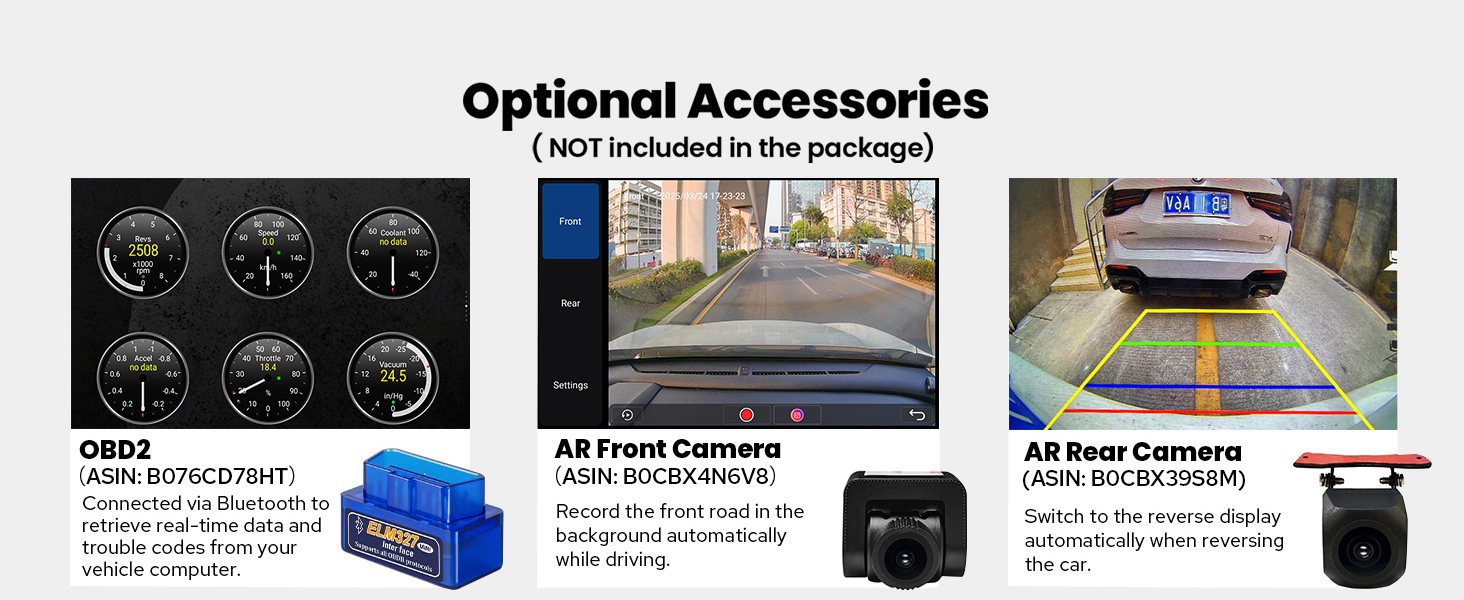
Image: CAN bus switch setting for proper communication with vehicle systems.
5. Arahan Operasi
5.1 User Interface and Fast Boot
The unit runs on Android 13, providing a modern and intuitive user interface. After the initial boot-up (which may take 30-40 seconds), subsequent startups are significantly faster, typically entering the user interface within 2 seconds when the car key is inserted.

Image: Joying Android 13 main user interface.

Image: Android 13 interface with LHD and RHD user options.
5.2 CarPlay & Android Auto
Connect your mobile phone via USB cable or Bluetooth to utilize built-in Apple CarPlay or Android Auto. This allows you to access navigation, make phone calls, send messages, and listen to music directly from your phone's apps displayed on the car stereo's screen.

Image: Built-in Apple CarPlay and Android Auto functionality.
5.3 Navigasi GPS
The unit includes precise GPS engines and an antenna for accurate real-time navigation. It supports offline maps, allowing you to download and save map data for specific areas to the car stereo for use without an internet connection.
5.4 Modul 4G
Insert a SIM card into the dedicated slot to enable 4G internet access. This feature supports various FDD-LTE and TDD-LTE bands. Please note that this module is for data access only and does not support phone calls or SMS.
5.5 Radio and Hands-free Calling
Enjoy AM/FM radio functionality. The built-in Bluetooth allows for hands-free calling, enhancing safety while driving.
5.6 OEM Feature Retention
The Joying JY-VT131N4 is designed to retain many of your vehicle's original features, including:
- Factory Air Conditioning Display
- Factory Parking Sensor Display
- Kawalan Roda Stereng Kilang
- Factory Door Information Display
- Compatibility with Factory Amplifier and Reverse Camera

Image: Retention of original vehicle features.
6. Ciri Audio
Experience high-quality sound with the integrated TDA7851 DSP chip and a 48-band graphic equalizer, delivering 4x50W maximum output power. The unit also provides advanced connectivity for external audio systems.
Output Audio Lanjutan:
- Optical Fiber Output: For direct digital audio transmission to compatible external amppenyelamat.
- Output Digital Koaksial: Another option for high-fidelity digital audio output.
- Output RCA: Includes 4 audio outputs (Front R&L, Rear R&L), a dedicated center channel output, and a subwoofer output for comprehensive aftermarket ampsokongan penghidup.

Image: High-quality sound enjoyment features and audio outputs.
7. Multitasking and Connectivity
7.1 Split-screen Multitasking
The unit supports split-screen functionality, allowing you to run two applications simultaneously. For example, you can have navigation on one side and a media player on the other.

Image: Split-screen multitasking in action.
7.2 Output HDMI
The unit features an HDMI output, providing a full digital image and sound-sending interface. This allows you to connect external displays, such as headrest monitors, to project content from the main screen. This is ideal for passenger entertainment.

Image: HDMI output for projection screen display.
7.3 Kesambungan Wi-Fi
An independent WiFi antenna ensures stable signal quality and provides fast, smooth internet access. The unit supports 802.11a/b/g/n/AC standards across 2.4GHz and 5GHz spectral bands.

Image: Upgraded WiFi signal for stable internet access.
7.4 USB Ports & Micro SD Card Slot
The unit includes 3 USB ports for connecting external devices, and a Micro SD card slot for additional storage or media playback.
8. Maintenance and Cooling System
The Joying JY-VT131N4 features a dual heat sink design for superior heat dissipation, improved temperature control, and enhanced performance stability. You can set a warning value for CPU temperature or radio volume. If these values are exceeded, the cooling fan will automatically activate to prevent overheating.

Image: Upgraded cooling system with dual heat sink and fan control.
9. Pemperibadian
Customize your head unit experience with various personalization options:
- Logo But Kereta: Set a custom logo to display when the unit starts up.
- Wallpaper Boleh Disesuaikan: Choose from a selection of wallpapers or upload your own.
- Warna Butang Boleh Tukar: Adjust the color of the physical buttons to match your vehicle's interior lighting or personal preference.

Image: Personalized settings for the car stereo.
10. Aksesori Pilihan
Enhance your driving experience with these optional accessories (not included in the package):
- OBD2 Scanner: Connects via Bluetooth to retrieve real-time vehicle data and trouble codes.
- AR Front Camera: Records the road ahead automatically while driving.
- AR Rear Camera: Menyediakan yang jelas view when reversing, automatically switching the display.

Image: Optional accessories for the Joying car stereo.
11. Spesifikasi
| Ciri | Perincian |
|---|---|
| Nombor Model | JY-VT131N4 |
| Saiz Paparan | 9 Inci |
| Sistem Operasi | Android 13 |
| Kapasiti Penyimpanan Memori | 64 GB |
| Teknologi Ketersambungan | Bluetooth, Ethernet, HDMI, USB, Wi-Fi |
| Ciri Khas | DSP, Equalizer, Front View Camera Input, RCA, RDS |
| Mod Keluaran Audio | Stereo (with Optical Fiber and Coaxial Digital Output) |
| Komponen yang Disertakan | 9" radio, Power Cable, AR Cable, Screen Ribbon Cable, External Mic, 4G Antenna (x2), WiFi Antenna, USB Cable (x2), GPS Antenna, User Manual |
| Berat Barang | 5 paun |
| Dimensi Pakej | 13 x 9 x 8 inci |
12. Penyelesaian masalah
If you encounter issues with your Joying JY-VT131N4 car stereo, consider the following common troubleshooting steps:
- Tiada Kuasa: Check all power connections and fuses. Ensure the wiring harness is correctly installed.
- Tiada Bunyi: Sahkan sambungan pembesar suara dan amplifier settings. Check the volume level and ensure the audio source is correctly selected. If using external amplifiers, confirm optical/coaxial connections.
- Kawalan Roda Stereng Tidak Berfungsi: Ensure the CAN bus setting is correct (refer to Section 4). Check the steering wheel control settings within the unit's software.
- Isu Isyarat GPS: Pastikan antena GPS disambungkan dengan betul dan diletakkan di lokasi yang jelas view dari langit.
- CarPlay/Android Auto Connectivity Problems: Ensure your phone's software is up to date. Try reconnecting the USB cable or re-pairing via Bluetooth. Check the settings within the unit for CarPlay/Android Auto activation.
- Slow Performance/Freezing: Mulakan semula unit. Jika masalah berterusan, pertimbangkan untuk melakukan tetapan semula kilang (nota: ini akan memadamkan semua data dan tetapan pengguna).
- Terlalu panas: Ensure proper ventilation around the unit. Check if the cooling fan is operating. If the fan is not activating, verify the temperature warning settings.
For persistent issues, please refer to the detailed troubleshooting section in the full user manual or contact Joying customer support.
13. Waranti dan Sokongan
The Joying JY-VT131N4 car stereo comes with a Waranti 2 tahun dari tarikh pembelian. Waranti ini meliputi kecacatan pembuatan dan kerosakan dalam penggunaan biasa.
For warranty claims, technical assistance, or further inquiries, please contact Joying customer support through their official channels. Please have your purchase receipt and product model number (JY-VT131N4) ready when contacting support.