
1. Pengenalan
Thank you for choosing the Xega Solar Security Camera. This device is designed to provide reliable outdoor surveillance with the convenience of solar power and wireless connectivity. Featuring 2K resolution, Pan-Tilt-Zoom (PTZ) functionality, color night vision, and smart motion detection, it offers comprehensive monitoring for your property. This manual will guide you through the installation, operation, and maintenance of your camera system.

Image: The Xega Solar WiFi Camera mounted on a house, illustrating its wireless connectivity.
2. Apa yang ada di dalam Kotak
Sila semak kandungan pakej untuk memastikan semua item ada:
- WiFi Camera (4 units)
- Panel Suria (4 unit)
- Solar Panel Bracket (4 units)
- 3-meter Connection Cable (4 units)
- Manual Pengguna
- Skru dan Palam Dinding
3. Produk Lebihview dan Ciri
The Xega Solar Security Camera is equipped with advanced features for reliable outdoor surveillance:
- Solar-Powered & Easy Installation: Operates entirely on solar energy with a built-in 5200mAh rechargeable battery. No electrical wiring required, allowing flexible installation. The 3.5W angle-adjustable solar panel maximizes sunlight exposure.
- 2K Image & PTZ Technology: Delivers 2K HD clarity with a high-performance image sensor. Features 355° horizontal and 90° vertical rotation for wide area coverage.
- Penglihatan Malam Warna: Provides vibrant full-color night vision up to 25 meters (82ft) in darkness.
- Smart Detection & Instant Alerts: Built-in PIR sensor with adjustable sensitivity supports human detection and customizable detection zones to minimize false alarms. Triggers bright floodlights and audible alarms upon detection. Real-time alerts are pushed to your phone via the Ubox app.
- Ceramah Dua Hala: Built-in microphone and speaker enable real-time two-way communication.
- Optional Storage: Supports local storage via TF card (up to 128GB, not included) and cloud storage (30-day trial available).
- IP66 Kalis Cuaca: Designed to withstand various weather conditions, ensuring year-round security.
Ciri Visual Lebihview

Image: The camera and solar panel setup, emphasizing continuous solar power for 365 days.
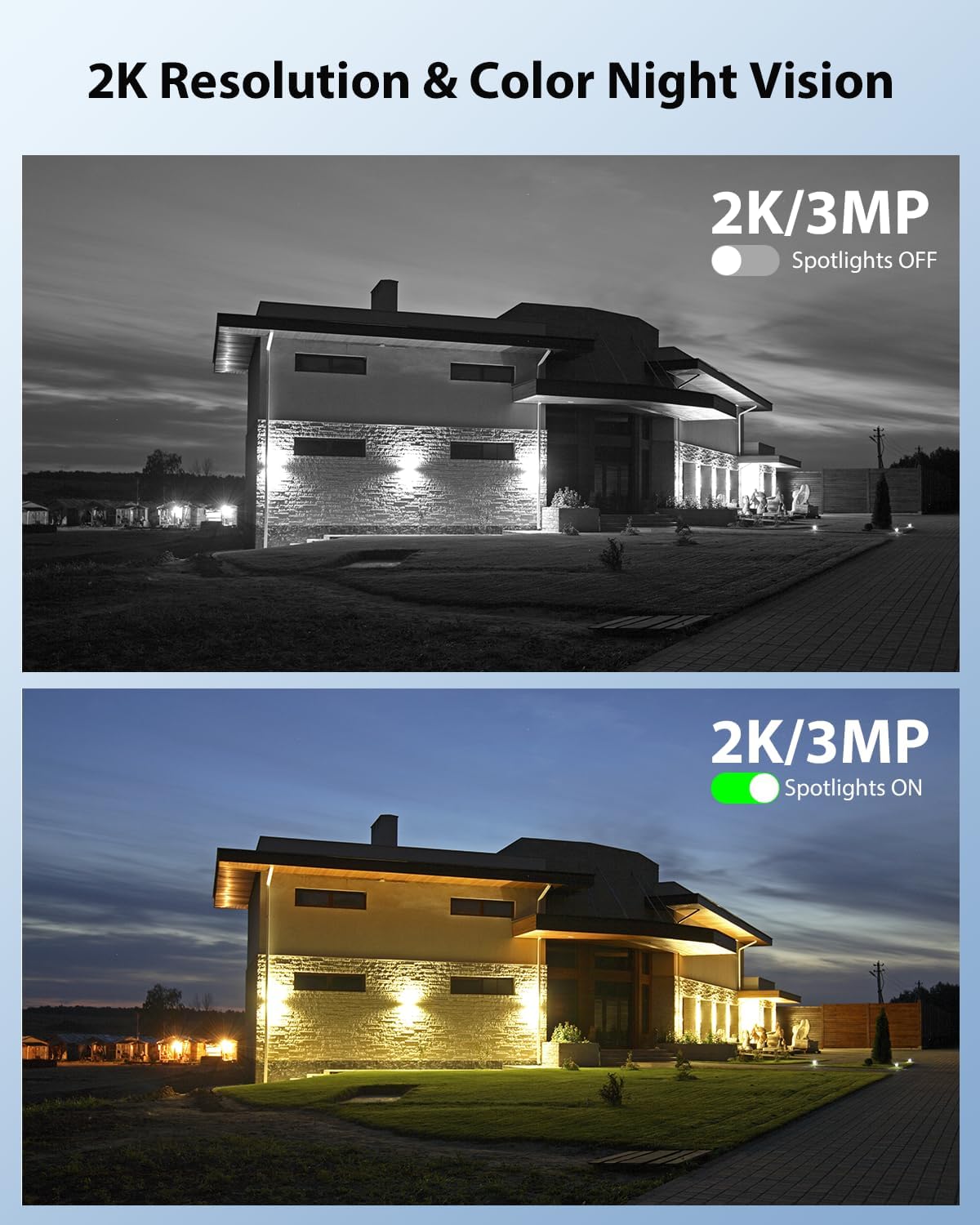
Image: Demonstrates 2K resolution and the difference between infrared and color night vision with spotlights.

Image: Illustrates the panoramic view and PTZ (Pan-Tilt-Zoom) capabilities controlled via a smartphone app.
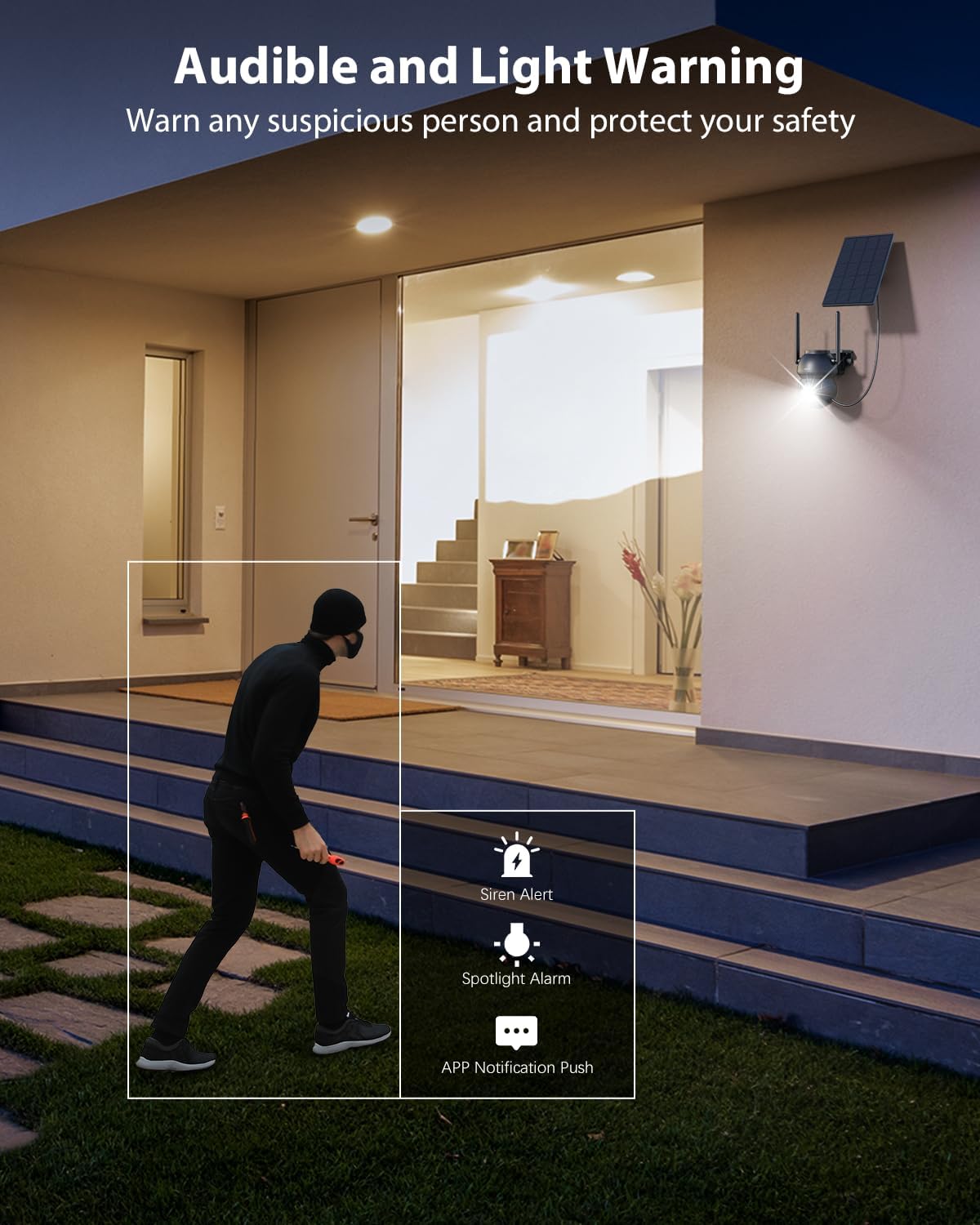
Image: Shows the camera's audible and light warning system deterring a suspicious person.

Image: Depicts the two-way audio function, allowing communication through the camera.

Image: Shows how to customize detection areas to focus monitoring on important zones and reduce false alarms.

Image: Highlights the IP66 weather-resistant design, showing the camera's durability in various weather conditions.
Video Produk
Video: Tamatview of the Xega Solar WiFi Camera Outdoor Wireless, demonstrating its key features and ease of installation.
4. Panduan Persediaan
4.1 Mengecas Bateri
Before initial use, fully charge the camera's built-in 5200mAh battery using the provided USB cable. Although solar-powered, a full initial charge ensures optimal performance from the start.
4.2 Pemasangan Aplikasi dan Penciptaan Akaun
- Muat turun Ubox aplikasi daripada gedung aplikasi telefon pintar anda (iOS atau Android).
- Buka apl dan ikut arahan pada skrin untuk membuat akaun baharu atau log masuk jika anda sudah mempunyai akaun.
4.3 Camera Pairing with Wi-Fi
- Pastikan telefon pintar anda disambungkan ke a Rangkaian Wi-Fi 2.4GHzKamera ini tidak menyokong Wi-Fi 5GHz.
- In the Ubox app, tap the "Add Device" or "+" icon.
- Power on the camera. It will enter pairing mode, indicated by a specific LED light pattern (refer to the camera's LED indicator guide in the app for details).
- Follow the app's instructions to connect the camera to your Wi-Fi network. This usually involves scanning a QR code displayed on your phone with the camera lens.
- Once connected, the camera will confirm successful pairing, and you can name your device.
4.4 Memasang Kamera dan Panel Suria
The camera and solar panel are designed for wall mount installation.
- Pilih Lokasi: Select an outdoor location with good Wi-Fi signal strength and ample sunlight exposure for the solar panel. The camera should be mounted at a height that provides optimal viewing angles and detection range.
- Lekapkan Kamera: Use the provided screws and wall plugs to securely attach the camera bracket to a wall or suitable surface. Ensure the camera has a clear line of sight to the area you wish to monitor.
- Pasang Panel Suria: Attach the solar panel bracket to a location where it receives direct sunlight for most of the day. Adjust the angle of the solar panel to maximize sunlight exposure.
- Sambungkan Panel Suria: Use the 3-meter connection cable to link the solar panel to the camera.
5. Arahan Operasi
5.1 Langsung View dan Kawalan PTZ
- Open the Ubox app and select your camera to access the live view.
- Use the on-screen joystick or swipe gestures to control the camera's 355° pan and 90° tilt movements.
- Pinch to zoom in or out (digital zoom).
5.2 Audio Dua Hala
- Dalam siaran langsung view, ketik ikon mikrofon untuk bercakap melalui pembesar suara kamera.
- Ketik ikon pembesar suara untuk mendengar audio dari persekitaran kamera.
5.3 Pengesanan Gerakan dan Makluman
- Navigate to the camera settings in the Ubox app.
- Adjust PIR sensor sensitivity to optimize detection and minimize false alarms.
- Set up custom detection zones to monitor specific areas of interest.
- Enable or disable floodlight and siren alarms for motion events.
- Ensure push notifications are enabled in your phone settings and the Ubox app to receive instant alerts.
5.4 Mod Penglihatan Malam
The camera offers different night vision modes:
- Penglihatan Malam Inframerah: Provides clear black and white images in low light.
- Penglihatan Malam Warna: Activates built-in spotlights to provide full-color images at night when motion is detected. This can be configured in the app settings.
5.5 Pilihan Storan
- Penyimpanan Kad TF: Insert a TF (microSD) card (up to 128GB, not included) into the camera's designated slot for local recording.
- Storan Awan: Subscribe to the optional cloud storage service via the Ubox app for secure, remote storage of your recordings. A 30-day trial may be available.
- Akses foo yang dirakamtage and playback options through the Ubox app.
6. Penyelenggaraan
- Pembersihan Panel Suria: Lap permukaan panel solar secara berkala dengan kain lembutamp kain untuk menghilangkan habuk, kotoran atau serpihan yang boleh mengurangkan kecekapan pengecasan.
- Pembersihan Kanta Kamera: Bersihkan lensa kamera dengan lembut menggunakan kain microfiber untuk memastikan kualiti imej yang jelas. Elakkan bahan yang melelas.
- Kemas kini Firmware: Check the Ubox app periodically for firmware updates. Keeping your camera's firmware updated ensures optimal performance and access to new features.
- Kesihatan Bateri: While solar-powered, extreme weather or prolonged periods of low sunlight may affect battery levels. Ensure the solar panel is optimally positioned.
- Rintangan Cuaca: The IP66 rating ensures protection against dust and strong jets of water. No special weather-proofing maintenance is typically required beyond ensuring secure mounting.
7. Penyelesaian masalah
- Kamera Tidak Menyambung ke Wi-Fi:
- Pastikan rangkaian Wi-Fi anda ialah 2.4GHz.
- Periksa kekuatan isyarat Wi-Fi di lokasi kamera.
- Mulakan semula penghala anda dan kamera.
- Sahkan entri kata laluan Wi-Fi yang betul dalam aplikasi.
- Kualiti Imej Lemah:
- Bersihkan lensa kamera.
- Ensure adequate lighting, especially for color night vision.
- Semak kelajuan sambungan internet anda.
- Makluman Gerakan Palsu:
- Adjust PIR sensor sensitivity in the app.
- Define or refine custom detection zones to exclude irrelevant areas (e.g., public roads, swaying trees).
- Bateri Tidak Dicas:
- Pastikan panel solar menerima cahaya matahari langsung selama beberapa jam setiap hari.
- Bersihkan permukaan panel solar.
- Check the connection cable between the solar panel and the camera.
- Isu Audio Dua Hala:
- Ensure your phone's volume is up and the microphone is enabled for the Ubox app.
- Check the camera's speaker and microphone settings in the app.
8. Spesifikasi
| Ciri | Spesifikasi |
|---|---|
| Nama Model | XG-22-WIFI-P4 |
| Penggunaan Dalaman/Luar | Luar |
| Sumber Kuasa | Solar and Battery Powered (5200mAh Lithium Ion batteries included) |
| Teknologi Ketersambungan | WiFi 2.4Ghz |
| Resolusi Tangkapan Video | 2K (1296p) |
| PTZ (Pan/Tilt) | 355° Mendatar, 90° Menegak |
| Julat Penglihatan Malam | 25 Meter (82 kaki) |
| Teknologi Cahaya Rendah | Penglihatan Malam Warna |
| Pengesanan Pergerakan | PIR Sensor, Human Detection, Customizable Alarm Areas |
| Audio Dua Hala | ya |
| Pilihan Storan | TF Card (Max. 128GB), Cloud Storage |
| Penilaian Perlindungan Antarabangsa | IP66 |
| Jenis Pemasangan | Lekap di dinding |
| bahan | Akrilonitril Butadiena Stirena (ABS) |
| Dimensi Produk | 5 x 5 x 5 inci |
| Berat Barang | 6.43 paun (untuk 4 pek) |
9. Waranti dan Sokongan
9.1 Maklumat Waranti
Xega products typically come with a manufacturer's warranty. Please refer to the product packaging or the official Xega website for specific warranty terms and conditions. Keep your purchase receipt as proof of purchase.
9.2 Sokongan Pelanggan
For technical assistance, troubleshooting, or any product-related inquiries, please contact Xega customer support. You can usually find contact information on the Xega official website or through the Ubox app.

Image: Xega offers 24/7 online customer support for assistance.