
pengenalan
The FRIZZLIFE LP365-P is an advanced Smart Wi-Fi Water Detector designed to provide comprehensive leak protection and water consumption monitoring for your home. Utilizing patented ultrasonic technology, it detects micro-leaks as small as 0.04 liters per minute (0.01 GPM) and features an automatic shut-off valve to prevent water damage. With real-time alerts and app-based control, you can monitor your water system from anywhere.
Kandungan Pakej
- LP365-P System Unit
- G=1" (male) Pipe Connector
- G=3/4" (male) Pipe Connector
- 2 Palam
- 1 x Kabel Kuasa 2 meter
- 1 Sealing Tape
Spesifikasi
| Nombor Model | LP365-P UKEU |
| Jenama | FRIZZLIFE |
| Dimensi Produk (L x W x H) | 14.5 x 9.91 x 7.8 cm |
| Berat badan | 2 kilogram |
| warna | putih |
| Sumber Kuasa | Battery powered (1 Lithium-ion battery included) |
| Voltage | 5 Volt |
| Kaedah Kawalan | Application (Smart Life App) |
| Peranti Serasi | Telefon Pintar, Tablet |
| Teknologi Sensor | Penderia Ultrasonik |
| Keserasian Paip | 1" and 3/4" diameter pipes |
| Leak Detection Sensitivity | 0.04 l/min (0.01 GPM) |
| UPC / GTIN | 850073755099 |
Persediaan & Pemasangan
1. Keperluan Pra-Pemasangan
- Ensure a stable Wi-Fi connection (2.4 GHz and 5 GHz compatible) is available near the installation site.
- A power outlet must be accessible for the device's power cable.
- Pemasangan profesional disyorkan untuk hasil yang optimum.
2. Pemasangan Fizikal
The Frizzlife LP365-P is designed for in-line installation on your home's main water supply pipe. It is compatible with both 1" and 3/4" diameter pipes.

Penerangan Imej: This image illustrates the Frizzlife LP365-P unit installed directly onto a main water pipe. It shows the device connected to a power outlet and highlights the need for a nearby Wi-Fi connection. Dimensions of 3.1" and 3.9" for width and 5.7" for height are indicated on the device. A professional plumber is shown performing the installation.
- Identify the main water supply line where the device will be installed.
- Matikan bekalan air utama ke rumah anda.
- Drain the water from the pipes.
- Cut the pipe to accommodate the LP365-P unit.
- Use the provided G=1" or G=3/4" male pipe connectors and sealing tape to securely attach the LP365-P unit to the main water line. Ensure all connections are watertight.
- Connect the 2-meter power cable to the device and plug it into a nearby power outlet.
- Turn the main water supply back on and check for any leaks.
3. Choosing the Correct Adapter
Select the appropriate adapter based on your existing plumbing connections to ensure a proper fit and leak-free installation.
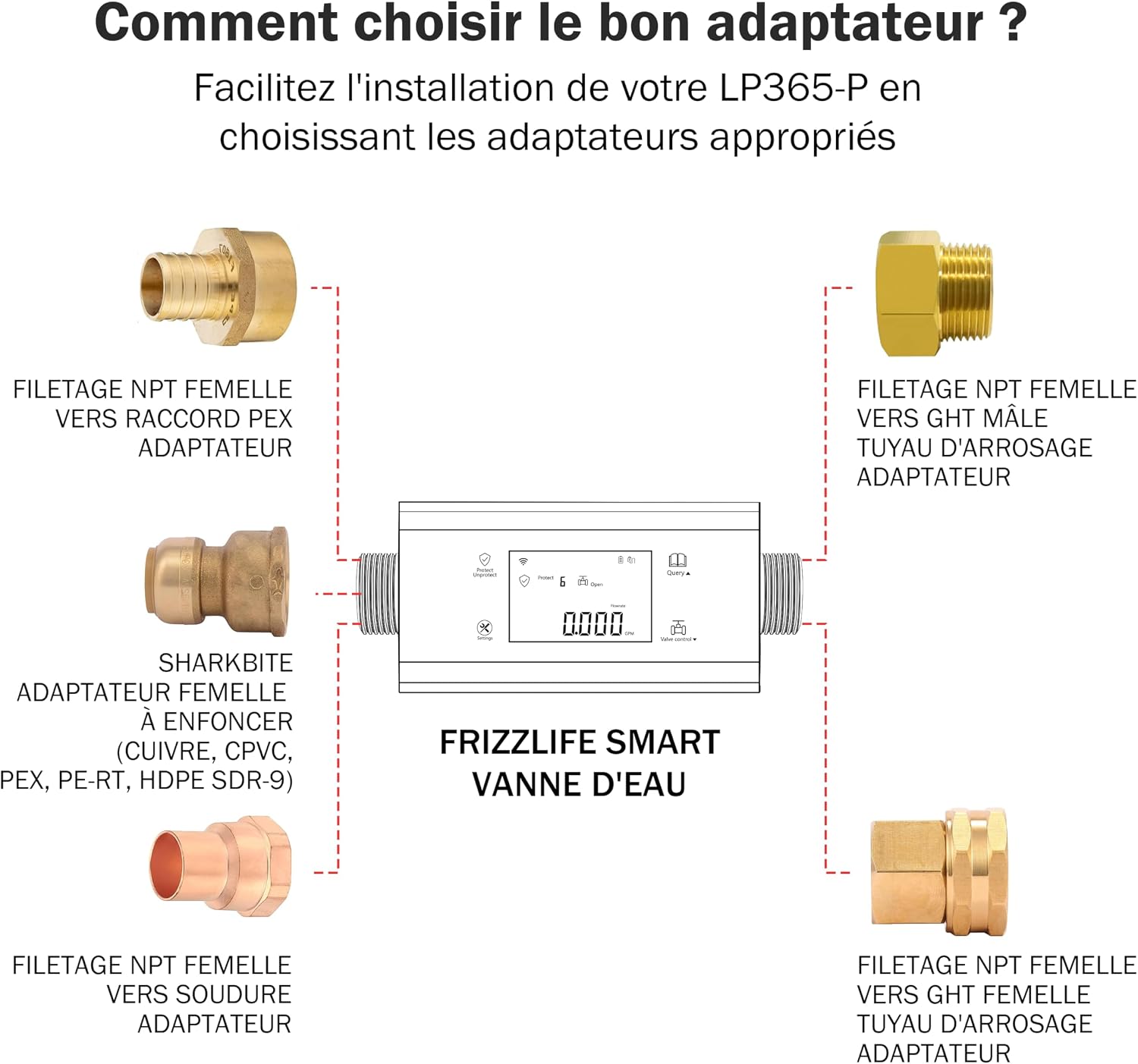
Penerangan Imej: This diagram illustrates different types of adapters that can be used with the Frizzlife Smart Water Valve for various pipe connections. Examples include NPT female to PEX, NPT female to GHT male hose, Sharkbite female push-fit (for copper, CPVC, PEX, PE-RT, HDPE SDR-9), NPT female to solder, and NPT female to GHT female hose adapters.
4. Muat Turun Apl dan Berpasangan
- Download the "Smart Life" app from your smartphone's app store (iOS or Android).
- Daftar atau log masuk ke akaun Smart Life anda.
- Follow the in-app instructions to add the Frizzlife LP365-P device. Ensure your phone is connected to the same Wi-Fi network as the device during pairing.
Arahan Operasi
1. Real-time Monitoring via App
The "Smart Life" app provides a comprehensive interface to monitor your water system. You can view real-time data on water consumption, flow rate, temperature, and pressure.

Penerangan Imej: This image displays a smartphone screen with the Frizzlife app. The app interface shows controls for the water valve, real-time water consumption data for today, the last 24 hours, the last 7 days, and the current month. It also displays water pressure and flow rate. A separate notification bubble indicates a "Leak Detected!" alarm.
- Kawalan Injap: Remotely open or close the main water valve directly from the app.
- Penggunaan Air: Track daily, weekly, and monthly water usage to identify trends and potential waste.
- Kadar Aliran: Monitor the current water flow in liters per minute or gallons per minute.
- Tekanan: View real-time water pressure within your system.
2. Leak Alerts and Automatic Shut-off
The LP365-P provides 24/7 real-time leak detection. In the event of a detected leak:
- You will receive immediate alerts via SMS, phone call, and app notifications.
- The device will automatically close the main water valve to prevent further damage.
- You can manually override the shut-off or reopen the valve via the app after addressing the leak.
3. Customizing Protection Settings
Personalize your leak protection settings to match your household's specific water usage patterns, home size, and daily routines. This helps reduce false alarms and ensures accurate, responsive protection.

Penerangan Imej: This image displays four smartphone screens. The top-left shows "Alarm" settings with "Auto", "Mode 1", "Mode 2", and "Mode 3" options, along with an "Advanced setting". The bottom-left shows "Device Information" with a "Share Device" option, allowing family members to access control. The bottom-right shows a "Running Leak Test" in progress, indicating 45% completion and 5:00 minutes remaining. The top-right shows a visual of water dripping, implying insurance savings from leak prevention.
- Access the "Settings" section within the Smart Life app.
- Adjust parameters such as maximum flow rate, duration of continuous flow, and specific leak detection thresholds.
- Set different protection modes (e.g., Home, Away, Vacation) to optimize detection based on your presence.
- Perkongsian Keluarga: Easily share device control with other family members through the app.
4. Performing a Leak Test
To verify the effectiveness of the leak detection system, use the "Leak Test" function in the app. This test is conducted by an independent laboratory.

Penerangan Imej: This image shows a smartphone displaying the "Leak Test" function of the Frizzlife app. The screen indicates the test is 27% complete with 03:40 minutes remaining. In the background, a cutaway view of a house highlights various rooms (kitchen, bathroom, bedroom, living room) with green checkmarks, signifying that these areas are being monitored or protected during the test. The text emphasizes that no tools are needed, just your phone.
- Ensure the main water supply valve is open and all fixtures in your home are closed.
- Open the Smart Life app and navigate to the "Leak Test" function.
- Start the test and follow any on-screen prompts.
- Do not operate the device or use water during the test.
- The app will display the progress and results of the test.
Penyelenggaraan
The Frizzlife LP365-P is designed for low maintenance. Regular checks can help ensure its longevity and optimal performance.
- Pemeriksaan Visual Biasa: Periodically check the device and pipe connections for any visible signs of wear, damage, or minor leaks.
- Kemas Kini Perisian: Ensure your Smart Life app and the device firmware are kept up-to-date for the latest features and security enhancements.
- Bateri: The device is battery-powered (Lithium-ion). Monitor battery status via the app and replace or recharge as indicated to ensure continuous operation.
- Pembersihan: Gently wipe the exterior of the device with a soft, damp kain. Jangan gunakan bahan kimia yang keras atau pembersih yang kasar.
Menyelesaikan masalah
If you encounter issues with your Frizzlife LP365-P, refer to the following common problems and solutions:
- Peranti tidak bersambung ke Wi-Fi:
- Ensure your Wi-Fi network is 2.4 GHz or 5 GHz.
- Semak sama ada peranti berada dalam julat penghala Wi-Fi anda.
- Restart your router and the LP365-P unit.
- Sahkan entri kata laluan Wi-Fi yang betul dalam aplikasi.
- No alerts for detected leaks:
- Check app notification settings on your phone and within the Smart Life app.
- Ensure the device has a stable internet connection.
- Perform a "Leak Test" to confirm the sensor is functioning correctly.
- Penggera palsu:
- Adjust the customized protection settings in the app to better match your household's water usage patterns.
- Ensure all water fixtures are properly closed when not in use.
- Verify that the device is securely installed and not experiencing vibrations that could mimic flow.
- Valve not closing/opening:
- Check the power supply to the device.
- Ensure there are no physical obstructions preventing the valve from operating.
- Attempt to control the valve manually via the app.
If problems persist, contact Frizzlife Customer Support.
Waranti & Sokongan
FRIZZLIFE is committed to providing high-quality products and excellent customer service.
- Waranti: Specific warranty details may vary by region and retailer. Please refer to your purchase documentation or the official FRIZZLIFE weblaman web untuk maklumat jaminan terperinci.
- Sokongan Pelanggan: For any questions, technical assistance, or support needs, FRIZZLIFE offers 24/7 customer support. You can reach them via their official webtapak atau maklumat hubungan yang diberikan bersama produk anda.