
DOMO SLP9
DOMO Slate SLP9 OS12 T310 Tablet PC User Manual
Model: SLP9
pengenalan
This manual provides essential information for the proper use and maintenance of your DOMO Slate SLP9 OS12 T310 Tablet PC. Please read it thoroughly before operating the device to ensure optimal performance and longevity.
Apa yang ada dalam Kotak
- 1 Pc DOMO Slate SLP9 OS12 T310 Tablet PC
- 1 Pc Charging Power Adapter
- 1 Pc Type-C USB Cable
- 1 Pc Type-C OTG Cable
- 1 Sim Card Tray Eject Pin
- Manual Pengguna (dokumen ini)
Produk Selesaiview
Familiarize yourself with the physical components of your DOMO Slate SLP9 OS12 T310 Tablet PC.
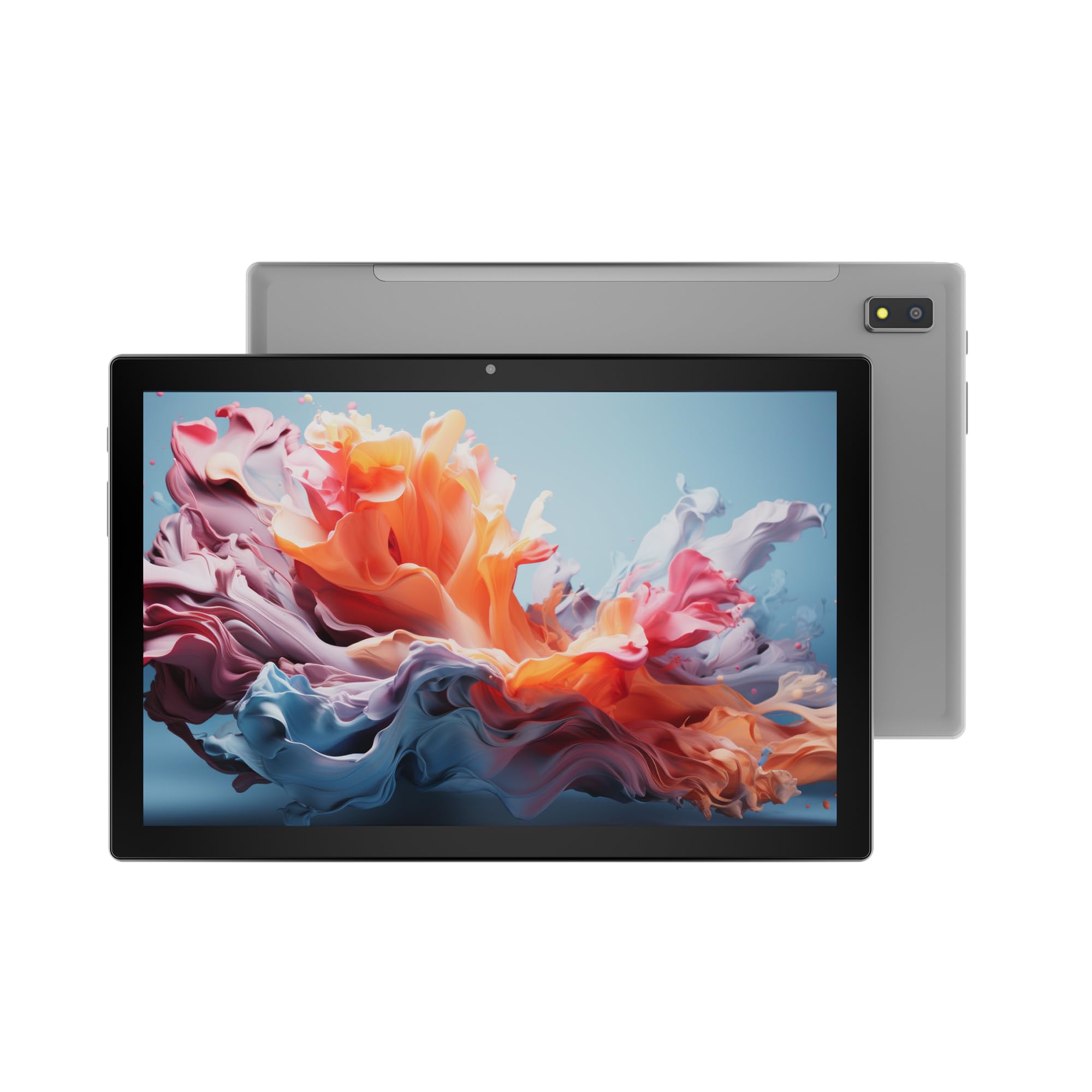
Rajah 1: Depan view of the DOMO Slate SLP9 OS12 T310 Tablet PC, showcasing the 10.1-inch IPS LCD display.

Rajah 2: bersudut view of the tablet, highlighting its slim profile dan skrin.

Rajah 3: sebelah view of the tablet, showing the placement of buttons and ports.

Rajah 4: belakang view of the tablet, displaying the camera module and branding.
Komponen Utama
- 10.1-inch IPS HD LCD Display: Skrin beresolusi tinggi untuk visual yang jelas.
- Kamera Depan: Located above the screen for video calls and selfies.
- Rear Camera with LED Flash: Untuk merakam foto dan video.
- Butang Kuasa: To turn the device on/off or put it to sleep.
- Butang Kelantangan: Untuk melaraskan tahap audio.
- Port USB Jenis-C: Untuk pengecasan dan pemindahan data.
- Dual SIM Slot: Supports 4G, 3G, and 2G SIM cards for cellular connectivity and voice calling.
- Slot Kad MicroSD: Untuk storan yang boleh dikembangkan sehingga 1TB.
- Dual Box Type Speakers: Untuk output audio.
Persediaan
1. Mengecas Tablet
Before first use, fully charge your tablet. Connect the provided Type-C USB cable to the tablet's Type-C port and the other end to the charging power adapter. Plug the adapter into a wall outlet. The battery indicator on the screen will show charging status.
2. Memasukkan Kad SIM dan MicroSD
- Cari dulang kad SIM/MicroSD di sisi tablet.
- Insert the provided SIM eject pin into the small hole next to the tray to open it.
- Carefully place your 4G/3G/2G SIM card(s) and/or MicroSD card into the designated slots on the tray. Ensure correct orientation as indicated on the tray.
- Tolak dulang kembali ke dalam tablet dengan lembut sehingga ia terpasang dengan klik di tempatnya.
3. Hidupkan dan Persediaan Awal
- Tekan dan tahan butang Butang Kuasa until the DOMO logo appears on the screen.
- Follow the on-screen prompts to select your language, connect to a Wi-Fi network, set up your Google account, and configure other initial settings.
- Once setup is complete, your tablet is ready for use.
Arahan Operasi
Navigasi Asas
- Sentuh: Ketik ikon untuk membuka apl atau memilih item.
- Sentuh dan Tahan: Press and hold an item to access contextual menus or move icons.
- Leret: Seret jari anda merentasi skrin untuk menatal halaman atau senarai.
- Cubit: Gunakan dua jari untuk zum masuk atau keluar pada foto dan web muka surat.
Menyambung ke Rangkaian
Sambungan Wi-Fi
- Pergi ke tetapan > Rangkaian & internet > Wi-Fi.
- Togol Wi-Fi On.
- Pilih rangkaian yang anda inginkan daripada senarai dan masukkan kata laluan jika digesa.
Berpasangan Bluetooth
- Pergi ke tetapan > Peranti yang disambungkan > Bluetooth.
- Togol Bluetooth On.
- Select the device you wish to pair with from the list of available devices. Confirm the pairing code if prompted.
Cellular Data and Voice Calling (4G)
With a valid SIM card inserted, your tablet supports 4G cellular data and voice calling (VoLTE). Ensure your SIM card is activated for these services.
- To enable/disable mobile data, go to tetapan > Rangkaian & internet > Rangkaian mudah alih.
- Untuk membuat panggilan, buka telefon app and dial the number.
Operasi Kamera
Buka Kamera aplikasi daripada skrin utama atau laci aplikasi anda.
- Ketik pada Pengatup butang untuk mengambil gambar.
- Ketik pada Video icon to switch to video recording mode.
- Gunakan Tukar Kamera icon to toggle between the front and rear cameras.
Fungsi GPS
The tablet has an inbuilt GPS chip and antenna. To use location services, ensure GPS is enabled in tetapan > Lokasi. You can then use navigation apps or other location-based services.
Penyelenggaraan
Membersihkan Peranti
- Gunakan kain lembut dan tidak berbulu untuk membersihkan skrin dan badan tablet.
- Elakkan menggunakan bahan kimia yang keras, pembersih yang melelas, atau semburan aerosol.
- Do not allow moisture to enter openings.
Penjagaan Bateri
- Elakkan suhu yang melampau, kerana ia boleh merendahkan hayat bateri.
- Gunakan hanya pengecas dan kabel yang disediakan.
- Jangan biarkan tablet mengecas untuk tempoh yang lama selepas ia dicas sepenuhnya.
Kemas Kini Perisian
Semak kemas kini sistem secara berkala untuk memastikan tablet anda mempunyai ciri dan penambahbaikan keselamatan terkini. Pergi ke tetapan > Sistem > Kemas kini sistem.
Menyelesaikan masalah
| Masalah | Penyelesaian yang Mungkin |
|---|---|
| Tablet tidak dihidupkan. | Ensure the battery is charged. Connect the charger and try again. If unresponsive, press and hold the power button for 10-15 seconds to force a restart. |
| Tidak dapat menyambung ke Wi-Fi. | Check if Wi-Fi is enabled in settings. Ensure the Wi-Fi password is correct. Restart your router and the tablet. |
| Kad SIM tidak dikesan. | Ensure the SIM card is correctly inserted into the tray. Restart the tablet. Check if the SIM card is active with your service provider. |
| Prestasi perlahan. | Close unused applications. Clear cache. Consider uninstalling unnecessary apps. Perform a factory reset as a last resort (backup data first). |
| Kamera tidak berfungsi. | Ensure the camera app has necessary permissions. Restart the tablet. |
Spesifikasi
| Ciri | Perincian |
|---|---|
| Jenama | DOMO |
| Nama Model | Slate SLP9 OS12 T310 |
| Paparan | 10.1-inch IPS HD LCD, 1920 x 1200 Pixels, 400 NITS Brightness, 2.5D Corning Glass Touch Screen |
| Pemproses | UNISOC Tiger T310 - 64-bit Quadcore @ 3.8Ghz |
| RAM | 4GB LPDDR4 |
| Storan Dalaman | 64GB |
| Storan Boleh Dikembangkan | Sehingga 1TB melalui kad MicroSD |
| Sistem Operasi | Android 12 |
| Kamera Belakang | 13MP with LED Flash |
| Kamera Depan | 5MP |
| Bateri | 5020 mAh rechargeable polymer battery |
| Ketersambungan | Dual SIM (4G VoLTE, 3G, 2G), DualBand Wi-Fi (2.4GHz & 5GHz), Bluetooth 5.0, GPS, FM Radio |
| Pelabuhan | Type-C USB Port, POGO Connector |
| Dimensions (L x W x Thickness) | 24.4L x 16.2L x 1Sentimeter |
| Berat badan | 505 Gram |
| Perumahan | logam |
| Negara Asal | India |
Waranti dan Sokongan
Maklumat Waranti
The DOMO Slate SLP9 OS12 T310 Tablet PC comes with a Waranti 1 tahun for the device and Waranti 3 bulan for accessories. The warranty type is Onsite, which includes free pickups and deliveries for service.
Pengecualian Waranti: Physical damages, water damages, moisture damages, seal tampering, and burnout cases are not covered under warranty.
Sokongan Pelanggan
For technical assistance, troubleshooting, or warranty claims, please contact DOMO customer support. Support options include an online knowledge base, support tickets, and phone support. Post-warranty services are available as paid onsite services.
Untuk maklumat lanjut, lawati pegawai DOMO Store on Amazon.
Ask a question about this manual
Ask about setup, troubleshooting, compatibility, parts, safety, or missing instructions. Manuals+ will review the question and use this page’s manual context to help answer it.