
MSP03
Smart Self-Cleaning Cat Litter Box User Manual
Model: MSP03
pengenalan
Thank you for choosing the Smart Self-Cleaning Cat Litter Box. This automatic litter box is designed to provide a hygienic and convenient solution for cat owners, eliminating the need for daily scooping. It features app control, advanced safety mechanisms, and compatibility with various clumping litter types. Please read this manual thoroughly before operation to ensure proper use and maintenance.
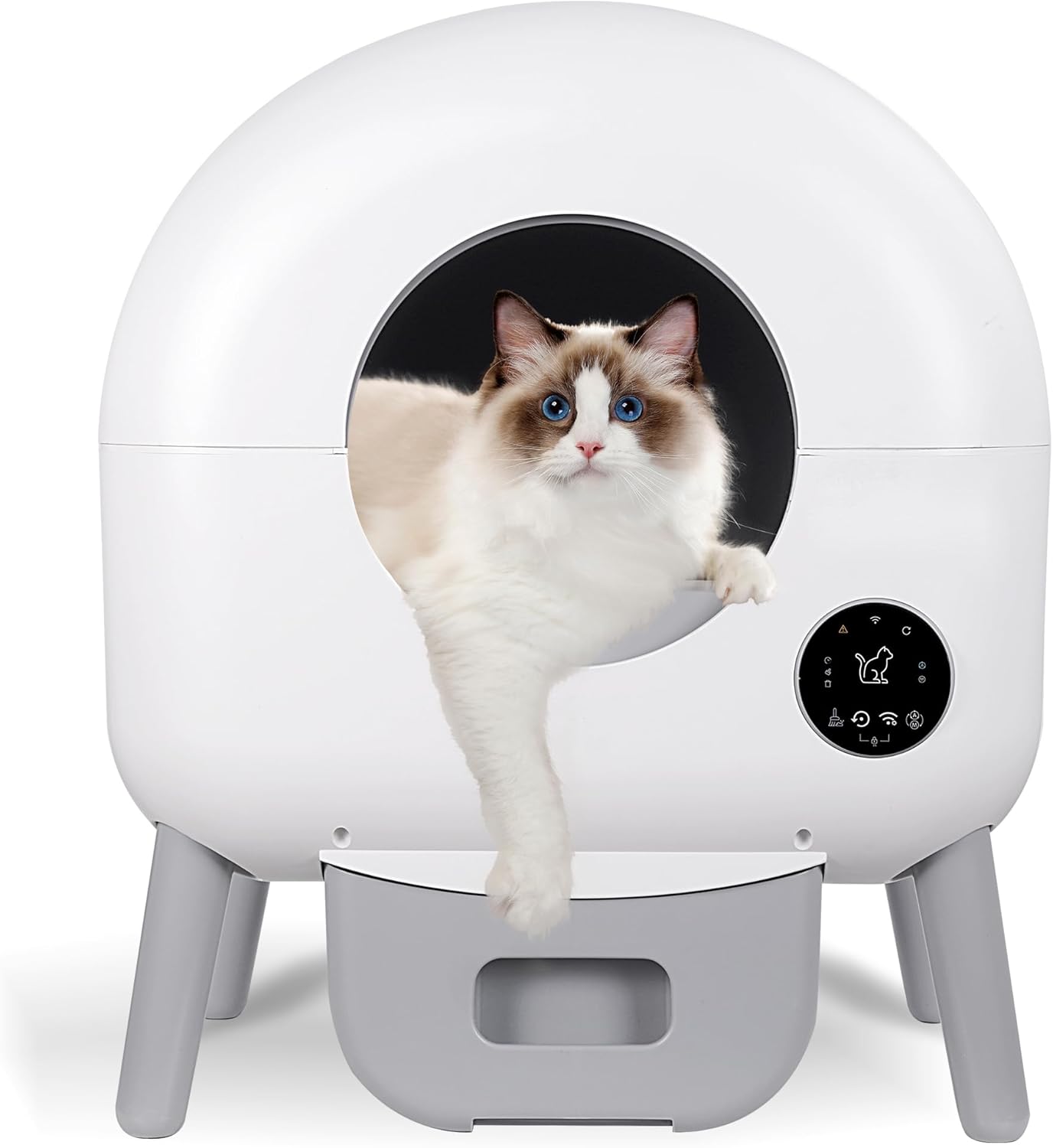
The Smart Self-Cleaning Cat Litter Box, designed for convenience and hygiene.
Maklumat Keselamatan
- Jangan benarkan kanak-kanak bermain atau mengendalikan kotak pasir.
- Pastikan kotak pasir diletakkan di atas permukaan yang stabil dan rata.
- Keep the power adapter and cord away from water and moisture.
- Jangan cuba membuka atau membaiki unit sendiri. Hubungi sokongan pelanggan untuk mendapatkan bantuan.
- The anti-pinch sensors are designed to stop operation if a cat is detected. Do not interfere with this mechanism.
- This device is suitable for cats weighing between 2.2 lbs (1 kg) and 23 lbs (10.4 kg).
- Use only clumping cat litter. Non-clumping litter or other materials may damage the unit.

Berakhirview of the safety protection features, including physical guards, weighing upgrades, and hardware guarding.
Kandungan Pakej
Sila semak kandungan pakej untuk memastikan semua item ada:
- Smart Automatic Cat Litter Box (Product Body) x 1
- Manual Arahan x 1
- Penyesuai Kuasa x 1
- Berus Pembersih x 1
- Diffuser Box x 1 (for odor control)
- Waste Bags x 10

All components included in the package for the Smart Self-Cleaning Cat Litter Box.
Panduan Persediaan
- Buka bungkus dan letakkan: Carefully remove all components from the packaging. Place the litter box on a firm, level surface in a suitable location, ensuring there is enough space around it for ventilation and access.
- Install Waste Bag: Open the waste drawer at the bottom of the unit. Place one of the included waste bags inside the drawer, ensuring it is properly seated and secured. Close the drawer.
- Tambah Sampah Kucing: Open the top lid of the litter box. Pour clumping cat litter into the main chamber. Ensure the litter level is between the MIN and MAX lines indicated inside the drum. Do not overfill.
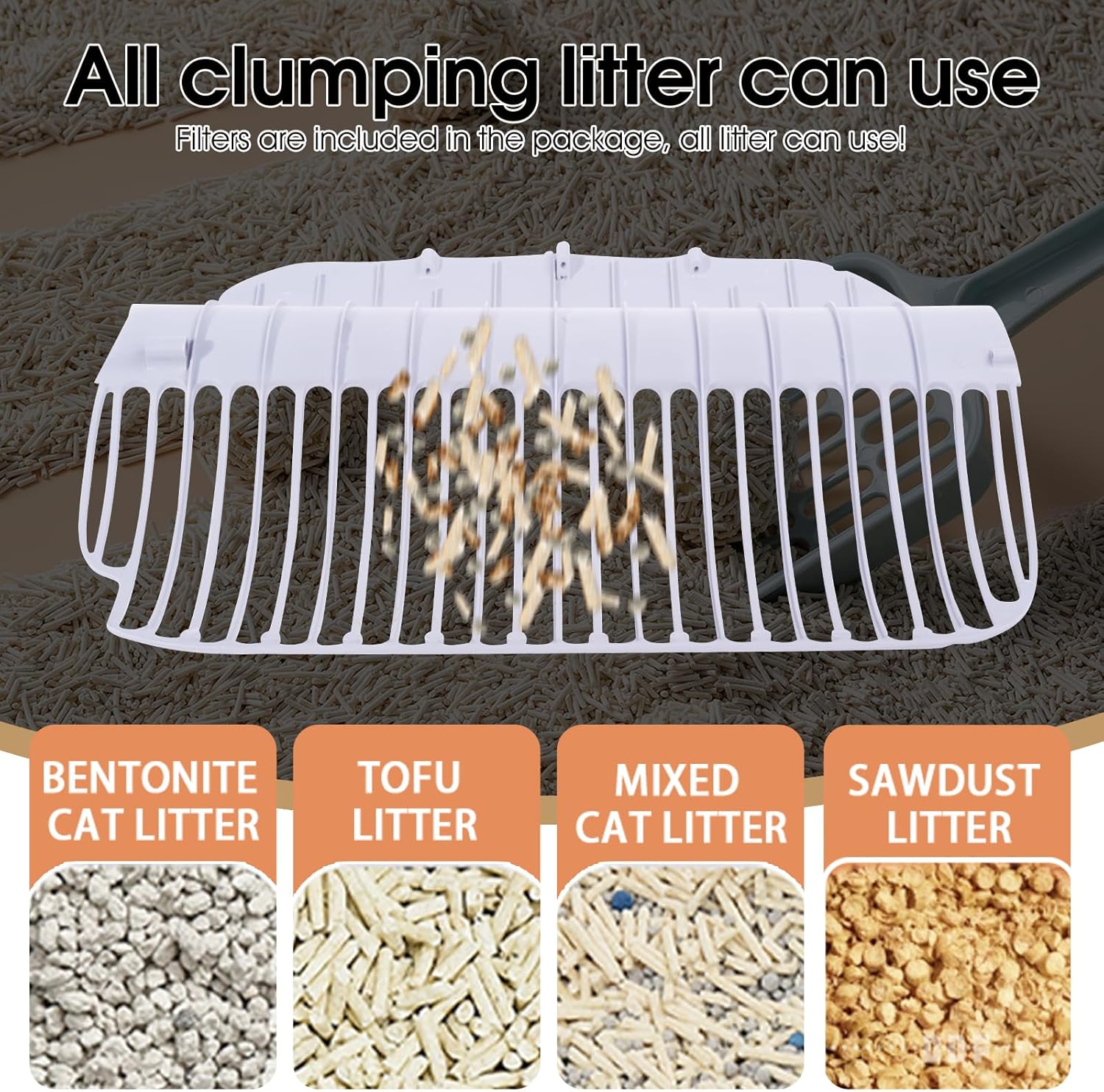
The litter box is compatible with various types of clumping cat litter, including bentonite, tofu, mixed, and sawdust litter.
- Sambungkan Kuasa: Plug the power adapter into the designated port on the back of the litter box, then plug the adapter into a standard electrical outlet. The unit will power on and perform an initial self-check.
- Sambungan Aplikasi (Pilihan tetapi Disyorkan):
- Download the companion app from your smartphone's app store (search for "Smart Pet Home" or refer to the QR code in the instruction manual).
- Create an account and follow the in-app instructions to connect your litter box to your home Wi-Fi network. This will enable remote control and monitoring features.
Arahan Operasi
Kitaran Pembersihan Automatik
The litter box is designed to automatically clean itself after your cat exits the unit. The sensors detect your cat's presence and departure, initiating a cleaning cycle after a preset delay (default is typically 3-5 minutes to allow clumping).
- Once the cycle begins, the internal drum will rotate, sifting clean litter and depositing waste into the sealed waste drawer below.
- The drum will then return to its original position, ready for the next use.
Pembersihan Manual
You can initiate a cleaning cycle manually using the control panel on the unit or through the mobile app.
- On Unit: Press the "Clean" button on the control panel.
- Melalui Apl: Open the app, select your device, and tap the "Clean" or "Start Cycle" option.
App Control and Monitoring
The mobile app provides comprehensive control and monitoring features:
- Pembersihan Jauh: Start a cleaning cycle from anywhere.
- Usage History: Track your cat's litter box usage, including frequency and duration.
- Waste Drawer Full Alerts: Receive notifications when the waste drawer needs to be emptied.
- Pemantauan Kesihatan: Some models may track cat weight and usage patterns, providing insights into your cat's health.
- tetapan: Adjust delay times for cleaning cycles, odor control settings, and more.

The mobile application allows for intelligent monitoring and recording of cat health data, including weight.

Remote control and monitoring of the litter box are possible via the dedicated application when away from home.
Pembuangan Sisa
When the waste drawer is full (indicated by an app notification or indicator light on the unit), carefully pull out the drawer, seal the waste bag, and dispose of it according to local regulations. Replace with a new waste bag.

The litter box can operate for up to 15 days without manual cleaning, providing convenience for travel.
Penyelenggaraan
Pembersihan Berkala
- Laci Sisa: Empty and replace the waste bag regularly (as needed, or when full). Clean the drawer with a mild detergent and water if necessary.
- Luaran: Lap bahagian luar unit dengan iklanamp kain. Jangan gunakan pembersih yang kasar.
Deep Cleaning (Monthly/Bi-Monthly)
- Cabut palam unit before performing any deep cleaning.
- Remove Litter: Empty all cat litter from the main chamber.
- Clean Drum: The internal drum can be removed for thorough cleaning. Wash with mild soap and water, rinse thoroughly, and allow to air dry completely before reassembling.
- Penderia: Gently wipe the infrared sensors (located near the entrance) with a soft, dry cloth to ensure they remain clear of dust or debris.
Menyelesaikan masalah
| Masalah | Kemungkinan Punca | Penyelesaian |
|---|---|---|
| Unit tidak dapat dihidupkan. | Penyesuai kuasa tidak disambungkan; masalah soket kuasa. | Ensure power adapter is securely plugged into the unit and a working outlet. |
| Cleaning cycle not starting automatically. | Sensors obstructed; cat still inside; litter level too high/low. | Clean sensors; ensure cat has exited; adjust litter level. |
| Apl tidak boleh bersambung ke unit. | Incorrect Wi-Fi password; unit too far from router; Wi-Fi signal weak. | Sahkan kata laluan Wi-Fi; alihkan unit lebih dekat ke penghala; mulakan semula penghala dan unit. |
| Odor issues. | Waste drawer full; diffuser box needs refill; poor ventilation. | Empty waste drawer; check/refill diffuser; ensure good air circulation. |
| Litter tracking outside the box. | Cat tracking litter; litter type. | Consider a litter mat; try a different clumping litter type with less dust. |
Spesifikasi
- model: MSP03
- Dimensi (LxWxH): 21.65" x 19.69" x 26.18" (55 x 50 x 66.5 cm)
- Bahan: Akrilonitril Butadiena Stirena (ABS)
- kapasiti: 100L (internal volume)
- Kapasiti Tong Sampah: Lebih kurang 13L
- Suitable Cat Weight: 2.2 lbs - 23 lbs (1 kg - 10.4 kg)
- Tahap Bunyi: <45dB
- Input Kuasa: DC 12V
- Ketersambungan: Wi-Fi (2.4GHz)

Detailed dimensions of the Smart Self-Cleaning Cat Litter Box.
Ask a question about this manual
Ask about setup, troubleshooting, compatibility, parts, safety, or missing instructions. Manuals+ will review the question and use this page’s manual context to help answer it.