
1. Produk Lebihview
The Bagotte A21 Robot Vacuum and Mop Combo is a versatile cleaning device designed for efficient floor maintenance. It features 4-in-1 functionality: sweeping, rolling, vacuuming, and mopping. With a powerful 5000Pa suction, it effectively removes debris, pet hair, and dust from various floor types, including hard floors and low-pile carpets. The device is equipped with smart obstacle avoidance and anti-drop sensors for safe navigation.
Ciri-ciri utama termasuk:
- No Roller Brush Design: Prevents pet hair entanglement, ideal for pet owners.
- 5000Pa Super Suction: Powerful cleaning for dust and debris.
- Pengelakan Halangan Pintar: Navigates around furniture and avoids stairs.
- App Control & Scheduling: Customize cleaning plans and modes via a smartphone application.
- Reka bentuk ultra-nipis: 2.87 inches height allows access under low furniture.
- Pengecasan Automatik: Returns to the charging station when battery is low.

Figure 1: The Bagotte A21 Robot Vacuum and Mop Combo demonstrating its 4-in-1 cleaning capabilities, highlighting the 300ml dust box, 280ml water tank, 3 water levels, and 5000Pa suction power.
2. Apa yang ada di dalam Kotak
Carefully unpack the box and ensure all components are present and in good condition. If any items are missing or damaged, please contact customer support.
- 1x Robotic Vacuum Cleaner
- 1x Electric Control Water Tank
- 1x Stesen Pengecasan
- 1x Penyesuai Kuasa
- 2x Berus Sisi
- 2x Mop Cloths
- 1x Mopping Cloth Holder
- Pengawal Jauh 1x
- 1x Manual Pengguna
- 1x Filter (pre-installed or spare)

Figure 2: All included components of the Bagotte A21 package, clearly labeled for identification.
3. Panduan Persediaan
3.1 Penempatan Stesen Pengecasan
Place the charging station against a wall in an open, uncluttered area. Ensure there is at least 0.5 meters (1.6 feet) of clear space on both sides and 1.5 meters (4.9 feet) in front of the charging station. Connect the power adapter to the charging station and plug it into a wall outlet. Ensure the indicator light on the charging station illuminates.
3.2 Caj Permulaan
Place the robot vacuum onto the charging station, ensuring the charging contacts on the robot align with those on the station. The robot will begin charging automatically. For first-time use, fully charge the robot for at least 6 hours.
3.3 Memasang Berus Sisi
Press the side brushes onto the posts at the bottom of the robot until they click into place. Ensure the left (L) and right (R) brushes are installed on the correct posts.
3.4 App Connection (Wi-Fi)
- Download the Bagotte app from your smartphone's app store (iOS or Android).
- Daftar akaun dan log masuk.
- Ensure your phone is connected to a 2.4GHz Wi-Fi network. The robot does not support 5GHz Wi-Fi.
- Follow the in-app instructions to add your device. This typically involves pressing and holding a button on the robot to enter pairing mode.
- Once connected, you can control the robot, set schedules, and monitor its status via the app.
4. Arahan Operasi
4.1 Memulakan/Menjeda Pembersihan
Press the power button on the robot or the "Start/Pause" button on the remote control/app to begin or pause a cleaning cycle. The robot will automatically select a cleaning mode or follow the last selected mode.
4.2 Mod Pembersihan
The Bagotte A21 offers multiple cleaning modes to suit different needs:
- Pembersihan Automatik: The robot cleans systematically, adjusting its path based on the environment.
- Pembersihan Tempat: Concentrates cleaning on a specific area, moving in a spiral pattern.
- Pembersihan Tepi: Membersihkan sepanjang dinding dan tepi perabot.
- Pembersihan Zig-Zag: Cleans in a back-and-forth pattern for thorough coverage.
- Tetapan Jadual: Program specific cleaning times and modes via the app.
- Isi semula automatik: The robot returns to the charging station when the battery is low or cleaning is complete.

Figure 3: Visual representation of the six available cleaning modes for the Bagotte A21.
4.3 Fungsi Mop
Untuk menggunakan fungsi mengemop:
- Fill the electric control water tank with clean water. Do not use cleaning solutions that are not approved for robot vacuums.
- Attach a clean mop cloth to the mopping cloth holder and then attach the holder to the water tank.
- Insert the filled water tank assembly into the robot.
- Select a mopping mode via the app or remote control. The robot will vacuum and mop simultaneously.
4.4 Kawalan Apl
The Bagotte app provides comprehensive control over your robot vacuum:
- Mod: Select specific cleaning modes (Auto, Spot, Edge).
- Jadual: Tetapkan jadual pembersihan harian atau mingguan.
- Pelarasan sedutan: Adjust suction power levels (e.g., Quiet, Standard, Strong, Max).
- Paparan Bateri: Monitor the robot's current battery level.
- Kawalan manual: Use directional controls to steer the robot.

Figure 4: The Bagotte app interface for controlling the robot vacuum's functions.
5. Penyelenggaraan
Regular maintenance ensures optimal performance and extends the lifespan of your robot vacuum. Always turn off the robot and disconnect it from the charging station before performing any maintenance.
5.1 Emptying the Dust Box
The dust box should be emptied after each cleaning cycle or when full. Press the release button to remove the dust box, open its lid, and discard the collected debris. Clean the filter inside the dust box as described below.
5.2 Membersihkan Penapis
The HEPA filter and sponge filter should be cleaned regularly (weekly for light use, more frequently for heavy use or pets). Tap the filter gently to remove dust. Do not wash the HEPA filter with water; the sponge filter can be rinsed and air-dried completely before reinstallation.
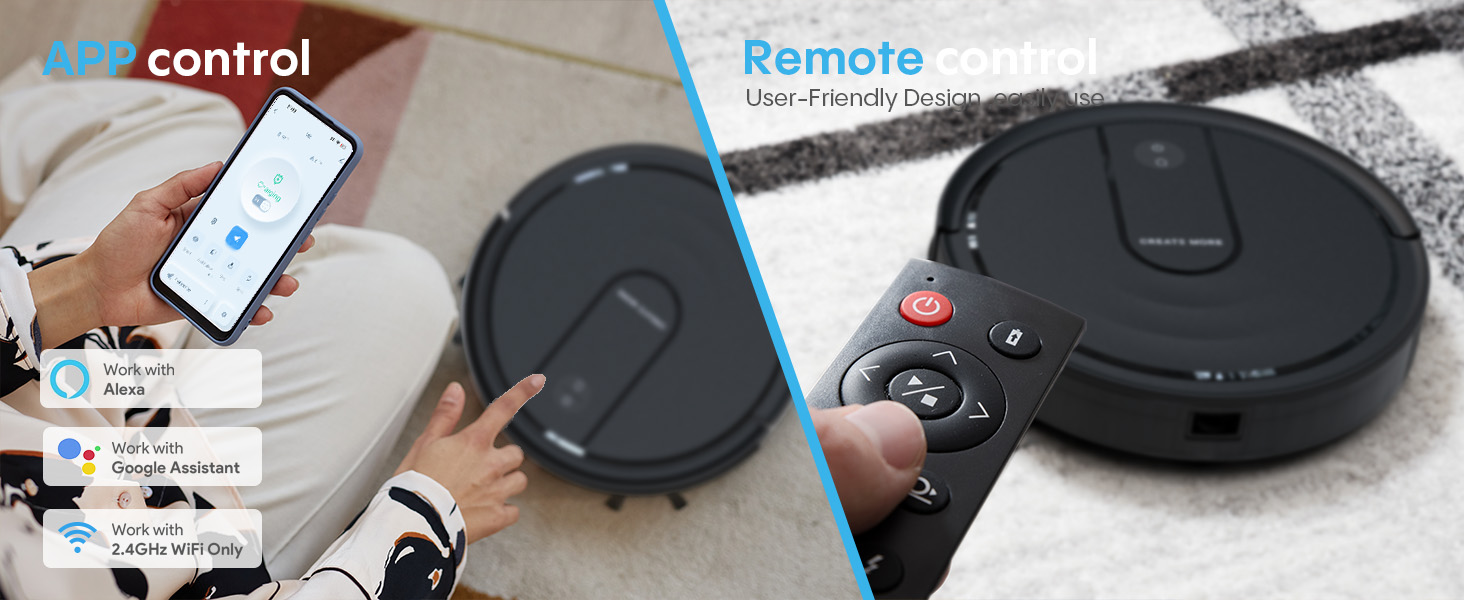
Figure 5: Illustration of the robot's filtration system and the electric control water tank assembly.
5.3 Cleaning the Water Tank and Mop Cloth
After each mopping session, empty any remaining water from the water tank. Rinse the tank thoroughly. Remove the mop cloth, wash it with water, and allow it to air dry completely before storing or reusing. Replace mop cloths when they show signs of wear.
5.4 Membersihkan Berus Sisi
Periodically check the side brushes for tangled hair or debris. Use a small brush or your fingers to remove any obstructions. If brushes are damaged or worn, replace them with new ones.
5.5 Membersihkan Penderia dan Mengecas Kenalan
Wipe the anti-drop sensors, bumper sensors, and charging contacts on both the robot and the charging station with a clean, dry cloth. This ensures proper navigation and charging.
6. Penyelesaian masalah
If you encounter issues with your Bagotte A21, refer to the following common problems and solutions:
| Masalah | Kemungkinan Punca | Penyelesaian |
|---|---|---|
| Robot tidak boleh dihidupkan atau dicas. | Battery is completely drained; charging contacts are dirty; power adapter is not connected. | Ensure the power adapter is securely plugged in. Clean the charging contacts on both the robot and the charging station with a dry cloth. Place the robot directly on the charging station. |
| Robot kerap tersangkut. | Obstacles in the cleaning path; sensors are dirty; robot is on a dark-colored surface that triggers anti-drop sensors. | Clear the cleaning area of cables, small objects, and thick rugs. Clean all sensors. If on dark carpet, consider using boundary strips (if applicable) or manual cleaning. |
| Prestasi pembersihan yang lemah. | Dust box is full; filter is clogged; side brushes are worn or tangled. | Empty the dust box. Clean or replace the filter. Clean or replace side brushes. |
| Robot tidak boleh menyambung ke Wi-Fi/Apl. | Incorrect Wi-Fi password; 5GHz Wi-Fi network; robot is too far from router; app pairing mode not activated. | Ensure you are connecting to a 2.4GHz Wi-Fi network. Verify the Wi-Fi password. Move the robot closer to the router. Follow app instructions to re-enter pairing mode. |
| Fungsi mengemop tidak berfungsi. | Water tank is empty; water outlet is clogged; mop cloth is not properly attached. | Fill the water tank. Check for blockages in the water outlet and clean if necessary. Ensure the mop cloth and holder are correctly installed. |
7. Spesifikasi
| Ciri | Perincian |
|---|---|
| Jenama | Bagotte |
| Nama Model | A21 |
| Ciri Khas | Advanced Custom Cleaning |
| warna | Hitam |
| Dimensi Produk | 12.61"L x 12.61"W x 2.88"H |
| Komponen yang Disertakan | Filter, Robotic Vacuum Cleaner, Electric Control Water Tank, Charging Station, Power Adapter, Side Brushes x 2, MOP x 2, Mopping Cloth Holder, Remote Controller, User Manual |
| Jenis Penapis | HEPA |
| Hayat Bateri | Sehingga 120 minit |
| Sumber Kuasa | Dikuasakan Bateri |
| Kaedah Kawalan | Apl, Kawalan Jauh |
| Faktor Bentuk | Bulat |
| Berat Barang | 7.76 paun |
| Syor Permukaan | Hard Floors, Low-Pile Carpet |
8. Waranti dan Sokongan
The Bagotte A21 Robot Vacuum and Mop Combo comes with a Waranti 2 tahun. For technical support, warranty claims, or any questions regarding your product, please contact Bagotte customer service. Refer to the contact information provided in the included User Manual or visit the official Bagotte webtapak.
Sila simpan bukti pembelian anda untuk tujuan waranti.