
pengenalan
Welcome to your Angrox Universal Replacement Remote Control. This manual provides detailed instructions for setting up and operating your new remote, designed for seamless compatibility with various Philips Smart 4K UHD Android TVs. Please read this manual thoroughly to ensure optimal performance and longevity of your remote control.
1. Persediaan
1.1 Pemasangan Bateri
The remote control requires two AAA alkaline batteries (not included).
- Cari penutup petak bateri di belakang alat kawalan jauh.
- Press down on the tab and slide the cover downwards to open.
- Masukkan dua bateri AAA, pastikan terminal positif (+) dan negatif (-) sejajar dengan tanda di dalam petak.
- Luncurkan penutup bateri ke tempat semula sehingga ia berbunyi dengan selamat.
1.2 Sambungan Awal
This Angrox replacement remote control is designed for immediate use with compatible Philips Smart TVs. No programming or pairing is required. Simply insert the batteries, and the remote is ready to operate your television.
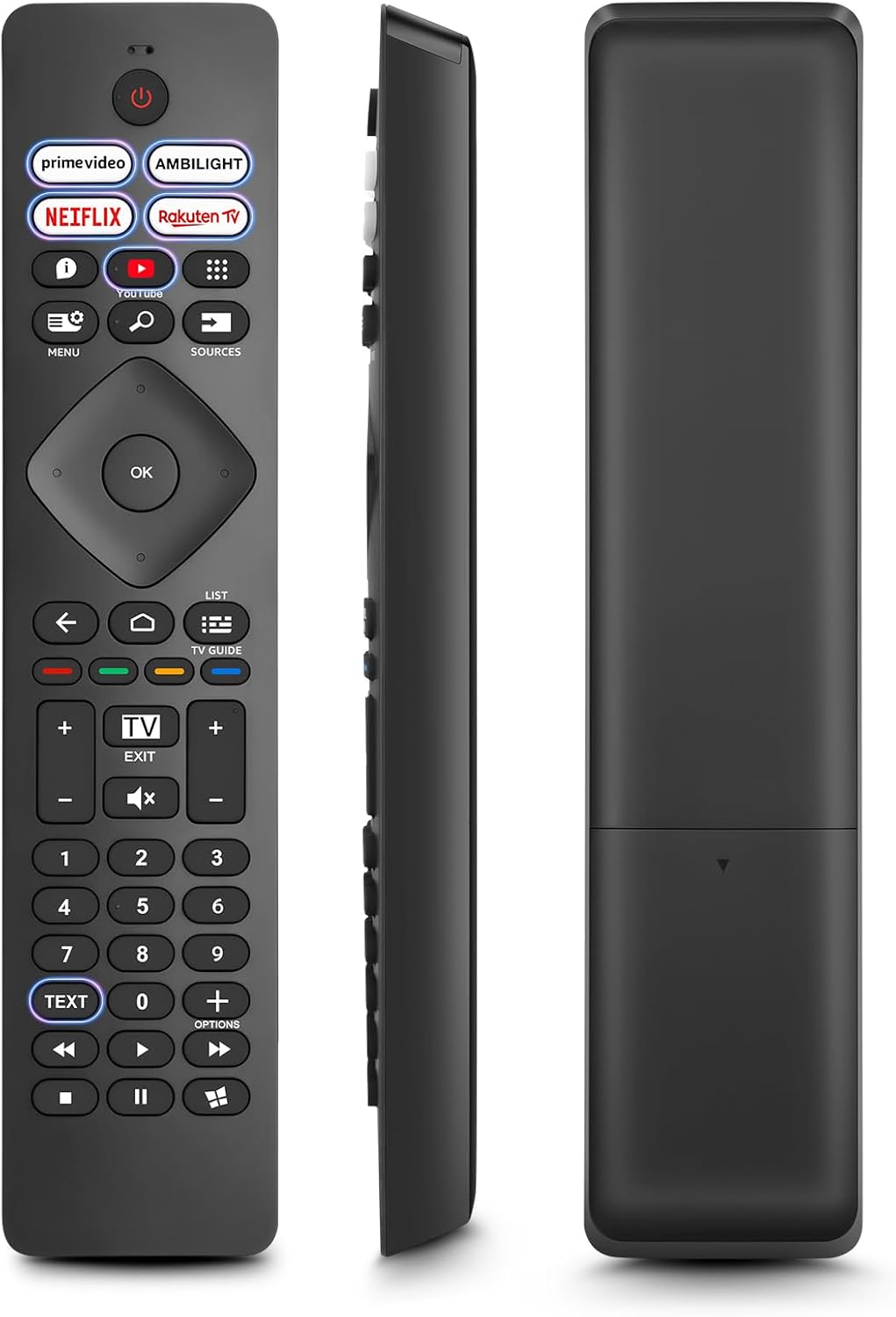
Imej: Depan, sisi, dan belakang views of the Angrox Universal Replacement Remote Control. This image illustrates the physical design and battery compartment location.
2. Arahan Operasi
2.1 Butang Berfungsi Berakhirview
Familiarize yourself with the remote control's buttons and their primary functions.
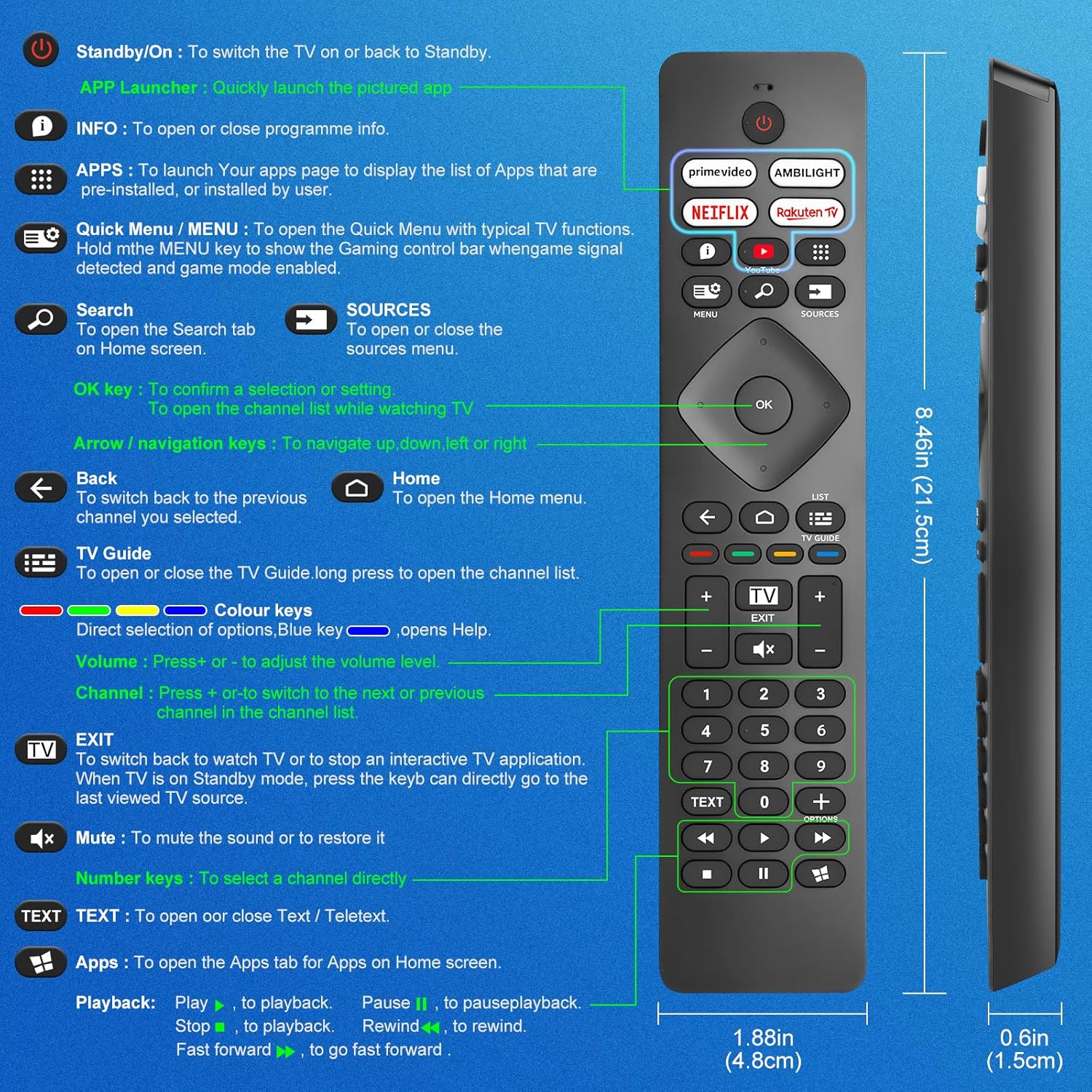
Image: A detailed diagram illustrating each button on the Angrox remote control and its corresponding function.
Detailed Button Descriptions:
- Standby/On (Power Button): Untuk menghidupkan atau kembalikan TV ke Standby.
- APP Launcher: Quickly launch the pictured app.
- MAKLUMAT: To open or close programme info.
- APLIKASI: To launch your apps page to display the list of apps that are pre-installed or installed by the user.
- Quick Menu / MENU: To open the Quick Menu with typical TV functions. Hold the MENU key to show the Gaming control bar when game signal detected and game mode enabled.
- Cari: To open the Search tab on Home screen.
- SUMBER: To open or close the sources menu.
- kunci OK: To confirm a selection or setting. To open the channel list while watching TV.
- Arrow/Navigation keys: Untuk menavigasi ke atas, bawah, kiri atau kanan.
- Belakang: Untuk beralih kembali ke saluran sebelumnya yang anda pilih.
- Rumah: To open the Home menu.
- Panduan TV: To open or close the TV Guide. Long press to open the channel list.
- Colour keys (Red, Green, Yellow, Blue): Direct selection of options. Blue key opens Help.
- Jilid +/-: Untuk melaraskan tahap kelantangan.
- Saluran +/-: Untuk beralih ke saluran seterusnya atau sebelumnya dalam senarai saluran.
- KELUAR: To switch back to watch TV or to stop an interactive TV application. When TV is on Standby mode, press the key to directly go to the last viewed TV source.
- Redam: Untuk meredam bunyi atau memulihkannya.
- Kekunci Nombor (0-9): Untuk memilih saluran secara langsung.
- TEKS: To open or close Text / Teletext.
- Apps (Netflix, Prime Video, Rakuten TV, YouTube): Quick access to dedicated streaming applications.
- Kawalan Main Semula (Main, Jeda, Henti, Undur, Maju Pantas): Untuk main balik media.
2.2 Butang Pintasan
The remote features dedicated shortcut buttons for popular streaming services and Ambilight control.

Image: The Angrox remote control with highlighted shortcut buttons for Prime Video, Ambilight, Netflix, Rakuten TV, and YouTube.
- Video Perdana: Direct access to Amazon Prime Video.
- Ambilight: Control Philips Ambilight features.
- Netflix: Direct access to Netflix.
- Rakuten TV: Direct access to Rakuten TV.
- YouTube: Direct access to YouTube.
3. Keserasian
This Angrox replacement remote control is universally compatible with a wide range of Philips Smart TVs, including:

Image: Visual representation of the Angrox remote's compatibility with Philips 4K Ambilight TV, 4K Ultra HD TV, LED 4K TV, and OLED 4K TV.
- TV Ambilight 4K
- TV Ultra HD 4K
- TV LED 4K
- TV OLED 4K
It is designed to function with all Philips Smart TV models that utilize an infrared remote control.
4. Ciri Prestasi

Image: Graphics indicating a 0.2-second fast response and a 10-meter transmitting distance for the remote control.
- Respon Pantas: Enjoy a quick response time of approximately 0.2 seconds for button presses.
- Jarak Penghantaran: Effective operating range up to 10 meters (approximately 33 feet).
5. Penyelenggaraan
- Pembersihan: Use a soft, dry cloth to clean the remote control. Avoid using liquid cleaners or abrasive materials.
- Penjagaan Bateri: If the remote will not be used for an extended period, remove the batteries to prevent leakage and potential damage. Replace batteries when the remote's response becomes sluggish or inconsistent.
- Storan: Simpan alat kawalan jauh di tempat yang sejuk dan kering jauh dari cahaya matahari langsung dan suhu yang melampau.
6. Penyelesaian masalah
6.1 Alat Jauh Tidak Menjawab
- Semak Bateri: Ensure batteries are inserted correctly with the correct polarity (+/-). Replace old or depleted batteries with new AAA alkaline batteries.
- Garis penglihatan: Make sure there is a clear line of sight between the remote control and the TV's infrared sensor. Obstructions can block the signal.
- Sensor Jauh: Ensure the TV's infrared sensor is not blocked or dirty.
6.2 Fungsi Terhad
- While this remote is broadly compatible, some specific advanced functions unique to certain original Philips remote models might not be replicated. Verify the button functions against the provided diagram.
6.3 Ambilight Functionality
Sebilangan pengguna semulaviews indicate that Ambilight functionality might vary. If your Ambilight button does not work as expected, ensure your TV's Ambilight feature is enabled and configured correctly in your TV settings.
7. Spesifikasi
| Ciri | Perincian |
|---|---|
| Jenama | Angrox |
| Model | pour Philips TV |
| Peranti Serasi | Philips Smart TV (4K Ambilight, 4K UHD, LED 4K, OLED 4K) |
| Ciri Khas | Sejagat |
| Jenis Penyambung | Inframerah |
| Jenis Bateri | 2 x AAA Alkali (tidak termasuk) |
| Dimensi Item | 22.7 x 6.2 x 2.4 cm |
| Berat Barang | 60 g |
| warna | Hitam |
Nota: Spesifikasi tertakluk kepada perubahan tanpa notis terlebih dahulu.
8. Waranti dan Sokongan
For product support or warranty inquiries, please contact your retailer or the manufacturer, Angrox, directly. Please refer to your purchase documentation for specific warranty terms and contact information.
Pengeluar: Angrox
ASIN: B0F83X2FQG