1. Pengenalan
This manual provides essential information for the proper installation, operation, and maintenance of your Generic 25-foot High-Speed HDMI Cable with Ethernet. This cable is designed to deliver high-quality digital video and audio signals between compatible devices, supporting advanced features such as Ethernet data connectivity, Audio Return Channel (ARC), and 3D content.
2. Ciri-ciri
- Pemindahan Data Berkelajuan Tinggi: Supports high bandwidth for resolutions up to 4K and beyond.
- Ethernet Data Connectivity: Allows for internet connection sharing among compatible devices without a separate Ethernet cable.
- Saluran Pulangan Audio (ARC): Enables a TV to send audio data upstream to an A/V receiver or surround sound system, reducing the need for a separate audio cable.
- Sokongan 3D: Serasi dengan format video 3D.
- Pembinaan Berkualiti Tinggi: Produced with high-grade materials for reliable performance and durability.
3. Produk Lebihview
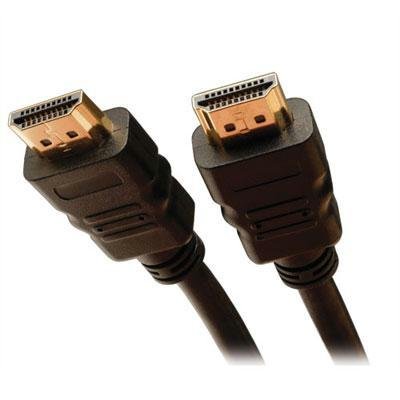
The image above displays the Generic 25-foot High-Speed HDMI Cable with Ethernet. It features standard HDMI Type A connectors on both ends, designed for secure and reliable connections. The cable is constructed to support the latest HDMI specifications, ensuring optimal signal integrity over its 25-foot length.
4. Arahan Persediaan
Follow these steps to connect your HDMI cable:
- Kenal pasti Pelabuhan: Locate the HDMI output port on your source device (e.g., Blu-ray player, game console, computer) and the HDMI input port on your display device (e.g., TV, monitor, projector).
- Sambungkan Sumber: Gently insert one end of the HDMI cable into the HDMI output port of your source device. Ensure it is fully seated.
- Paparan Sambungkan: Gently insert the other end of the HDMI cable into the HDMI input port of your display device. Ensure it is fully seated.
- Hidupkan Peranti: Hidupkan kedua-dua peranti sumber anda dan peranti paparan anda.
- Pilih Input: On your display device, use the remote control or on-screen menu to select the correct HDMI input source (e.g., HDMI 1, HDMI 2) that corresponds to the port you used.
Nota: For optimal performance, ensure both devices are powered off before connecting or disconnecting the cable.
5. Arahan Operasi
Once the HDMI cable is correctly connected and the input source is selected on your display device, the cable operates automatically. It will transmit digital video and audio signals from your source device to your display. If your devices support HDMI Ethernet Channel (HEC) and Audio Return Channel (ARC), these features will also function automatically when enabled on your devices.
- Video: The cable supports various video resolutions, including 1080p, 4K, and 3D content, depending on the capabilities of your connected devices.
- Audio: High-quality digital audio, including multi-channel surround sound, will be transmitted.
- Ethernet: If both connected devices support HEC, they can share an internet connection without additional Ethernet cables.
6. Penyelenggaraan dan Penjagaan
Untuk memastikan ketahanan dan prestasi optimum kabel HDMI anda, ikuti garis panduan penyelenggaraan ini:
- Tangani dengan Berhati-hati: Elakkan membengkokkan kabel secara mendadak atau memberi tekanan berlebihan pada penyambung.
- Jaga kebersihan: Gunakan kain lembut dan kering untuk mengelap kabel dan penyambung dengan lembut jika ia menjadi berdebu. Jangan gunakan pembersih cecair terus pada penyambung.
- Storan yang Betul: When not in use, coil the cable loosely. Avoid tight coiling or kinking, which can damage internal wires.
- Elakkan Keadaan Melampau: Jangan dedahkan kabel kepada suhu yang melampau, cahaya matahari langsung untuk tempoh yang lama atau kelembapan berlebihan.
7. Penyelesaian masalah
If you encounter issues with your HDMI cable, consider the following troubleshooting steps:
- Tiada Gambar/Bunyi:
- Pastikan kabel disambungkan dengan selamat ke kedua-dua peranti.
- Sahkan bahawa input HDMI yang betul dipilih pada peranti paparan anda.
- Cuba sambungkan kabel ke port HDMI lain pada peranti paparan anda.
- Test the cable with another HDMI-compatible device to rule out issues with the source or display.
- Mulakan semula kedua-dua peranti sumber dan paparan.
- Poor Picture Quality (Flickering, Static):
- Periksa sebarang kerosakan fizikal pada kabel atau penyambung.
- Ensure the cable is not running near sources of strong electromagnetic interference.
- Kurangkan resolusi atau kadar penyegaran pada peranti sumber anda untuk melihat sama ada masalah berterusan.
- No Ethernet/ARC Functionality:
- Confirm that both connected devices support HDMI Ethernet Channel (HEC) and Audio Return Channel (ARC) and that these features are enabled in their settings.
- Consult the user manuals of your source and display devices for specific instructions on enabling these features.
8. Spesifikasi Teknikal
| Spesifikasi | Perincian |
|---|---|
| ASIN | B0F8172RB8 |
| Pengeluar | 212 Utama |
| Tarikh Mula-mula Tersedia | 8 November 2023 |
9. Waranti dan Sokongan
For information regarding warranty coverage or technical support for your Generic 25-foot High-Speed HDMI Cable with Ethernet, please refer to the documentation provided at the point of purchase or contact the retailer directly. Specific warranty terms and support procedures may vary.


