
pengenalan
This manual provides essential information for the safe and efficient operation of your ProCaster LE-32A552H 32" HD Ready LED-TV. Please read these instructions thoroughly before using the television and retain them for future reference. This television features Android TV 11, HDR10 support, built-in Chromecast, Bluetooth connectivity, and supports both 12V and 230V power sources.
Maklumat Keselamatan
Sentiasa ikuti langkah berjaga-jaga keselamatan asas apabila menggunakan televisyen ini untuk mengurangkan risiko kebakaran, renjatan elektrik dan kecederaan.
- Jangan dedahkan TV kepada hujan atau lembapan.
- Jangan buka TV casing; merujuk semua perkhidmatan kepada kakitangan yang berkelayakan.
- Pastikan pengudaraan yang betul di sekeliling TV.
- Use only the power adapter supplied with the TV or a compatible 12V/230V power source.
- Jauhkan TV daripada cahaya matahari langsung dan sumber haba.
Kandungan Pakej
Sahkan bahawa semua item terdapat dalam pakej:
- ProCaster LE-32A552H 32" HD Ready LED-TV
- Alat Kawalan Jauh
- Penyesuai Kuasa (230V)
- 12V Power Cable (for mobile use)
- Penyangga TV (2 keping) dan Skru
- Manual Pengguna (dokumen ini)
- Panduan Mula Pantas
Persediaan
1. Membongkar
Carefully remove the TV and all accessories from the packaging. Retain the packaging for future transport or storage.
2. Pemasangan Stand
Jika anda tidak memasang TV di dinding, pasangkan dirian seperti berikut:
- Letakkan TV menghadap ke bawah pada permukaan yang lembut dan bersih untuk mengelakkan kerosakan skrin.
- Jajarkan setiap bahagian dirian dengan slot yang sepadan di bahagian bawah TV.
- Pasangkan setiap bahagian penyangga dengan skru yang disediakan. Pastikan ia diketatkan dengan kuat.
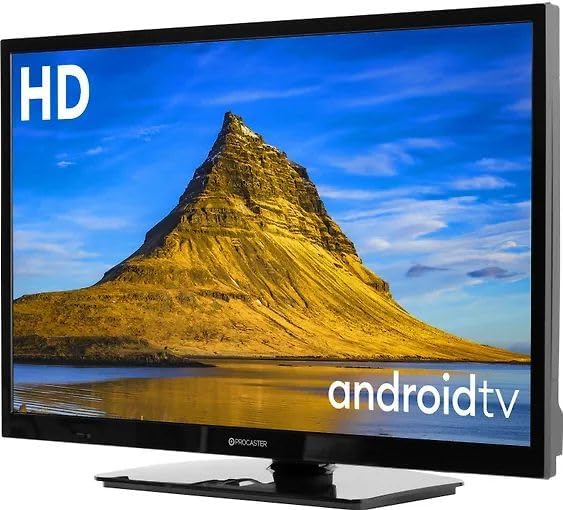
Image: The ProCaster LE-32A552H television with its stand attached, ready for placement.
3. Pemasangan Dinding (Pilihan)
This TV is VESA compatible. For wall mounting, use a compatible VESA mount (not included) and follow the instructions provided with the wall mount. Ensure the wall can support the weight of the TV and mount.
4. Kuasa Penyambung
Your TV supports both 230V AC (standard household) and 12V DC (e.g., for caravans or boats) power sources.
- For 230V AC: Connect the supplied power adapter to the TV's power input, then plug the adapter into a wall outlet.
- For 12V DC: Connect the supplied 12V power cable to the TV's 12V input and to a compatible 12V DC power source.
5. Menyambung Peranti Luaran
Connect your external devices such as set-top boxes, game consoles, or USB drives to the appropriate ports on the TV.
- HDMI: Untuk audio dan video definisi tinggi.
- USB: For media playback from USB drives or connecting USB accessories.
- Ethernet (LAN): Untuk sambungan internet berwayar.
Beroperasi
1. Alat Kawalan Jauh
Insert two AAA batteries (not included) into the remote control. Ensure correct polarity.

Image: The remote control for the ProCaster LE-32A552H television, showing its layout and buttons.
2. Hidupkan/Mati Kuasa
Tekan ke kuasa button on the remote control or on the TV to turn the TV on or off.
3. First Time Setup (Android TV)
Sebaik sahaja dihidupkan buat kali pertama, TV akan membimbing anda melalui proses persediaan awal:
- Pemilihan Bahasa: Pilih bahasa pilihan anda.
- Sambungan Rangkaian: Sambungkan ke rangkaian Wi-Fi anda atau gunakan sambungan Ethernet berwayar.
- Log Masuk Akaun Google: Sign in with your Google account to access Android TV features, apps, and Google Assistant.
- Syarat Perkhidmatan: Terima terma dan syarat.
- Imbasan Saluran: Imbas untuk saluran TV yang tersedia (jika menyambungkan antena).

Image: The ProCaster LE-32A552H television displaying the Android TV home screen, showing various streaming service applications.
4. Navigasi Asas
Gunakan butang arah (Atas bawah kiri kanan) dan OK button on the remote to navigate the Android TV interface. The Rumah butang mengembalikan anda ke skrin utama.
5. Pemilihan Sumber Input
Tekan ke Input button on the remote to switch between HDMI inputs, TV tuner, or other connected sources.
6. Ciri TV Pintar
- Chromecast Terbina dalam: Cast content from your compatible mobile devices or computer to the TV.
- Bluetooth: Connect Bluetooth headphones, speakers, or game controllers. Navigate to Tetapan > Alat Kawalan Jauh & Aksesori to pair devices.
- Apl: Download and install apps from the Google Play Store. Popular services like Netflix, Disney+, YouTube, and HBO Max are supported.
- Kawalan Suara: Use the Google Assistant button on your remote to issue voice commands for searching content, controlling smart home devices, and more.
7. Tetapan Gambar
Access picture settings via Settings > Display & Sound > Picture. Adjust brightness, contrast, color, and select picture modes. The TV supports HDR10 for enhanced dynamic range with compatible content.
8. Tetapan Bunyi
Access sound settings via Settings > Display & Sound > Sound. Adjust volume, balance, and select sound modes.
Penyelenggaraan
1. Membersihkan TV
- Skrin: Lap skrin perlahan-lahan dengan kain lembut yang tidak berbulu. Untuk kesan degil, gunakan pembersih skrin yang direka khusus untuk TV, digunakan pada kain, bukan terus ke skrin.
- Casing: Lap casing dengan kain lembut dan kering. Jangan gunakan pembersih atau pelarut yang melelas.
2. Kemas Kini Perisian
The TV may receive automatic software updates via the internet. You can also manually check for updates via Tetapan > Keutamaan Peranti > Perihal > Kemas kini sistem.
Menyelesaikan masalah
Jika anda menghadapi masalah, cuba penyelesaian berikut sebelum menghubungi sokongan:
- Tiada Kuasa: Ensure the power cable is securely connected and the power outlet is working. Try a different outlet.
- Tiada Gambar/Bunyi: Check input source selection. Ensure external devices are powered on and connected correctly.
- Alat Jauh Tidak Berfungsi: Check batteries and ensure there are no obstructions between the remote and the TV's IR sensor.
- Isu Sambungan Rangkaian: Restart your router. Check Wi-Fi password. For wired connections, ensure the Ethernet cable is properly connected.
- Apps Not Working: Try restarting the app or clearing its cache via Tetapan > Aplikasi > [Nama Aplikasi] > Kosongkan cache.
- Tetapan semula kilang: If problems persist, a factory reset can resolve many software issues. Go to Tetapan > Keutamaan Peranti > Perihal > Tetapan semula kilang. Amaran: This will erase all personal data and settings.
Spesifikasi
| Ciri | Spesifikasi |
|---|---|
| Nama Model | ProCaster LE-32A552H |
| Saiz Skrin | 32 inci |
| Teknologi Paparan | LED |
| Resolusi | HD Sedia |
| Kadar Segar Semula | 60 Hz |
| Nisbah Aspek | 16:9 |
| Sistem Operasi | Android TV 11 |
| Sokongan HDR | HDR10 |
| Ciri Pintar | Chromecast Built-in, Bluetooth, Wi-Fi |
| Perkhidmatan Internet yang Disokong | Netflix, Disney+, YouTube, HBO Max |
| Ketersambungan | HDMI, USB (1x USB 3.0), Ethernet, Bluetooth, Wi-Fi |
| Bekalan Kuasa | 12V DC / 230V AC |
| Kaedah Kawalan | Remote Controlled, Voice Controlled |
Waranti dan Sokongan
Your ProCaster LE-32A552H television comes with a standard manufacturer's warranty. Please refer to the warranty card included in your package for specific terms and conditions. For technical support, troubleshooting assistance, or warranty claims, please contact your retailer or the official ProCaster customer service. Contact information can typically be found on the manufacturer's webtapak atau dalam dokumentasi pembelian anda.