
1. Pengenalan
This manual provides detailed instructions for the setup, operation, and maintenance of your Dangbei DBOX02 Pro 4K Projector. Please read this manual thoroughly before using the product to ensure proper and safe operation. Keep this manual for future reference.
2. Apa yang ada di dalam Kotak
Upon opening the packaging, verify that all the following items are included:
- Dangbei DBOX02 Pro Projector
- Penyesuai Kuasa
- Alat Kawalan Jauh
- Bateri AAA (2)
- Manual Pengguna (dokumen ini)
The projector and its accessories are securely packaged to prevent damage during transit. The main product box is protected by air-filled cushioning within an outer shipping box.

Rajah 2.1: The Dangbei DBOX02 Pro Projector and its packaging, showing the secure internal cushioning.
3. Produk Lebihview
The Dangbei DBOX02 Pro is a compact and versatile 4K projector designed for home theater use. It features a sleek, dark grey cubic design with a built-in gimbal stand for flexible positioning.
3.1 Depan dan Atas View
The front of the projector houses the lens and various sensors for automatic image adjustments. The top surface is smooth and reflective.
Rajah 3.1: Depan dan atas view of the Dangbei DBOX02 Pro, highlighting the lens and sleek design.
3.2 Panel Belakang dan Port
The rear panel provides all necessary connectivity options for your home entertainment system:
- HDMI 2.1 (eARC): For connecting audio devices with Audio Return Channel support.
- HDMI2.1: For connecting video sources such as Blu-ray players, gaming consoles, or streaming devices.
- USB 2.0 (x2): For connecting external storage devices or other USB peripherals.
- S/PDIF: Output audio digital untuk menyambung ke sistem bunyi.
- LAN: Port Ethernet untuk sambungan rangkaian berwayar.
- Jack Audio: 3.5mm audio output for headphones or external speakers.

Rajah 3.2: Rear panel of the projector, illustrating the HDMI, USB, S/PDIF, LAN, and Audio ports.
4. Persediaan
Follow these steps for initial setup of your Dangbei DBOX02 Pro projector.
4.1 Penempatan
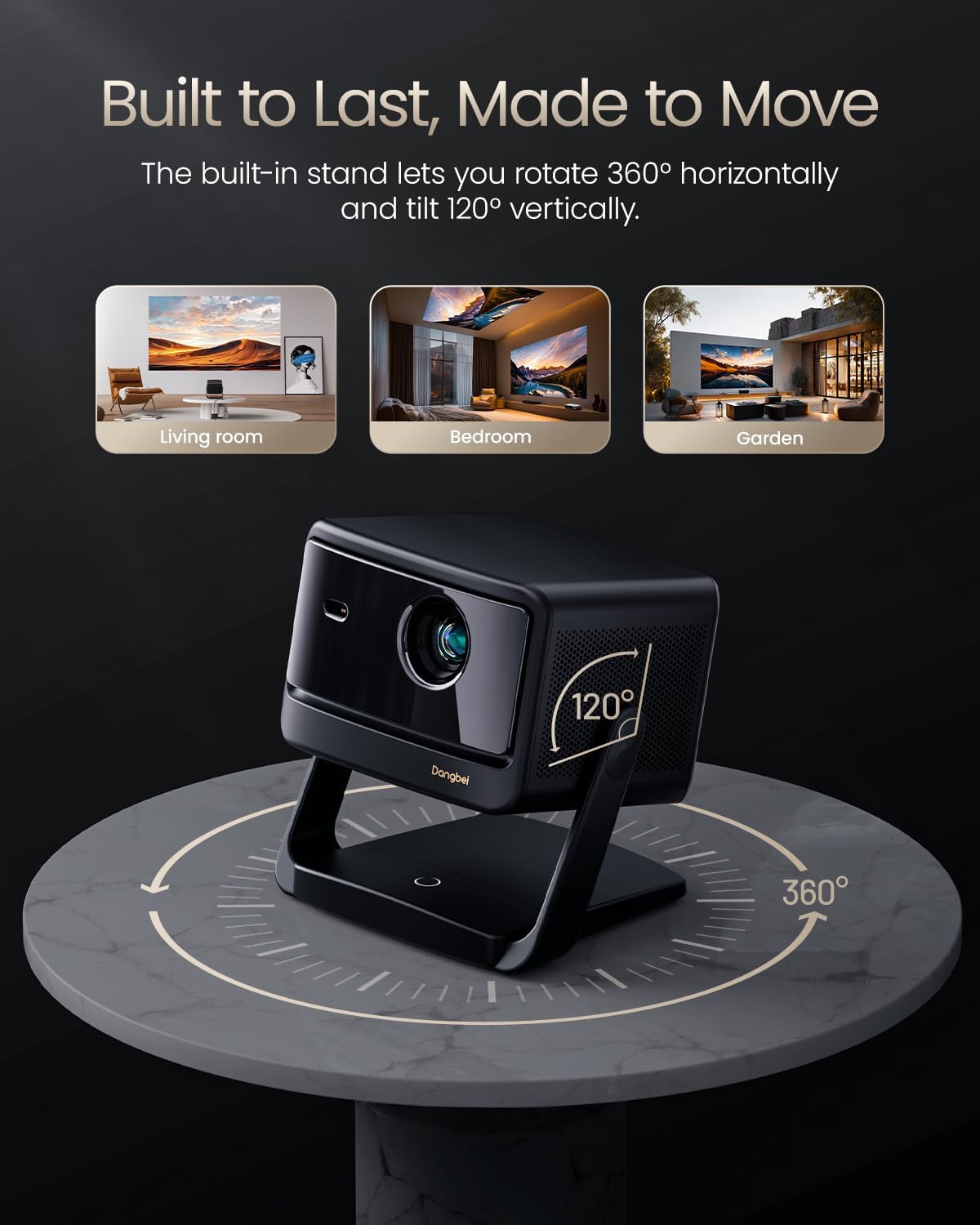
Position the projector on a stable, flat surface. The built-in gimbal stand allows for 360° horizontal rotation and 120° vertical tilt, offering flexibility in placement. Ensure the lens is unobstructed and facing the projection surface (wall or screen).
The DBOX02 Pro can project images from 40 inches up to 300 inches diagonally. For optimal viewing quality, a projection size between 80" and 150" is recommended. The projection distance will vary based on the desired screen size.

Rajah 4.1: The projector's capability to project a large 300-inch image, demonstrating its suitability for various room sizes.
4.2 Sambungan Kuasa
- Connect the power adapter to the projector's DC-IN port.
- Palamkan penyesuai kuasa ke salur keluar dinding.
- Tekan butang kuasa pada projektor atau alat kawalan jauh untuk menghidupkannya.
4.3 InstanPro AI Image Setup
The DBOX02 Pro features InstanPro AI Image Setup for automatic image optimization:
- Fokus Auto: Automatically adjusts the image for sharpness.
- Pembetulan Auto Keystone: Corrects image distortion to ensure a rectangular picture.
- Muatan Skrin: Automatically adjusts the image to fit the projection surface.
- Mengelakkan halangan: Detects and adjusts the projection to avoid obstacles in the path.
- Perlindungan Mata: Automatically lowers brightness when people or pets are detected nearby (requires manual activation).
- AI Brightness Adjustment: Adjusts brightness based on ambient room lighting.
Rajah 4.2: Visual representation of the InstanPro AI Image Setup features, showing how the projector automatically optimizes the display.
5. Arahan Operasi
5.1 Antara Muka Google TV
The projector comes with built-in Google TV, providing access to a wide range of streaming services and applications. Navigate the interface using the remote control.

Rajah 5.1: The Google TV home screen displayed on the projector, showing various streaming app icons.
5.2 Alat Kawalan Jauh
The custom remote control offers intuitive navigation and quick access to key functions:
- Butang Kuasa: Short press to manually focus, long press to activate Auto Focus.
- Kawalan Suara: Activate "Hey Google" for hands-free operation.
- Butang Kelantangan: Laraskan kelantangan audio.
- One-Click Wake & Play: Instantly launch Netflix, YouTube, or Prime Video from sleep mode.
- Butang Tetapan: Short press to enter the Projector settings menu.

Rajah 5.2: The remote control for the DBOX02 Pro, detailing its various buttons and their functions.
5.3 Ketersambungan
Projektor ini menyokong sambungan berwayar dan tanpa wayar:
- Wi-Fi 6: For high-speed wireless internet access and 4K streaming.
- Bluetooth 5.2: For connecting wireless headphones, speakers, or other Bluetooth devices.
- HDMI & USB: Utilize the physical ports on the rear for direct connections to various devices.
6. Ciri Lanjutan
6.1 Cinematic 4K Laser Brilliance
The DBOX02 Pro utilizes advanced laser technology to deliver stunning 4K UHD (3840x2160) resolution with 2000 ISO lumens. It supports HDR10+/HLG for enhanced contrast and a 108% REC-709 wide color gamut for accurate color reproduction.

Rajah 6.1: A visual comparison demonstrating the superior color and clarity of the DBOX02 Pro's 4K laser projection.
6.2 Dolby Audio & Dual 12W Theater Sound
Experience immersive audio with dual 12W speakers and a 600cc acoustic chamber. The projector supports Dolby Audio and DTS Virtual:X, providing rich bass and clear dialogue for a cinema-quality sound experience.
6.3 3D Ready
The projector is 3D ready, allowing you to enjoy compatible 3D content. Please note that active shutter 3D glasses are required and sold separately for 3D viewing.
7. Penyelenggaraan
Penyelenggaraan yang betul memastikan jangka hayat dan prestasi optimum projektor anda.
7.1 Pembersihan
- Kanta: Gently wipe the projector lens with a soft, lint-free cloth specifically designed for optical surfaces. Avoid abrasive materials or harsh chemicals.
- Luaran: Bersihkan bahagian luar casing with a soft, dry cloth. Do not use liquid cleaners directly on the projector.
- Pengudaraan: Periodically check the air vents for dust accumulation. As the DBOX02 Pro is a completely enclosed projector, it requires minimal complex maintenance efforts.
7.2 Kehidupan Sumber Cahaya
The DBOX02 Pro uses an ALPD 2.0 laser light source with an estimated lifespan of 30,000 hours, significantly reducing the need for lamp pengganti.
8. Penyelesaian masalah
Jika anda menghadapi masalah dengan projektor anda, rujuk kepada masalah dan penyelesaian biasa berikut:
- Tiada gambar: Ensure the power adapter is securely connected and the projector is turned on. Check the input source selection.
- Imej Kabur: Use the auto-focus feature via the remote control. If needed, manually adjust focus in the settings menu. Ensure the projection surface is flat.
- Tiada Bunyi: Verify that the volume is not muted and is turned up. Check audio cable connections (if using external speakers). Ensure the correct audio output is selected in the projector settings.
- Alat Kawalan Jauh Tidak Menjawab: Check the batteries in the remote control and replace them if necessary. Ensure there are no obstructions between the remote and the projector.
- Isu Kesambungan (Wi-Fi/Bluetooth): Restart the projector and your router/Bluetooth device. Re-enter Wi-Fi passwords or re-pair Bluetooth devices.
For persistent issues not covered here, please contact Dangbei customer support.
9. Spesifikasi
| Ciri | Perincian |
|---|---|
| Jenama | Dangbei |
| Nombor Model | DBOX02 |
| Resolusi Paparan | 3840 x 2160 (4K UHD) |
| Kecerahan | 2000 Lumen ISO |
| Sumber Cahaya | Laser (ALPD 2.0) |
| Teknologi Ketersambungan | Bluetooth 5.2, HDMI 2.1 (eARC), USB 2.0, LAN, Wi-Fi 6 |
| Ciri Khas | Auto Focus, Auto Keystone Correction, Screen Fit, Obstacle Avoidance, Eye Protection, AI Brightness Adjustment |
| Audio | Dual 12W Speakers, Dolby Audio, DTS Virtual:X |
| Dimensi Produk | 11.81 x 11.81 x 4.72 inci |
| Berat Barang | 7.7 paun |
| Sistem Operasi | Google TV |
10. Waranti dan Sokongan
10.1 Maklumat Waranti
The Dangbei DBOX02 Pro comes with a Perkhidmatan waranti 12 bulan. This warranty covers quality issues under normal use, providing free repair or replacement services.
10.2 Polisi Pemulangan
Produk ini layak mendapat a 30-day return for refund or replacement from the date of purchase, subject to the retailer's return policy.
10.3 Sokongan Teknikal
Dangbei offers sokongan teknikal seumur hidup for the DBOX02 Pro. If you require assistance with setup, troubleshooting, or any other product-related queries, please contact our dedicated support team. Contact details can typically be found on the official Dangbei webtapak atau melalui platform pembelian anda.