1. Produk Lebihview
The LENUTO W13 Magnetic Power Bank is a versatile portable charger designed for convenience and efficiency. It features a 10000mAh battery, 22.5W fast charging capabilities, a foldable stand, and dual USB output for charging multiple devices simultaneously. This manual provides essential information for safe and effective use of your power bank.

Rajah 1: Komponen dan Pelabuhan Produk
- 1. Butang Kuasa: Activates/deactivates the power bank and LED display.
- 2. Magnetic Wireless Charging Surface: For MagSafe compatible wireless charging.
- 3. USB-C Input/Output Port: Untuk mengecas bank kuasa atau mengecas peranti.
- 4. USB-A Output Port: For wired charging of devices.
- 5. Paparan LED: Menunjukkan percen bateritage dan status pengecasan.
- 6. Foldable Stand: Integrated stand for hands-free device viewing.
2. Apa yang ada di dalam Kotak
Sila semak kandungan pakej semasa membuka kotak:
- 1 x LENUTO W13 10000mAh Portable Power Bank
- 1 x Kabel Pengecasan USB-A ke USB-C
- 1 x Manual Pengguna
3. Spesifikasi
| Model | W13 |
| Kapasiti Bateri | 10000mAh |
| Input/Output USB-C | Input: 18W (Max), Output: 20W (Max) |
| Keluaran USB-A | 22.5W (Maks) |
| Output Pengecasan Tanpa Wayar | 15W (Maks) |
| Dimensi Produk | 4.3 x 2.89 x 0.69 inci |
| Berat Barang | 8.1 auns |
| Ciri Khas | Fast Charging, LED Display, Wireless Charging, Foldable Stand |
4. Persediaan dan Penggunaan Awal
4.1 Activating the LED Display
For the first time use or if the product has not been used for a long period, please follow these steps to activate the LED display for accurate battery percentage bacaan:
- Use the product until the battery display reaches 0%.
- Charge the product to 100% without disconnecting the power or unplugging the charging cable.
Note: Failure to follow these steps may result in an inaccurate battery display.

Figure 2: LED Display Activation Process
4.2 Mengecas Power Bank
To charge your LENUTO W13 Power Bank:
- Connect the provided USB-A to USB-C charging cable to the USB-C Input/Output Port (3) on the power bank.
- Sambungkan hujung kabel yang satu lagi ke penyesuai kuasa USB yang serasi (tidak disertakan) atau port USB komputer.
- The LED Display (5) will show the increasinperatusan bateri gtage. When fully charged, it will display "100".

Figure 3: Charging the Power Bank
5. Arahan Operasi
5.1 Power Button Operation and LED Display
- Tekan sekali: Turns on the power bank and displays the remaining battery percentage pada paparan LED.
- Press twice in succession: Turns off the power bank. The LED display will go out.
5.2 Pengecasan Tanpa Wayar (Serasi dengan MagSafe)
The power bank supports magnetic wireless charging for MagSafe compatible devices (iPhone 12 series and newer, or other wireless-charging-capable phones with a magnetic ring).
- Ensure the power bank is turned on (press the Power Button once).
- Align your MagSafe compatible device with the Magnetic Wireless Charging Surface (2) on the power bank. The magnets will snap into place, and charging will begin automatically.
- The LED display will show a charging indicator.

Figure 4: Wireless Charging in Progress
Note: For optimal magnetic connection and charging efficiency, use with MagSafe compatible cases or without a case. Non-magnetic cases may hinder the magnetic attachment and wireless charging performance.
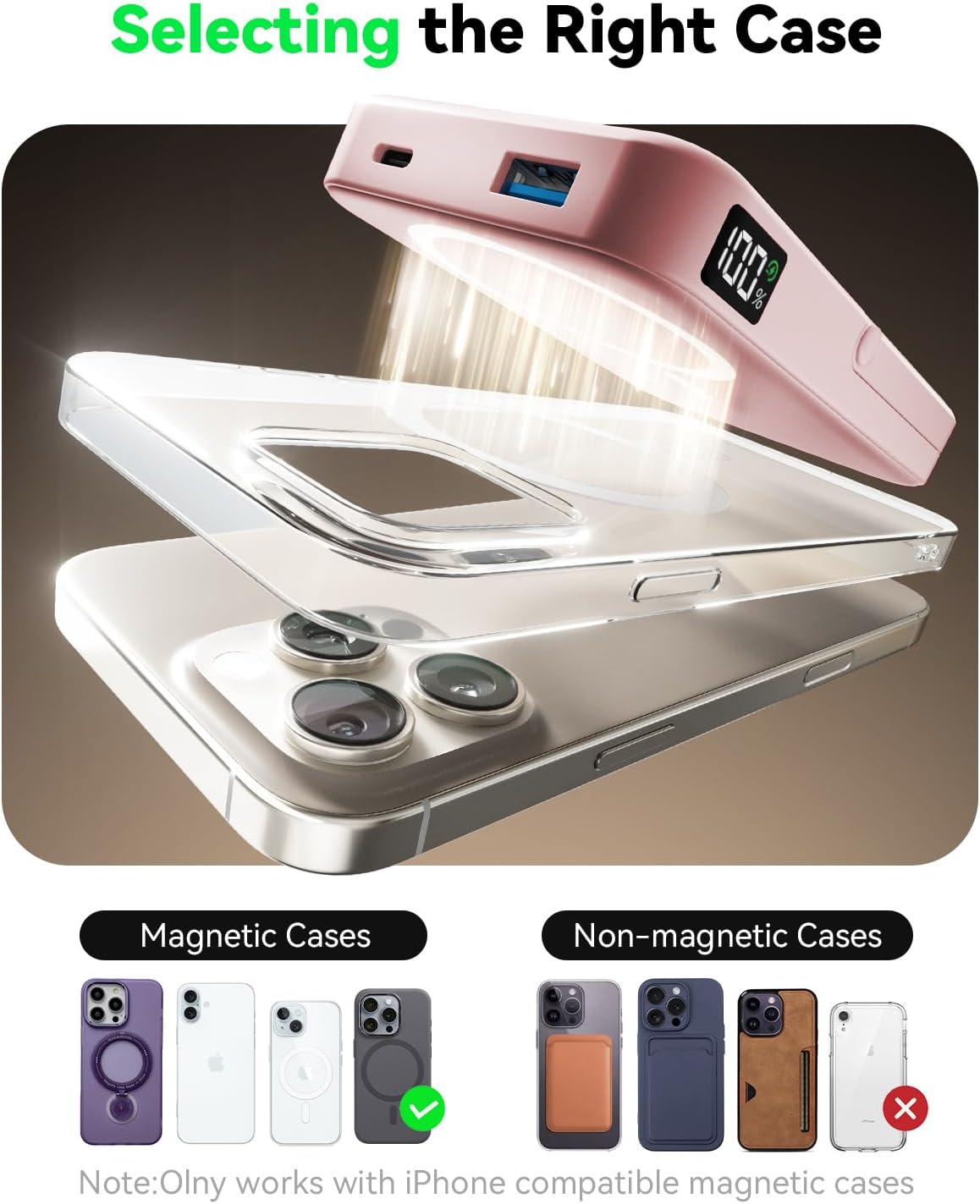
Figure 5: Selecting the Right Case for Magnetic Charging
5.3 Wired Charging (USB-C and USB-A)
The power bank offers wired charging via its USB-C and USB-A ports.
- Connect your device's charging cable to either the USB-C Input/Output Port (3) or the USB-A Output Port (4) on the power bank.
- Sambungkan hujung kabel yang lain ke peranti anda.
- Ensure the power bank is turned on. Charging will begin automatically.
The power bank supports charging up to three devices simultaneously (one wirelessly, two wired). However, charging multiple devices may reduce the charging speed for each device and cause the power bank to heat up, which is normal.

Rajah 6: Mengecas Berbilang Peranti
5.4 Menggunakan Pendirian Boleh Lipat
The integrated foldable stand allows for hands-free viewing of your device while charging.
- Gently pull out the Foldable Stand (6) from the back of the power bank.
- Laraskan pendirian mengikut kehendak anda viewing angle (up to 60 degrees).
- Place your device on the magnetic charging surface or connect it via cable.
The stand supports both portrait and landscape orientations for your device.

Figure 7: Multiple Usage Modes with Foldable Stand
6. Langkah berjaga-jaga keselamatan yang penting
Untuk memastikan operasi yang selamat dan memanjangkan jangka hayat power bank anda, sila patuhi garis panduan keselamatan berikut:
- Jangan dedahkan bank kuasa kepada suhu yang melampau (melebihi 60°C/140°F) atau cahaya matahari langsung.
- Elakkan daripada menjatuhkan, memukul atau membuka peranti.
- Jauhkan daripada air, lembapan dan bahan mudah terbakar.
- Jangan gunakan jika bank kuasa rosak, bengkak atau bocor.
- Gunakan hanya kabel dan penyesuai pengecas yang diluluskan.
- Jauhkan daripada kanak-kanak.
- This product contains a lithium polymer battery. Dispose of it responsibly according to local regulations.
- The power bank is certified with FCC/CE/ROHS, ensuring safe and reliable charging.
Video 1: Selesaiview of the LENUTO W13 Magnetic Power Bank, highlighting its features and safety aspects.
7. Penyelesaian masalah
- Peranti tidak mengecas secara wayarles:
- Ensure your device is MagSafe compatible or has a magnetic ring.
- Periksa sama ada bank kuasa dihidupkan.
- Remove any thick or non-magnetic phone cases.
- Ensure proper alignment of the device on the charging surface.
- Kelajuan pengecasan perlahan:
- Verify that your device and cable support fast charging.
- Charging multiple devices simultaneously may reduce individual charging speeds.
- Ensure the power bank itself is sufficiently charged.
- Bank kuasa tidak dicas:
- Periksa kabel pengecas dan penyesuai untuk kerosakan.
- Ensure the cable is securely connected to both the power bank and the power source.
- Try a different cable or adapter.
- LED display inaccurate or not working:
- Perform the LED display activation steps outlined in Section 4.1.
8. Penyelenggaraan
- Bersihkan bank kuasa dengan kain lembut dan kering. Jangan gunakan bahan kimia yang keras atau bahan yang melelas.
- Simpan bank kuasa di tempat yang sejuk dan kering jauh dari cahaya matahari langsung dan suhu yang melampau.
- Jika tidak digunakan untuk tempoh yang lama, cas power bank kepada kira-kira 50-70% setiap tiga bulan untuk mengekalkan kesihatan bateri.
9. Waranti dan Sokongan
LENUTO products come with a standard manufacturer's warranty. For warranty claims, technical support, or any product-related inquiries, please contact your retailer or visit the official LENUTO website. Please have your purchase receipt and product model number (W13) ready when contacting support.
For further assistance, you may also refer to the contact information provided on the product packaging or the official LENUTO brand store on Amazon: LENUTO Store.