
Neoteck TL338
Neoteck Digital Thickness Gauge TL338 User Manual
Model: TL338 | Brand: Neoteck
1. Maklumat Keselamatan
Please read and understand all instructions before operating this device. Keep this manual for future reference.
- Kendalikan tolok dengan berhati-hati bagi mengelakkan kerosakan pada permukaan pengukur atau komponen dalaman.
- Jangan dedahkan peranti kepada suhu yang melampau, kelembapan atau cahaya matahari langsung.
- Elakkan daripada menjatuhkan peranti atau terkena impak yang kuat.
- Keep the device clean and free from dust, oil, and other contaminants.
- Jangan cuba membuka atau mengubah suai peranti, kerana ini akan membatalkan jaminan dan boleh menyebabkan kerosakan.
- Buang bateri mengikut peraturan tempatan.
2. Produk Lebihview
The Neoteck Digital Thickness Gauge TL338 is a precision instrument designed for accurate measurement of various materials. It features a high-resolution LCD display and a durable construction for reliable performance.
Ciri-ciri Utama:
- Ultra-Precise Measurements: 0.00005inch (0.001mm) resolution across a 0-1inch (0-25.4mm) range.
- 10mm Aluminum Alloy Measuring Surface: Ensures wear resistance and long-term stability.
- Effortless One-Handed Operation: Constant-force press lever and ergonomic handle for swift measurements.
- User-Friendly Smart Design: One-touch ZERO, instant mm/inch unit switching, backlit LCD, and auto power-off.
- Durable Construction: Aluminum Alloy/Iron body for demanding environments.
- Versatile Application: Suitable for paper, leather, plastic, metal sheets, film, and more.
Komponen:
The package includes the Digital Thickness Gauge, one 1.5V LR44 battery, and this instruction manual.
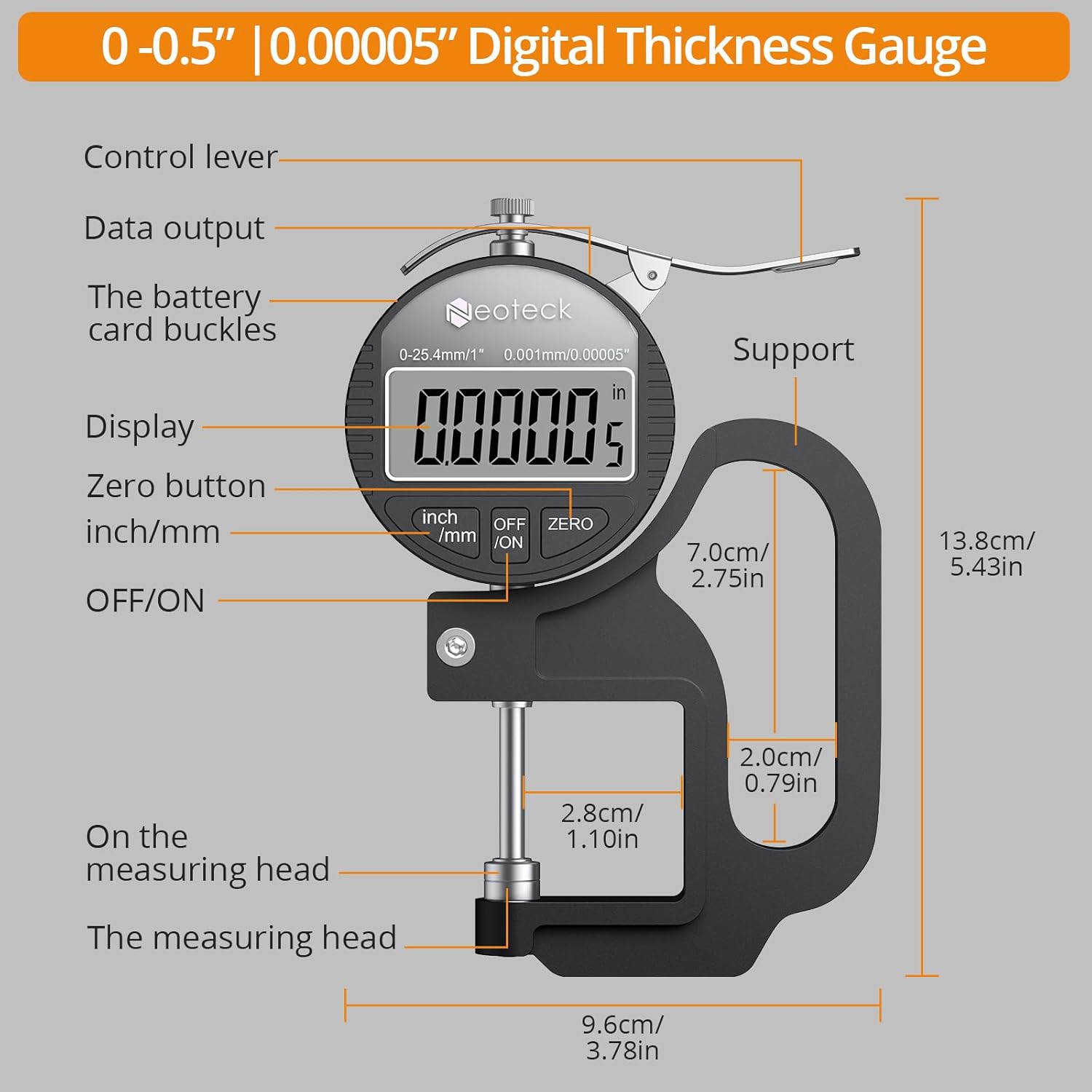
Rajah 1: Terperinci view of the Neoteck Digital Thickness Gauge components and dimensions.
3. Persediaan
Pemasangan Bateri:
- Locate the battery compartment on the back of the gauge.
- Buka penutup bateri.
- Insert one 1.5V LR44 battery, ensuring correct polarity (+/-).
- Tutup penutup bateri dengan selamat.
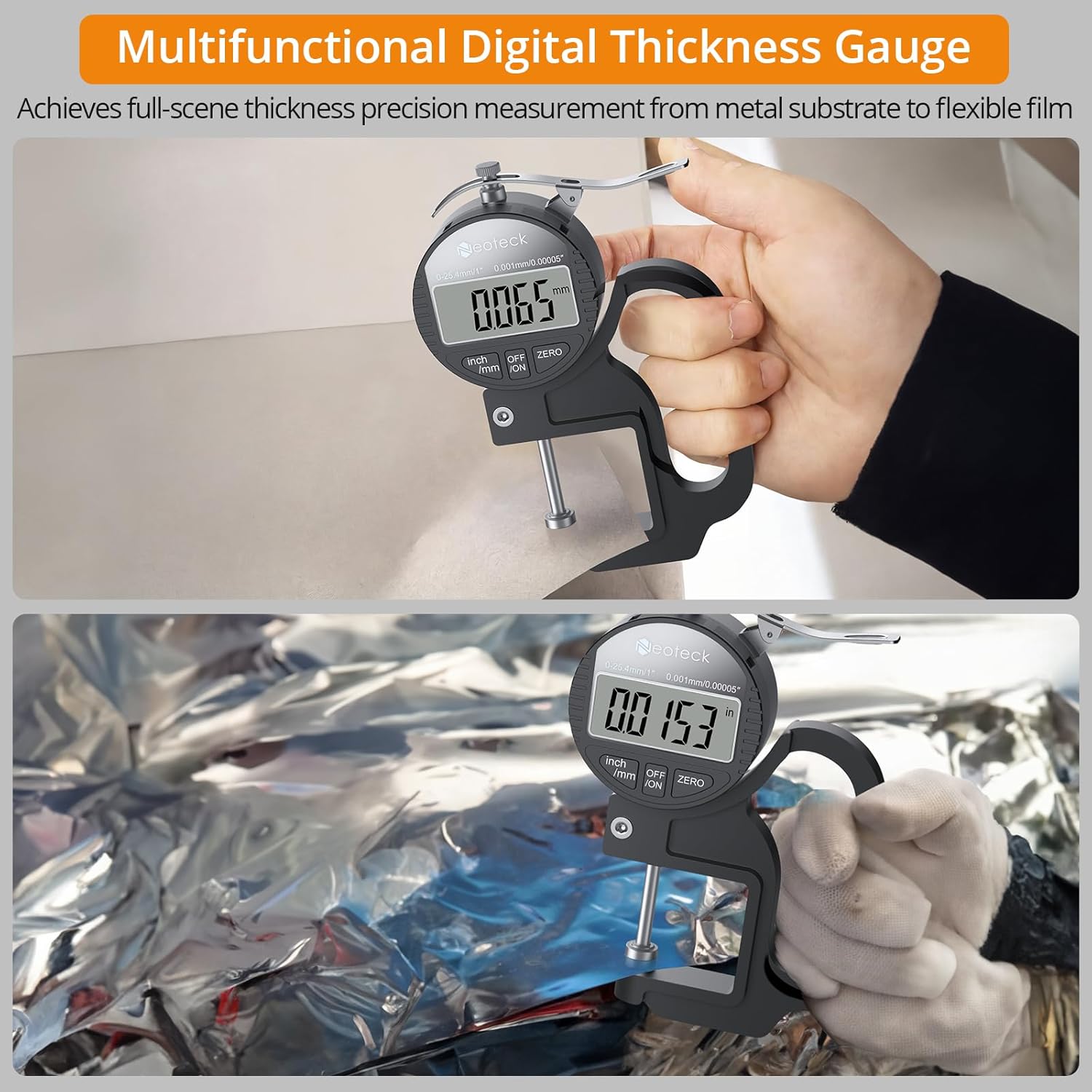
Figure 2: Contents of the Neoteck Digital Thickness Gauge package, including the gauge, battery, and manual.
4. Arahan Operasi
Hidupkan/Mati Kuasa:
Press the 'OFF/ON' button to turn the device on or off. The device will automatically power off after 5 minutes of inactivity to conserve battery life.
Inch/MM Unit Conversion:
Press the 'inch/mm' button to switch between imperial (inches) and metric (millimeters) units. The selected unit will be displayed on the LCD screen.

Figure 3: The large LCD display and unit conversion buttons.
Tetapan Sifar:
Before taking a measurement, ensure the measuring surfaces are clean and then press the measuring rod to the bottom. Press the 'ZERO' button to set the display to zero. This calibrates the gauge for accurate readings.
Mengambil Pengukuran:
- Ensure the gauge is powered on and zeroed.
- Hold the gauge comfortably with one hand using the ergonomic grip.
- Press the control lever to open the measuring jaws.
- Carefully place the material to be measured between the measuring surfaces.
- Release the control lever slowly, allowing the measuring surfaces to gently contact the material.
- Read the thickness value directly from the LCD display.

Figure 4: One-hand operation for quick and easy measurements.

Figure 5: Measuring various materials with the alloy measuring surface.
Important Measurement Notes:
- The thickness gauge should be placed vertically during measurement, as gravity can affect data.
- For optimal accuracy, take multiple measurements and calculate the average value.
- Avoid applying excessive pressure when closing the measuring surfaces on the material.
Demonstrasi Video:
Video 1: A demonstration of the Neoteck Digital Thickness Meter in use, showcasing its features and measurement process.
5. Penyelenggaraan
Pembersihan:
Regularly clean the measuring surfaces with a soft, dry cloth. For stubborn dirt, a slightly damp kain boleh digunakan, diikuti dengan pengeringan segera. Jangan gunakan pelarut atau pembersih yang kasar.
Storan:
When not in use, store the thickness gauge in its protective case in a dry, cool place, away from direct sunlight and extreme temperatures. Remove the battery if the device will not be used for an extended period.
Penggantian Bateri:
If the display becomes dim or unresponsive, replace the LR44 battery as described in the 'Battery Installation' section.
6. Penyelesaian masalah
| Masalah | Kemungkinan Punca | Penyelesaian |
|---|---|---|
| Paparan kosong atau malap | Bateri lemah atau pemasangan bateri yang salah. | Gantikan bateri LR44, pastikan kekutuban yang betul. |
| Bacaan tidak tepat | Measuring surfaces are dirty or not zeroed correctly. | Clean measuring surfaces and perform zero setting. Ensure the gauge is held vertically. |
| Butang tidak bertindak balas | Kerosakan peranti atau bateri lemah. | Gantikan bateri. Jika masalah berterusan, hubungi khidmat pelanggan. |
7. Spesifikasi
| Ciri | Spesifikasi |
|---|---|
| Jenama | Pemeriksaan semula |
| Model | TL338 |
| Julat Pengukuran | 0-1 inci (0-25.4mm) |
| Resolusi | 0.00005 inci (0.001mm) |
| Ketepatan Pengukuran | 0.0005"/0.00005" |
| bahan | Aluminum Alloy/Iron |
| Jenis Bateri | 1 x 1.5V LR44 (included) |
| Suhu Operasi | 0°C hingga 40°C (32°F hingga 104°F) |
| Komponen yang Disertakan | Thickness Gauge, 1.5V Battery, Instruction Manual |
8. Waranti dan Sokongan
Waranti:
This Neoteck Digital Thickness Gauge is covered by an 18-month warranty from the date of purchase. The warranty covers manufacturing defects and material faults under normal use. It does not cover damage caused by misuse, accidents, unauthorized modifications, or improper maintenance.
Sokongan Pelanggan:
For technical assistance, warranty claims, or any questions regarding your Neoteck Digital Thickness Gauge, please contact our customer support team. Refer to the contact information provided on the product packaging or our official webtapak.
Ask a question about this manual
Ask about setup, troubleshooting, compatibility, parts, safety, or missing instructions. Manuals+ will review the question and use this page’s manual context to help answer it.