
1. Pengenalan
Thank you for choosing the KLIM KLCD-0582 CD Cassette Boombox. This versatile audio system combines classic and modern features, allowing you to enjoy music from various sources including CDs, cassette tapes, AM/FM radio, Bluetooth-enabled devices, USB drives, and auxiliary input. This manual provides detailed instructions for safe operation, setup, and maintenance of your device. Please read it thoroughly before use and retain it for future reference.
2. Arahan Keselamatan Penting
- Baca arahan ini dengan teliti sebelum mengendalikan unit.
- Simpan arahan ini untuk rujukan masa hadapan.
- Patuhi semua amaran pada produk dan dalam arahan pengendalian.
- Ikut semua arahan.
- Jangan gunakan alat ini berhampiran air.
- Bersihkan hanya dengan kain kering.
- Jangan sekat sebarang bukaan pengudaraan. Pasang mengikut arahan pengilang.
- Jangan pasang berhampiran mana-mana sumber haba seperti radiator, daftar haba, dapur, atau radas lain (termasuk amppenghidup) yang menghasilkan haba.
- Lindungi kord kuasa daripada berjalan atau tersepit, terutamanya pada palam, bekas kemudahan dan tempat keluar dari radas.
- Hanya gunakan lampiran/aksesori yang ditentukan oleh pengilang.
- Cabut plag radas ini semasa ribut petir atau apabila tidak digunakan untuk jangka masa yang lama.
- Rujuk semua servis kepada kakitangan perkhidmatan yang berkelayakan. Servis diperlukan apabila radas telah rosak dalam apa jua cara, seperti kord bekalan kuasa atau palam rosak, cecair telah tertumpah atau objek jatuh ke dalam radas, radas telah terdedah kepada hujan atau lembapan, tidak beroperasi seperti biasa. , atau telah digugurkan.
3. Kandungan Pakej
Sila semak pakej untuk item berikut:
- KLIM CD Cassette Player (KLCD-0582)
- Kord kuasa (kabel AC)
- AAA alkaline batteries * 2 (for remote control)
- KLIM envelope
- Manual arahan (dokumen ini)
4. Produk Lebihview
Familiarize yourself with the main components and controls of your KLIM KLCD-0582 boombox.
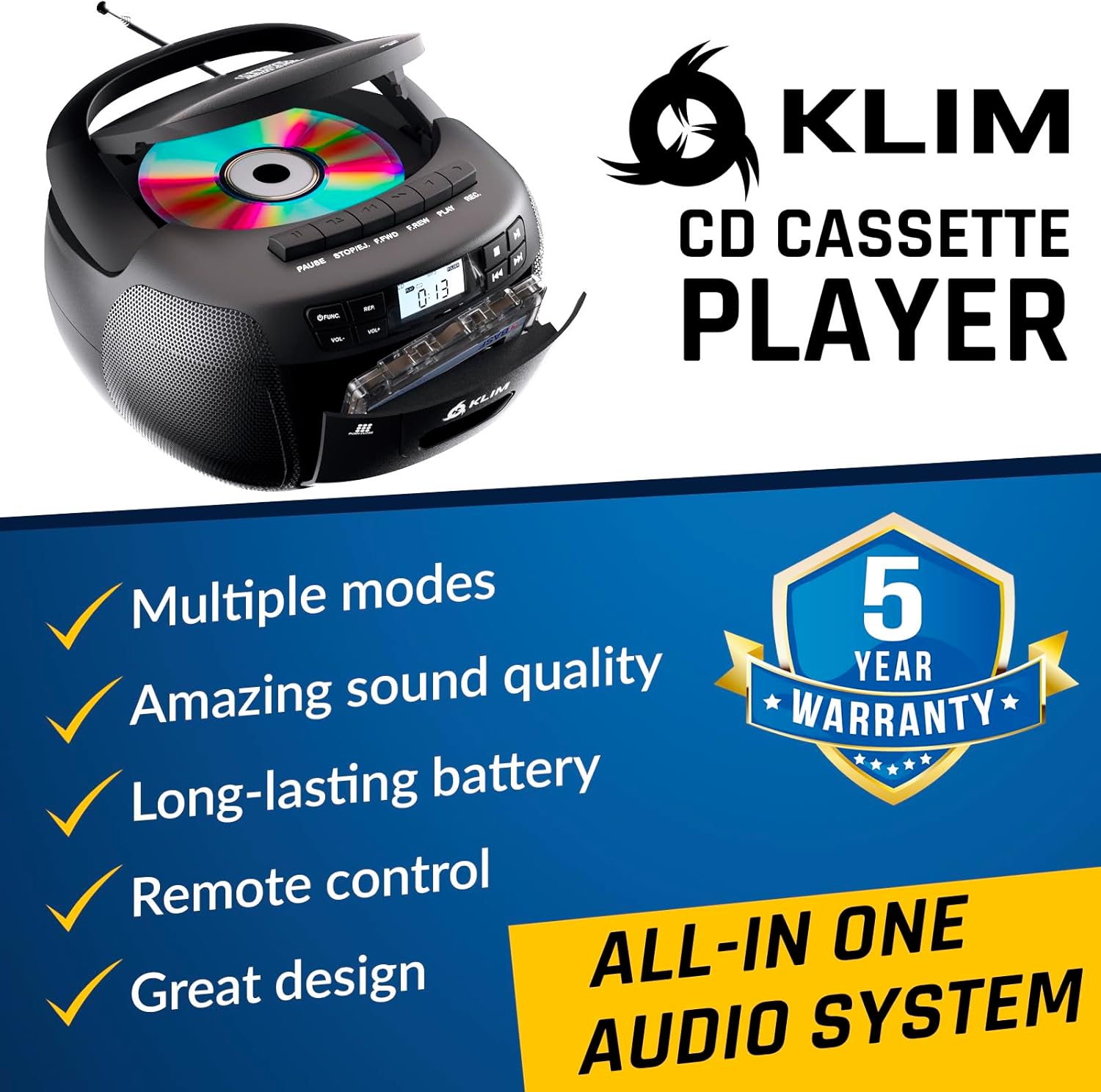
Rajah 4.1: Depan view of the KLIM KLCD-0582 CD Cassette Boombox, showing the CD lid, cassette deck, and control buttons.
Kawalan Panel Depan:
- Butang Kuasa: Menghidupkan atau mematikan unit.
- Butang Fungsi/Mod: Switches between CD, Cassette, Radio, Bluetooth, USB, and AUX modes.
- Volume Control (VOL+/-): Laraskan kelantangan main balik.
- Play/Pause Button (CD/USB): Memulakan atau menjeda main balik CD/USB.
- Stop Button (CD/USB/Cassette): Menghentikan main balik.
- Butang Langkau/Cari (<< / >>): Skips tracks or searches within a track (CD/USB). Tunes radio stations.
- Repeat Button (CD/USB): Mengulang trek semasa atau semua trek.
- Program Button (CD/USB): Programs track order for CD/USB playback.
- Record Button (Cassette): Initiates recording to cassette tape.
- Eject Button (Cassette): Opens the cassette deck.
- Paparan LCD: Shows current mode, track number, radio frequency, etc.

Rajah 4.2: Terperinci view of the LCD display and speaker area, highlighting the digital interface.
Side/Rear Panel Connections:
- Input Kuasa AC: Menyambungkan kord kuasa AC.
- Petak Bateri: Holds 6 C-size batteries for portable use.
- Port USB: Untuk memainkan audio files daripada pemacu USB.
- Input AUX (3.5mm): Menyambung peranti audio luaran.
- Bicu Fon Kepala (3.5mm): Untuk mendengar secara peribadi.
- Antena Teleskopik: Untuk penerimaan radio AM/FM.

Figure 4.3: Product label on the bottom of the unit, indicating model number and electrical ratings.
5. Persediaan
5.1 Mengkuasakan Unit
Your boombox can be powered by either AC power or batteries.
AC Power (Indoor Use):
- Pastikan unit dimatikan.
- Connect the supplied AC power cord to the AC power input on the rear of the boombox.
- Plug the other end of the AC power cord into a standard wall outlet (110-120V, 60Hz).
DC Power (Battery Operation - Portable Use):
- Pastikan unit dimatikan dan diputuskan sambungannya daripada kuasa AC.
- Buka penutup petak bateri di bahagian bawah unit.
- Insert 6 C-size (UM-2) batteries, ensuring correct polarity (+/-) as indicated inside the compartment.
- Tutup penutup petak bateri dengan selamat.
Nota: Tanggalkan bateri jika unit tidak akan digunakan untuk tempoh yang lama untuk mengelakkan kebocoran dan kerosakan.
5.2 Pemasangan Bateri Kawalan Jauh
- Buka petak bateri di belakang alat kawalan jauh.
- Insert 2 AAA alkaline batteries, observing the correct polarity.
- Tutup penutup petak bateri.

Figure 5.1: The boombox shown with its remote control, which requires AAA batteries.
5.3 Persediaan Antena
Untuk penerimaan radio FM yang optimum, panjangkan sepenuhnya antena teleskopik. Untuk penerimaan AM, putar unit untuk isyarat terbaik.
6. Operasi
6.1 Kawalan Asas
- Hidupkan/Mati Kuasa: Tekan ke KUASA butang.
- Pilih Mod: Tekan ke FUNGSI or MODE button repeatedly to cycle through CD, Cassette, Radio (AM/FM), Bluetooth, USB, and AUX modes.
- Laraskan Kelantangan: Gunakan VOL+ dan vol- butang.
6.2 Main Semula CD
- Tekan ke FUNGSI butang untuk memilih mod CD.
- Buka penutup petak CD.
- Place a CD (audio CD or MP3/WMA CD) with the label side facing up.
- Close the CD compartment lid. The unit will read the disc and begin playback automatically or display the total number of tracks.
- Tekan MAIN/JEDA untuk memulakan atau menjeda main semula.
- Tekan BERHENTI untuk menghentikan main balik.
- guna LANGKAH (<< / >>) buttons to skip tracks. Hold to fast forward/rewind within a track.
- Main Program: Dalam mod berhenti, tekan PROGRAM. guna SKIP to select desired tracks, then press PROGRAM again to confirm each track. Press BERMAIN untuk memulakan main balik yang diprogramkan.
- Ulang Main: Tekan ULIKAN once for single track repeat, twice for all tracks repeat.
6.3 Main Semula Kaset dan Rakaman
- Tekan ke FUNGSI butang untuk memilih mod TAPE.
- Tekan ke LEPASKAN button to open the cassette deck.
- Insert a cassette tape and close the deck.
- Tekan BERMAIN untuk memulakan main balik.
- guna FAST FORWARD (FFWD) or REWIND (REW) butang untuk menavigasi pita.
- Tekan BERHENTI untuk menghentikan main balik.
Rakaman ke Kaset:
- Insert a blank, recordable cassette tape.
- Select the desired source (CD, Radio, AUX, Bluetooth, USB).
- Start playback on the source (e.g., play a CD track, tune to a radio station).
- Tekan ke REKOD butang pada boombox. BERMAIN button will also engage. Recording will begin.
- Tekan BERHENTI untuk menamatkan rakaman.
Penting: Ensure the cassette tape has its record-protection tabs intact for recording.
Radio 6.4 AM/FM
- Tekan ke FUNGSI butang untuk memilih mod RADIO.
- Extend the telescopic antenna for FM reception. For AM, rotate the unit.
- Gunakan MENALA tombol atau LANGKAH (<< / >>) buttons to tune to your desired station. The frequency will be displayed on the LCD.
6.5 Sambungan Bluetooth
- Tekan ke FUNGSI button to select BLUETOOTH mode. The LCD will display "BT" and the unit will enter pairing mode, indicated by a flashing Bluetooth icon.
- Pada peranti anda yang didayakan Bluetooth (cth., telefon pintar, tablet), dayakan Bluetooth dan cari peranti yang tersedia.
- Select "KLIM Boombox" from the list of devices.
- Once paired, the Bluetooth icon on the boombox's LCD will stop flashing. You can now play audio from your device through the boombox.
- Control playback (play/pause, skip tracks) either from your connected device or using the boombox's controls.
6.6 Main Semula USB
- Masukkan pemacu kilat USB ke dalam port USB.
- Tekan ke FUNGSI button to select USB mode. The unit will automatically detect and begin playing compatible audio files (MP3/WMA).
- guna MAIN/JEDA, BERHENTI, dan LANGKAH (<< / >>) buttons to control playback, similar to CD mode.
- Main Program: Dalam mod berhenti, tekan PROGRAM. guna SKIP to select desired tracks, then press PROGRAM again to confirm each track. Press BERMAIN untuk memulakan main balik yang diprogramkan.
6.7 Input AUX
- Connect an external audio device (e.g., MP3 player, smartphone) to the AUX input jack using a 3.5mm audio cable (not included).
- Tekan ke FUNGSI button to select AUX mode. The LCD will display "AUX".
- Start playback on your external device. The audio will be routed through the boombox speakers.
- Volume can be adjusted on both the boombox and the external device. Playback controls are managed on the external device.
6.8 Menggunakan Alat Kawalan Jauh
The included remote control allows convenient operation from a distance of up to 20 feet. Ensure line of sight to the boombox's front panel.
- Kuasa (Butang Merah): Menghidupkan / mematikan unit.
- Redam: Redam/nyahredamkan audio.
- VOL +/-: Melaraskan kelantangan.
- FUNGSI: Cycles through modes (CD, TAPE, FM, AM, BT, USB, AUX).
- REP: Repeat function for CD/USB.
- PROG: Program function for CD/USB.
- PLAY/PAUSE, STOP, FFWD, REW: Playback controls for CD/USB/Cassette.
- Number Buttons (0-9, -10, +10): Pemilihan trek terus untuk CD/USB.
7. Penyelenggaraan
7.1 Membersihkan Unit
- Sentiasa cabut plag unit daripada sumber kuasa sebelum membersihkan.
- Gunakan kain lembut dan kering untuk membersihkan permukaan luar.
- Jangan gunakan pembersih, lilin atau pelarut yang melelas kerana ia boleh merosakkan kemasan.
- Untuk kanta CD, gunakan cakera pembersih kanta CD khusus.
- Untuk dek kaset, bersihkan kepala pita dan penggelek picit secara berkala dengan kapas yang dilap perlahan-lahan.ampditambah dengan isopropil alkohol.
7.2 Penyimpanan
When not in use for extended periods, store the unit in a cool, dry place away from direct sunlight and extreme temperatures. Remove batteries from both the main unit and the remote control to prevent leakage.
8. Penyelesaian masalah
If you encounter issues with your boombox, please refer to the following common problems and solutions before contacting support.
| Masalah | Kemungkinan Punca | Penyelesaian |
|---|---|---|
| Tiada kuasa | Kord AC tidak disambungkan; Bateri habis atau salah dimasukkan. | Periksa sambungan kord AC; Gantikan bateri atau pastikan polariti yang betul. |
| Tiada bunyi | Kelantangan terlalu rendah; Fungsi bisu aktif; Mod salah dipilih; Fon kepala disambungkan. | Increase volume; Press MUTE on remote; Select correct mode; Disconnect headphones. |
| CD tidak dimainkan / ralat "TIADA CAKERA" | CD inserted incorrectly; CD dirty or scratched; CD compartment not closed; Unit in wrong mode. | Insert CD label side up; Clean or replace CD; Close CD lid securely; Select CD mode. |
| Pita kaset tidak dimainkan/rakam | Tape inserted incorrectly; Tape damaged; Record-protection tab missing (for recording); Unit in wrong mode. | Insert tape correctly; Use a new tape; Cover record-protection tab with tape; Select TAPE mode. |
| Penerimaan radio yang lemah | Antena tidak dilanjutkan; Kedudukan unit. | Panjangkan sepenuhnya antena FM; Putar unit untuk penerimaan AM yang lebih baik. |
| Kegagalan berpasangan Bluetooth | Boombox not in pairing mode; Device Bluetooth off; Device too far. | Ensure boombox is in BT mode and flashing; Enable Bluetooth on device; Move device closer (within 30 ft). |
| Alat kawalan jauh tidak berfungsi | Bateri berkurangan atau dimasukkan dengan salah; Halangan antara alat kawalan jauh dan unit. | Replace batteries; Ensure clear line of sight to the unit's front panel. |
9. Spesifikasi
| Ciri | Perincian |
|---|---|
| Nombor Model | KLCD-0582 |
| Jenama | KLIM |
| Teknologi Ketersambungan | Tambahan, Bluetooth 5.1, USB |
| warna | Hitam |
| Dimensi Item (L x W x H) | 8.5 x 8.39 x 4.92 inci |
| Berat Barang | 1.5 Kilogram |
| Sumber Kuasa | Corded Electric (AC 110-120V/60Hz), 6 x C-size batteries (DC 9V) |
| Peranti Serasi | Pemain MP3, peranti berkemampuan Bluetooth |
| Piawaian yang Disokong | CD, MP3, WMA |
| Format Audio yang Disokong | CD-DA, MP3, WMA |
| Penceramah | 3W Dual Speakers |
| Pancaragam Radio | AM/FM |
10. Waranti dan Sokongan
10.1 Maklumat Waranti
The KLIM KLCD-0582 CD Cassette Boombox comes with a Waranti 5 tahun. This warranty covers manufacturing defects and ensures the product meets its specified performance. Please retain your proof of purchase for warranty claims.
10.2 Sokongan Pelanggan
For any questions, technical assistance, or warranty claims, please contact KLIM customer support. You can typically find contact information on the manufacturer's website or through the retailer where you purchased the product. KLIM offers 24/7 customer support to assist you.
For more information, visit the official KLIM webtapak atau rujuk butiran hubungan yang disediakan dalam pembungkusan produk anda.