
1. Arahan Keselamatan Penting
Please read these instructions carefully before using the Audizio Canzo DAB+ Internet Radio. Keep this manual for future reference.
- Jangan dedahkan peranti kepada hujan atau lembapan untuk mengelakkan kebakaran atau kejutan elektrik.
- Jangan buka casing. Tiada bahagian yang boleh diservis pengguna di dalamnya. Rujuk semua servis kepada kakitangan yang berkelayakan.
- Hanya gunakan penyesuai kuasa yang dibekalkan bersama peranti.
- Pastikan pengudaraan yang betul di sekitar unit. Jangan halang bukaan pengudaraan.
- Elakkan meletakkan unit berhampiran sumber haba atau di bawah cahaya matahari langsung.
- Bersihkan unit hanya dengan kain kering dan lembut. Jangan gunakan pembersih cecair.
2. Produk Lebihview
The Audizio Canzo is a versatile DAB+ Internet Radio designed for high-quality audio reception and playback. It features multiple connectivity options including Wi-Fi, Bluetooth 5.3, AUX, and USB, along with a remote control for convenient operation. The elegant wooden finish and clear display make it suitable for various home environments.
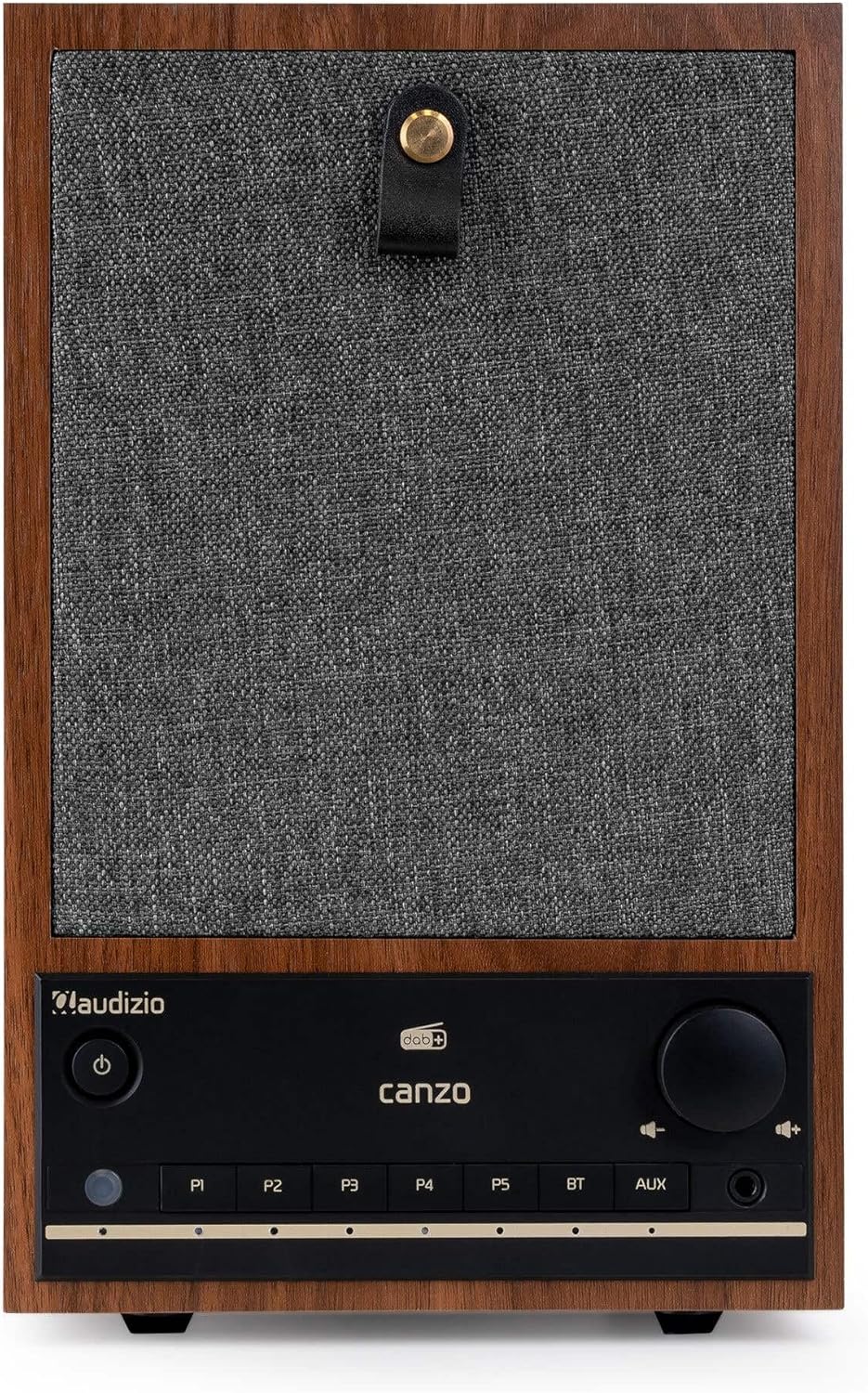
Rajah 2.1: Depan view of the Audizio Canzo DAB+ Internet Radio in walnut finish.

Rajah 2.2: Depan view with speaker grille removed, highlighting the speaker, display, and control panel.
3. Apa yang ada di dalam Kotak
Buka bungkusan kotak dengan berhati-hati dan pastikan semua item ada:
- Audizio Canzo DAB+ Internet Radio
- Penyesuai Kuasa
- Alat Kawalan Jauh
- Panduan Mula Pantas
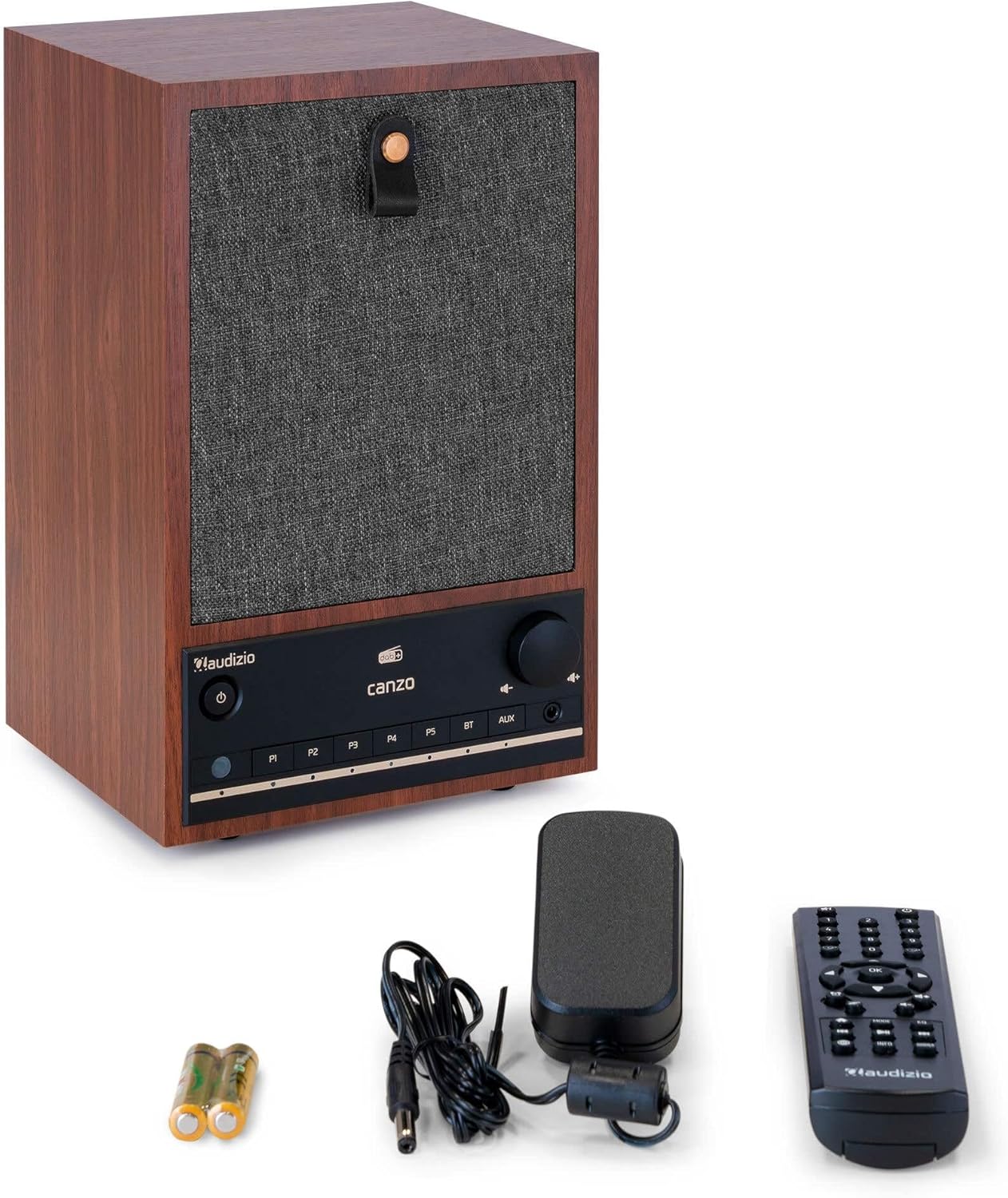
Figure 3.1: Audizio Canzo radio with its accessories.
4. Persediaan
4.1 Kuasa Penyambung
- Insert the DC plug of the power adapter into the DC IN port on the back of the radio.
- Plug the power adapter into a standard wall outlet (220V).
- Balikkan HIDUP/MATI switch on the back of the unit to the ON kedudukan.
4.2 Sambungan Antena
For optimal DAB+ and FM reception, extend the telescopic antenna located on the back of the unit. Adjust its position for the best signal.

Figure 4.1: Rear panel with power input, audio ports, USB, LAN, and antenna.
4.3 Hidupkan Awal dan Persediaan Rangkaian
- Tekan ke kuasa button on the front panel or remote control to turn on the radio.
- The display will show the Audizio logo and then guide you through the initial setup wizard.
- Pilih bahasa pilihan anda.
- The radio will prompt you to connect to a network. Choose Wi-Fi or LAN.
- Untuk Wi-Fi: Select your Wi-Fi network from the list and enter the password using the navigation buttons and OK butang.
- For LAN: Sambungkan kabel Ethernet dari penghala anda ke LAN port on the back of the radio. The connection should be established automatically.
- Once connected, the radio will update the time and date automatically.
5. Arahan Operasi
5.1 Kawalan Asas
The front panel features a power button, preset buttons (P1-P5), Bluetooth (BT) and AUX input buttons, a volume knob, and navigation controls. The remote control provides full access to all functions.
5.2 Pemilihan Mod
Tekan ke MODE button on the radio or remote control to cycle through available modes: Internet Radio, DAB+, FM, Bluetooth, AUX, and USB Playback.
5.3 Radio Internet
- Pilih Radio Internet mod.
- Use the navigation buttons to browse stations by location, genre, or search.
- Tekan OK untuk memilih stesen.
- Untuk menyimpan stesen sebagai pratetap, tekan dan tahan salah satu daripadanya P1-P5 butang sehingga paparan mengesahkan.
5.4 Radio DAB+
- Pilih DAB+ mod.
- Radio akan mengimbas stesen DAB+ yang tersedia secara automatik.
- Use the navigation buttons to scroll through the list of found stations.
- Tekan OK untuk memilih stesen.
- Untuk menyimpan stesen sebagai pratetap, tekan dan tahan salah satu daripadanya P1-P5 butang.
5.5 Radio FM
- Pilih FM mod.
- Tekan dan tahan butang Imbas button (usually on the remote or via menu) to auto-scan for FM stations.
- Use the navigation buttons to tune manually or select from scanned stations.
- Untuk menyimpan stesen sebagai pratetap, tekan dan tahan salah satu daripadanya P1-P5 butang.
5.6 Main Balik Bluetooth
- Pilih Bluetooth mode. The radio will enter pairing mode, indicated on the display.
- Pada telefon pintar atau tablet anda, dayakan Bluetooth dan cari peranti yang tersedia.
- Select "Audizio Canzo" from the list to pair.
- Setelah dipasangkan, anda boleh memainkan audio daripada peranti anda melalui radio.
5.7 Input AUX
- Sambungkan peranti audio luaran (cth, pemain MP3) ke AUX IN port on the back of the radio using a 3.5mm audio cable.
- Pilih AUX mod.
- Audio daripada peranti yang disambungkan kini akan dimainkan melalui radio.
5.8 Main Semula USB
- Masukkan pemacu kilat USB yang mengandungi audio files ke dalam MAIN SEMULA USB port on the back of the radio.
- Pilih USB mod.
- Use the navigation buttons to browse and select audio files untuk main balik.
5.9 Jam Penggera dan Pemasa Tidur
- penggera: Access the Alarm settings via the menu. Set up to two alarms with desired time, source (buzzer, radio), and volume.
- Pemasa Tidur: Access the Sleep Timer settings via the menu. Set a duration (e.g., 15, 30, 60 minutes) after which the radio will automatically turn off.
- Tunda: Apabila penggera berbunyi, tekan butang Tunda button on the remote or radio to temporarily silence it.
6. Penyelenggaraan
6.1 Pembersihan
To clean the radio, use a soft, dry, lint-free cloth. Do not use abrasive cleaners, waxes, or solvents as they may damage the finish or internal components.
6.2 Penyimpanan
Jika menyimpan unit ini untuk tempoh yang lama, cabut kabelnya dari soket kuasa dan simpan di tempat yang sejuk dan kering, jauh daripada cahaya matahari langsung dan suhu yang melampau.
7. Penyelesaian masalah
| Masalah | Kemungkinan Punca | Penyelesaian |
|---|---|---|
| Tiada kuasa | Power adapter not connected; ON/OFF switch is OFF. | Ensure power adapter is securely connected and ON/OFF switch is ON. |
| Tiada bunyi | Volume too low; incorrect source selected; headphones connected. | Increase volume; select correct input mode; disconnect headphones. |
| Tidak dapat menyambung ke Wi-Fi | Kata laluan salah; penghala terlalu jauh; masalah rangkaian. | Verify Wi-Fi password; move radio closer to router; restart router. |
| Penerimaan DAB+/FM yang lemah | Antena tidak dilanjutkan; kawasan isyarat lemah. | Fully extend and adjust the telescopic antenna; try repositioning the radio. |
| Alat kawalan jauh tidak berfungsi | Batteries depleted; obstruction between remote and radio. | Replace remote control batteries; ensure clear line of sight to the radio's sensor. |
8. Spesifikasi
| Ciri | Spesifikasi |
|---|---|
| Nombor Model | Canzo |
| Dimensi Produk | 22.5 x 20.5 x 34 cm |
| Berat Barang | 2.9 Kilogram |
| warna | kenari |
| Saiz Skrin | 2.4 Inci |
| Teknologi Ketersambungan | Aux, Bluetooth, Wi-Fi, LAN |
| Versi Bluetooth | 5.3 |
| Kumpulan Radio yang Disokong | DAB+, FM, Radio Internet |
| Sumber Kuasa | Corded Electric (220 Volt) |
| Ciri Khas | Integrated Clock, Sleep Timer, Alarm, Remote Control, Preset Stations |
| Peranti Serasi | Smartphone, Tablet, Headphones, MP3 Player, USB Storage Device |
9. Waranti dan Sokongan
For warranty information and technical support, please refer to the warranty card included with your product or contact your retailer. Keep your proof of purchase for any warranty claims.