
1. Pengenalan
Terima kasih kerana membeliasing the DAMOACAM 2.5K Keyless Spy Camera (Model: CK400FQHD). This ultra-compact, covert camera is designed for discreet video recording, surveillance, and evidence collection. Its keyless fob design ensures complete stealth, making it ideal for various scenarios including personal safety, home/office monitoring, and meeting recording. This manual provides detailed instructions to help you set up, operate, and maintain your device.

Figure 1.1: The DAMOACAM CK400FQHD Keyless Spy Camera, designed for discreet recording.
2. Ciri-ciri Produk
- Crystal Clear 2.5K QHD Video: Supports video recording at 2560x1440px and 1920x1080px resolutions, providing clear and detailed footage.
- Ultra-Compact & Covert Design: Disguised as a common car key fob, featuring a specially manufactured camouflage plate that conceals the lens, ensuring discreet operation.
- Kanta Sudut Lebar: Equipped with an 80-degree wide-angle lens, capturing a broader field of view compared to many other mini cameras.
- Built-in 64GB Storage: Comes with 64GB of internal memory, providing ampruang untuk rakaman.
- Hayat Bateri Tahan Lama: Built-in lithium-ion rechargeable battery supports approximately 70 minutes of continuous recording on a full charge.
- Kesambungan USB Jenis-C: Features a Type-C port for convenient charging and data transfer.
- Loop Recording Function: Secara automatik menulis ganti yang tertua files when the memory is full, ensuring continuous recording.
- Sokongan Kuasa Luaran: Can operate while connected to an external power source for extended recording times.
- Mikrofon terbina dalam: Merakam audio bersama-sama dengan video.
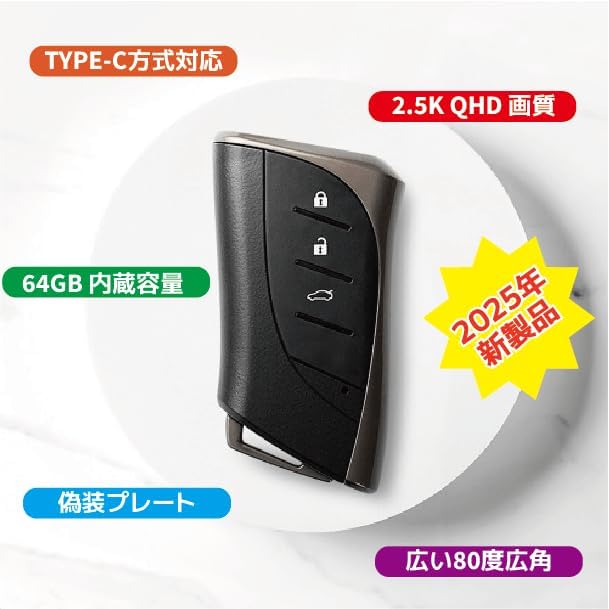
Figure 2.1: Key features of the DAMOACAM CK400FQHD.

Figure 2.2: Visual comparison of QHD (2560x1440p) and FHD (1920x1080p) video quality.

Figure 2.3: The 80-degree wide-angle lens captures a significantly larger area.
3. Kandungan Pakej
Pastikan semua item berikut disertakan dalam pakej anda:
- DAMOACAM CK400FQHD Main Unit
- Pemegang Kunci
- Kabel Jenis-C USB
- Instruction Manual (PDF download version)
- Product Warranty Card (PDF download version)

Figure 3.1: Included accessories: Key holder and USB Type-C cable.
4. Bermula (Persediaan)
4.1 Pengecasan Awal
Before first use, fully charge the device. Connect the included USB Type-C cable to the camera's Type-C port and the other end to a USB power source (e.g., computer USB port, USB wall adapter - sold separately). The indicator light will show charging status (refer to Section 5.1 for indicator light details).

Figure 4.1: Charging and data transfer via USB Type-C.
5. Operasi
5.1 Device Layout and Indicator Lights

Figure 5.1: Key components and controls of the camera.
The device features a hidden lens, a Power Button, an FHD Button, a QHD Button, a USB Type-C port for charging and data transfer, and an operation indicator light.
5.2 Rakaman Video
The camera supports two video resolutions: 2560x1440px (QHD) and 1920x1080px (FHD).
- Hidupkan kuasa: Press and hold the Power Button until the indicator light turns on.
- Pilih Resolusi:
- For QHD (2560x1440px) recording, press the QHD Button.
- For FHD (1920x1080px) recording, press the FHD Button.
- Mulakan Rakaman: Once the desired resolution is selected, the camera will automatically begin recording. The indicator light will typically blink or change color to indicate active recording.
- Hentikan Rakaman: Press the Power Button briefly to stop recording. The camera will save the current video file dan kembali ke mod siap sedia.
- Matikan: Press and hold the Power Button until the indicator light turns off completely.
5.3 Pemindahan Data
Untuk mengakses rakaman files, connect the camera to a computer using the provided USB Type-C cable. The camera will appear as a removable storage device. You can then copy video files ke komputer anda.
6. Penyelenggaraan
- Pastikan peranti bersih dengan mengelapnya dengan kain lembut dan kering.
- Avoid exposing the camera to extreme temperatures, humidity, or direct sunlight.
- Jangan cuba membuka atau mengubah suai peranti, kerana ini akan membatalkan jaminan.
- Simpan kamera di tempat yang sejuk dan kering apabila tidak digunakan.
7. Penyelesaian masalah
7.1 Isu Lazim
- Peranti tidak dihidupkan: Ensure the battery is sufficiently charged. Connect to a power source and try again.
- Cannot record video: Semak sama ada memori dalaman penuh. Pemindahan files to a computer to free up space. Ensure the battery has enough charge.
- Computer not recognizing the device: Try a different USB port or cable. Ensure the camera is powered on when connected.
- Device becomes warm during use: It is normal for the device to generate some heat during operation. This is not an abnormality.
If you encounter issues not listed here, please refer to the warranty and support section for assistance.
8. Spesifikasi
| Ciri | Spesifikasi |
|---|---|
| Nombor Model | CK400FQHD |
| Resolusi Video | 2560x1440px (QHD), 1920x1080px (FHD) |
| Kaedah Mampatan | H.264 (High Profile L4.1) |
| Kadar Bingkai | Sehingga 30 FPS |
| Bidang View | lebih kurang 80° |
| Memori Dalaman | 64GB |
| Recording Time (Full Charge) | Approx. 70 minutes (theoretical value, may vary) |
| Jenis Bateri | Lithium-ion bateri boleh dicas semula |
| Kaedah Pengecasan | USB Bus Power / AC Adapter (sold separately) |
| Dimensi Produk | lebih kurang 40 x 75 x 16 mm |
| Berat badan | lebih kurang 71g |
| Kalis air | Tidak |
| Suhu Operasi | 10℃~40℃ |
| Kelembapan Operasi | 20~80% RH (non-condensing) |
| OS yang disokong | Microsoft Windows |
| Negara Asal | Korea |
9. Maklumat Keselamatan Penting
- Do not use this product for any malicious acts that violate privacy laws or nuisance prevention ordinances.
- Keep the device away from water and moisture, as it is not waterproof.
- Elakkan daripada menjatuhkan atau meletakkan peranti kepada kesan yang kuat.
- Do not expose the device to open flames or extreme heat.
- Jauhkan daripada kanak-kanak.
10. Waranti dan Sokongan
This product comes with a warranty period of 6 months from the date of product arrival.
For technical support, troubleshooting assistance, or warranty claims, please contact your retailer or the DAMOACAM customer service. Please have your product model number (CK400FQHD) and purchase information ready when contacting support.