
pengenalan
Thank you for choosing the Mxmoonant Scent Air Machine, Model rad8. This waterless essential oil diffuser is designed to provide consistent and customizable fragrance for spaces up to 1500 sq.ft. Featuring smart app control, motion sensing capabilities, and a large 800ml oil reservoir, this device offers a convenient and efficient way to enhance your environment. Please read this manual thoroughly before operation to ensure proper use and maintenance.
Maklumat Keselamatan
- Use only pure essential oils or aroma oils specifically designed for waterless diffusers. Do not use water or other liquids.
- Jauhkan peranti daripada kanak-kanak dan haiwan peliharaan.
- Letakkan peresap pada permukaan yang stabil dan rata.
- Do not block the air outlet or inlet during operation.
- Cabut plag peranti sebelum membersihkan atau mengisi semula.
- Jangan buka atau cuba membaiki peranti itu sendiri. Hubungi sokongan pelanggan untuk mendapatkan bantuan.
- Avoid direct contact with essential oils, as they can cause irritation. In case of contact, wash thoroughly with water.
Kandungan Pakej
Sahkan bahawa semua item terdapat dalam pakej:
- Mxmoonant Scent Air Machine (Model rad8)
- Penyesuai Kuasa
- Perkakasan Pemasangan (skru, sauh dinding)
- Key for internal access
- Manual Pengguna

Image: The Mxmoonant Scent Air Machine shown with its power adapter, mounting screws, wall anchors, and a small key, illustrating the complete package contents.
Produk Selesaiview
Familiarize yourself with the main components of your scent air machine:
- Unit Utama: Houses the diffusion mechanism and control board.
- Takungan Minyak: 800ml capacity bottle for essential oils.
- Panel Kawalan: Located on the top, with indicator lights for intensity levels (Min, Low, Med, High, Max) and a manual mode shift button.
- Penderia Gerakan: Detects movement for automatic scent adjustment.
- Suis kuasa: On/Off switch, typically located on the side or back.
- Lock Design: A keyhole for secure internal access to the oil reservoir.
- Bottom Anti-skid Pad: Ensures stability on surfaces.

Image: A close-up showing the internal 800ml oil reservoir, the key lock mechanism, the manual mode shift button, the durable PP material of the casing, and the anti-skid pads on the base.
Persediaan
1. Penempatan Awal
Choose a suitable location for your diffuser. It can be placed on a flat surface or mounted on a wall using the provided hardware. Ensure the area is clear and allows for optimal scent dispersion.

Image: The scent air machine positioned discreetly in a modern living room, blending with the decor.
2. Mengisi Takungan Minyak
- Use the provided key to unlock and open the front panel of the diffuser.
- Carefully remove the empty oil bottle from its compartment.
- Unscrew the cap from the oil bottle.
- Fill the bottle with your desired waterless essential oil or aroma oil. Do not overfill.
- Screw the cap back onto the bottle securely.
- Insert the filled oil bottle back into the diffuser compartment.
- Close the front panel and lock it with the key.
3. Menghidupkan
- Connect the power adapter to the diffuser's power port.
- Palamkan penyesuai kuasa ke soket elektrik standard.
- Flip the power switch (usually located on the side or back) to the "ON" position. The indicator lights on the top panel will illuminate.
4. Muat Turun Apl dan Sambungan
The Mxmoonant Scent Air Machine can be controlled via a smartphone app. Scan the QR code in the manual or search for "Aroma Link" in your app store.
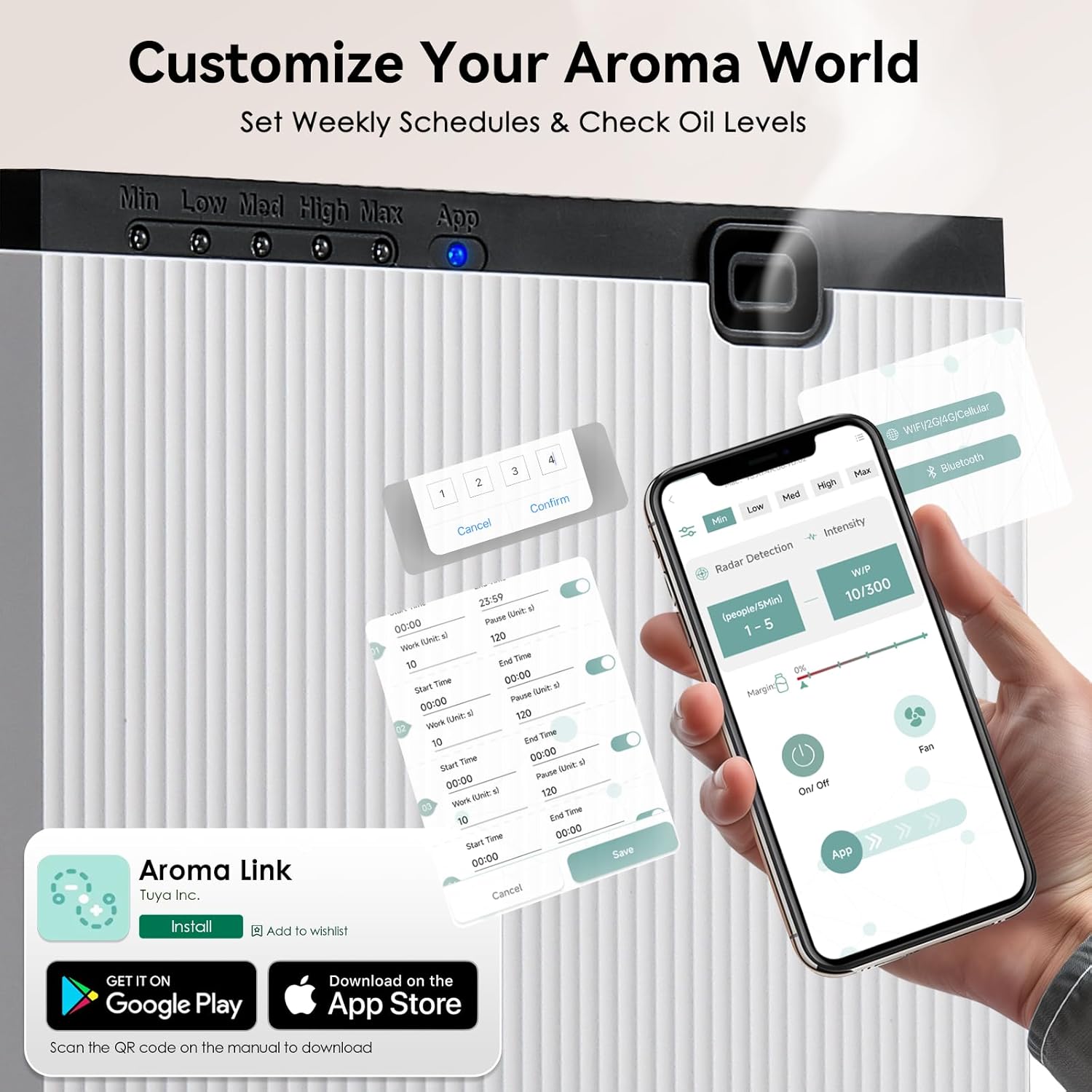
Image: A smartphone displaying the "Aroma Link" app, showing controls for work time, pause time, and radar detection settings.
- Download and install the "Aroma Link" app from the App Store (iOS) or Google Play Store (Android).
- Open the app and follow the on-screen instructions to register an account or log in.
- Add your device by selecting the appropriate model and following the pairing instructions. Ensure your phone's Bluetooth and Wi-Fi are enabled.
Arahan Operasi
1. Kawalan Manual
The device has a manual mode shift button on the top panel. Pressing this button cycles through different intensity levels (Min, Low, Med, High, Max), indicated by the LED lights. Each press changes the diffusion intensity.
2. Ciri Kawalan Aplikasi
The "Aroma Link" app provides comprehensive control over your diffuser:
- Hidup/Mati: Remotely turn the diffuser on or off.
- Pelarasan Intensiti: Customize spray frequency (Work Time: 5 to 900 seconds) and pause intervals (Pause Time). This allows for precise control over scent output to match room size and preference.
- Weekly Scheduling: Program up to 5 daily time slots from Monday to Sunday for automated operation. Set specific start and end times for diffusion.
- Motion Sensing (Radar Detection): Activate the motion sensor mode. The diffuser will adjust spray frequency based on occupancy within a 3m/10ft range. More people detected may result in longer spray times and shorter pause intervals. If no one is detected for 5 minutes, the system enters standby mode.
- Pemeriksaan Paras Minyak: Monitor the remaining essential oil level directly from the app.
- Kawalan Kipas: Control the built-in fan for faster and more even fragrance dispersion.

Image: A smartphone screen displaying the app's scheduling interface, allowing users to set specific work and pause times for each day of the week.

Image: An illustration demonstrating the motion sensor's 3-meter detection range and a table detailing how working time and pause time adjust based on the number of detected people.
Penyelenggaraan
1. Membersihkan Unit
To maintain optimal performance, clean the diffuser periodically:
- Cabut plag peranti daripada salur keluar kuasa.
- Lap bahagian luar peresap dengan lembut, damp kain. Jangan gunakan pembersih yang melelas atau rendam unit di dalam air.
- If changing essential oil types, it is recommended to clean the oil bottle. Empty any remaining oil, rinse the bottle with a small amount of rubbing alcohol, and let it air dry completely before adding new oil.
2. Refilling the Oil Reservoir
When the oil level is low (indicated by the app or reduced scent output), follow these steps:
- Cabut plag peranti.
- Unlock and open the front panel using the key.
- Keluarkan botol minyak.
- Unscrew the cap and refill with essential oil.
- Securely screw the cap back on and reinsert the bottle.
- Tutup dan kunci panel hadapan.
- Plug the device back in and turn it on.
Menyelesaikan masalah
| Masalah | Kemungkinan Punca | Penyelesaian |
|---|---|---|
| No scent output | Oil reservoir empty or low. Nozzle clogged. Device not powered on. | Refill oil. Clean nozzle with rubbing alcohol. Ensure power switch is ON and adapter is plugged in. |
| Aplikasi tidak dapat menyambung ke peranti | Bluetooth/Wi-Fi off. Device not in pairing mode. App error. | Ensure phone's Bluetooth/Wi-Fi is on. Restart diffuser and app. Re-attempt pairing process. |
| Scent is too weak/strong | Incorrect intensity settings. Room size mismatch. | Adjust work time and pause time in the app. Consider the room size relative to the diffuser's coverage. |
| Peranti mengeluarkan bunyi yang luar biasa | Normal operation (light vibration from air pump). Internal component issue. | A light vibration sound from the air pump is normal. If the noise is loud or unusual, unplug and contact support. |
Spesifikasi
| Ciri | Perincian |
|---|---|
| Jenama | Mxmoonant |
| Nama Model | rad8 |
| Ciri Khas | App Control, Motion Sensing |
| warna | putih |
| Liputan Keluasan Lantai | Sehingga 1500 Kaki Persegi |
| Mod Operasi | Automatic, Manual, App Controlled |
| Dimensi Produk | 4.17"P x 4.17"L x 9.45"T (106mm x 106mm x 240mm) |
| Oil Reservoir Capacity | 800 mililiter |
| Sumber Kuasa | Elektrik Bertali arus (12V, 10W) |
| Tahap Kebisingan | <40dBa |
| Berat Barang | 6 paun (lebih kurang 2.7 kg) |

Image: A visual representation of the diffuser's dimensions and a table summarizing its key specifications like voltage, power, noise, capacity, weight, scent coverage, and product size.
Waranti dan Sokongan
The Mxmoonant Scent Air Machine comes with a standard manufacturer's warranty. For detailed warranty information, product support, or service inquiries, please refer to the warranty card included in your package or visit the official Mxmoonant website. You can also contact customer service through your purchase platform.