
1. Produk Lebihview
The REVODATA Ultra HD 8MP Mini POE IP Camera (Model I706-3-P-HS82) is a compact indoor security camera designed for high-resolution surveillance. It features a 1.7mm fisheye lens providing a 180° viewing angle, 8MP (3840x2160P) resolution, and supports H.265/H.264 video encoding for efficient storage. Power over Ethernet (POE) capability simplifies installation by combining power and data transmission over a single cable. The camera also includes motion detection and P2P remote viewing via a smartphone application or VMS software.
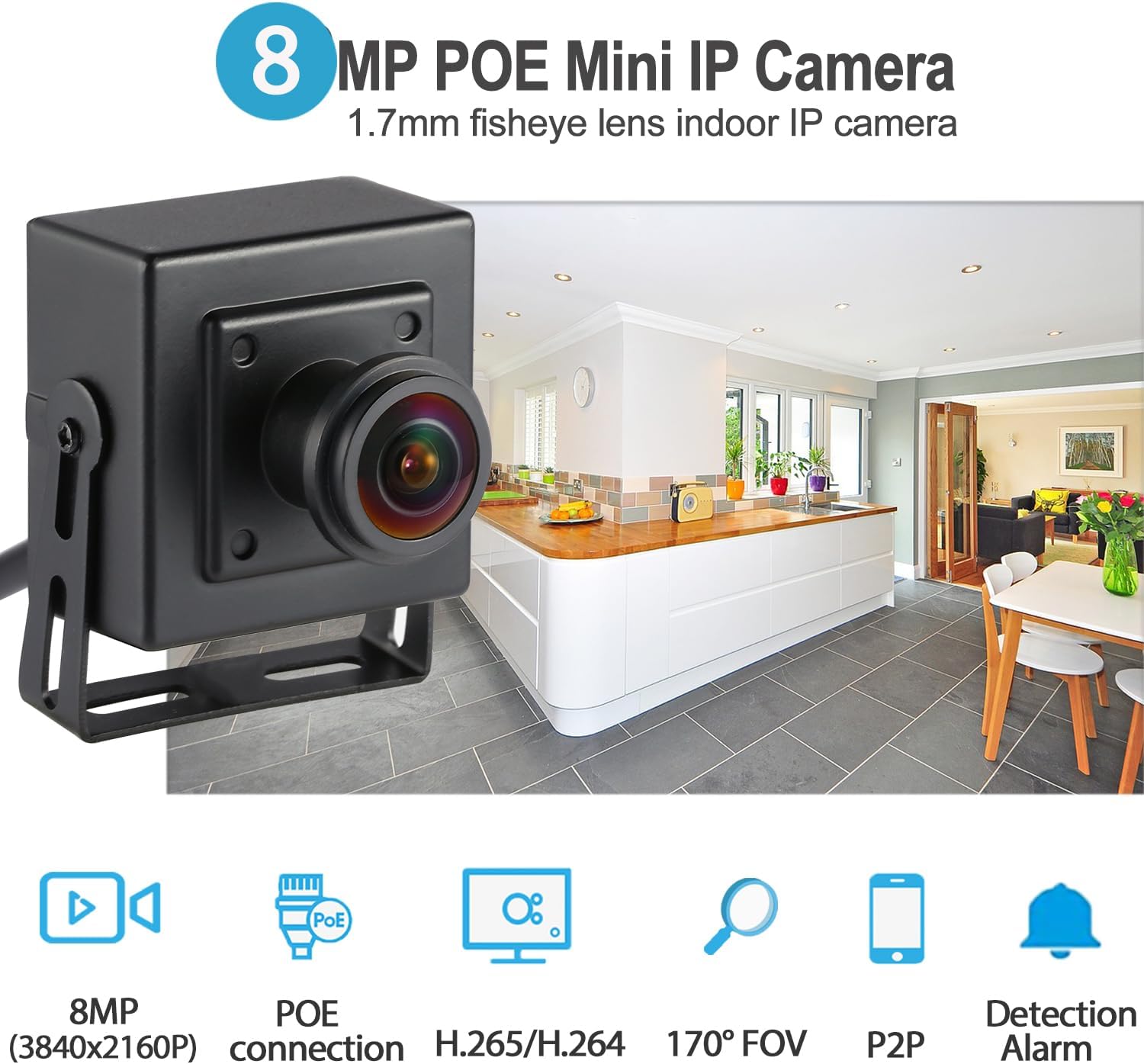
Image 1: REVODATA 8MP Mini POE IP Camera highlighting its compact design, 1.7mm fisheye lens, and key features like 8MP resolution, POE, H.265/H.264, 170° FOV, P2P, and Detection Alarm.

Image 2: Visual comparison demonstrating the clarity and detail provided by 8MP (4K) resolution compared to 2MP (1080P) resolution, showcasing the camera's high-definition capabilities.
2. Kandungan Pakej
Sahkan bahawa semua item terdapat dalam pakej anda:
- 1 x REVODATA Mini POE IP Camera (Model I706-3-P-HS82)
- 1 x Manual Arahan
- 1 x Screw Set for mounting

Image 3: Depiction of the package contents, including the camera, user manual, and screw set. Note that the power unit is not included.
3. Persediaan dan Pemasangan
3.1 Menguasakan Kamera
This camera supports Power over Ethernet (POE) and requires an external 802.3AF standard 48V POE switch or injector. Alternatively, it can be powered by a standard 12V 2A power supply (not included) via its auxiliary power interface, functioning as a non-POE network camera.

Image 4: Illustration of the POE cable connection, showing the POE LAN port (Data+Power) and an extra power port (DC 5.5x2.1mm) for flexible power options.
3.2 Memasang Kamera
The camera comes with an adjustable mounting bracket and a screw set for installation. It is designed for indoor use and can be mounted on a ceiling or other suitable surfaces. Ensure the camera is securely fastened to prevent accidental falls.

Image 5: Close-up of the mini camera design, emphasizing its small size for discreet placement and the 8MP resolution for clear images.
3.3 Connecting to VMS Software, Web Interface, and Smartphone APP
The camera can be accessed and managed through VMS software on a Windows computer, a web browser interface, or a smartphone application (iOS/Android). The following video demonstrates the connection process for these methods.
Video 1: This video provides a step-by-step guide on how to connect the REVODATA IP camera to VMS software, access its web interface via a browser, and set up remote viewing using a smartphone application. It covers initial login credentials and basic configuration steps.
Nota: Default username for VMS and web interface is 'admin'. Default password for VMS is 'admin', and for the web interface is '123456'. It is highly recommended to change these default credentials immediately after initial setup for security purposes.

Image 6: Screenshot showing the live view interface on both a mobile application (APP View) and VMS software (VMS View), demonstrating remote monitoring capabilities.
4. Arahan Operasi
4.1 Resolution and Encoding Settings
The camera defaults to 8MP resolution and H.265 encoding. If your Network Video Recorder (NVR) does not support 8MP or H.265, you can adjust the camera settings to 1080P (2MP) and H.264 encoding via the web interface or VMS software. H.265 encoding offers improved compression efficiency, reducing bandwidth and storage requirements by approximately 50% compared to H.264 for the same image quality.

Image 7: Diagram illustrating the benefits of H.265/H.264 dual encoding, showing 50% reduction in bandwidth and storage, and compatibility with both H.264 and H.265 devices.
4.2 Motion Detection and Alarm Function
The camera supports motion detection and alarm functions. When motion is detected, the camera can trigger an alarm and send notifications to your smartphone application. This feature helps in monitoring specific areas and receiving alerts for unusual activity.
Image 8: Visual representation of the motion detection alarm and P2P cloud function, showing a person triggering motion detection and a smartphone receiving an alarm message.
5. Penyelenggaraan
To ensure optimal performance and longevity of your REVODATA IP camera, follow these maintenance guidelines:
- Pembersihan: Gently wipe the camera lens and body with a soft, dry cloth. Avoid using harsh chemicals or abrasive materials that could damage the lens or casing.
- Suhu: The camera's small casing may cause it to feel warm during operation. This is normal and safe due to heat generation from the internal components. Ensure adequate ventilation around the camera.
- Kemas kini Firmware: Periksa pengeluar secara berkala webtapak untuk kemas kini perisian tegar bagi memastikan kamera anda mempunyai ciri terkini dan penambahbaikan keselamatan.
- Keadaan Persekitaran: This camera is designed for indoor use. Avoid exposing it to extreme temperatures, high humidity, direct water, or corrosive environments.
6. Penyelesaian masalah
- Kamera Tidak Dihidupkan:
Ensure the POE switch/injector is providing 48V 802.3AF standard power, or that a 12V 2A power supply is correctly connected. Check all cable connections.
- Tiada Suapan Video:
Verify network connectivity. Ensure the camera is properly added to the VMS software or smartphone app. Check the IP address and port settings. If using a web browser, confirm the correct IP address is entered.
- Kualiti Imej Lemah:
The camera defaults to 8MP (H.265). If your NVR or viewing device does not support these specifications, adjust the camera's resolution to 1080P (2MP) and encoding to H.264 in the camera's settings via the web interface or VMS software. Ensure the lens is clean.
- Cannot Log In:
The default username is 'admin'. The default password for VMS is 'admin', and for the web interface is '123456'. If you have changed the password and forgotten it, you may need to perform a factory reset (refer to the full manual for specific instructions, if available, or contact support).
- Pengesanan Pergerakan Tidak Berfungsi:
Check motion detection settings in the camera's configuration. Ensure the detection area is correctly defined and sensitivity is adjusted appropriately. Verify that alarm notifications are enabled in the app settings.
7. Spesifikasi
| Ciri | Spesifikasi |
|---|---|
| Nama Model | I706-3-P-HS82 |
| Resolusi | 8MP (3840x2160P) |
| Sensor | 1/2.7 inch CMOS (Hi3516CV610+GC8613) |
| Minimum Lighting | 0.005Lux @ (F1.2, AGC HIDUP) |
| Kelajuan Pengatup | 1/25 sec - 1/100,000 sec |
| Kadar Bingkai | 8MP/20fps |
| Format Mampatan | H.264 / H.265 |
| Lensa | 1.7mm Fisheye Lens |
| Viewsudut | 180° |
| Jenis Pelekap Lensa | M12 |
| Penyimpanan | NVR or PC (No Cloud Storage support) |
| Alamat IP | Dynamic (default) / Static |
| Penggera Pintar | Motion Detection, Email Alarm |
| Protokol yang Disokong | HTTP, TCP/IP, RTSP, RTP, UPNP, SMTP, DHCP, DDNS, DNS, FTP, NTP |
| Protokol Masuk | Standard NVR ONVIF port |
| Ethernet | 10M/100M Mbit/s (RJ-45) |
| Suhu Operasi | -25°C ~ 60°C |
| Kelembapan Bekerja | 10% ~ 90% |
| Bekalan Kuasa | POE (802.3AF) or DC 12V 2A (adapter not included) |
| Dimensi | 5.3cm x 4.5cm x 4cm (2.09 x 1.77 x 1.57 inci) |
| Berat badan | 0.2 kg |
| Bahan Kepungan | logam |
| Peranti Serasi | Android, iOS, Windows |
8. Waranti dan Sokongan
For warranty information and technical support, please refer to the documentation included with your purchase or visit the official REVODATA website. If you encounter any issues not covered in this manual, please contact REVODATA customer service for assistance.
Pengeluar: REVODATA
Webtapak: REVODATA Store on Amazon