
pengenalan
Thank you for choosing the Infinity X1 Solar Path & Motion Security Lights. These outdoor LED stake lights are designed to provide both ambient path illumination and enhanced security through motion activation. Featuring a durable, weatherproof design and solar-powered operation, they offer a convenient and energy-efficient lighting solution for your yard, walkway, or garden.
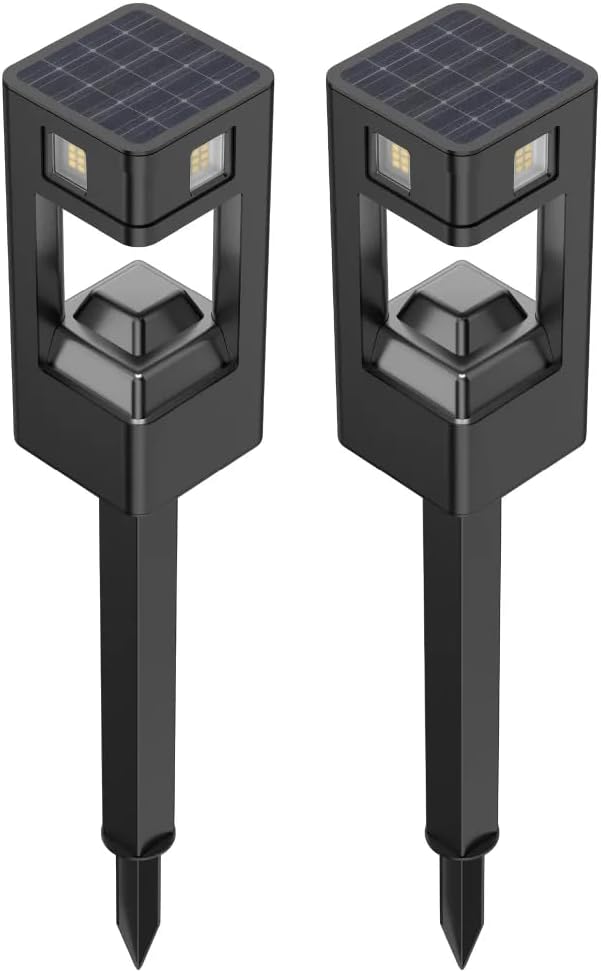
This image displays two Infinity X1 solar path and motion security lights. Each light features a square design with a solar panel integrated into the top surface and an LED light source below, mounted on a stake for ground installation.
Ciri-ciri Produk
- Mod Pencahayaan Dwi: Offers 50 lumens for continuous dusk-to-dawn path lighting and up to 500 lumens for motion-activated security lighting.
- Berkuasa Suria: Equipped with a 2.8Wh (5.5V/500mA) monocrystalline silicon solar panel for efficient charging.
- Penderia Gerakan: Integrated microwave motion sensor with 360-degree detection range.
- Kecerahan boleh laras: Motion-activated mode features selectable brightness levels of 150, 250, or 500 lumens.
- Reka Bentuk Kalis Cuaca: IPX4 water resistance rating ensures durability in outdoor conditions.
- Long Operation: Memberikan pencahayaan sehingga 8 jam dengan cas penuh.
- Pemasangan Mudah: Stake mount design for simple placement in ground.

The product packaging shows two lights, emphasizing their dual functionality: 50 lumens for dusk-to-dawn path lighting and 500 lumens for motion-activated security lighting. The box indicates a 2-pack.
Kandungan Pakej
Sahkan bahawa semua komponen terdapat dalam pakej anda:
- 2 x Infinity X1 Solar Path & Motion Security Lights
- 2 x Pancang Tanah
- 1 x Manual Pengguna (dokumen ini)
Pemasangan dan Pemasangan
Follow these steps to assemble and install your solar lights:
- Buka Pembungkusan Komponen: Keluarkan semua item dari bungkusan dengan berhati-hati.
- Pasang Pancang: Attach the ground stake to the bottom of the light unit. Ensure it is securely fastened.
- Caj Permulaan: Before first use, place the solar lights in direct sunlight for at least 8 hours to allow the internal battery to fully charge. Ensure the solar panel is clean and unobstructed.
- Pilih Lokasi: Pilih lokasi luar yang menerima ample direct sunlight throughout the day. Avoid areas under eaves, trees, or other obstructions that may block sunlight or cast shadows on the solar panel.
- Masukkan ke dalam Tanah: Gently push the assembled light, with the stake, into soft ground. Do not force the light into hard soil, as this may damage the stake or the unit. If the ground is too hard, moisten it or use a tool to create a pilot hole.
- Laraskan Kepala Cahaya: The light head can be rotated 360 degrees to direct the light and optimize motion detection coverage.

A detailed image of the light's upper section, featuring the solar panel and light housing. An arrow illustrates the 360-degree detection and rotational capability of the light head, allowing for adjustable coverage.

A technical drawing providing the physical dimensions of the light, including its total height (24 inches / 61.21 cm), the height of the light head (7 inches / 18 cm), and the stake length (12 inches / 30.48 cm, with a 5-inch / 12.7 cm ground insertion).
Arahan Operasi
The Infinity X1 Solar Lights offer two primary operating modes: Dusk-to-Dawn Path Light and Motion-Activated Security Light. These modes are typically selected via switches located on the underside of the light head.
Pemilihan Mod
Locate the control switches on the underside of the light's top section. These switches allow you to configure the light's behavior.

This close-up reveals the control interface on the underside of the light's top section. Two small switches are visible: one for adjusting the motion detection delay (e.g., 10 or 15 seconds) and another for selecting motion-activated brightness levels (150, 250, or 500 lumens).
- Dusk-to-Dawn Path Light (50 Lumens): In this mode, the light will automatically turn on at dusk at a constant 50-lumen brightness and remain on until dawn or until the battery is depleted. This mode is ideal for continuous ambient lighting.
- Motion-Activated Security Light (Up to 500 Lumens): In this mode, the light remains off or at a very low standby level until motion is detected within its 360-degree range. Upon detection, the light will illuminate at a higher brightness (selectable) for a set duration.
Adjusting Motion-Activated Brightness and Delay
Use the switches to customize the motion-activated mode:
- Pemilihan Kecerahan: One switch allows you to choose the brightness level when motion is detected: 150 lumens, 250 lumens, or 500 lumens. Select the desired intensity based on your security needs.
- Kelewatan Pengesanan: Another switch controls the duration the light stays on after motion is no longer detected. Common settings include 10 seconds or 15 seconds.
The light will automatically charge during the day and operate according to the selected mode at night.

A graphic representation of the light's two primary illumination modes: a constant 50 lumens for path lighting and a brighter 500 lumens when motion is detected, highlighting the difference in output.
Penyelenggaraan
Regular maintenance ensures optimal performance and longevity of your solar lights:
- Panel Suria Bersih: Lap panel solar secara berkala dengan lembut, damp kain untuk menanggalkan habuk, kotoran dan serpihan. Panel yang bersih memastikan penyerapan cahaya matahari maksimum dan pengecasan yang cekap.
- Halangan yang jelas: Ensure that no leaves, snow, or other objects are covering the solar panel or the light sensor.
- Penjagaan Bateri: While the internal battery is designed for long life, consistent exposure to direct sunlight is crucial for its health. Avoid prolonged storage in a discharged state.
- Periksa Kerosakan: Regularly check the light unit and stake for any signs of physical damage.
Menyelesaikan masalah
If your Infinity X1 Solar Light is not functioning as expected, consider the following:
- Light Does Not Turn On at Night:
- Ensure the light has received at least 8 hours of direct sunlight for initial charging.
- Pastikan panel solar bersih dan bebas daripada halangan.
- Check if the light is placed in an area with sufficient direct sunlight during the day.
- Confirm that the light is not positioned near other strong light sources (e.g., streetlights), which might prevent the dusk-to-dawn sensor from activating.
- Light is Dim or Only Stays On for a Short Time:
- The battery may not be fully charged. Ensure the light receives adequate direct sunlight for a full day.
- Bersihkan panel solar untuk meningkatkan kecekapan pengecasan.
- Environmental factors like cloudy weather or shorter winter days can reduce charging efficiency.
- Penderia Gerakan Tidak Mengaktifkan:
- Ensure the light head is rotated to cover the desired detection area.
- Verify that the motion sensor is not obstructed.
- Check the selected brightness and delay settings on the control switches.
Spesifikasi
| Jenama | Infiniti X1 |
| Nombor Model | 1806287 |
| Sumber Kuasa | Berkuasa Suria |
| Jenis Sumber Cahaya | LED |
| Brightness (Dusk-to-Dawn) | 50 Lumen |
| Brightness (Motion Activated) | 150 / 250 / 500 Lumens (Selectable) |
| Pengesanan Pergerakan | 360° Microwave Motion Sensor |
| Panel Suria | 2.8Wh (5.5V/500mA) Monocrystalline Silicon |
| Voltage | 5.5 Volt (DC) |
| Tahap Ketahanan Air | IPX4 (Tahan Air) |
| Jenis Pemasangan | Mount Stake |
| Dimensi Produk | 3 x 3 x 24 inci (7.62 x 7.62 x 60.96 cm) |
| Berat Barang | 2.72 paun (1.23 kg) |
| Perhimpunan Diperlukan | ya |
Maklumat Keselamatan
Sila baca dan patuhi garis panduan keselamatan berikut:
- Jangan cuba membuka atau mengubah suai produk. Ini boleh membatalkan jaminan dan menimbulkan risiko keselamatan.
- Keep the solar panel clean to ensure proper charging.
- Avoid placing the light in areas where it may be submerged in water, despite its water-resistant rating.
- Ensure the ground stake is firmly inserted to prevent the light from falling over.
- Do not stare directly into the LED light source when illuminated, as it may cause temporary vision impairment.
Waranti dan Sokongan
For warranty information or technical support, please refer to the product packaging or contact Infinity X1 customer service directly. Keep your purchase receipt for warranty claims.