
1. Pengenalan
This manual provides detailed instructions for the setup, operation, and maintenance of your FREEWOLF M75 Wireless Dual-Mode Keyboard. Please read this manual thoroughly before using the product to ensure proper functionality and longevity.

Image 1.1: The FREEWOLF M75 Wireless Dual-Mode Keyboard, showcasing its compact layout and gradient keycaps.
2. Kandungan Pakej
Sebelum meneruskan dengan persediaan, sila sahkan bahawa semua item terdapat dalam pakej:
- FREEWOLF M75 Keyboard x 1
- Kabel USB-C x 1
- 2.4GHz Wireless Receiver x 1
- Manual Pengguna x 1

Image 2.1: Contents of the FREEWOLF M75 keyboard package, including the keyboard, USB-C cable, 2.4GHz receiver, and user manual.
3. Arahan Persediaan
3.1 Mengecas Papan Kekunci
The M75 keyboard is equipped with a 2000mAh rechargeable battery. For optimal performance, fully charge the keyboard before first use.
- Connect the supplied USB-C cable to the keyboard's charging port.
- Sambungkan hujung kabel USB-C yang satu lagi ke sumber kuasa USB (cth., port USB komputer, penyesuai dinding).
- The OLED display will indicate charging status. A full charge provides approximately 150 hours of use with the backlight off, or 24 hours with the backlight on.

Image 3.1: Visual representation of the M75 keyboard's 2000mAh battery, highlighting its estimated usage duration with and without backlighting.
3.2 Menyambung Papan Kekunci
The M75 keyboard supports dual-mode connectivity: 2.4GHz wireless and Bluetooth 5.1/5.2.

Image 3.2: The M75 keyboard demonstrating its dual-mode connection capabilities, supporting 2.4GHz wireless and Bluetooth for various devices.
3.2.1 Sambungan Wayarles 2.4GHz
- Locate the 2.4GHz wireless receiver in the package.
- Plug the 2.4GHz receiver into an available USB port on your computer or compatible device.
- Turn on the keyboard using the switch located on the right side.
- The keyboard will automatically connect to the receiver. The OLED display will show the 2.4G connection status.
3.2.2 Sambungan Bluetooth
The M75 keyboard supports up to two Bluetooth devices (BT1 and BT2).
- Turn on the keyboard using the switch on the right side.
- Tekan dan tahan butang Fn kunci dan BT1 or BT2 key (usually located on the right side near the OLED display) for 3-5 seconds until the indicator light flashes, indicating pairing mode.
- On your device (Windows PC, MacBook, Linux system, tablet, or smartphone), navigate to Bluetooth settings and search for new devices.
- Select "FREEWOLF M75" from the list of available devices to pair.
- Once connected, the OLED display will show the corresponding Bluetooth connection status (BT1 or BT2).
- To switch between connected Bluetooth devices, short press Fn + BT1 or Fn + BT2.
4. Arahan Operasi
4.1 Multi-functional Knob and OLED Display
The M75 keyboard features a multi-functional knob and an OLED display for enhanced control and information.

Imej 4.1: Jarak dekat view of the M75 keyboard's multi-functional knob and OLED display, detailing their functions and indicators.
- Kefungsian Tombol:
- Rotate left/right: Adjusts system volume.
- Press down: Play/Pause media.
- Press down for 5 seconds: Adjusts backlight brightness.
- Paparan OLED: Shows real-time information including battery level, current connection mode (2.4G, BT1, BT2), charging status, and low battery warnings.
4.2 Kawalan Lampu Latar
The M75 keyboard features rainbow backlighting.
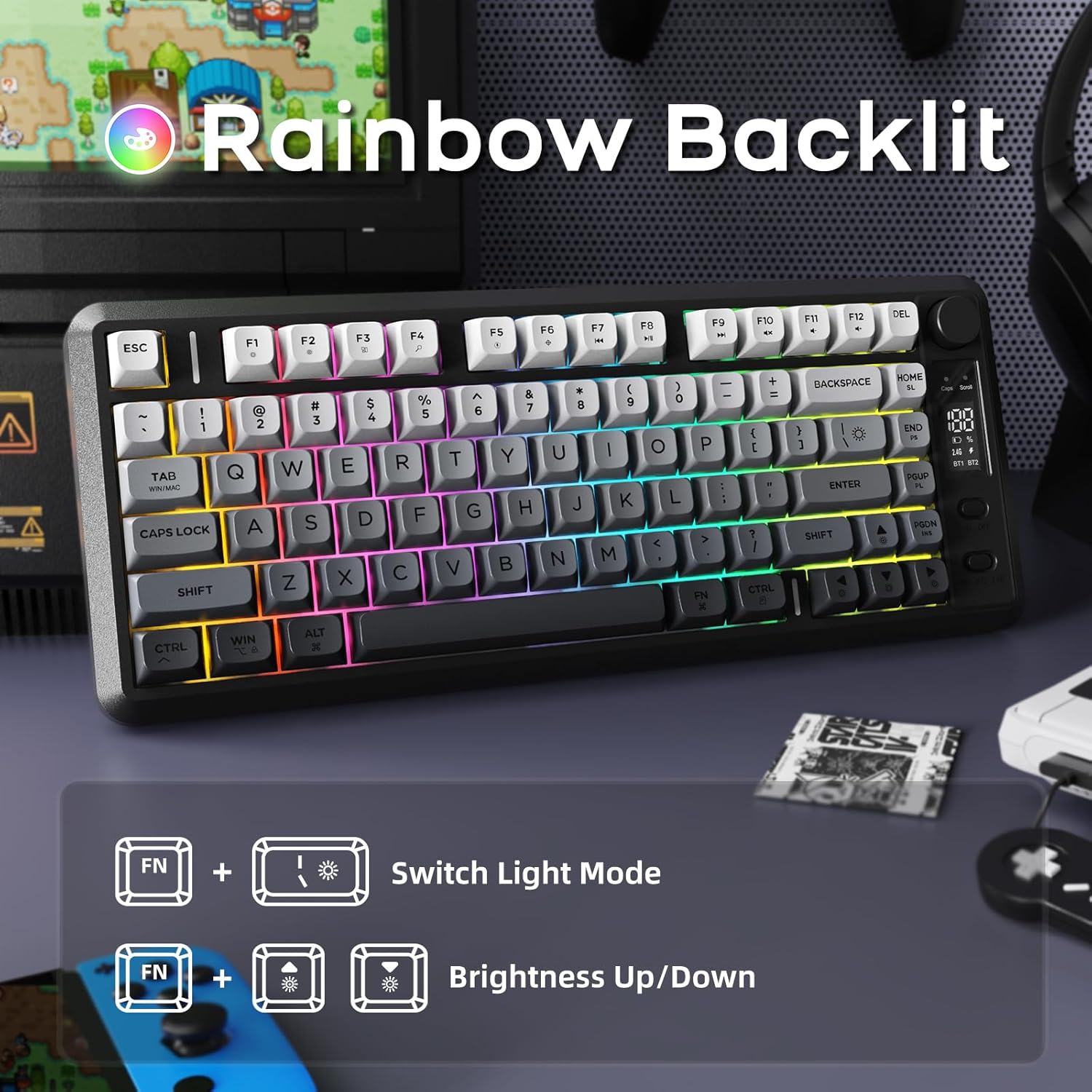
Image 4.2: Instructions for controlling the M75 keyboard's rainbow backlight, showing key combinations for mode switching and brightness adjustment.
- Tekan Fn + I: Switches between different backlight modes.
- Tekan Fn + ↑ (Up Arrow): Increases backlight brightness.
- Tekan Fn + ↓ (Down Arrow): Decreases backlight brightness.
Note: The keycaps are opaque, meaning the light illuminates around the keys, not through the legends.
4.3 Anti-Ghosting
The M75 keyboard features 26-key rollover technology, ensuring that multiple simultaneous key presses are registered accurately without conflicts. This is particularly beneficial for gaming and fast typing.

Image 4.3: Illustration of the M75 keyboard's 26-key anti-ghosting feature, highlighting its compact 75% layout.
5. Penyelenggaraan
5.1 Membersihkan Papan Kekunci
Untuk mengekalkan rupa dan fungsi papan kekunci:
- Putuskan sambungan papan kekunci daripada semua sumber kuasa dan peranti sebelum membersihkan.
- Gunakan kain lembut dan tidak berbulu sedikit dampdisapu dengan air atau larutan pembersih lembut untuk mengelap penutup kekunci dan permukaan.
- Elakkan menggunakan bahan kimia yang keras, bahan yang melelas atau kelembapan berlebihan.
- Untuk habuk dan serpihan di antara kunci, gunakan udara termampat.
5.2 Penjagaan Bateri
Untuk memanjangkan hayat bateri:
- Elakkan menyahcas sepenuhnya bateri dengan kerap.
- Simpan papan kekunci di tempat yang sejuk dan kering apabila tidak digunakan untuk tempoh yang lama.
- If the keyboard will not be used for a long time, charge it to about 50% before storage.
6. Penyelesaian masalah
If you encounter issues with your FREEWOLF M75 keyboard, refer to the following common solutions:
| Masalah | Kemungkinan Punca | Penyelesaian |
|---|---|---|
| Keyboard not connecting via 2.4GHz | Receiver not plugged in, keyboard off, low battery, interference. | Ensure receiver is securely plugged in. Turn keyboard on. Charge keyboard. Try a different USB port. |
| Papan kekunci tidak bersambung melalui Bluetooth | Keyboard not in pairing mode, device Bluetooth off, already connected to another device, low battery. | Ensure keyboard is in pairing mode (Fn+BT1/BT2 long press). Enable Bluetooth on your device. Disconnect from other devices. Charge keyboard. |
| Lampu latar tidak berfungsi atau malap | Backlight turned off, brightness set to minimum, low battery. | Press Fn+I to cycle modes. Press Fn+↑ to increase brightness. Charge keyboard. |
| Keys not responding or ghosting | Low battery, software issue, physical obstruction. | Charge keyboard. Restart your computer. Clean under keycaps. |
| Paparan OLED tidak menunjukkan maklumat | Keyboard off, low battery, display issue. | Ensure keyboard is on and charged. If issue persists, contact support. |
| Kehabisan bateri yang cepat | Backlight constantly on at high brightness, frequent use. | Reduce backlight brightness or turn it off when not needed. Ensure keyboard is fully charged. |
7. Spesifikasi
| Ciri | Perincian |
|---|---|
| Jenama | FREEWOLF |
| Model | M75 |
| Teknologi Ketersambungan | Tanpa Wayar 2.4G, Bluetooth 5.1/5.2 |
| Penerangan Papan Kekunci | Membrane, Wireless |
| Bahan Keycaps | Polybutylene Terephthalate (PBT) |
| Ciri Khas | Backlit, Ergonomic, Rechargeable, Silent, Volume Roller, OLED Display, Anti-Ghosting |
| Kapasiti Bateri | 2000mAh |
| Anggaran Hayat Bateri | 150 hours (backlight off), 24 hours (backlight on) |
| Peranti Serasi | Laptop, PC, Tablet (Windows, MacBook, Linux) |
| Berat Barang | 1.65 paun |
| Dimensi Pakej | 15.75 x 6.02 x 1.89 inci |
8. Waranti dan Sokongan
For warranty information and technical support, please refer to the documentation included with your purchase or contact the manufacturer directly. Keep your proof of purchase for warranty claims.
Manufacturer: FREEWOLF


