
RASTKY RASTKYxhm9bnta1g
RASTKY Smart Voice Translator User Manual
Model: RASTKYxhm9bnta1g
1. Pengenalan
Thank you for choosing the RASTKY Smart Voice Translator. This device is designed to facilitate seamless communication across language barriers, offering high-accuracy online, offline, and photo translation capabilities. Its portable design and intuitive interface make it an ideal companion for travelers, language learners, and anyone needing quick and reliable translation.
This manual provides detailed instructions on how to set up, operate, and maintain your translator to ensure optimal performance and longevity.
2. Maklumat Keselamatan
Please read all safety instructions carefully before using the device to prevent damage or injury.
- Jangan dedahkan peranti kepada suhu yang melampau, cahaya matahari langsung atau kelembapan yang tinggi.
- Elakkan daripada menjatuhkan atau meletakkan peranti kepada kesan yang kuat.
- Jangan cuba membuka atau membaiki peranti sendiri. Rujuk kepada kakitangan perkhidmatan yang berkelayakan.
- Jauhkan peranti daripada air dan cecair lain.
- Use only the provided or approved charging cable and adapter.
- Buang peranti dan baterinya secara bertanggungjawab mengikut peraturan tempatan.
3. Produk Lebihview
Familiarize yourself with the components and controls of your RASTKY Smart Voice Translator.

Rajah 3.1: Depan View
This image shows the front of the RASTKY Smart Voice Translator, featuring the 2.4-inch touch screen, the "YOU" button (left), the camera button (center), and the "ME" button (right). Below the buttons is the speaker grille.
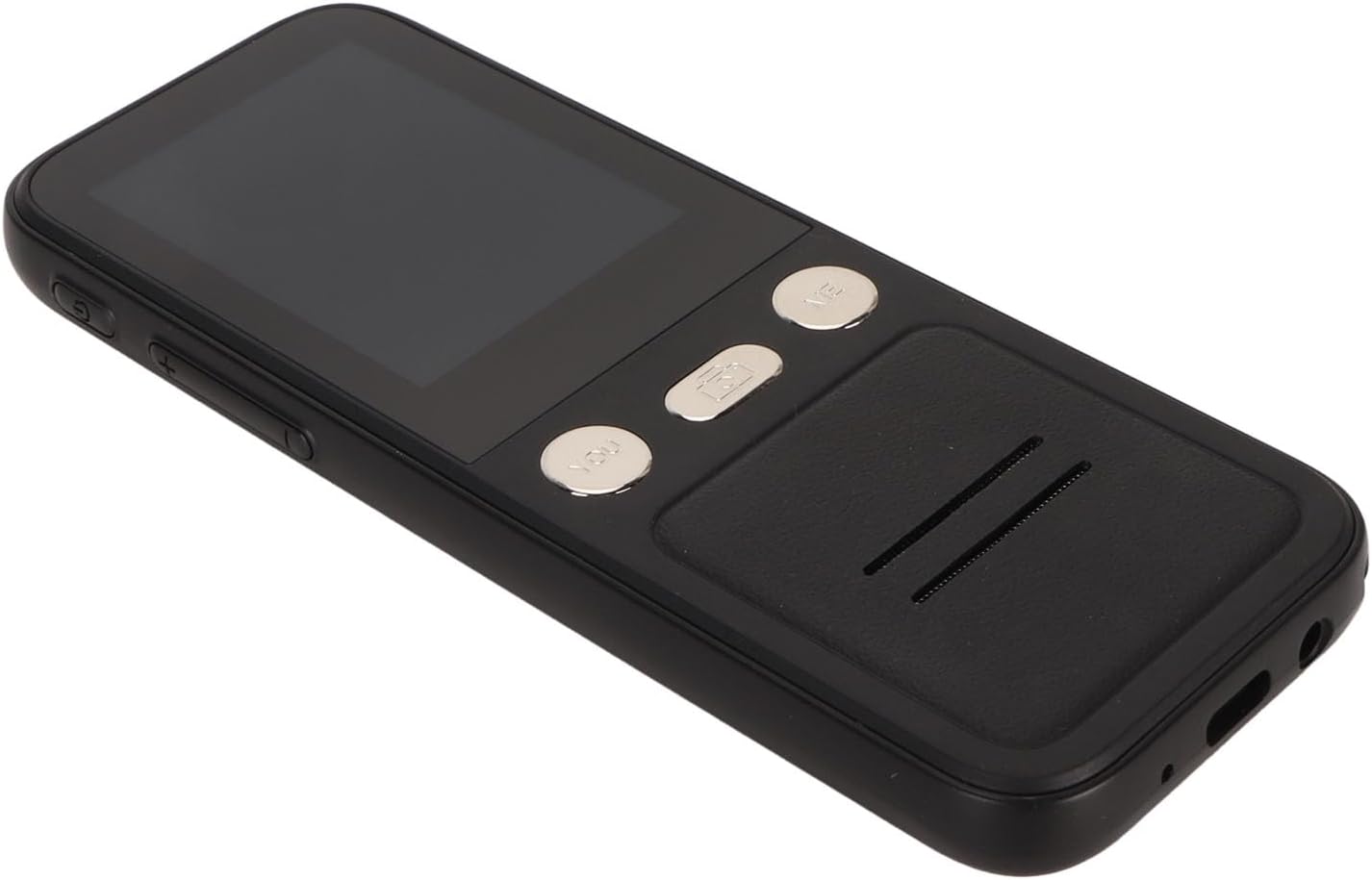
Rajah 3.2: Sisi View
This image displays the side of the translator, highlighting the power button and volume control buttons located on the left side of the device.

Rajah 3.3: Depan dan Belakang View
This image presents both the front and back of the translator. The back shows the "SMART CAMERA" lens and text indicating "charge Type-c USB=1.0Amax", along with compliance markings.

Figure 3.4: Bottom Ports
Satu jarak dekat view of the bottom of the device, showing the USB Type-C charging port and a 3.5mm headphone jack.
3.1. Komponen Peranti
- Skrin Sentuh 2.4-inci: For navigation and displaying translations.
- "YOU" Button: Press and hold to speak your language for translation.
- "ME" Button: Press and hold for the other person to speak their language for translation.
- Butang Kamera: Activates the 5MP camera for photo translation.
- Butang Kuasa: Menghidupkan/mematikan peranti dan mengunci/membuka kunci skrin.
- Butang Kelantangan: Melaraskan kelantangan output audio.
- Penceramah: Mengeluarkan audio yang diterjemahkan.
- mikrofon: Captures speech for translation.
- Port USB Jenis-C: Untuk mengecas peranti.
- Bicu Fon Kepala 3.5mm: For private listening of translations.
4. Persediaan
4.1. Mengecas Peranti
Before first use, fully charge your translator. A full charge typically takes approximately 2-3 hours.
- Connect the provided USB Type-C cable to the charging port at the bottom of the device.
- Sambungkan hujung kabel USB yang satu lagi ke penyesuai kuasa USB yang serasi (tidak disertakan) atau port USB komputer.
- The charging indicator on the screen will show the charging status.

Figure 4.1: Device and Charging Cable
This image shows the RASTKY Smart Voice Translator alongside its USB Type-C charging cable, illustrating the components included for charging.
4.2. Menghidupkan/Mematikan
- Untuk Menghidupkan: Press and hold the Power button (located on the side) for approximately 3 seconds until the screen lights up.
- Untuk Mematikan: Press and hold the Power button for approximately 3 seconds. A power-off menu will appear on the screen. Select "Power Off" to shut down the device.
- Kunci/Buka Kunci Skrin: Tekan butang Kuasa sebentar untuk mengunci atau membuka kunci skrin.
4.3. Persediaan Awal dan Sambungan Wi-Fi
Upon first power-on, you may be prompted to select your preferred language and connect to a Wi-Fi network. A Wi-Fi connection is recommended for the most accurate and comprehensive translation services, including access to 112 online languages.
- Follow the on-screen prompts to select your system language.
- Navigasi ke tetapan > Wi-Fi.
- Pilih rangkaian Wi-Fi yang anda inginkan daripada senarai dan masukkan kata laluan jika perlu.
- Sebaik sahaja disambungkan, ikon Wi-Fi akan muncul pada bar status.
5. Arahan Operasi
5.1. Terjemahan Suara Dalam Talian (112 Bahasa)
This mode provides the highest accuracy and widest range of languages.
- Ensure the device is connected to Wi-Fi.
- On the main translation screen, select the source language (your language) and the target language (the language you want to translate to) by tapping on the language names at the top of the screen.
- To speak your language, press and hold the "YOU" button (left button). Speak clearly into the microphone. Release the button when you finish speaking.
- Peranti akan memaparkan dan menuturkan terjemahan dalam bahasa sasaran.
- To have the other person speak, press and hold the "ME" button (right button). They should speak clearly into the microphone. Release the button when they finish speaking.
- The device will display and speak the translation in your language.
5.2. Terjemahan Suara Luar Talian (10 Bahasa)
The device supports 10 default offline languages. Additional offline language packs can be downloaded via Wi-Fi for use without an internet connection.
- Default Offline Languages: Simplified Chinese, Traditional Chinese, English, German, Spanish, French, Japanese, Korean, Russian, and Thai.
- To Download More Offline Languages: Connect to Wi-Fi, navigate to tetapan > Terjemahan Luar Talian, and select the language packs you wish to download.
- Once downloaded, the offline translation process is similar to online translation, using the "YOU" and "ME" buttons.
5.3. Terjemahan Foto (43 Bahasa)
The 5MP camera allows you to translate text from images, such as signs, menus, or documents.
- Ensure the device is connected to Wi-Fi for optimal photo translation accuracy.
- Ketik pada Butang kamera on the device's front panel or select the Photo Translation option from the main menu on the screen.
- Point the camera at the text you wish to translate. Ensure the text is well-lit and clear within the frame.
- Tap the capture button on the screen to take a photo.
- The device will process the image and display the translated text on the screen. You can select the source and target languages for photo translation.
5.4. Pemilihan Bahasa
To change the translation languages:
- On the main translation screen, tap on the language displayed for "YOU" (your language) to open the language list. Select your desired language.
- Tap on the language displayed for "ME" (the other person's language) to open the language list. Select their desired language.
- For photo translation, language selection options will appear within the photo translation interface.
6. Penyelenggaraan
Proper care will extend the life of your RASTKY Smart Voice Translator.
- Pembersihan: Use a soft, dry, lint-free cloth to clean the device. For stubborn smudges on the screen, slightly dampLap kain dengan air atau pembersih skrin. Jangan gunakan bahan kimia yang keras atau bahan yang melelas.
- Storan: Simpan peranti di tempat yang sejuk dan kering jauh dari cahaya matahari langsung dan suhu yang melampau apabila tidak digunakan untuk tempoh yang lama.
- Penjagaan Bateri: Untuk mengekalkan hayat bateri, elakkan daripada menyahcas sepenuhnya bateri dengan kerap. Cas peranti dengan kerap, walaupun tidak digunakan secara berterusan.
7. Penyelesaian masalah
If you encounter issues with your translator, refer to the following common problems and solutions.
| Masalah | Kemungkinan Punca | Penyelesaian |
|---|---|---|
| Peranti tidak dihidupkan. | Bateri lemah; peranti beku. | Charge the device for at least 30 minutes. If still unresponsive, press and hold the Power button for 10-15 seconds to force a restart. |
| Translation is inaccurate or slow. | Poor Wi-Fi connection; unclear speech; incorrect language selection. | Ensure a stable Wi-Fi connection. Speak clearly and at a moderate pace. Verify that the correct source and target languages are selected. |
| Photo translation not working. | Poor lighting; blurry image; text not recognized. | Ensure adequate lighting. Hold the device steady to avoid blur. Make sure the text is within the camera frame and clearly legible. |
| Tiada bunyi dari pembesar suara. | Kelantangan terlalu rendah; pembesar suara tersumbat. | Increase the volume using the volume buttons. Check if anything is blocking the speaker grille. |
| Tidak dapat menyambung ke Wi-Fi. | Kata laluan salah; di luar julat; isu rangkaian. | Double-check the Wi-Fi password. Move closer to the Wi-Fi router. Restart your router and the translator. |
8. Spesifikasi
Technical specifications for the RASTKY Smart Voice Translator.
- model: RASTKYxhm9bnta1g
- Saiz Skrin: Skrin Sentuh 2.4 Inci
- Resolusi: 240 x 320
- Kapasiti Bateri: 1500mAh (Terbina dalam)
- Main Balik Berterusan: 6 jam atau lebih
- RAM: 1GB
- ROM: 8GB
- kamera: 5MP Pixels
- Kaedah rangkaian: WIFI Networking
- Antara Muka Data: Antara Muka Jenis C
- Pengecaman Pertuturan: For Google SR
- Translation Engine: For Google, for iFlytek
- Online Supported Languages: 112
- Offline Supported Languages: 10 (Simplified Chinese, Traditional Chinese, English, German, Spanish, French, Japanese, Korean, Russian, Thai)
- Photo Translation Languages: 43
- Dimensi: Kira-kira 6.69 x 3.15 x 1.57 inci
- Berat: Kira-kira 8 auns
9. Waranti dan Sokongan
RASTKY products are manufactured to the highest quality standards. For warranty information and customer support, please refer to the warranty card included with your purchase or visit the official RASTKY website. Please have your model number (RASTKYxhm9bnta1g) and purchase details ready when contacting support.
For further assistance, you may also contact your retailer.
Ask a question about this manual
Ask about setup, troubleshooting, compatibility, parts, safety, or missing instructions. Manuals+ will review the question and use this page’s manual context to help answer it.