
TOPTRO TP1
Manual Pengguna Projektor Pintar TOPTRO TP1
Model: TP1
1. Pengenalan
This manual provides detailed instructions for the setup, operation, and maintenance of your TOPTRO TP1 Smart Projector. The TP1 is designed to deliver a high-quality home cinema experience with its native 1080P resolution, 4K decoding support, integrated smart system with licensed streaming applications, Dolby Audio, and advanced connectivity options.
2. Produk Lebihview
2.1 Kandungan Pakej
- Projektor Pintar TOPTRO TP1
- Kord Kuasa
- Kabel HDMI
- Alat Kawalan Jauh
- Manual Pengguna
- Kit Pembersihan
2.2 Ciri-ciri Utama
- Officially Licensed Streaming Apps: Access Netflix, Prime Video, YouTube, and more directly.
- Sokongan Audio Dolby: Enhanced sound experience with built-in 2*10W speakers.
- Native 1080P Resolution: Full HD display with 4K video decoding capability.
- 800 ANSI Lumen: Bright and clear image projection.
- Pendirian Boleh Laras 360°: Flexible projection angles for various surfaces.
- Auto Focus & Auto Keystone: Automatic image correction for quick setup.
- WiFi 6 & Two-Way Bluetooth 5.2: Fast wireless connectivity and versatile audio options.
- Pelbagai Kaedah Pemasangan: Supports ceiling, desktop, tripod, and wall mounting.

Image 2.1: The TOPTRO TP1 Smart Projector, showcasing its compact design and integrated stand. Key features such as Netflix, 1080P, Dolby Audio, and Auto Focus are visually represented around the projector.
3. Panduan Persediaan
3.1 Sambungan Kuasa
- Sambungkan kord kuasa ke port input kuasa projektor.
- Pasangkan hujung kord kuasa yang satu lagi ke dalam soket elektrik yang sesuai.
- Tekan butang kuasa pada projektor atau alat kawalan jauh untuk menghidupkan peranti.
3.2 Penempatan Awal
Position the projector on a stable surface. The 360° adjustable stand allows for flexible placement, including projecting onto walls or ceilings. Ensure the projection path is clear of obstructions.
3.3 Alat Kawalan Jauh
Insert two AAA batteries (not included) into the remote control. Point the remote control towards the projector's IR receiver for optimal response.
3.4 Sambungan Rangkaian
- Upon first startup, follow the on-screen prompts to select your language and region.
- Navigate to the network settings and select your desired Wi-Fi network.
- Enter the Wi-Fi password to establish a connection. The projector supports Wi-Fi 6 (5G/2.4G dual-band) for stable streaming.
4. Arahan Operasi
4.1 Smart System Navigation
The TOPTRO TP1 features an intelligent system with pre-installed applications. Use the remote control's directional buttons and 'OK' button to navigate the interface. The home screen provides access to streaming services, apps, and settings.

Image 4.1: The projector displaying its smart interface, featuring icons for Netflix, YouTube, Prime Video, Hulu, Plex, and an open browser, accessible via the remote control.
4.2 Aplikasi Penstriman
Directly access officially licensed applications such as Netflix, Prime Video, and YouTube. Log in with your existing accounts to enjoy a wide range of content. Ensure a stable internet connection for optimal streaming performance.
4.3 Main Semula Media
The projector supports playback from various sources:
- Pemacu USB: Insert a USB drive into the USB port to play local media files.
- Input HDMI: Connect external devices like laptops, gaming consoles (PS5), or TV sticks via the HDMI port.
- Pencerminan Skrin Wayarles: Connect iOS and Android smartphones or iPads wirelessly (Google phones are not supported for direct mirroring).
5. Ketersambungan
5.1 Wi-Fi 6
The TP1 is equipped with the latest Wi-Fi 6 technology, supporting both 5G and 2.4G dual-band frequencies. This ensures a smoother and more stable wireless connection for streaming and online activities.
5.2 Two-Way Bluetooth 5.2
The two-way Bluetooth 5.2 functionality allows the projector to:
- Connect to External Speakers: Pair with Bluetooth-enabled speakers for enhanced audio output.
- Act as a Bluetooth Speaker: Stream audio from your phone or laptop to the TP1, utilizing its built-in speakers.

Image 5.1: The TOPTRO TP1 Projector demonstrating its Wi-Fi 6 and two-way Bluetooth 5.2 capabilities, showing wireless connection to external speakers and a smartphone for gaming.
5.3 Physical Ports
The projector includes the following ports:
- Port HDMI: For connecting devices like Fire TV Stick, Roku, laptops, and gaming consoles.
- Port USB: Untuk menyambungkan pemacu USB.
- Bicu Fon Kepala 3.5mm: For connecting wired headphones or external speakers.
5.4 CEC & ARC Functions
The HDMI port supports CEC (Consumer Electronics Control) and ARC (Audio Return Channel) functions:
- CEC: Allows you to control connected HDMI devices (e.g., a TV stick) using the projector's remote control. To enable, select the HDMI signal source, enter settings via the remote's menu button, and turn on CEC.
- ARC: Enables audio output from the projector to an ARC-compatible speaker or soundbar connected via HDMI. Ensure the external audio device is set to HDMI ARC mode.
6. Ciri Audio
The TOPTRO TP1 is equipped with advanced audio capabilities to enhance your viewpengalaman dalam.
6.1 Dolby Audio Support
Experience rich and clear sound effects with Dolby Audio support, providing an immersive audio environment for movies and music.
6.2 Pembesar Suara Terbina dalam
The projector features two integrated 10W speakers, delivering robust sound output suitable for most environments. For larger spaces or enhanced audio, external speakers can be connected via Bluetooth or the 3.5mm audio jack.

Image 6.1: The TOPTRO TP1 Projector creating an immersive audio experience with Dolby Audio, projecting an image of a cellist with sound waves illustrating the audio output.
7. Pelarasan Imej
The TP1 projector offers several features for optimizing image quality and projection alignment.
7.1 Auto Fokus
The projector automatically adjusts the focus to ensure a sharp and clear image. This feature activates upon startup or when the projector is moved.
7.2 Pembetulan Auto Keystone
The auto keystone function automatically corrects vertical image distortion, ensuring a rectangular screen even when the projector is placed at an angle.
7.3 4-Point Correction
For precise image alignment, the 4-point correction feature allows manual adjustment of each corner of the projected image to achieve a perfect rectangular shape.
7.4 Digital Zoom (50%-100%)
Adjust the size of the projected image from 100% down to 50% without physically moving the projector, providing flexibility for various screen sizes and distances.

Image 7.1: Visual representation of the projector's Auto Focus, Auto Vertical Keystone, 4-Point Correction, and Digital Zoom capabilities, ensuring a clear and properly aligned image.
7.5 Projection Throw Ratio
With a 1.1:1 projection throw ratio, the TP1 can project a large screen even in small spaces, making it suitable for various room sizes.
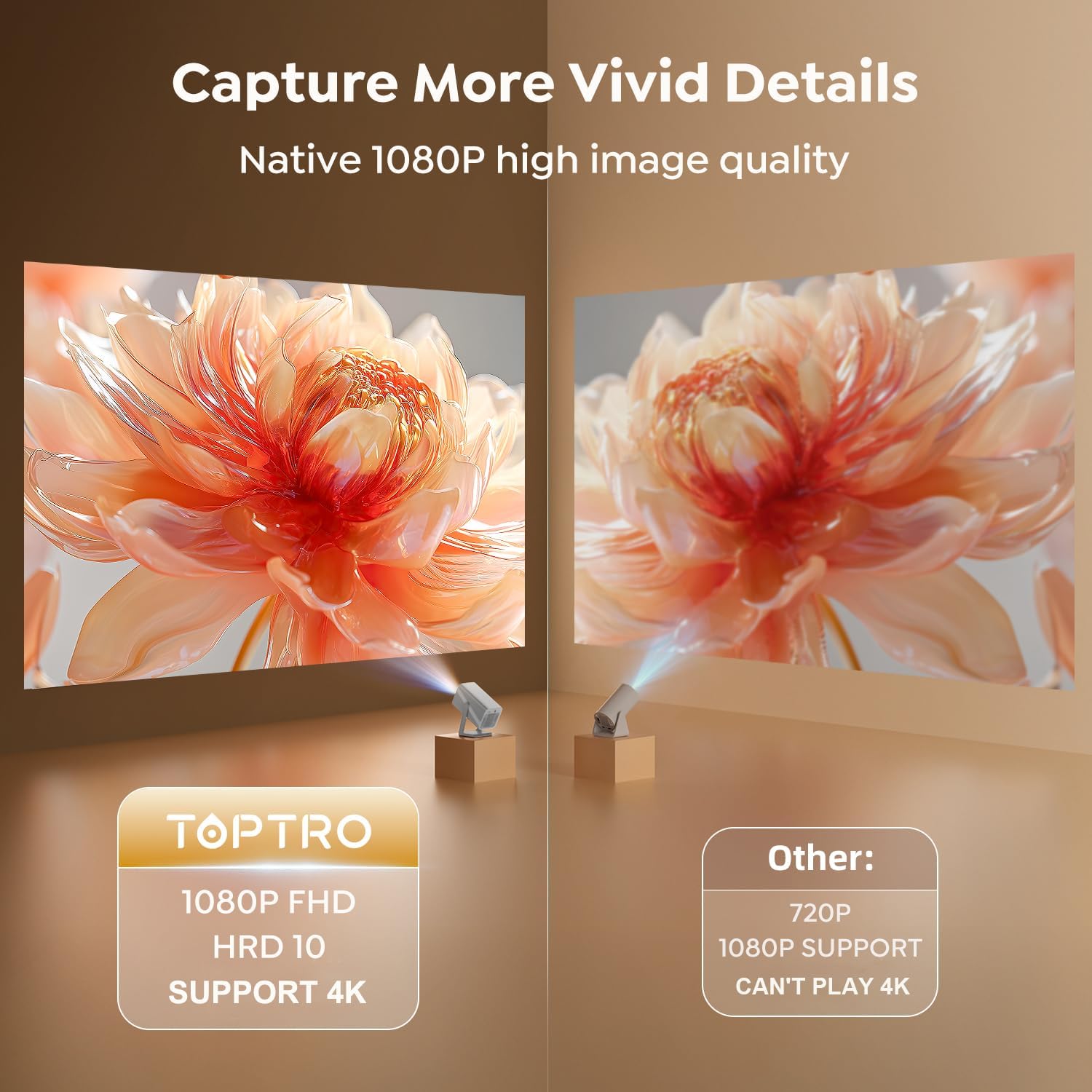
Image 7.2: A side-by-side comparison illustrating the superior clarity and detail of the TOPTRO TP1's native 1080P FHD image quality compared to a standard 720P projector.
8. Kaedah Pemasangan
The TOPTRO TP1 projector offers versatile installation options to suit different environments and preferences.
8.1 360° Rotatable Stand
The integrated 360° rotatable stand allows you to easily adjust the projection angle, enabling projection onto walls, ceilings, or floors without additional accessories.

Image 8.1: The TOPTRO TP1 Projector positioned to project an image onto the ceiling, highlighting the flexibility of its 360° adjustable stand.
8.2 Pilihan Pemasangan
The projector supports various mounting configurations:
- Desktop/Meja: Letakkan projektor pada permukaan rata.
- Tripod: Utilize the 1/4'' screw hole on the base to mount the projector on a tripod.
- Lekapan Siling: Secure the projector to the ceiling using a compatible mount (sold separately).
- Pemasangan Dinding: Attach the projector to a wall using a compatible mount (sold separately).
9. Spesifikasi
| Ciri | Spesifikasi |
|---|---|
| Jenama | TOPTRO |
| Nombor Model | TP1 |
| Dimensi Produk | 24 x 12.2 x 11.6 cm |
| Berat Barang | 1.1 kg |
| warna | Perak |
| Faktor Bentuk | Mudah alih |
| Native Screen Resolution | 1920 x 1080 (FHD) |
| Resolusi Paparan Maksimum | 3840 x 2160 (4K Decoding) |
| Kecerahan | 800 ANSI Lumen |
| Jenis Paparan | LCD |
| Teknologi Ketersambungan | 3.5mm Jack, Bluetooth 5.2, HDMI, USB, Wi-Fi 6 (5G/2.4G) |
| Voltage | 110 Volt |
| Wattage | 60 watt |
| Ciri Khas | 360° Rotatable Stand, Auto Keystone Correction, Precise Focus, Digital Zoom, Built-in Officially-Licensed Apps (Netflix/Prime Video/YouTube), Dolby Audio, Built-In 2*10W Speakers, Two-way Bluetooth 5.2 |
| Penggunaan yang Disyorkan | Pendidikan, Permainan, Pawagam Rumah |
| Jenis Pemasangan | Ceiling/Floor/Tabletop/Wall Mount |
10. Penyelesaian masalah
This section addresses common issues you might encounter with your TOPTRO TP1 projector.
10.1 Tiada Imej atau Imej Kabur
- Semak Kuasa: Pastikan projektor disambungkan kepada kuasa dengan betul dan dihidupkan.
- Fokus Auto: Allow the projector a few seconds to perform auto-focus. If still blurry, manually adjust focus via settings.
- Pembetulan Keystone: Verify auto keystone correction is active or perform 4-point correction manually if the image is distorted.
- Kebersihan kanta: Use the provided cleaning kit to gently clean the projector lens.
10.2 Tiada Bunyi
- Tahap Kelantangan: Periksa tetapan kelantangan projektor dan pastikan ia tidak disenyapkan.
- Audio Luaran: If using external speakers, ensure they are properly connected (Bluetooth or 3.5mm jack) and their volume is adjusted. For ARC, confirm the external device is set to HDMI ARC mode.
- Sumber Audio: Verify the audio output settings on your connected source device (e.g., laptop, TV stick).
10.3 Isu Sambungan Wi-Fi
- Ketersediaan Rangkaian: Pastikan rangkaian Wi-Fi anda aktif dan dalam julat.
- kata laluan: Semak semula kata laluan Wi-Fi untuk ketepatannya.
- Mula Semula Penghala: Cuba mulakan semula penghala Wi-Fi anda.
- Gangguan Isyarat: Move the projector closer to the router or away from potential interference sources.
10.4 Alat Kawalan Jauh Tidak Bertindak Balas
- Bateri: Gantikan bateri dalam alat kawalan jauh.
- Garis penglihatan: Ensure there is a clear line of sight between the remote and the projector's IR receiver.
11. Waranti dan Sokongan
TOPTRO is committed to providing reliable products and excellent customer service.
11.1 Maklumat Waranti
- 1-Year Money-Back Guarantee: If you are not satisfied with your purchase, you may be eligible for a full refund within one year.
- 3-Year Free Replacement Warranty: The projector is covered by a three-year warranty for free replacement in case of manufacturing defects.
- Sokongan Teknikal Seumur Hidup: TOPTRO provides professional technical support for the lifetime of the product.
11.2 Hubungi Sokongan
Should you encounter any issues or require assistance, please refer to the quick guide included in your package for contact details. TOPTRO aims to provide a solution within 24 hours of your inquiry.
Ask a question about this manual
Ask about setup, troubleshooting, compatibility, parts, safety, or missing instructions. Manuals+ will review the question and use this page’s manual context to help answer it.