
pengenalan
Welcome to the user manual for your new OnePlus 13s smartphone. This guide provides essential information on setting up, operating, maintaining, and troubleshooting your device. The OnePlus 13s combines powerful performance with advanced AI features and a compact design.
- Prestasi Elit: Powered by the Snapdragon 8 Elite processor, the OnePlus 13s delivers high performance for demanding tasks, supported by a Cryo-Velocity cooling system.
- Smarter Everyday: Experience OxygenOS 15 with integrated OnePlus AI features like AI Plus Mind, Intelligent Search, and Google Gemini for enhanced productivity and organization.
- Jangka Hayat Bateri: Equipped with a 5850mAh battery and 80W SUPERVOOC Fast Charge, ensuring long-lasting power and quick recharging.
- Reka bentuk padat: Features a 16.05cm (6.32-inch) ProXDR display in an ergonomic form factor, offering a comfortable viewing and handling experience.
- Sistem Kamera Lanjutan: Capture clear images with a 32MP autofocus front camera and dual 50MP rear cameras, including features like Clear Burst.
- Ketersambungan yang Dipertingkatkan: Includes an independent G1 Wi-Fi chipset, 5.5G support, and a 360-degree antenna system for reliable network connections.
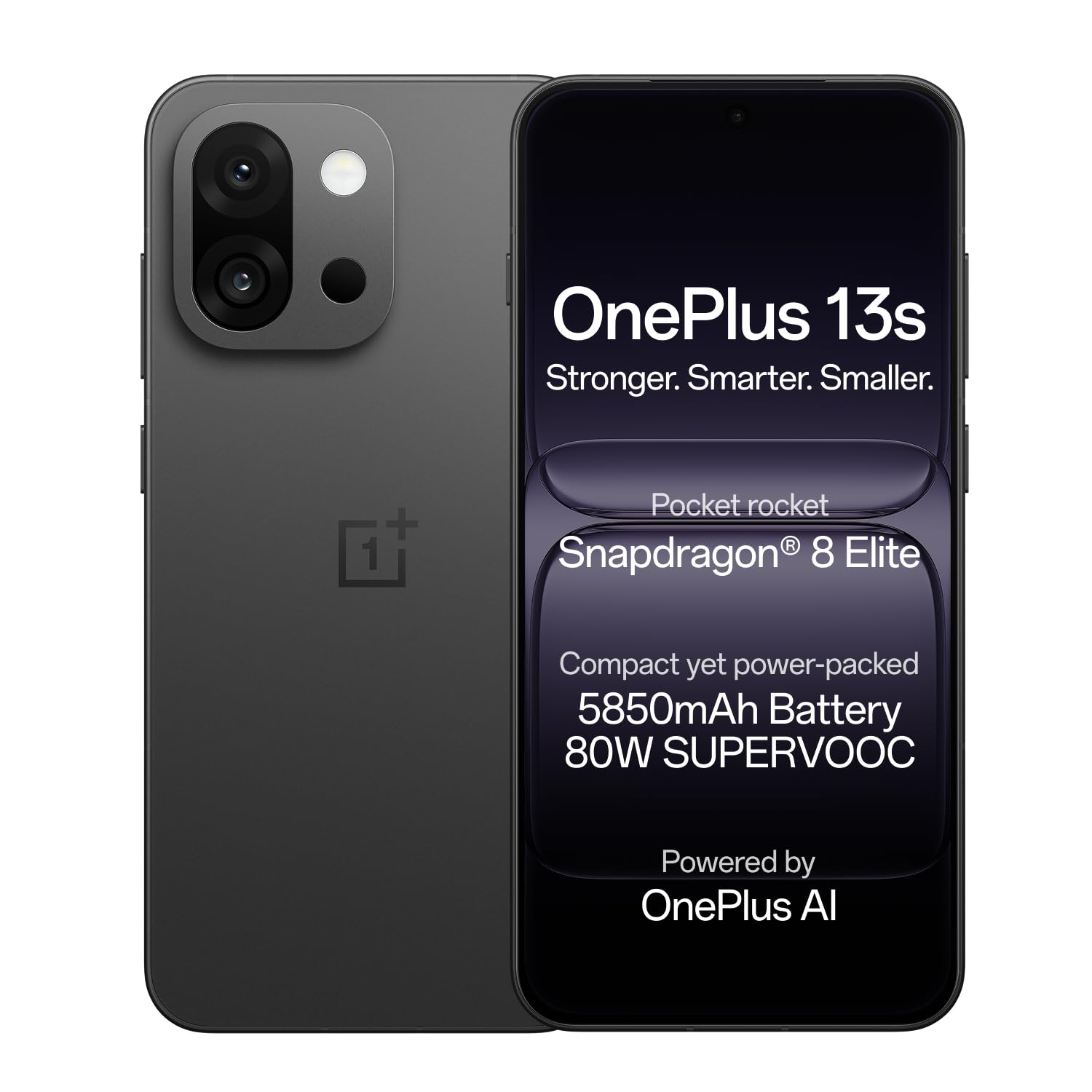
Image: OnePlus 13s smartphone in Black Velvet.
Panduan Persediaan
1. Unboxing dan Pemeriksaan Awal
Carefully unbox your OnePlus 13s. Verify that all components are present and undamaged.
Kandungan Kotak:
- OnePlus 13s Smartphone
- Penyesuai Kuasa
- Kabel USB
- Ejector Dulang SIM
- Sarung Telefon
- Pelindung Skrin (yang telah dipasang atau di dalam kotak)
2. Memasukkan Kad SIM
- Cari dulang kad SIM di sisi peranti anda.
- Masukkan alat ejektor dulang SIM ke dalam lubang kecil di sebelah dulang dan tekan perlahan-lahan sehingga dulang terkeluar.
- Place your Nano SIM card(s) into the tray with the gold contacts facing down. The OnePlus 13s supports Dual SIM.
- Masukkan semula dulang SIM dengan berhati-hati ke dalam telefon sehingga ia berbunyi klik pada tempatnya.

Imej: Sisi view of the OnePlus 13s, indicating the SIM tray location.
3. Hidupkan dan Persediaan Awal
- Press and hold the Power button (usually on the right side) until the OnePlus logo appears.
- Ikut arahan pada skrin untuk memilih bahasa anda, sambung ke Wi-Fi dan sediakan akaun Google anda.
- Configure security features such as fingerprint recognition and a screen lock (PIN, pattern, or password).
4. Mengecas Peranti
Before first use, it is recommended to fully charge your OnePlus 13s. Use the provided 80W SUPERVOOC Power Adapter and USB Cable for optimal charging speed.
- Connect the USB cable to the power adapter and then to the USB Type-C port on your phone.
- Palamkan penyesuai kuasa ke salur keluar dinding.
- The device will indicate charging status on the screen. A full charge takes approximately 63 minutes.

Imej: Dalaman view of the OnePlus 13s highlighting the 5850mAh battery and SUPERVOOC charging.
Arahan Operasi
1. Navigasi Asas
- Skrin sentuh: Interact with the device using taps, swipes, pinches, and long presses on the 120Hz ProXDR AMOLED display.
- Pengecaman Cap Jari: Unlock your device quickly and securely using the in-display fingerprint sensor.
- Butang Kuasa: Press to lock/unlock the screen. Press and hold to power off or restart the device.
- Butang Kelantangan: Laraskan kelantangan media, kelantangan panggilan dan kelantangan pemberitahuan.
2. OxygenOS 15 and AI Features
Your OnePlus 13s runs on OxygenOS 15, which includes several AI-powered enhancements:
- AI Plus Mind: Organize schedules, events, and information efficiently.
- Carian Pintar: Power your search using natural, conversational prompts.
- AI Voice Scribe: Record, translate, and summarize VoIP and video calls across applications.
- Google Gemini: Utilize Google's personal AI assistant for various tasks, including writing, planning, and learning.

Image: OxygenOS 15 interface demonstrating the AI Plus Mind feature.

Image: OxygenOS 15 interface demonstrating the AI Search feature.
3. Penggunaan Kamera
The OnePlus 13s features a versatile camera system for capturing photos and videos.
- Kamera Belakang: Dual 50MP sensors for high-resolution photos and 20x digital zoom.
- Kamera Depan: 32MP with autofocus for clear selfies and video calls.
- Clear Burst: Utilize this feature to capture fast-moving subjects without missing key moments.
- AI Unblur: Automatically unblur photos of people or pets.
- AI Detail Boost: Enhance sharp details, even when zooming in on images.

Imej: Terperinci view of the OnePlus 13s camera module, showing 50MP AF Wide, 50MP AF Telephoto, and 32MP AF Front cameras.

Image: Demonstration of the AI Unblur feature, showing a blurred and unblurred photo of a cat.
4. Ketersambungan
The OnePlus 13s supports various connectivity options:
- Selular: 5G network support for fast mobile data.
- Wi-Fi: Independent G1 Wi-Fi chipset for enhanced wireless performance.
- Bluetooth: Untuk menyambung aksesori wayarles.
- NFC: Untuk pembayaran tanpa sentuh dan gandingan pantas.
- USB Jenis-C: Untuk pengecasan dan pemindahan data.

Imej: Dalaman view of the OnePlus 13s, emphasizing the independent Wi-Fi chipset for next-gen connectivity.
Penyelenggaraan
1. Penjagaan Bateri
- To prolong battery lifespan, avoid extreme temperatures.
- Use only the official OnePlus 80W SUPERVOOC charger and cable.
- Elakkan daripada mengalirkan bateri sepenuhnya dengan kerap.
2. Kemas Kini Perisian
Regularly check for and install software updates to ensure optimal performance, security, and access to new features. Updates are delivered via OxygenOS 15.
- Pergi ke tetapan > Perihal peranti > OxygenOS.
- Ketik Semak kemas kini dan ikut gesaan pada skrin.
3. Membersihkan Peranti Anda
- Gunakan kain lembut dan tidak berbulu untuk membersihkan skrin dan badan.
- Elakkan bahan kimia yang keras atau bahan yang melelas.
- The device is water resistant; however, avoid intentional submersion.
Menyelesaikan masalah
If you encounter issues with your OnePlus 13s, try the following common troubleshooting steps:
- Peranti Tidak Membalas: Tekan dan tahan butang Kuasa selama kira-kira 10-15 saat untuk memaksa mulakan semula.
- Isu Pengecasan: Pastikan pengecas dan kabel disambungkan dengan selamat dan tidak rosak. Cuba salur keluar kuasa yang berbeza.
- Ranap Apl: Clear the cache and data for the problematic app (Settings > Apps > [App Name] > Storage > Clear cache/Clear data). If the issue persists, reinstall the app.
- Kesambungan Rangkaian: Toggle Airplane Mode on and off. Restart your device. Check your SIM card insertion. For Wi-Fi, forget the network and reconnect.
- Prestasi Perlahan: Close unnecessary background apps. Clear system cache (refer to online guides for your specific OxygenOS version). Consider a factory reset as a last resort (back up your data first).
For persistent issues, refer to the Support section for contact information.
Spesifikasi
| Ciri | Perincian |
|---|---|
| Jenama | OnePlus |
| Model | 13an |
| Sistem Operasi | Android 15, OxygenOS |
| Model CPU | Snapdragon 8 Elite (4.32 GHz) |
| Memori RAM | 12 GB |
| Kapasiti Storan | 256 GB |
| Saiz Paparan | 6.32 Inci |
| Jenis Paparan | AMOLED, 120Hz ProXDR |
| Resolusi | 2640×1216 Pixels (460 PPI) |
| Kamera Belakang | Dual 50 MP (Optical Sensor Resolution) |
| Kamera Depan | 32 MP (Autofokus) |
| Kapasiti Bateri | 5850 mAh (Lithium-Ion) |
| Mengecas | 80W SUPERVOOC Fast Charge (63 mins for full charge) |
| Ketersambungan | 5G, Wi-Fi (Independent G1 chipset), Bluetooth, NFC, USB Type C |
| Keselamatan Biometrik | Pengecaman Cap Jari |
| Tahan Air | Tahan Air |
| Dimensi | 15.1 x 7.2 x 0.8 Sentimeter |
| Berat badan | 185 Gram |
| Tahun Model | 2025 |
Maklumat Waranti
Your OnePlus 13s comes with the following warranty coverage:
- Waranti Pengilang: 1 year manufacturer warranty for the device from the date of purchase.
- Jaminan Aksesori: 1 year manufacturer warranty for in-box accessories, including batteries, from the date of purchase.
- Lifetime Display Warranty: OnePlus provides a lifetime display warranty for industry-wide greenline issues.
Please retain your proof of purchase for warranty claims. For detailed terms and conditions, refer to the official OnePlus webtapak atau hubungi sokongan pelanggan.

Image: Information regarding the OnePlus Lifetime Display Warranty.
Sokongan
For further assistance or inquiries, please contact OnePlus Customer Service:
- Customer Service Contact Number: 1800 102 8411
- Sokongan WhatsApp: +91-9289606888
- Alamat Pengilang: OPPO Mobiles India Private Limited, PLOT-NO.1, SECTOR ECOTECH-VII, GREATER, NOIDA, UTTAR PRADESH, India-201306
- Visit the Official OnePlus Support Webtapak