
pengenalan
The plplaaoo Portable LCD Fish Finder Sonar Sensor TL88E is designed to assist fishing enthusiasts in locating fish and understanding underwater structures in various environments, including rivers, lakes, and seas. This device utilizes advanced sonar technology to provide accurate readings of fish depth, size, and location. Its user-friendly design and portable nature make it a convenient tool for any fishing trip.
This manual provides detailed instructions for the proper setup, operation, maintenance, and troubleshooting of your TL88E fish finder to ensure optimal performance and longevity.
Kandungan Pakej
Sebelum meneruskan dengan persediaan, sila pastikan semua komponen terdapat dalam pakej:
- plplaaoo Portable LCD Fish Finder (Main Unit)
- Sonar Sensor with Cable
- Tali Leher
- Float (for sensor)
- Manual Pengguna (dokumen ini)

Imej: All components of the plplaaoo TL88E fish finder, including the main unit, sonar sensor with cable, and float.
Persediaan
- Pasang Bateri:
The fish finder requires 4 AAA batteries (not included). Open the battery compartment on the back of the main unit and insert the batteries, ensuring correct polarity. Close the compartment securely.

Imej: belakang view of the fish finder, indicating the battery compartment.
- Connect Sonar Sensor:
Connect the sonar sensor cable to the designated port on the main unit. Ensure the connection is firm to prevent water ingress and ensure proper signal transmission.
- Pasangkan Tali Leher:
Attach the provided neck strap to the main unit for convenient carrying and hands-free operation during fishing.

Imej: Depan view of the fish finder with sensor and neck strap.
- Positioning the Sonar Sensor:
The sonar sensor can be deployed in several ways:
- Float Method: Attach the float to the sensor cable and cast the sensor into the water.
- Boat Mount: Secure the sensor to the hull of a boat using appropriate mounting hardware (not included), ensuring it is submerged and facing downwards.
- Ice Fishing: Place the sensor directly into a hole in the ice, ensuring it is fully submerged.

Imej: Illustrations of different sonar sensor deployment methods.
Arahan Operasi
Kawal Selesaiview:
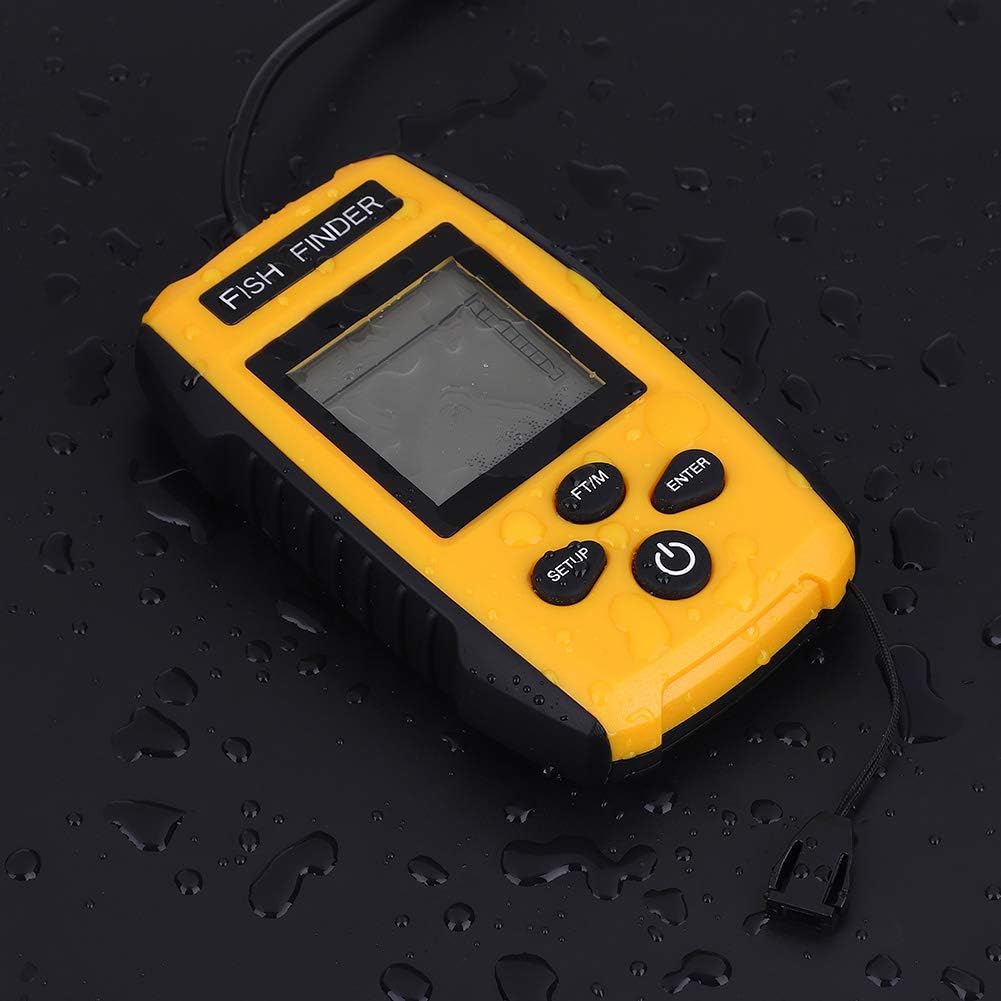
Imej: Control panel of the fish finder.
- Butang kuasa: Press and hold to turn the unit ON/OFF. Press briefly to access backlight settings.
- Butang SETUP: Enters the settings menu to adjust sensitivity, depth range, fish alarm, and other parameters.
- Butang ENTER: Confirms selections within the settings menu.
- FT/M Button: Toggles the depth display between feet (FT) and meters (M).
Operasi asas:
- Hidupkan kuasa: Press and hold the POWER button until the display illuminates.
- Sonar Scan: Once powered on and the sensor is submerged, the unit will automatically begin scanning. The display will show real-time sonar readings, including water depth, fish icons, and bottom contour.

Imej: Fish finder displaying sonar data in a fishing environment.
- Laraskan Tetapan:
- Press the SETUP button to enter the settings menu.
- Use the POWER or FT/M buttons to navigate through options.
- Press ENTER to select an option and adjust its value.
- Tetapan biasa termasuk:
- Sensitiviti: Adjusts the unit's ability to detect weak sonar returns. Higher sensitivity detects smaller targets but may also show more clutter.
- Julat Kedalaman: Sets the maximum depth displayed.
- Penggera Ikan: Activates an audible alert when fish are detected.
- Unit ukuran: Use the FT/M button to switch between feet and meters.
- Matikan: Press and hold the POWER button until the unit shuts down.
Penyelenggaraan
- Pembersihan: After each use, especially in saltwater, rinse the sonar sensor and main unit with fresh water. Wipe dry with a soft cloth. Do not use abrasive cleaners or solvents.
- Storan: Store the fish finder in a cool, dry place away from direct sunlight. If storing for extended periods, remove the batteries to prevent leakage.
- Penjagaan Sensor: Inspect the sonar sensor cable for any signs of damage or wear before each use. Ensure the sensor surface is clean and free of debris for optimal performance.
- Penggantian Bateri: Replace batteries when the low battery indicator appears on the display or when the unit fails to power on.

Imej: Fish finder unit with water droplets, highlighting its durability.
Menyelesaikan masalah
| Masalah | Kemungkinan Punca | Penyelesaian |
|---|---|---|
| Unit tidak dihidupkan. | Bateri mati atau tidak dipasang dengan betul. | Gantikan bateri dengan yang baharu, memastikan kekutuban yang betul. |
| No sonar reading or erratic readings. |
|
|
| Fish icons not appearing. |
|
|
| Paparan malap atau sukar dibaca. |
|
|
Spesifikasi
| Nama Model | TL88E |
| Sonar Frequency | 200KHz |
| Sonar Beam Angle | 45 darjah |
| Julat Kedalaman | 0.7 meters (2.3 feet) to 100 meters (328 feet) |
| Paparan | 2-inch Anti-LCD with Green LED Backlight |
| Keperluan Kuasa | 4 x bateri AAA (tidak termasuk) |
| Hayat Bateri | Up to 24 hours (continuous usage) |
| bahan | ABS |
| Dimensi (Unit Utama) | 12 x 7.5 x 2.5 cm (4.7 x 3 x 1 inci) |
| Berat badan | 567 Gram (lebih kurang 1.25 paun) |

Imej: Dimensions of the fish finder unit.
Waranti
The plplaaoo Portable LCD Fish Finder Sonar Sensor TL88E comes with a manufacturer warranty for 90 days from the date of purchase. This warranty covers defects in materials and workmanship under normal use. It does not cover damage caused by misuse, accident, unauthorized modification, or improper maintenance.
Please retain your proof of purchase for warranty claims. For warranty service, contact customer support as described in the Support section.
Sokongan
For technical assistance, troubleshooting beyond this manual, or warranty inquiries, please contact plplaaoo customer support. Refer to the product packaging or the official plplaaoo webtapak untuk maklumat hubungan terkini.
When contacting support, please have your product model (TL88E) and purchase information readily available.
Maklumat Keselamatan Penting
- Do not attempt to open or repair the unit yourself. This may void the warranty and cause damage.
- Keep the unit and its components out of reach of children.
- Ensure the battery compartment is sealed properly before exposing the unit to water.
- Buang bateri secara bertanggungjawab mengikut peraturan tempatan.
Sumber Video
No official product videos from the seller were found in the provided data. Please refer to the written instructions and diagrams for guidance.