
pengenalan
Welcome to the user manual for your new VAIO SX-R Laptop. This document provides essential information to help you set up, operate, maintain, and troubleshoot your device. Please read this manual thoroughly to ensure optimal performance and longevity of your laptop.
Produk Selesaiview
The VAIO SX-R is a high-performance laptop designed for productivity and creative tasks. It features an Intel Core Ultra 7 processor, a vibrant 14-inch WQXGA Touch Display, ampmemori yang rendah dan storan yang pantas.
Ciri-ciri Utama
- Pemproses: Intel Core Ultra 7 (16-Core, AI-Boosted) for enhanced speed and responsiveness.
- paparan: 14-inch WQXGA Touch Display (2560x1600) offering high resolution and wide color gamut.
- Ingatan: 32GB LPDDR5 RAM for superior multitasking.
- Storan: 1TB PCIe NVMe SSD for fast data access and amppenyimpanan le.
- Sistem pengendalian: Windows 11 Pro with enterprise-grade security and productivity features.
- Keselamatan: Integrated IR Camera and Fingerprint Reader for secure login.
- Chassis: Durable Carbon Fiber construction.
Laptop Components and Ports

Figure 1: VAIO SX-R Laptop, illustrating the overall design.
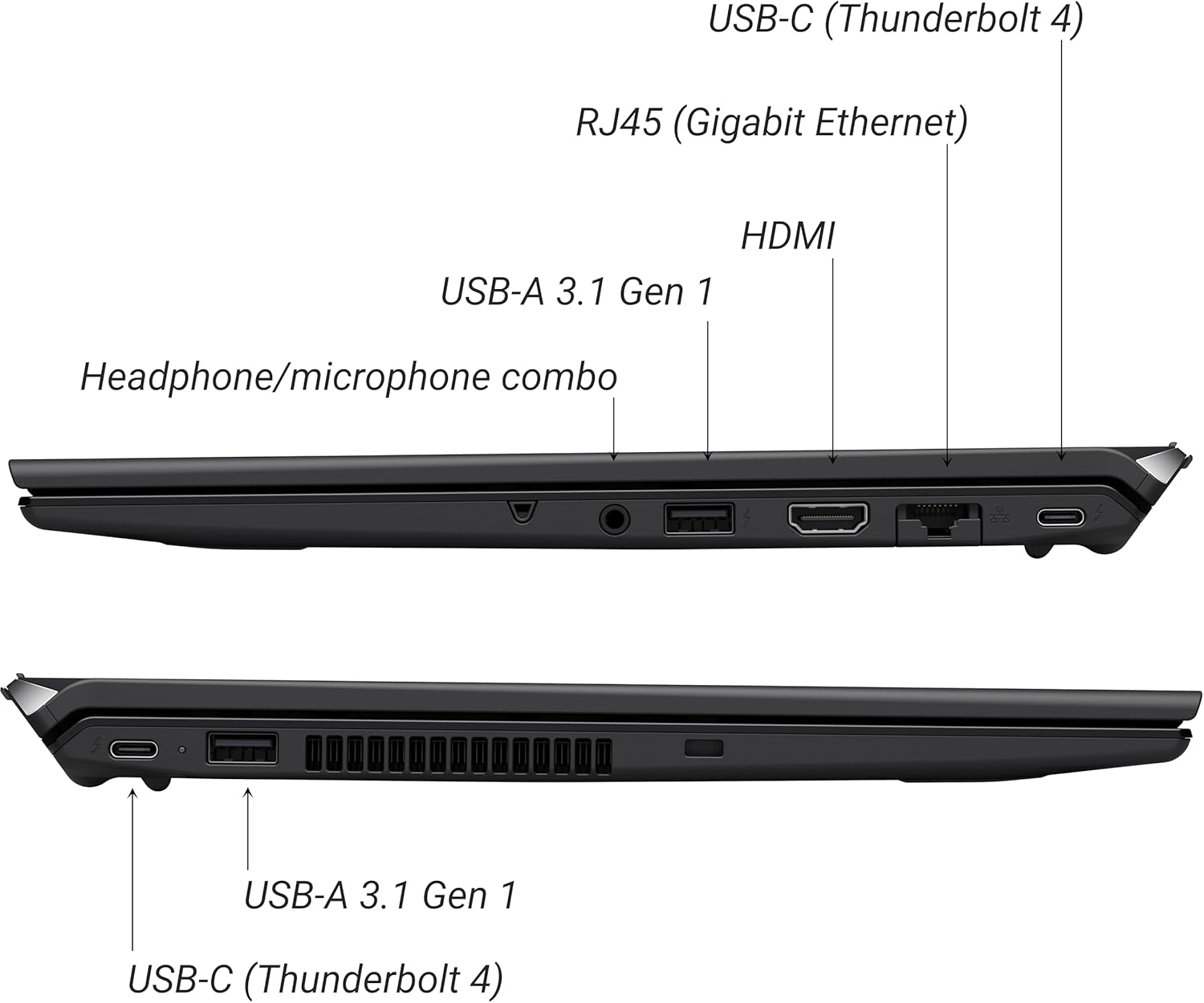
Figure 2: Port layout of the VAIO SX-R Laptop. The left side includes a headphone/microphone combo jack, USB-A 3.1 Gen 1, HDMI, RJ45 (Gigabit Ethernet), and USB-C (Thunderbolt 4). The right side features another USB-C (Thunderbolt 4) and USB-A 3.1 Gen 1 port.
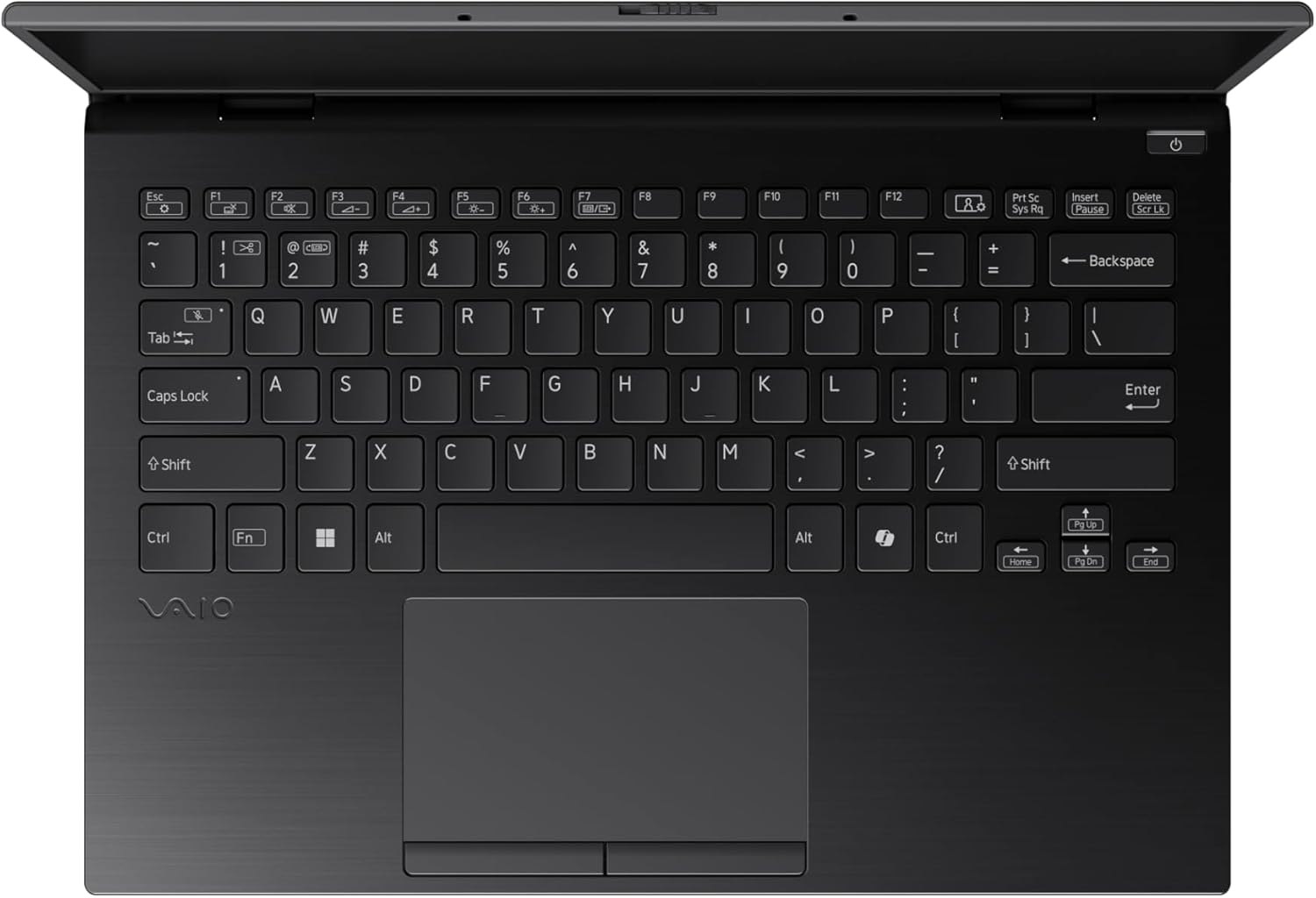
Figure 3: The VAIO SX-R Laptop keyboard and touchpad, featuring a backlit keyboard and integrated fingerprint sensor.
Persediaan
1. Kuasa Awal Hidup
- Sambungkan Kuasa: Pasangkan penyesuai AC ke port kuasa komputer riba dan kemudian ke soket dinding.
- Buka Laptop: Buka penutup komputer riba dengan berhati-hati.
- Hidupkan kuasa: Press the power button, typically located on the top right of the keyboard deck. The power indicator light will illuminate.
2. Persediaan Windows 11 Pro
Follow the on-screen instructions to complete the initial Windows 11 Pro setup. This includes:
- Memilih kawasan dan reka letak papan kekunci anda.
- Menyambung ke rangkaian Wi-Fi.
- Menerima perjanjian lesen.
- Creating or logging in with a Microsoft account.
- Setting up your PIN, fingerprint, or facial recognition (IR Camera).
3. Menyambung Peranti
You can connect external devices such as mice, keyboards, external monitors, and USB drives to the available ports as shown in Figure 2.
Beroperasi
1. Penggunaan Asas
- papan kekunci: Use the integrated backlit keyboard for typing. Function keys (F1-F12) often have secondary functions accessible via the 'Fn' key.
- Pad sentuh: Pad sentuh ketepatan menyokong gerak isyarat berbilang sentuhan untuk navigasi.
- Skrin sentuh: Interact directly with the 14-inch WQXGA display using touch gestures.
2. Ciri-ciri Keselamatan
- Pembaca Cap Jari: Enroll your fingerprints through Windows Settings > Accounts > Sign-in options for quick and secure login.
- IR Camera: Utilize Windows Hello facial recognition for convenient and secure access. Set this up in Windows Settings > Accounts > Sign-in options.
3. Pengurusan Kuasa
- Mod tidur: Close the lid or press the power button briefly to put the laptop to sleep.
- Tutup: Go to Start > Power > Shut down to turn off the laptop completely.
- Mulakan semula: Go to Start > Power > Restart to reboot the system.
Penyelenggaraan
1. Pembersihan
- Skrin: Gunakan kain lembut dan tidak berbulu sedikit dampdiisi dengan air atau pembersih skrin. Elakkan bahan kimia yang keras.
- Papan Kekunci dan Casis: Gunakan kain lembut. Untuk kotoran degil, sedikit damp kain dengan sabun lembut boleh digunakan, memastikan tiada cecair memasuki bukaan.
- Pelabuhan: Gunakan udara termampat untuk membersihkan habuk dari port secara perlahan.

Figure 4: The VAIO SX-R features a water-resistant keyboard, designed to withstand minor spills.
2. Kemas Kini Perisian
Regularly update your Windows operating system and device drivers to ensure optimal performance, security, and compatibility. Access updates via Windows Settings > Windows Update.
3. Penjagaan Bateri
- Elakkan suhu yang melampau.
- Jangan keluarkan bateri sepenuhnya dengan kerap.
- Untuk penyimpanan jangka panjang, cas bateri kepada kira-kira 50-60%.
Menyelesaikan masalah
Bahagian ini menangani isu biasa yang mungkin anda hadapi.
1. Komputer Riba Tidak Dapat Dihidupkan
- Pastikan penyesuai AC disambungkan dengan selamat pada kedua-dua komputer riba dan salur keluar kuasa yang berfungsi.
- Periksa sama ada alur keluar kuasa berfungsi dengan memasang peranti lain.
- Jika bateri habis sepenuhnya, biarkan ia mengecas sekurang-kurangnya 30 minit sebelum cuba menghidupkan.
2. Isu Paparan
- Tiada Paparan: Sambungkan monitor luaran ke port HDMI untuk memeriksa sama ada masalahnya adalah pada paparan dalaman komputer riba.
- Paparan Berkelip/Herot: Update your graphics drivers. Adjust display resolution and refresh rate in Windows Settings > System > Display.
3. Wi-Fi Connectivity Problems
- Ensure Wi-Fi is enabled in Windows Settings > Network & internet > Wi-Fi.
- Mulakan semula penghala dan modem anda.
- Jalankan Penyelesai Masalah Rangkaian Windows.
4. Prestasi Perlahan
- Tutup aplikasi yang tidak perlu berjalan di latar belakang.
- Semak Pengurus Tugas (Ctrl+Shift+Esc) untuk proses yang memerlukan sumber yang banyak.
- Ensure your system is up to date and free from malware.
Spesifikasi
Below are the detailed specifications for the VAIO SX-R Laptop (Model: VJS4R1X0511B).
| Ciri | Spesifikasi |
|---|---|
| Jenama | VAIO |
| Nama Model | VAIO SX-R |
| Nombor Model Item | VJS4R1X0511B |
| Sistem Operasi | Windows 11 Pro |
| Pemproses | Intel Core Ultra 7 (1.4 GHz) |
| Memori RAM | 32 GB LPDDR5 |
| Pemacu Keras | 1 TB PCIe NVMe SSD |
| Saiz Skrin | 14 Inci |
| Resolusi Skrin | 2560 x 1600 piksel (WQXGA) |
| Kad Grafik | Grafik Intel Bersepadu |
| Jenis Wayarles | 802.11bgn |
| Port USB 3.0 | 3 |
| Purata Hayat Bateri | 10 Jam |
| Berat Barang | 3.1 paun |
| Dimensi Produk | 14.2 x 15 x 3.3 inci |
| Ciri Khas | Backlit Keyboard, Fingerprint Reader, HD Audio, Memory Card Slot, Webcam |
Waranti dan Sokongan
1. Maklumat Waranti
Your VAIO SX-R Laptop is covered by a manufacturer's warranty. Please refer to the warranty card included with your product packaging for specific terms, conditions, and duration. Keep your proof of purchase for warranty claims.
2. Sokongan Teknikal
For technical assistance, troubleshooting beyond this manual, or service inquiries, please contact VAIO customer support. You can typically find contact information on the official VAIO website or in the documentation provided with your laptop.
- Sokongan dalam talian: Visit the official VAIO support website for FAQs, driver downloads, and contact options.
- Sokongan Telefon: Refer to your product documentation for regional support phone numbers.