
1. Lebihview
The VAIO SX-R Laptop is a high-performance portable computer designed for productivity and creative tasks. It features an Intel Core Ultra 7 processor, a vibrant 14-inch WQXGA touch display, ample memory, and fast storage, all running on Windows 11 Pro.

Figure 1: VAIO SX-R Laptop, open view.
2. Ciri-ciri Produk
- Intel Core Ultra 7 Processor: Equipped with 16 cores and AI-enhanced performance for speed and intelligent task management.
- 14" WQXGA Touch Display (2560x1600): High-resolution screen with wide color gamut and touch capability.
- RAM LPDDR5 32GB: Provides superior multitasking capabilities with instant responsiveness.
- 1TB PCIe NVMe SSD: Offers massive storage with ultra-fast read/write speeds.
- Windows 11 Pro: Includes enterprise-grade security and productivity features.
- IR Camera & Fingerprint Reader: Enhanced security and convenient login options.
- Casis Gentian Karbon: Pembinaan yang ringan dan tahan lama.
- Water Resistant Keyboard: Designed to withstand accidental spills.

Figure 2: Key features of the VAIO SX-R Laptop.
3. Fizikal Overview
3.1 Port dan Penyambung
The VAIO SX-R Laptop is equipped with a variety of ports for connectivity. Refer to the diagram below for port locations and types.
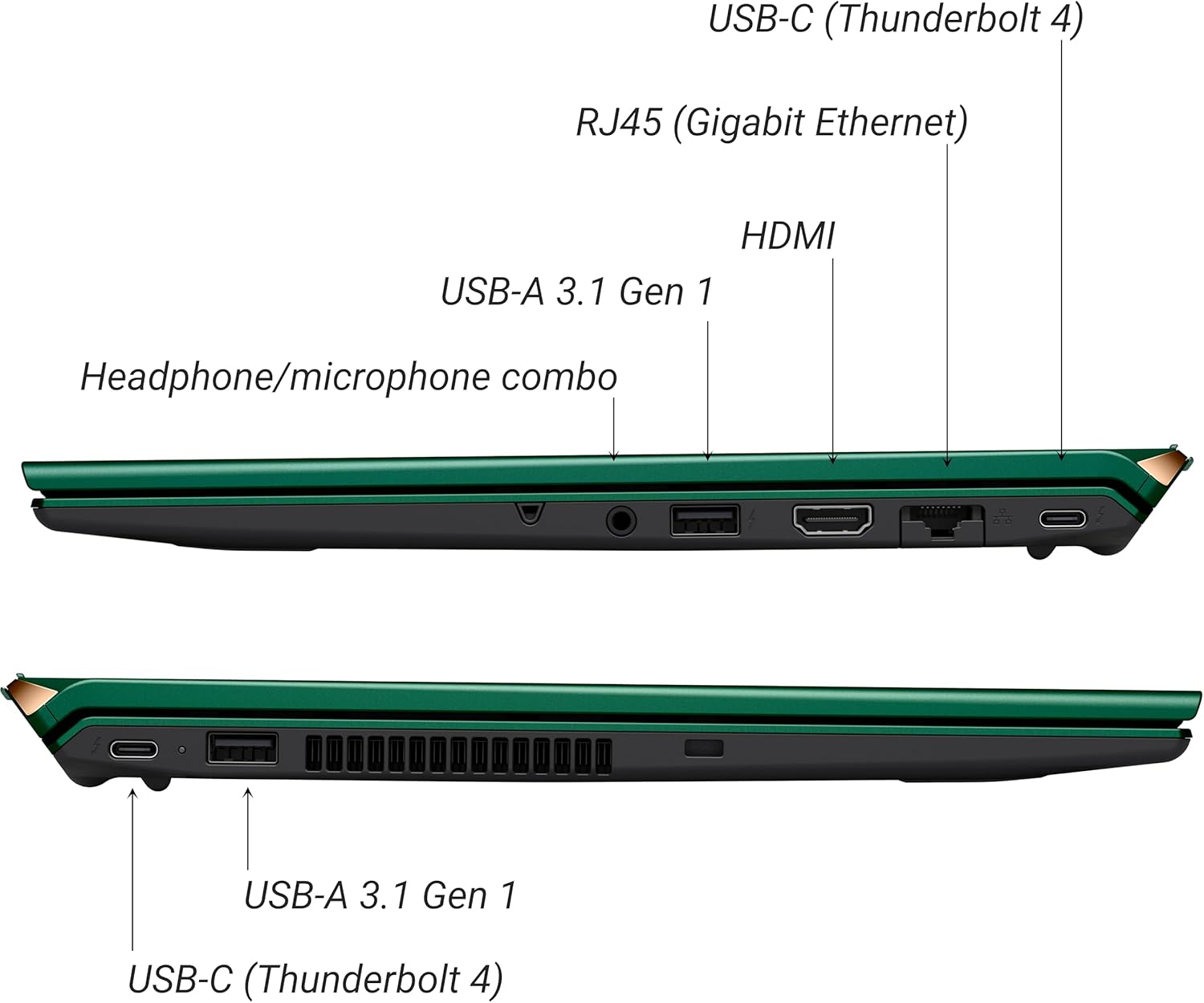
Rajah 3: Sisi view of VAIO SX-R Laptop ports.
- USB-C (Thunderbolt 4): High-speed data transfer, video output, and power delivery.
- RJ45 (Gigabit Ethernet): Untuk sambungan rangkaian berwayar.
- HDMI: Untuk menyambung ke paparan luaran.
- USB-A 3.1 Gen 1: Untuk menyambungkan peranti USB.
- Bicu Kombo Fon Kepala/Mikrofon: Untuk input dan output audio.
3.2 Papan Kekunci dan Pad Sentuh
The laptop features a full-sized keyboard and a responsive touchpad for navigation and input.

Rajah 4: Susun atur papan kekunci dan pad sentuh.
4. Persediaan
4.1 Hidupkan Kuasa Awal
- Unpack the VAIO SX-R laptop and all accessories.
- Sambungkan penyesuai kuasa ke port pengecasan komputer riba dan kemudian ke alur keluar kuasa.
- Open the laptop lid. The system may power on automatically or you may need to press the power button located on the top right of the keyboard.
- Ikut arahan pada skrin untuk melengkapkan persediaan Windows 11 Pro, termasuk bahasa, wilayah, sambungan rangkaian dan penciptaan akaun pengguna.
4.2 Menyambung ke Rangkaian
- Wi-Fi: During initial setup or via Windows settings, select your preferred Wi-Fi network and enter the password. The VAIO SX-R supports Wi-Fi 7 for fast and stable wireless connectivity.
- Berwayar (Ethernet): Connect an Ethernet cable from your router or modem to the RJ45 port on the laptop.
5. Arahan Operasi
5.1 Hidupkan/Mati Kuasa dan Tidur
- Hidupkan kuasa: Open the lid or press the power button.
- Tutup: Klik butang Mula, kemudian Kuasa > Tutup.
- tidur: Tutup penutup atau klik butang Mula, kemudian Kuasa > Tidur.
5.2 Menggunakan Paparan Sentuh
The 14-inch WQXGA display supports touch input. You can interact with the screen using gestures similar to a tablet or smartphone.
5.3 IR Camera and Fingerprint Reader
For enhanced security and convenience, the laptop includes an IR camera for Windows Hello face recognition and a fingerprint reader.
- Windows Hello Face Recognition: Configure this feature in Windows Settings > Accounts > Sign-in options. The IR camera will recognize your face to unlock the device.
- Pembaca Cap Jari: Set up your fingerprint in Windows Settings > Accounts > Sign-in options for quick and secure access.
6. Penyelenggaraan
6.1 Penjagaan Am
- Keep the laptop in a clean, dry environment.
- Elakkan daripada mendedahkan komputer riba kepada suhu yang melampau atau cahaya matahari langsung.
- Jangan letakkan benda berat pada komputer riba.
6.2 Pembersihan
- Gunakan kain lembut dan tidak berbulu untuk membersihkan skrin dan bahagian luar.
- Untuk calitan degil, ringan dampen kain dengan air atau larutan pembersih skrin.
- Do not spray cleaners directly onto the laptop.
6.3 Penjagaan Bateri
- Untuk memanjangkan hayat bateri, elakkan daripada menyahcas sepenuhnya bateri dengan kerap.
- Simpan komputer riba dengan cas separa (sekitar 50%) jika tidak digunakan untuk tempoh yang lama.
7. Penyelesaian masalah
7.1 Isu Kuasa
- Komputer riba tidak dihidupkan: Pastikan penyesuai kuasa disambungkan dengan selamat dan alur keluar berfungsi. Cuba outlet lain.
- Bateri tidak dicas: Check the power adapter and cable for damage. Ensure the charging port is clean.
7.2 Masalah Paparan
- Tiada paparan: Connect an external monitor to check if the issue is with the laptop's internal display.
- Skrin sentuh tidak bertindak balas: Mulakan semula komputer riba. Pastikan pemacu paparan dikemas kini.
7.3 Isu Ketersambungan
- Tiada sambungan Wi-Fi: Check if Wi-Fi is enabled in Windows settings. Restart your router. Update wireless drivers.
- Bluetooth tidak berfungsi: Ensure Bluetooth is enabled and your device is discoverable.
8. Spesifikasi
| Ciri | Perincian |
|---|---|
| Nama Model | VAIO SX-R (VJS4R1X0811G) |
| Pemproses | Intel Core Ultra 7 (16-Core, AI-Boosted) |
| Sistem Operasi | Windows 11 Pro |
| Paparan | 14 Inches WQXGA Touch (2560x1600) |
| RAM | 32GB LPDDR5 |
| Penyimpanan | SSD PCIe NVMe 1TB |
| Grafik | Grafik Intel Arc Bersepadu |
| Kesambungan Wayarles | 802.11ax (Wi-Fi 7), Bluetooth |
| Pelabuhan | USB-C (Thunderbolt 4) x2, USB-A 3.1 Gen 1 x3, HDMI x1, RJ45 (Gigabit Ethernet) x1, Headphone/microphone combo x1 |
| Kamera | IR Camera (Windows Hello compatible) |
| Ciri Keselamatan | Fingerprint Reader, IR Camera |
| Hayat Bateri | Sehingga 10 Jam (Purata) |
| Berat badan | 3.1 paun |
| Dimensi (LxWxH) | 14.2 x 15 x 3.3 inci |
9. Durability and Testing
VAIO laptops are engineered with Japanese precision and undergo rigorous quality control to ensure reliability and performance. This includes various tests to withstand daily use.
9.1 Manufacturing and Quality Assurance
Video 1: VAIO Manufacturing and Durability Testing. This video demonstrates the quality control processes and durability tests performed on VAIO laptops, including keystroke testing, dust testing, LCD screen pressure testing, and opening/closure testing.
9.2 Key Durability Features
- Water Resistant Keyboard: The keyboard is designed to resist damage from accidental liquid spills.
- Screen Durability: The display undergoes pressure testing to ensure resilience.
- Ujian Drop: The laptop is tested to withstand drops from up to 3 feet.

Figure 5: Water resistant keyboard testing.

Figure 6: Screen durability test in progress.

Figure 7: 3-foot drop test for VAIO laptops.
10. Waranti dan Sokongan
Your VAIO SX-R Laptop comes with a standard manufacturer's warranty. For specific warranty terms and conditions, please refer to the documentation included with your product or visit the official VAIO support webtapak.
For technical support, troubleshooting assistance, or service requests, please contact VAIO customer support. Information regarding support channels can be found on the VAIO webtapak atau dalam pembungkusan produk anda.
Protection plans are available for purchase to extend coverage beyond the standard warranty. Options include 2-Year and 4-Year Protection Plans, as well as a Complete Protect + Norton 360 monthly plan.