
1. Pengenalan
This manual provides detailed instructions for the installation, operation, and maintenance of your JOYING 9-inch Double Din Car Stereo, Model JY-UTD07N4. This advanced head unit features Android 13, Apple CarPlay, Android Auto, GPS navigation, Bluetooth connectivity, AM/FM radio, and a built-in 4G module. Please read this manual thoroughly before using the product to ensure proper function and safety.

Figure 1.1: JOYING 9-inch Double Din Car Stereo (Model JY-UTD07N4) with its primary user interface.
2. Maklumat Keselamatan
- Pemasangan Profesional Disyorkan: Installation of this product requires technical knowledge and experience. It is highly recommended to have it installed by a qualified professional to prevent damage to the unit or your vehicle.
- Bekalan Kuasa: Ensure the car stereo is connected to a 12V DC power supply with negative grounding. Incorrect voltage boleh menyebabkan kerosakan.
- Pendawaian: Carefully follow the wiring diagrams provided. Incorrect wiring can lead to malfunctions, electrical shorts, or fire.
- Keselamatan Memandu: Jangan kendalikan peranti dengan cara yang mengalih perhatian anda daripada memandu. Sentiasa mengutamakan keselamatan jalan raya.
- Suhu: Elakkan daripada mendedahkan unit kepada suhu yang melampau, cahaya matahari langsung untuk tempoh yang lama, atau kelembapan yang tinggi.
- Pembersihan: Gunakan kain lembut dan kering untuk pembersihan. Jangan gunakan pembersih atau pelarut yang melelas.
3. Kandungan Pakej
Sahkan bahawa semua item yang disenaraikan di bawah disertakan dalam pakej anda:
- 9" Radio (1 unit)
- Double Din Cage (1 unit)
- Left & Right Bracket (1 set)
- Reinforced Shims (1 set)
- Installation Manual (1 copy)
- WiFi Antenna (1 unit)
- GPS Antenna (1 unit)
- 4G Antenna (2 units)
- External Mic (1 unit)
- USB Cable (2 units)
- AR Cable (1 unit)
- Screen Ribbon Cable (1 unit)
- ISO Cable (1 unit)
- Manual Pengguna (1 salinan)

Figure 3.1: Contents included in the JOYING JY-UTD07N4 package.
4. Persediaan dan Pemasangan
Proper installation is crucial for optimal performance. Refer to the dedicated Installation Manual included in your package for detailed wiring diagrams and mounting instructions.
4.1 Pertimbangan Pra-Pemasangan
- Keserasian Kenderaan: This is a double din unit. You may need an installation frame kit with an inner size of 178 x 102mm, a special ISO harness, an amplifier adapter, or a CANbus decoder depending on your car's specific requirements.
- Factory System Integration: This unit does bukan support factory car GPS antenna, backup rear camera, Bluetooth, USB, or microphone. These factory components will not integrate with the JOYING unit.
- Keserasian Aksesori: This unit only supports JOYING brand accessories (e.g., DVR, OBDII scanner, reverse camera, TPMS, steering wheel controller). These are not included and must be purchased separately.
4.2 Pemasangan Fizikal
The unit features an upgraded installation structure allowing the left and right brackets to be extended or telescoped. This adaptability helps achieve the best fixing position for a wider range of vehicle center consoles.

Figure 4.1: Adjustable installation structure for flexible fitting.
Nota: If your car is a Hyundai or Kia brand, please contact JOYING support for specific bracket recommendations.
4.3 Sambungan Antena
- Antena GPS: Connect the included GPS antenna for accurate positioning and navigation.
- Antena WiFi: Connect the independent WiFi antenna for stable and fast internet access. The unit supports 802.11a/b/g/n/AC standards across 2.4GHz/5GHz spectral bands.
- Antena 4G: Connect the two 4G antennas for cellular data connectivity.

Figure 4.2: WiFi antenna connection for enhanced signal.
5. Arahan Operasi
The JOYING JY-UTD07N4 operates on Android 13, offering a familiar and intuitive user experience.
5.1 Initial Boot-up and Fast Boot
- The first boot-up may take approximately 30-40 seconds.
- After the initial boot, the unit features a fast boot function. Once the car key is inserted, the system will start up and enter the user interface within 2 seconds.
5.2 Navigasi (GPS)
- The unit includes precise GPS engines and an antenna for accurate positioning and faster real-time navigation.
- Peta Luar Talian: If you are in an area where downloading Google offline map data is supported, you can save map data to the car stereo for offline use.
- Penyegerakan Telefon Pintar: Synchronize mobile phone map data to the head unit via Apple CarPlay or Android Auto.
5.3 Smartphone Integration (Apple CarPlay & Android Auto)
Connect your mobile phone to the car radio via a USB cable or Bluetooth to share phone applications on the larger screen. This allows access to navigation, phone calls, and music playback.

Rajah 5.1: Integrasi Apple CarPlay dan Android Auto.
5.4 Ciri Audio
- Bunyi Berkualiti Tinggi: Equipped with a TDA7851 DSP chip and a 48-band graphic equalizer for enhanced sound customization.
- Kuasa Output: Provides 4x50W maximum output power.
- Pasaran selepas Amplifier Support: Features Fiber Optical Output and SPDIF Coaxial Output for direct connection to external amplifiers with compatible inputs, allowing for optimal sound quality.
- Includes 4 audio outputs and 1 SUB output.

Figure 5.2: Advanced audio capabilities and outputs.
5.5 Ciri Paparan
- Skrin IPS: The 9-inch IPS screen offers a resolution of 1280x800P.
- Pelbagai Tugas Skrin Terpisah: Allows two applications to be displayed simultaneously. To use, tap the recent apps icon, find the app for split-screen, tap the split-screen button, then select a second app from recent apps.
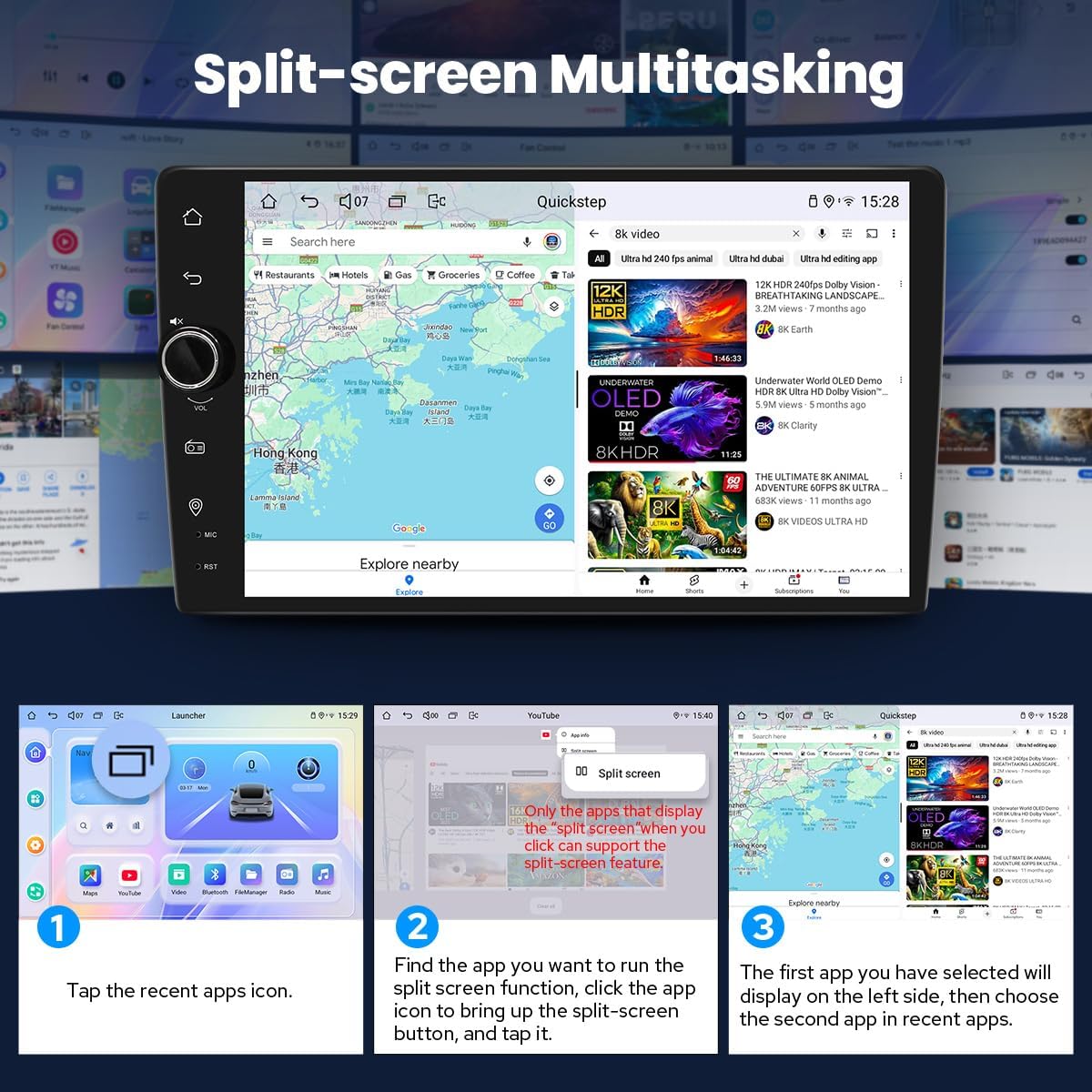
Figure 5.3: Split-screen multitasking in action.
- Output HDMI: Provides a full digital image and sound-sending interface. It can send uncompressed audio and video signals, allowing for synchronous output without manual adjustment. This supports projection screen displays for passengers and on-screen displays with 1080P clarity.

Figure 5.4: HDMI output functionality. Note: HDMI cable is not included.
5.6 Ketersambungan
- Built-in 4G Module: Insert a SIM card for internet access. This module supports FDD-LTE (B2/B4/B5/B7/B12/B13/B14/B17/B25/B26/B38/B66/B71) and TDD-LTE (B41) types. It does not support making phone calls or sending SMS.
- Bluetooth: For hands-free calls and audio streaming.
- Port USB: The unit includes 3 USB ports.
- Slot Kad Mikro SD: For additional storage.
5.7 Kawalan Roda Stereng (SWC)
The unit supports steering wheel controls, allowing you to switch songs, radio channels, and adjust volume for a safer driving experience. Nota: Cars with a CAN system may require an extra CANbus cable to enable this feature.

Rajah 5.5: Integrasi kawalan stereng.
5.8 Pemperibadian
Customize your head unit experience:
- Logo But Kereta: Set a custom boot logo.
- Wallpaper Boleh Disesuaikan: Choose from various wallpapers.
- Warna Butang Boleh Tukar: Adjust the color of the physical buttons.
- Kecerahan Skrin Boleh Laras: Control display brightness.

Figure 5.6: Personalization settings.
6. Penyelenggaraan
- Membersihkan Skrin: Gunakan kain lembut dan tidak berbulu untuk mengelap skrin dengan lembut. Untuk calitan degil, sedikit dampen kain dengan air atau pembersih selamat skrin. Elakkan bahan kimia yang keras.
- Kemas Kini Perisian: Periksa pegawai JOYING secara berkala weblaman web atau hubungi sokongan untuk kemas kini perisian yang tersedia bagi memastikan prestasi optimum dan akses kepada ciri baharu.
- Sistem Penyejukan: The unit features a dual heat sink design for superior heat dissipation and improved temperature control. It allows setting a warning value for CPU temperature or volume. If exceeded, the fan will automatically activate for cooling. Ensure the cooling vents are not obstructed.

Figure 6.1: Dual heat sink cooling system.
7. Penyelesaian masalah
Bahagian ini menangani isu biasa yang mungkin anda hadapi.
| Masalah | Kemungkinan Punca | Penyelesaian |
|---|---|---|
| Unit tidak dihidupkan. | Incorrect wiring, blown fuse, insufficient power. | Check power connections, inspect vehicle's fuse box and the unit's fuse, ensure 12V DC supply. |
| Screen glitches or goes black intermittently. | Loose ribbon cable, software issue, overheating. | Turn off the unit, disconnect the ribbon cable for a few seconds, then reconnect and restart. Ensure proper cooling. If the issue persists, contact support. |
| Tiada keluaran bunyi. | Incorrect speaker wiring, volume too low, mute activated, ampisu penguat. | Check speaker connections, increase volume, ensure unit is not muted. If using an external ampliifier, periksa kuasa dan sambungannya. |
| Isyarat GPS lemah atau tidak tepat. | Antena GPS tidak disambungkan atau terhalang dengan betul. | Ensure the GPS antenna is securely connected and placed in a location with a clear view dari langit. |
| Apple CarPlay/Android Auto tidak bersambung. | Incorrect USB cable, phone settings, software glitch. | Use a high-quality USB data cable. Check phone settings for CarPlay/Android Auto permissions. Restart both phone and head unit. |
8. Spesifikasi
| Ciri | Spesifikasi |
|---|---|
| Nombor Model | JY-UTD07N4 |
| Sistem Operasi | Android 13 |
| Saiz Paparan | 9 inci |
| Jenis Paparan | Skrin IPS |
| Resolusi Paparan | 1280x800P |
| RAM | 4GB |
| Storan Dalaman | 64GB |
| Pemproses | Qualcomm Snapdragon 6125, Octa Core 2.0GHz |
| Ketersambungan | Bluetooth, Ethernet, HDMI, USB, Wi-Fi, 4G Module |
| Mod Keluaran Audio | Stereo |
| Konfigurasi Saluran Bunyi Sekeliling | 5.1 |
| Jenis Penyambung | Koaksial, Optik |
| Jumlah Port HDMI | 1 (Keluaran) |
| Dimensi Produk | 5.91 x 7.99 x 4.72 inci (150 x 203 x 120 mm) |
| Berat Barang | 2.65 paun (1.2 kg) |
| Sokongan Pengekodan Video | H264/H265/MP4/AVI/MKV/FLV |

Figure 8.1: Key specifications of the JOYING JY-UTD07N4.

Figure 8.2: Dimensions and rear panel connections.
9. Aksesori Pilihan
The following accessories are not included in the standard package but can be purchased separately to enhance your experience:
- OBD2 Scanner: Connects via Bluetooth to retrieve real-time data and trouble codes from your vehicle's computer.
- AR Front Camera: Records the front road in the background automatically while driving.
- AR Rear Camera: Switches to a reverse display automatically when reversing the car.

Figure 9.1: Available optional accessories.
10. Waranti dan Sokongan
JOYING products are designed for reliability and performance. For warranty information, technical support, or service inquiries, please refer to the warranty card included with your product or visit the official JOYING website. Ensure you have your model number (JY-UTD07N4) and purchase details ready when contacting support.