
1. Pengenalan
The KILOTECH TI-30 Integrator is a sophisticated retail scale designed for efficient and accurate weighing and labeling in commercial environments. Featuring a responsive touchscreen, intuitive software, and versatile label printing capabilities, this device streamlines operations by allowing for the display of nutritional information, allergen details, and customized product data. This manual provides essential information for the proper setup, operation, and maintenance of your TI-30 Integrator scale.
2. Maklumat Keselamatan
- Always place the scale on a stable, level surface to ensure accurate readings.
- Do not expose the scale to excessive moisture, extreme temperatures, or direct sunlight.
- Gunakan hanya penyesuai kuasa yang dibekalkan bersama peranti.
- Avoid dropping or subjecting the scale to heavy impacts.
- Keep the touchscreen clean and free from sharp objects to prevent damage.
- Rujuk semua servis kepada kakitangan yang berkelayakan.
3. Kandungan Pakej
Sahkan bahawa semua item terdapat dalam pakej:
- KILOTECH TI-30 Integrator Scale Unit
- Paparan skrin sentuh
- Penyesuai Kuasa
- Roll of Printed Labels (initial supply)
- Manual Pengguna (dokumen ini)
4. Persediaan
4.1 Membongkar dan Meletakkan
Carefully remove the scale from its packaging. Place the TI-30 Integrator on a flat, stable, and level surface, away from vibrations, drafts, and direct heat sources. Ensure adequate space around the unit for ventilation and operation.
4.2 Sambungan Kuasa
- Connect the power adapter to the power input port on the rear of the scale.
- Palamkan penyesuai kuasa ke salur keluar elektrik yang sesuai.
- The scale will power on automatically or can be turned on using the designated power button (if present).
4.3 Tatarajah Awal
Upon first power-up, the scale may guide you through an initial setup wizard on the touchscreen. This typically includes:
- Pemilihan bahasa.
- Tetapan tarikh dan masa.
- Network (Wi-Fi) configuration for connectivity to a retail management system.
- Basic unit settings (e.g., default weighing unit: kg or lb).
Ikut gesaan pada skrin untuk melengkapkan persediaan awal.
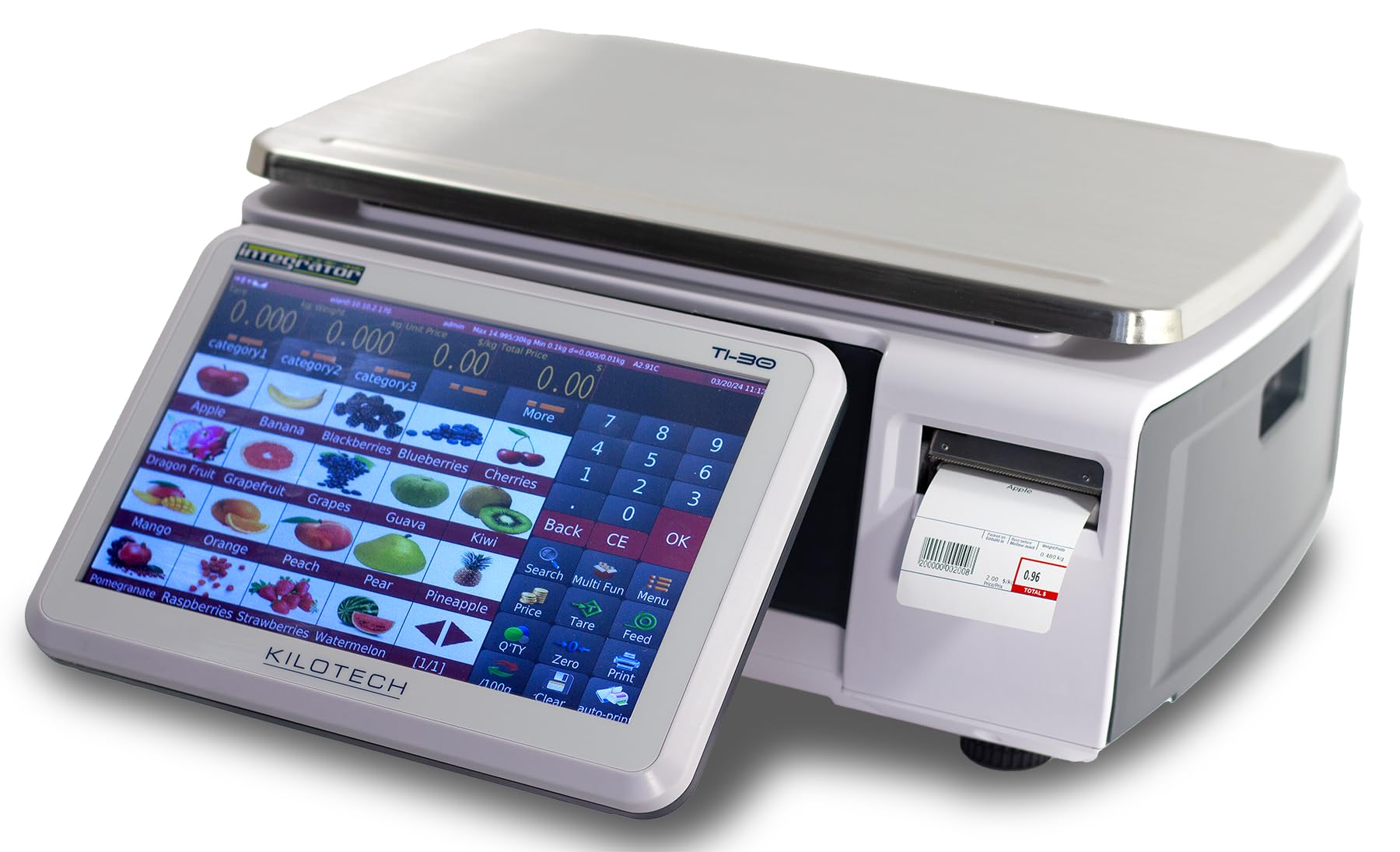
Figure 1: KILOTECH TI-30 Integrator Retail Scale with its touchscreen display angled for user interaction. The display shows weighing information and product images.
5. Arahan Operasi
5.1 Penimbangan Asas
- Ensure the scale is powered on and the display shows '0.000' (or similar, depending on unit).
- Carefully place the item to be weighed onto the weighing platter.
- The weight will be displayed on the touchscreen.
5.2 Fungsi Tara
The tare function allows you to subtract the weight of a container, so only the net weight of the product is measured.
- Place the empty container on the weighing platter.
- Press the 'Tare' button on the touchscreen. The display will reset to '0.000'.
- Add the product to the container. The display will show the net weight of the product.
5.3 Pemilihan Unit
To switch between weighing units (e.g., kilograms and pounds):
- Locate the 'Unit' button or setting on the touchscreen interface.
- Tap to cycle through available units (kg, lb).
5.4 Pencetakan Label
The TI-30 Integrator supports various label types and customization.
- After weighing an item, select the desired product from your database on the touchscreen.
- Verify the unit price and total price displayed.
- Press the 'Print Label' button. The scale will print a label with the product information, weight, unit price, and total price.
- To customize label content (e.g., nutritional information, allergens), navigate to the 'Settings' or 'Label Design' menu on the touchscreen.
6. Ciri-ciri
The KILOTECH TI-30 Integrator offers a range of features designed to enhance retail operations:
- Digital Grocery/Shop Scale: Accurate and reliable for various retail environments.
- Antara muka skrin sentuh: Intuitive and user-friendly for quick operations.
- Label Printing Scale: Integrated printer for on-demand product labels.
- Label boleh disesuaikan: Adaptable label options for displaying nutritional data, allergens, or other specific product information.
- Reka Bentuk Anggun dan Moden: Secara estetikasing and functional for modern retail spaces.
- Retail Management System Integration: Designed to connect with existing retail systems for seamless data flow.
- Adjustable Screen Angle: The display can be angled for optimal viewkeselesaan.
- Legal for Trade: Certified for commercial use, ensuring compliance with regulations.
- Kesambungan Wi-Fi: Enables wireless network integration.
- Fast Reload: Efficient operation for high-volume environments.
7. Penyelenggaraan
7.1 Pembersihan
Regular cleaning helps maintain the scale's accuracy and appearance.
- Disconnect the scale from the power source before cleaning.
- Wipe the weighing platter and exterior surfaces with a soft, damp cloth. Use a mild, non-abrasive cleaner if necessary.
- For the touchscreen, use a screen-specific cleaner and a microfiber cloth. Do not spray cleaner directly onto the screen.
- Ensure no liquids enter the scale's internal components.
7.2 Calibration Checks
As a 'MC Certified' scale, the TI-30 Integrator is designed for accuracy. However, periodic checks with certified weights are recommended to ensure continued precision. Refer to local regulations for required calibration intervals. For re-calibration, contact KILOTECH customer support or an authorized service provider.
8. Penyelesaian masalah
| Masalah | Kemungkinan Punca | Penyelesaian |
|---|---|---|
| Skala tidak dihidupkan | No power supply; Faulty power adapter | Check power connection; Try a different outlet; Contact support if adapter is faulty. |
| Bacaan berat yang tidak tepat | Unstable surface; Drafts; Debris under platter; Needs calibration | Place on stable surface; Avoid drafts; Clean under platter; Contact support for calibration. |
| Label tidak dicetak | No label roll; Label roll incorrectly loaded; Printer error | Check and replace label roll; Ensure roll is loaded correctly; Restart scale. |
| Skrin sentuh tidak bertindak balas | Gangguan perisian; Kerosakan fizikal | Restart the scale; Contact support if issue persists. |
9. Spesifikasi
| Spesifikasi | Perincian |
|---|---|
| Jenama | KILOTECH |
| Nombor Model | K851514 |
| Kapasiti | 30 KG x 0.01 KG (60 LB x 0.02 LB) |
| Pensijilan | MC Certified (Legal for Trade) |
| Ketersambungan | Wi-Fi |
| Paparan | Skrin sentuh |
| Komponen yang Disertakan | Touchscreen, Printed Labels |
| UPC | 888960515143 |
| ASIN | B0F56DYPD1 |
10. Waranti dan Sokongan
For warranty information, technical support, or service inquiries, please contact KILOTECH Inc. directly:
- Pengeluar: Kilotech Inc.
- Alamat: 2111 32e Avenue, Lachine, QC H8T 3J1, Quebec
- telefon: (514) 420-6020
- e-mel: kiloservice47@gmail.com