
pengenalan
This manual provides essential instructions for the safe and efficient operation, maintenance, and troubleshooting of your Eureka NEW400 Gen2 Cordless Vacuum Floor Washer. Please read this manual thoroughly before first use and keep it for future reference.
Arahan Keselamatan Penting
- Always ensure the device is switched off and unplugged before performing any maintenance or cleaning.
- Jangan rendam unit utama dalam air atau cecair lain.
- Jauhkan rambut, pakaian longgar, jari dan semua bahagian badan daripada bukaan dan bahagian yang bergerak.
- Use only Eureka recommended cleaning solutions.
- Use only on hard floor surfaces as specified. Not suitable for carpets.
- Simpan perkakas di dalam rumah di tempat yang kering.
- Perkakas ini tidak dimaksudkan untuk digunakan oleh orang (termasuk kanak-kanak) yang kurang keupayaan fizikal, deria atau mental, atau kurang pengalaman dan pengetahuan, melainkan mereka telah diberi pengawasan atau arahan mengenai penggunaan perkakas oleh orang yang bertanggungjawab untuk keselamatan mereka.
- Kanak-kanak harus diawasi untuk memastikan bahawa mereka tidak bermain dengan perkakas.
Apa yang ada dalam Kotak

Image: The Eureka NEW400 Gen2 cordless vacuum, accessory rack, roller brush, and cleaning solution are shown as included components.
- Unit utama
- Pemegang Aksesori
- Dulang Penyimpanan membersihkan diri
- Berus Pembersih
- Penapis
- Penyesuai Kuasa
- Manual Pengguna
- Penyelesaian Pembersihan
- Berus Penggelek
Persediaan
1. Perhimpunan
- Buka bungkusan semua komponen dari kotak dengan berhati-hati.
- Masukkan pemegang ke dalam unit utama sehingga ia klik dengan selamat pada tempatnya.
- Place the main unit onto the self-cleaning storage tray.
2. Mengecas Bateri

Image: The battery indicator on the device, illustrating its extended battery life of up to 30 minutes.
- Connect the power adapter to the charging port on the main unit and plug it into a wall outlet.
- Lampu penunjuk bateri akan menunjukkan status pengecasan. Pengecasan penuh mengambil masa kira-kira 5 jam.
- Ensure the device is fully charged before its first use for optimal performance.
3. Mengisi Tangki Air Bersih
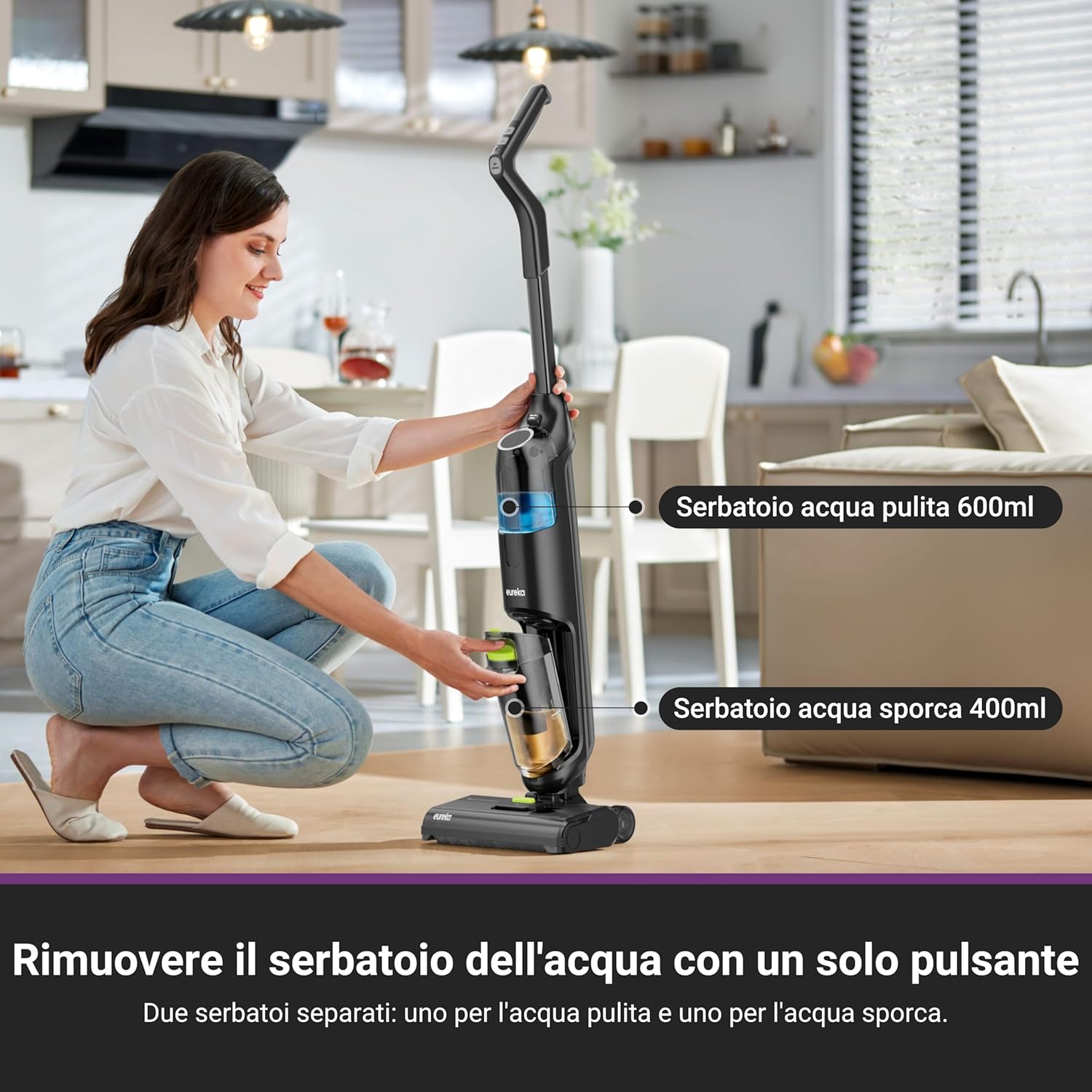
Image: Removing the clean water tank with a single button press, highlighting the separate clean (600ml) and dirty (400ml) water tanks.
- Press the release button to detach the clean water tank (600 ml) from the main unit.
- Open the tank cap and fill with clean tap water. For enhanced cleaning and odor removal, add the recommended Eureka cleaning solution as per instructions on the solution bottle.
- Close the cap securely and reattach the clean water tank to the main unit until it clicks.
Arahan Operasi
1. Powering On and Cleaning Modes
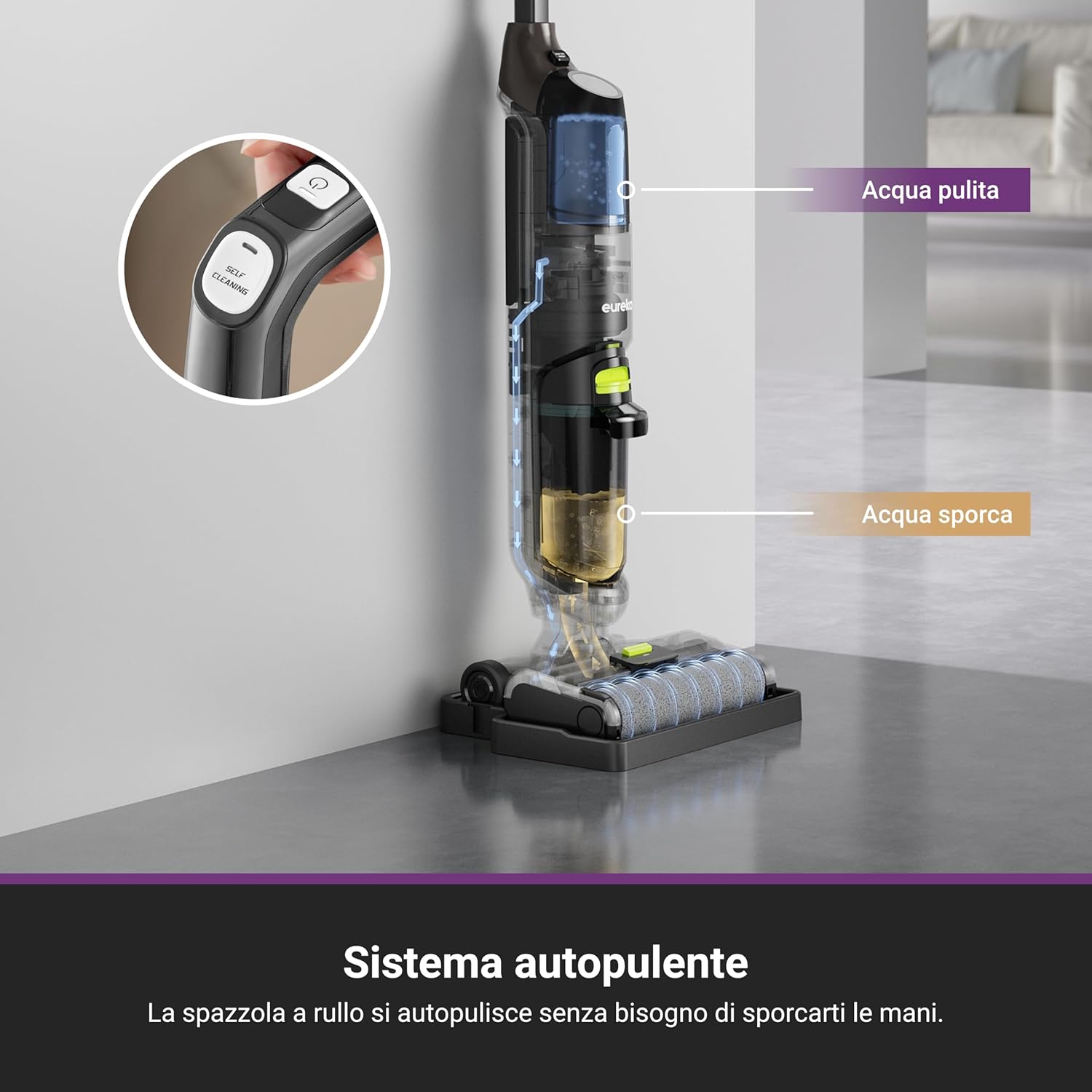
Image: A user cleaning a floor with the Eureka NEW400 Gen2, demonstrating its ability to vacuum and wash in one step.
- Tekan butang kuasa untuk menghidupkan peranti.
- Select the desired cleaning mode (e.g., standard, max) if available. The device offers 2 power levels.
- The 3-in-1 functionality allows for simultaneous vacuuming, washing, and drying of hard floors.
2. Prestasi Pembersihan

Image: The device performing multi-scenario cleaning on different hard floor types, effectively removing debris and spills.
- The self-propelled system makes cleaning effortless, reducing physical strain.
- The flexible nozzle and pivoting steering allow for easy maneuverability around furniture and into tight spaces.
- Suitable for various hard floor types including tiles, hardwood, and ceramic. Not recommended for carpets.
- The device automatically stops when placed in an upright position, enhancing safety and efficiency.
3. Dual Tank System

Image: The Eureka NEW400 Gen2 is shown to be effective for pet-owning families, capable of eliminating odors with its cleaning solution.
- The separate 600 ml clean water tank and 400 ml dirty water tank prevent cross-contamination.
- The device will alert you and automatically shut off when the dirty water tank is full to prevent overflow.
- High dirty water recovery efficiency (over 90%) ensures quick drying and streak-free floors.
Penyelenggaraan
1. Kitaran Pembersihan Kendiri

Image: The self-cleaning system diagram, indicating how the roller brush self-cleans without manual intervention.
- After each use, place the device on its self-cleaning storage tray.
- Press and hold the self-cleaning button for 3 seconds to activate the cycle.
- The roller brush will automatically clean itself, removing residues and bacteria, ensuring hygienic operation for the next use.
2. Mengosongkan Tangki Air Kotor
- After each cleaning session or when the dirty water tank full indicator activates, remove the dirty water tank (400 ml).
- Berhati-hati kosongkan kandungan ke dalam longkang.
- Bilas tangki dengan teliti menggunakan air bersih dan biarkan ia kering di udara sebelum dipasang semula.
3. Cleaning the Roller Brush and Filter
- Even with the self-cleaning function, occasional manual cleaning of the roller brush may be necessary. Remove the roller brush and use the provided cleaning brush to remove any tangled hair or debris.
- Remove the filter from the dirty water tank. Rinse it under running water until clean. Allow it to dry completely before reinserting.
- Replace the filter every 3-6 months, or as needed, to maintain optimal suction and cleaning performance.
Menyelesaikan masalah
| Masalah | Kemungkinan Punca | Penyelesaian |
|---|---|---|
| Peranti tidak dihidupkan. | Bateri tidak dicas. | Cas bateri selama 5 jam. |
| Poor suction/cleaning performance. | Dirty water tank is full or filter is clogged. | Empty and clean the dirty water tank. Clean or replace the filter. |
| Water not dispensing. | Clean water tank is empty or improperly installed. | Fill the clean water tank. Ensure it is securely attached. |
| Peranti berhenti tanpa diduga. | Dirty water tank is full or device is in upright position. | Empty the dirty water tank. Tilt the device to resume operation. |
| Roller brush not spinning. | Obstruction in the brush roll area. | Turn off the device, remove any obstructions from the brush roll. |
Spesifikasi
| Jenama | EUREKA |
| Nama Model | NEW400 Gen2 |
| Ciri Khas | High Power, Portable |
| Jenis Penapis | Kartrij |
| Permukaan Disyorkan | Hard floors, Pet hair |
| Sumber Kuasa | Dikuasakan bateri |
| Tahap Kebisingan | 77.6 Desibel |
| Bilangan Tahap Kuasa | 2 |
| Penggunaan Dalaman | Dalaman |
| Voltage | 230 Volt |
| Wattage | 120 watt |
| Amppemadam | 8.2 |
| Kaedah Kawalan | Butang |
| Berat Barang | 3.95 Kilogram |
| Dimensi Item (LxWxH) | 29L x 26W x 119H cm |
| Masa Pengecasan Bateri | 5 Jam |
| Jenis Bateri | Litium Ion |
| Masa Larian | Sehingga 30 minit |
| Kapasiti Tangki Air Bersih | 600 ml |
| Kapasiti Tangki Air Kotor | 400 ml |
Waranti dan Sokongan
EUREKA is committed to providing reliable after-sales warranty and support for its products. For warranty claims, technical assistance, or spare parts, please contact EUREKA customer service through their official webtapak atau peruncit tempat produk itu dibeli.
Sila simpan bukti pembelian anda untuk tujuan waranti.