
1. Pengenalan
This manual provides essential information for the safe and efficient operation of your Voltcraft DOV704 Digital Oscilloscope. The DOV704 is a high-quality, innovative, and compact 4-channel digital storage oscilloscope featuring a 70 MHz bandwidth, 1.25 GSa/s maximum sampling rate, and a 12-bit analog-to-digital converter. It is equipped with a 7-inch touchscreen display supporting gesture control, USB, LAN, and HDMI interfaces. Please read this manual thoroughly before using the device.
2. Maklumat Keselamatan
Sentiasa patuhi langkah keselamatan berikut untuk mengelakkan kecederaan dan kerosakan pada peranti:
- Pastikan bekalan kuasa voltage sepadan dengan keperluan yang dinyatakan pada peranti.
- Jangan kendalikan osiloskop dalam keadaan basah atauamp syarat.
- Elakkan daripada mendedahkan peranti kepada cahaya matahari langsung atau suhu yang melampau.
- Hanya gunakan penyesuai kuasa dan aksesori yang disediakan.
- Jangan cuba membuka atau mengubah suai peranti. Rujuk semua servis kepada kakitangan yang berkelayakan.
- Before making any connections, ensure the device is powered off.
3. Kandungan Pakej
Sahkan bahawa semua item yang disenaraikan di bawah terdapat dalam pakej anda:
- Voltcraft DOV704 Digital Oscilloscope
- Penyesuai Kuasa USB Jenis-C
- Kabel USB
- Four (4) Test Probes
- Two (2) Probe Adjustment Kits
- Software with English Manual (on CD)
- Panduan Mula Pantas
- Helaian Data Produk
4. Produk Lebihview
The Voltcraft DOV704 is designed for precise signal analysis. Below are key features and a visual representation of the device.
4.1 Ciri-ciri Utama
- Lebar Jalur 70 MHz
- 4 Analog Input Channels
- 7-inch (17.78 cm) Touchscreen Display with Gesture Control (1024 x 600 pixels)
- 12-bit Analog-to-Digital Converter
- S maksimumampling Rate: 1.25 GSa/s
- Real-time Waveform Capture Rate: 50,000 wfms/s
- Segmented Waveform Capture Rate: 700,000 wfms/s
- Record Length: 50 Mpts
- Horizontal Scan Speed: 1 ns/div to 1000 s/div (1-2-5 steps)
- Vertical Sensitivity: 500 µV/div to 10 V/div
- Multiple Trigger Functions: Edge, Video, Pulse, Slope, Runt, Window, Timeout, Nth, Logic, RS232/UART, I2C, SPI, CAN, LIN
- Connectivity: USB, LAN, HDMI
4.2 Susun atur Peranti
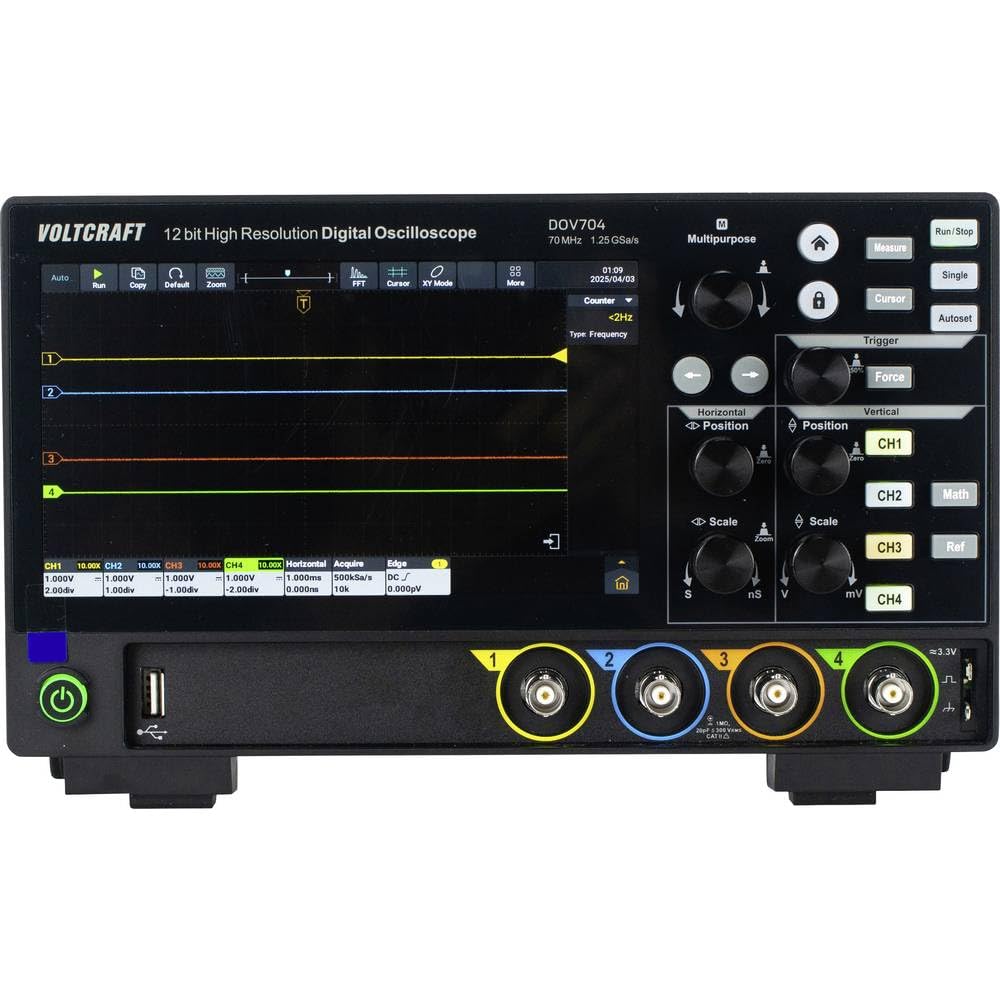
Rajah 1: Depan view of the Voltcraft DOV704 Digital Oscilloscope, showing the 7-inch touchscreen display, control knobs, buttons, and four BNC input connectors at the bottom. The power button and USB ports are also visible.

Rajah 2: hadapan bersudut view of the Voltcraft DOV704 Digital Oscilloscope, providing a clearer perspective of the control panel and input ports. The screen displays a waveform.

Rajah 3: sebelah view of the Voltcraft DOV704 Digital Oscilloscope, illustrating its compact profile dan jeriji pengudaraan.
5. Persediaan
5.1 Menghidupkan Peranti
- Connect the USB Type-C power adapter to the oscilloscope's power input port.
- Palamkan penyesuai kuasa ke salur keluar elektrik yang sesuai.
- Tekan butang kuasa yang terletak pada panel hadapan untuk menghidupkan osiloskop. Paparan akan menyala.
5.2 Sambungan dan Pampasan Probe
- Connect a test probe to one of the BNC input channels (CH1-CH4) on the front panel.
- Attach the probe tip to the probe compensation output (usually a square wave signal output on the front or side).
- Adjust the probe compensation screw (located on the probe body) until the square wave displayed on the screen has flat tops and bottoms, without overshoot or undershoot.
- Repeat this process for all probes you intend to use.
6. Arahan Operasi
6.1 Paparan Bentuk Gelombang Asas
- Pemilihan Saluran: Press the CH1, CH2, CH3, or CH4 buttons to enable or disable a channel.
- Skala Menegak: Gunakan Skala Menegak knob to adjust the volts per division (V/div) for the selected channel.
- Kedudukan Menegak: Gunakan Kedudukan menegak knob to move the waveform up or down on the screen.
- Skala Mendatar: Gunakan Skala Mendatar knob to adjust the time per division (s/div).
- Kedudukan Mendatar: Gunakan Kedudukan Mendatar knob to shift the waveform left or right.
6.2 Trigger Functions
The oscilloscope offers various trigger types to stabilize and capture specific parts of a waveform.
- Tekan ke Pencetus butang untuk mengakses tetapan pencetus.
- Select the desired trigger type (e.g., Edge, Pulse, Video) from the menu.
- Adjust the trigger level using the dedicated Tahap Pencetus knob or via the touchscreen.
- Choose the trigger source (CH1-CH4) as needed.
6.3 Touchscreen and Gesture Control
The 7-inch touchscreen allows for intuitive control.
- Ketik: Select menu items, buttons, or adjust settings.
- Cubit-untuk-Zum: Use two fingers to zoom in or out on waveforms (horizontal and vertical scaling).
- Seret: Move waveforms or menu elements across the screen.
6.4 Penyimpanan dan Ketersambungan Data
The DOV704 supports various methods for data storage and external connectivity.
- USB: Connect a USB flash drive to save waveform data, screenshots, or settings. Use the USB cable to connect to a computer for data transfer.
- LAN: Connect the oscilloscope to a network for remote control and data access using the provided software.
- HDMI: Connect an external display via the HDMI port for larger viewing of waveforms.
7. Penyelenggaraan
7.1 Pembersihan
- Putuskan sambungan kuasa sebelum membersihkan.
- Gunakan kain lembut dan kering untuk mengelap bahagian luar peranti.
- For the touchscreen, use a soft, lint-free cloth slightly dampened with a screen cleaner. Avoid abrasive cleaners.
- Jangan benarkan cecair memasuki peranti.
7.2 Penyimpanan
When not in use, store the oscilloscope in a clean, dry environment, away from direct sunlight and extreme temperatures.
8. Penyelesaian masalah
| Masalah | Kemungkinan Punca | Penyelesaian |
|---|---|---|
| Peranti tidak dihidupkan. | Power cable not connected or faulty. | Check power cable connection. Ensure power outlet is functional. Use the provided power adapter. |
| Tiada bentuk gelombang dipaparkan. | Channel disabled, probe not connected, or signal too weak/strong. | Ensure the desired channel is enabled. Check probe connection. Adjust vertical scale (V/div) and horizontal scale (s/div). Check trigger settings. |
| Waveform is unstable. | Incorrect trigger settings. | Adjust trigger level and trigger type. Ensure trigger source is correctly selected. |
| Skrin sentuh tidak bertindak balas. | Gangguan perisian sementara. | Restart the device. If the problem persists, contact support. |
9. Spesifikasi
| Parameter | Nilai |
|---|---|
| Nombor Model | VC-16753910 |
| Lebar jalur | 70 MHz |
| Saluran Analog | 4 |
| Maks. SampKadar ling | 1.25 GSa/s |
| Panjang Rekod | 50 Mpts |
| Resolusi ADC | 12 Bit |
| Waveform Capture Rate (Real-time) | 50,000 wfms/s |
| Waveform Capture Rate (Segmented) | 700,000 wfms/s |
| Paparan | 7-inch Touchscreen (1024 x 600 pixels) |
| Horizontal Scan Speed | 1 ns/div hingga 1000 s/div |
| Sensitiviti Menegak | 500 µV/div to 10 V/div |
| Antara muka | USB, LAN, HDMI |
| Dimensi Produk (W x D x H) | 26 x 7.8 x 16 cm |
| Berat badan | 2.71 kg |
10. Waranti dan Sokongan
For warranty information, please refer to the product data sheet included in your package or visit the official VOLTCRAFT website. For technical support, troubleshooting assistance beyond this manual, or service inquiries, please contact VOLTCRAFT customer service. Contact details can typically be found on the manufacturer's webtapak atau dalam dokumentasi yang disediakan bersama produk anda.