
1. Pengenalan
Thank you for choosing the PELONIS 40-Inch Tower Fan. This oscillating fan features an innovative washable design, providing 2000 CFM airflow at 28ft/s, 4 speeds, 2 modes, and 90° oscillation with a quiet 23dB operation. This manual provides important information for the safe and efficient use of your new tower fan. Please read it thoroughly before operation and retain it for future reference.

Figure 1: PELONIS 40-Inch Tower Fan (Model PSFZ40DR5ALG)
2. Arahan Keselamatan Penting
Apabila menggunakan peralatan elektrik, langkah berjaga-jaga asas hendaklah sentiasa diikuti untuk mengurangkan risiko kebakaran, kejutan elektrik dan kecederaan kepada orang, termasuk yang berikut:
- Baca semua arahan sebelum menggunakan kipas ini.
- Use this fan only as described in this manual. Other uses not recommended by the manufacturer may cause fire, electric shock, or injury to persons.
- Do not operate the fan with a damaged cord or plug. Discard the fan or return to an authorized service facility for examination and/or repair.
- Jangan gunakan tali di bawah permaidani. Jangan tutup tali dengan permaidani lempar, pelari, atau penutup yang serupa. Susun kord jauh dari kawasan lalu lintas dan di mana ia tidak akan tersandung.
- To disconnect the fan, turn controls to OFF, then remove plug from outlet.
- Jangan masukkan atau biarkan objek asing memasuki sebarang bukaan pengudaraan atau ekzos kerana ini boleh menyebabkan kejutan elektrik atau kebakaran, atau merosakkan kipas.
- Do not operate in areas where gasoline, paint, or flammable liquids are used or stored.
- Always unplug the fan before moving, cleaning, or when not in use.
- Kipas ini bertujuan untuk kegunaan isi rumah sahaja.
3. Kandungan Pakej
Sila semak kandungan bungkusan semasa dibuka. Jika ada item yang hilang atau rosak, hubungi sokongan pelanggan.
- PELONIS 40-Inch Tower Fan Unit
- Fan Base (2 parts)
- Alat Kawalan Jauh
- Manual Pengguna (dokumen ini)
4. Persediaan dan Pemasangan
Follow these steps to assemble your PELONIS Tower Fan:
- Pasang Pangkalan: Connect the two halves of the fan base together. Ensure they snap securely into place.
- Attach Base to Fan Unit: Align the assembled base with the bottom of the main fan unit. Secure the base to the fan unit using the provided nut, turning clockwise until tight. Route the power cord through the designated channel in the base for stability.
- Bateri Kawalan Jauh: Open the battery compartment on the remote control and insert the required batteries (not always included, check packaging).
- penempatan: Letakkan kipas di atas permukaan yang kukuh dan rata. Pastikan terdapat ruang yang mencukupi di sekeliling kipas untuk aliran udara dan ayunan yang betul.
- Sambungan Kuasa: Palamkan kord kuasa ke soket elektrik 120V AC standard.

Figure 2: Effortless Setup - Twist Lock and Lift the Upper Body
Video 1: How to install Pelonis Washable Tower Fan. This video demonstrates the assembly process for the PELONIS tower fan, including attaching the base and preparing it for use.
5. Arahan Operasi
Your PELONIS Tower Fan can be operated using the control panel on the top of the unit or the included remote control.
Panel Kawalan dan Fungsi Jauh:
- Butang kuasa (⏻): Menghidupkan atau mematikan kipas.
- Butang Kelajuan (⇌): Cycles through 4 fan speeds (Low, Medium, High, Turbo).
- Butang Mod (☽): Selects between 2 wind modes:
- Mod Biasa: Memberikan aliran udara yang konsisten.
- Mod tidur: Gradually decreases fan speed for quiet operation during sleep.
- Butang Ayunan (↻): Activates or deactivates the 90° oscillation feature, distributing air across a wider area.
- Butang Pemasa (⏱): Sets the auto-off timer for up to 7 hours. Press repeatedly to cycle through timer settings.

Figure 3: Remote Control and Fan Settings

Figure 4: 90° Oscillation for Wide Coverage
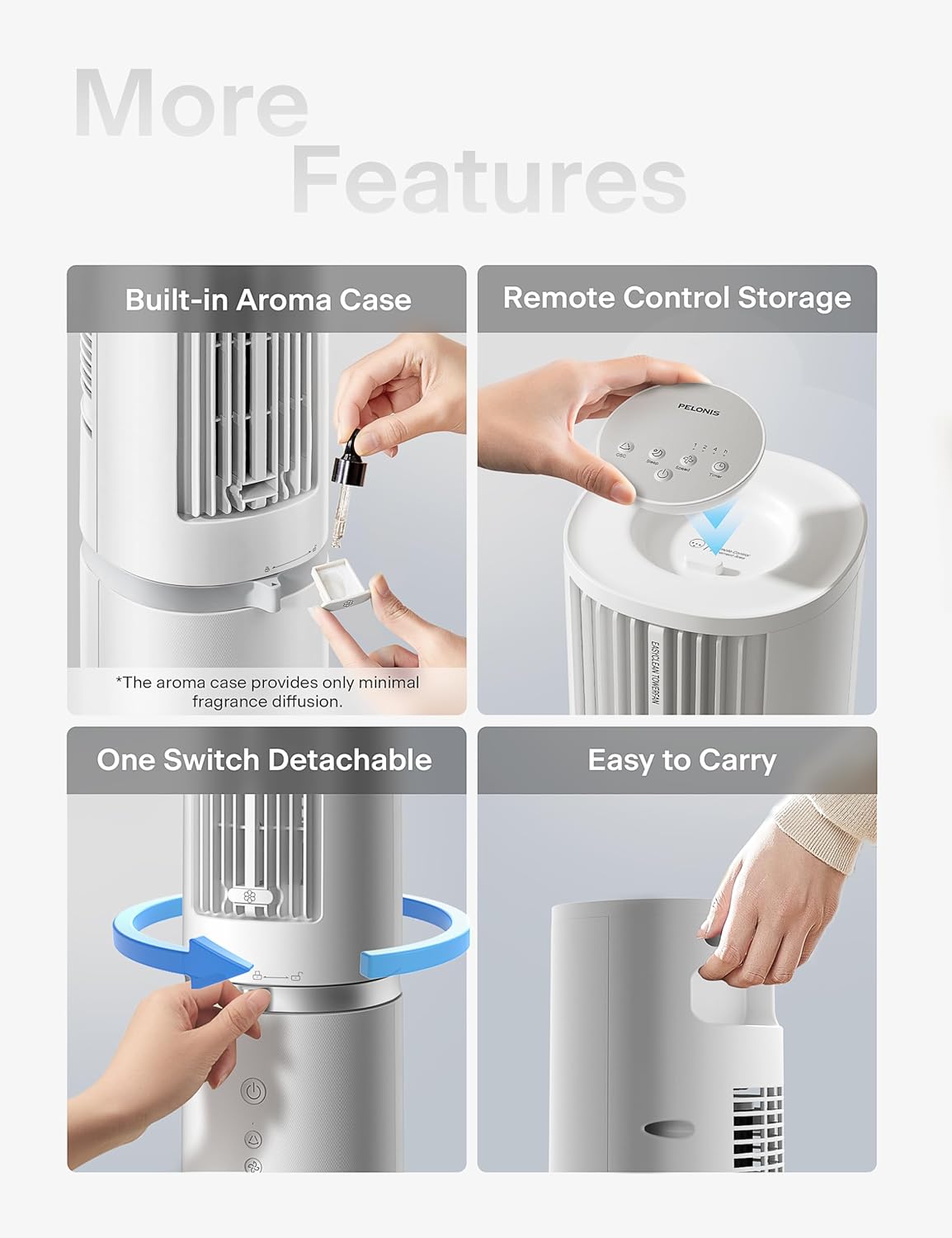
Figure 5: Additional Features including Aroma Case and Remote Storage
6. Penyelenggaraan dan Pembersihan
The PELONIS Tower Fan features an innovative washable design for easy cleaning. Regular cleaning ensures optimal performance and extends the life of your fan.
Arahan Pembersihan:
- Cabut plag kipas: Sentiasa pastikan kipas dicabut daripada soket kuasa sebelum membersihkannya.
- Detach Upper Body: The fan's upper body is detachable for thorough cleaning. Twist the lock mechanism at the base of the upper section and lift it off the motor unit.
- Komponen boleh dibasuh: The detachable upper body, including the air outlet grille and internal components, can be washed directly with water. Use mild soap and a soft cloth or sponge if necessary. Ensure no electronic components are exposed to water.
- Keringkan dengan teliti: Allow all washed parts to air dry completely before reassembling. Ensure no moisture remains, especially in crevices.
- Unit Asas Lap: Wipe the motor base unit with a soft, damp kain. Jangan rendam unit asas dalam air.
- Pasang semula: Once all parts are dry, carefully reattach the upper body to the motor unit, ensuring it locks securely into place.
Note: The aroma case (if present) can be cleaned by wiping it with a damp kain. Jangan gunakan bahan kimia yang keras.
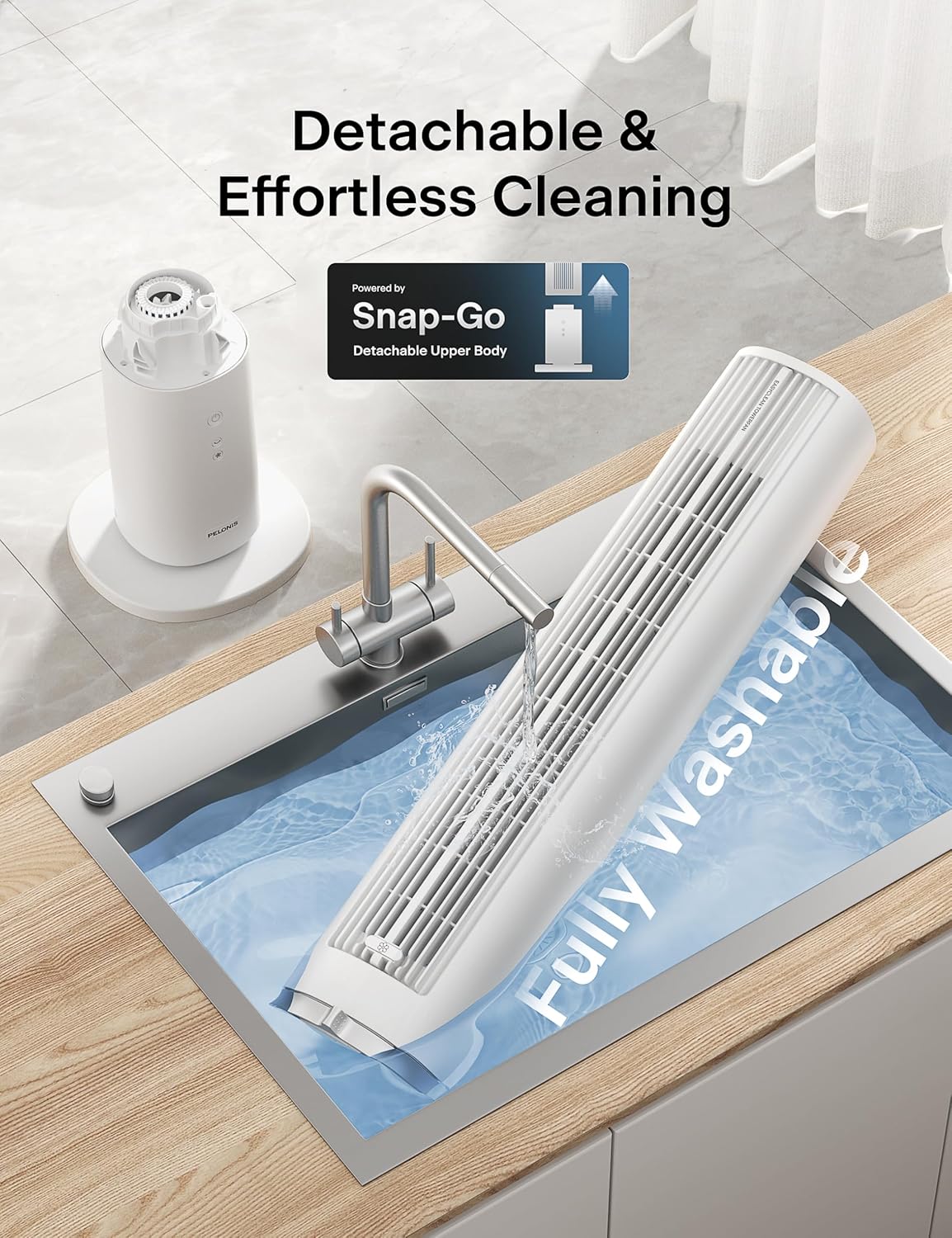
Figure 6: Detachable and Fully Washable Design

Figure 7: One-Twist Detachable Mechanism
7. Panduan Penyelesaian Masalah
Jika kipas anda tidak beroperasi dengan betul, sila rujuk isu dan penyelesaian biasa berikut:
| Masalah | Kemungkinan Punca | Penyelesaian |
|---|---|---|
| Kipas tidak dihidupkan. | Tidak dipasang; soket kuasa tidak berfungsi; butang kuasa tidak ditekan. | Ensure fan is securely plugged into a working outlet. Press the power button. |
| Aliran udara lemah atau tiada. | Fan speed too low; air intake/outlet blocked; internal components dirty. | Increase fan speed. Check for obstructions. Clean the fan as per maintenance instructions. |
| Fan is noisy during operation. | Fan not on a level surface; internal components dirty; foreign object inside. | Place fan on a flat, stable surface. Clean the fan. If noise persists, contact support. |
| Alat kawalan jauh tidak berfungsi. | Batteries are dead or incorrectly inserted; remote not pointed at receiver. | Replace batteries. Ensure correct polarity. Point remote towards the fan's control panel. |
| Ayunan tidak berfungsi. | Fungsi ayunan tidak diaktifkan. | Tekan butang ayunan pada panel kawalan atau alat kawalan jauh. |
8. Spesifikasi Produk
| Ciri | Perincian |
|---|---|
| Jenama | PELONIS |
| Nama Model | PSFZ40DR5ALG |
| Nombor Model | PSFZ40DR5ALG |
| warna | putih |
| Gaya | Upgraded with Washable Design |
| Dimensi Produk (D x W x H) | 10.82"D x 10.82"W x 40.6"H |
| Berat Barang | 7.03 Kilogram |
| Sumber Kuasa | AC/DC |
| Wattage | 45 watt |
| Voltage | 120 Volt |
| Bilangan Kelajuan | 4 |
| Mod Angin | Normal, Sleep |
| Oscillation | 90° |
| Tahap Kebisingan | 23 Desibel |
| Kapasiti Aliran Udara | 2000 Kaki Kubik Seminit (CFM) |
| Kelajuan Udara | 28 Feet Per Second (ft/s) |
| Pemasa | Sehingga 7 jam |
| Kaedah Kawalan | Button Control, Remote Control |
| Komponen yang Disertakan | Jauh |
| Penggunaan Dalaman/Luar | Dalaman |
9. Waranti dan Sokongan Pelanggan
PELONIS products are manufactured to the highest quality standards. For specific warranty information, please refer to the warranty card included with your product or visit the official PELONIS webtapak.
If you encounter any issues or have questions regarding your PELONIS 40-Inch Tower Fan, please contact our customer support team:
- Sokongan dalam talian: Lawati Kedai PELONIS di Amazon untuk Soalan Lazim dan maklumat produk.
- Maklumat Hubungan: Refer to your product packaging or the official PELONIS website for direct customer service contact details (phone, email).
Please have your model number (PSFZ40DR5ALG) and purchase date ready when contacting support.