
1. Pengenalan
The JIGUUN 1500W Pure Sine Wave Inverter is designed to convert 12V DC power from batteries into high-quality 230V AC power, suitable for a wide range of electronic equipment and household appliances. With a continuous output of 1500W and a peak power of 3000W, this inverter features advanced pure sine wave technology for stable and efficient operation. It also includes an integrated 30A charger, mains priority circuit, and UPS (Uninterruptible Power Supply) function to ensure continuous power supply during outages. A wireless remote control and an intelligent LCD display provide convenient monitoring and control.
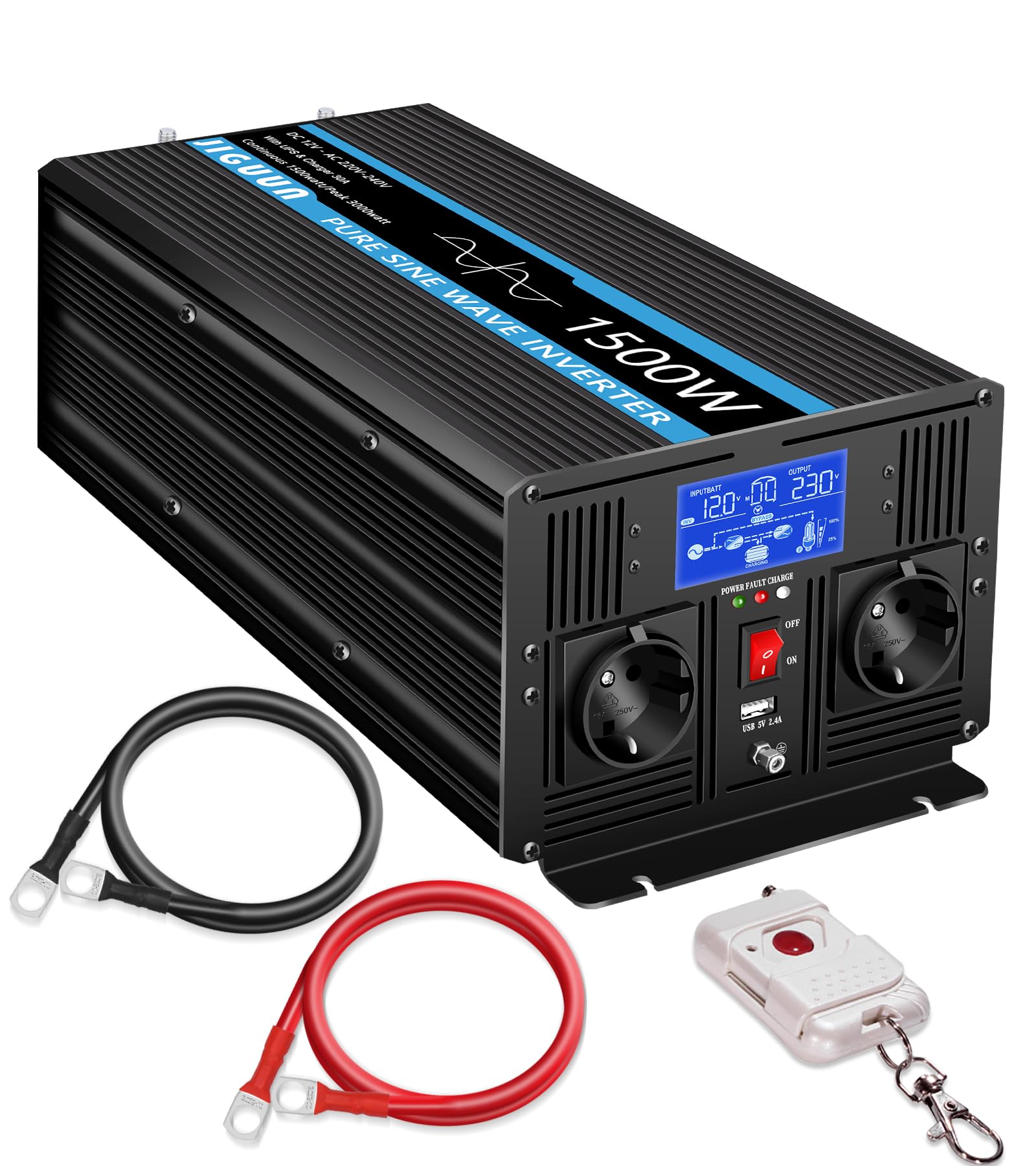
Image 1.1: JIGUUN 1500W Pure Sine Wave Inverter in an outdoor setting.
2. Arahan Keselamatan
Sila baca dan fahami semua arahan keselamatan sebelum memasang atau mengendalikan inverter. Kegagalan mematuhi arahan ini boleh mengakibatkan renjatan elektrik, kebakaran atau kecederaan serius.
- Pengudaraan: Ensure the inverter is installed in a well-ventilated area to prevent overheating. Do not block ventilation openings.
- Persekitaran: Avoid exposure to water, moisture, direct sunlight, heat sources, or flammable materials. Operate the inverter in a dry, cool environment.
- Sambungan Elektrik: All wiring must comply with local electrical codes and regulations. Use appropriate gauge cables for DC and AC connections. Ensure all connections are tight and secure to prevent loose contacts and overheating.
- Pembumian: The inverter must be properly grounded. Connect the ground terminal to an appropriate earth ground.
- Keselamatan Bateri: Work with batteries in a well-ventilated area. Wear eye protection and gloves. Avoid short-circuiting battery terminals.
- Penyelenggaraan: Disconnect all power sources before performing any maintenance or cleaning. Do not attempt to open or service the inverter yourself; refer to qualified service personnel.
- Kanak-kanak: Keep the inverter and its components out of reach of children.

Image 2.1: Inverter protection features.
3. Ciri-ciri Produk
The JIGUUN 1500W Pure Sine Wave Inverter offers a range of advanced features for reliable power conversion and management:
- Output Gelombang Sinus Tulen: Converts 12V DC to 230V AC with a pure sine wave, ensuring compatibility with sensitive electronics and reducing harmonic distortion. Continuous output of 1500W, with a peak power of 3000W.
- Integrated 30A Charger: Features an advanced Power Factor Correction (PFC) charging function with a maximum charging current of 30A, providing efficient battery charging.
- Mains Priority & UPS Function: Automatically switches to inverter power within 20 milliseconds during a power outage, ensuring an uninterrupted power supply for connected devices. Prioritizes mains power when available.
- Kawalan Jauh Wayarles: Allows convenient control of the inverter from a distance, enhancing usability in various setups.
- Paparan LCD Pintar: Provides real-time monitoring of input/output voltage, input/output frequency, load voltage, operating time, and error messages.
- Pelbagai Mekanisme Perlindungan: Built-in safeguards against overload, overvoltage, undervoltage, overheating, and short circuits to protect both the inverter and connected devices.
- Output Serbaguna: Equipped with two EU standard AC outlets and a 2.4A USB charging port for various power needs.

Image 3.1: Key features including intelligent chip and battery compatibility.

Image 3.2: Smart charging process diagram.
4. Kandungan Pakej
Upon unpacking, please verify that all items listed below are included in your package:
- 1 × JIGUUN 1500W Pure Sine Wave Inverter (12V to 230V)
- 1 × Manual Pengguna
- 1 × Battery Cable Set (1 red, 1 black)
- 1 × Kawalan Jauh Wayarles
- 1 × Earth Ground Cable
- 2 × Protective Covers
- 4 × Fuses

Image 4.1: What's in the Box.
5. Produk Lebihview
Familiarize yourself with the various parts and connections of your JIGUUN 1500W Inverter.

Image 5.1: Front and Rear Panel Overview.
Komponen Panel Depan:
- Paparan LCD: Shows operational status and error codes.
- Penunjuk Kuasa: LED light indicating power status.
- Suis ON / OFF: Suis kuasa utama untuk penyongsang.
- Cawangan AC (x2): Standard EU sockets for connecting AC appliances.
- Port USB: 2.4A USB output for charging devices.
- Sambungan Tanah: Terminal for connecting the earth ground cable.
Komponen Panel Belakang:
- DC Negative Terminal: Connects to the negative terminal of the battery.
- DC Positive Terminal: Menyambung ke terminal positif bateri.
- Input AC: For connecting to mains power when using the charger and UPS functions.
- Input AC Fuse: Protection for the AC input circuit.
- Cooling Fans (x2): Automatically activate to dissipate heat during operation.
6. Persediaan dan Pemasangan
Follow these steps for proper installation of your inverter:
- Pemasangan: Choose a dry, cool, and well-ventilated location for mounting the inverter. Ensure there is sufficient space around the unit for airflow.
- Sambungan Bateri:
- Sambungkan merah kabel bateri ke positif (+) DC terminal on the inverter and the positive terminal of your 12V battery.
- Sambungkan hitam kabel bateri ke negatif (-) DC terminal on the inverter and the negative terminal of your 12V battery.
- Ensure connections are tight and secure. Incorrect polarity will damage the inverter.
- Pembumian: Connect the included earth ground cable from the inverter's ground terminal to a reliable earth ground point.
- AC Input Connection (Optional, for Charger/UPS): If using the integrated charger and UPS function, connect the inverter's AC input port to a standard 230V AC mains power outlet using a suitable power cord.
- Sambungan Beban AC: Plug your 230V AC appliances into the AC outlets on the front panel of the inverter. Do not exceed the inverter's continuous power rating of 1500W.

Image 6.1: Inverter connection example.
7. Arahan Operasi
7.1 Menghidupkan/Mematikan
- Untuk Menghidupkan: Ensure all connections are secure. Press the ON/OFF switch on the front panel. The LCD display will illuminate, and the inverter will begin operating.
- Untuk Mematikan: Disconnect all AC loads. Press the ON/OFF switch. The LCD display will turn off.
7.2 Menggunakan Alat Kawalan Jauh Wayarles
The wireless remote control allows you to power the inverter on or off from a convenient distance.
- Press the power button on the remote control to toggle the inverter's power state.
- Ensure the remote control has fresh batteries and is within range of the inverter.

Image 7.1: Wireless remote control in use.
7.3 Maklumat Paparan LCD
The intelligent LCD display provides critical operational data:
- Input Voltage: Memaparkan volum DCtage daripada bateri.
- Keluaran Voltage: Menunjukkan volum output ACtage (cth, 230V).
- Kekerapan Input: Relevant when AC input is connected.
- Kekerapan Output: Memaparkan frekuensi output AC (cth., 50Hz).
- Beban Voltage: Indicates the current load on the inverter.
- Masa Berjalan: Shows how long the inverter has been operating.
- Mesej Ralat: Displays specific error codes if a fault occurs.

Image 7.2: Intelligent LCD display.
7.4 UPS and Mains Priority Function
When the inverter is connected to both a battery and an AC mains input, it operates in mains priority mode. It will use mains power to supply loads and charge the battery. If mains power fails, the inverter will automatically switch to battery power within 20 milliseconds, providing an uninterrupted power supply to connected devices.

Image 7.3: Uninterrupted power supply in action.
8. Penyelenggaraan
Regular maintenance ensures optimal performance and longevity of your inverter:
- Pembersihan: Bersihkan bahagian luar penyongsang secara berkala dengan kain kering dan lembut. Pastikan bukaan pengudaraan bebas daripada habuk dan serpihan. Jangan gunakan pembersih cecair.
- Pemeriksaan Sambungan: Regularly inspect all DC and AC connections for tightness. Loose connections can cause overheating and damage.
- Kesihatan Bateri: Monitor your battery's health and charge level, especially if the inverter is used in an off-grid or backup power system.
- Penggantian fius: If a fuse blows, replace it with a fuse of the same type and rating as specified in the manual or on the inverter. Always disconnect power before replacing fuses.
9. Penyelesaian masalah
The LCD display provides error codes to help diagnose issues. Refer to the table below for common error codes and troubleshooting steps.

Image 9.1: LCD display with error codes.
| Kod Ralat | Mesej Ralat | Kemungkinan Punca | Penyelesaian |
|---|---|---|---|
| 01 | Lebihan Output | Connected load exceeds inverter's continuous or peak power rating. | Reduce the connected load. Disconnect some appliances. |
| 02 | Bateri Undervoltage | Bateri voltage is too low. Battery is discharged or faulty. | Recharge the battery. Check battery connections and health. |
| 03 | Output Short Circuit, Overtemperature | Short circuit at the AC output or inverter is overheating. | Check AC output wiring for short circuits. Ensure adequate ventilation. Allow inverter to cool down. |
| 04 | Bateri Overvoltage | Bateri voltage terlalu tinggi. | Check charging source (e.g., solar charger, mains charger) and battery voltage. Disconnect charging source if necessary. |
Petua Penyelesaian Masalah Umum:
- If the inverter does not turn on, check battery connections and ensure the battery is charged.
- If there is no AC output, check the ON/OFF switch, AC load connections, and for any error codes on the LCD.
- If the remote control is not working, check its batteries and ensure it is within range.
10. Spesifikasi
| Spesifikasi | Nilai |
|---|---|
| Jenama | JIGUUN |
| Nama Model | 1500W12V |
| Kuasa Keluaran Berterusan | 1500 Watt |
| Kuasa Keluaran Puncak | 3000 Watt |
| Input Voltage | 12 Volt (DC) |
| Keluaran Voltage | 220 Volt (AC) |
| Bentuk Gelombang Output | Gelombang Sinus Tulen |
| Kekerapan | 50 Hz |
| Mengecas Semasa (Maks) | 30A (PFC function) |
| Masa Penukaran UPS | <20ms |
| Kecekapan | ≥90% |
| Jenis Paparan | LCD |
| Berat Barang | 4 Kilogram |
| Pensijilan | CE |
| Penggunaan yang Disyorkan | Boats, Camping, RVs, Off-grid systems, Outdoor work |
| UPC | 784847722768 |
| ASIN | B0F4JSFFWT |
11. Waranti dan Sokongan
JIGUUN stands behind the quality of its products.
- Waranti: This product comes with a one-year free replacement warranty from the date of purchase. This warranty covers manufacturing defects and malfunctions under normal use.
- Perkhidmatan Pelanggan: For any questions regarding the use, performance, or troubleshooting of your JIGUUN inverter, please contact our friendly 24-hour customer service team.
- Maklumat Hubungan: Please refer to the contact details provided on our official website or your purchase documentation for support.