
1. Pengenalan
This manual provides instructions for the safe and efficient use of your Brother CP2160F Computerized Sewing Machine. Please read this manual thoroughly before operating the machine to ensure proper function and to prevent damage or injury. Keep this manual in a safe place for future reference.
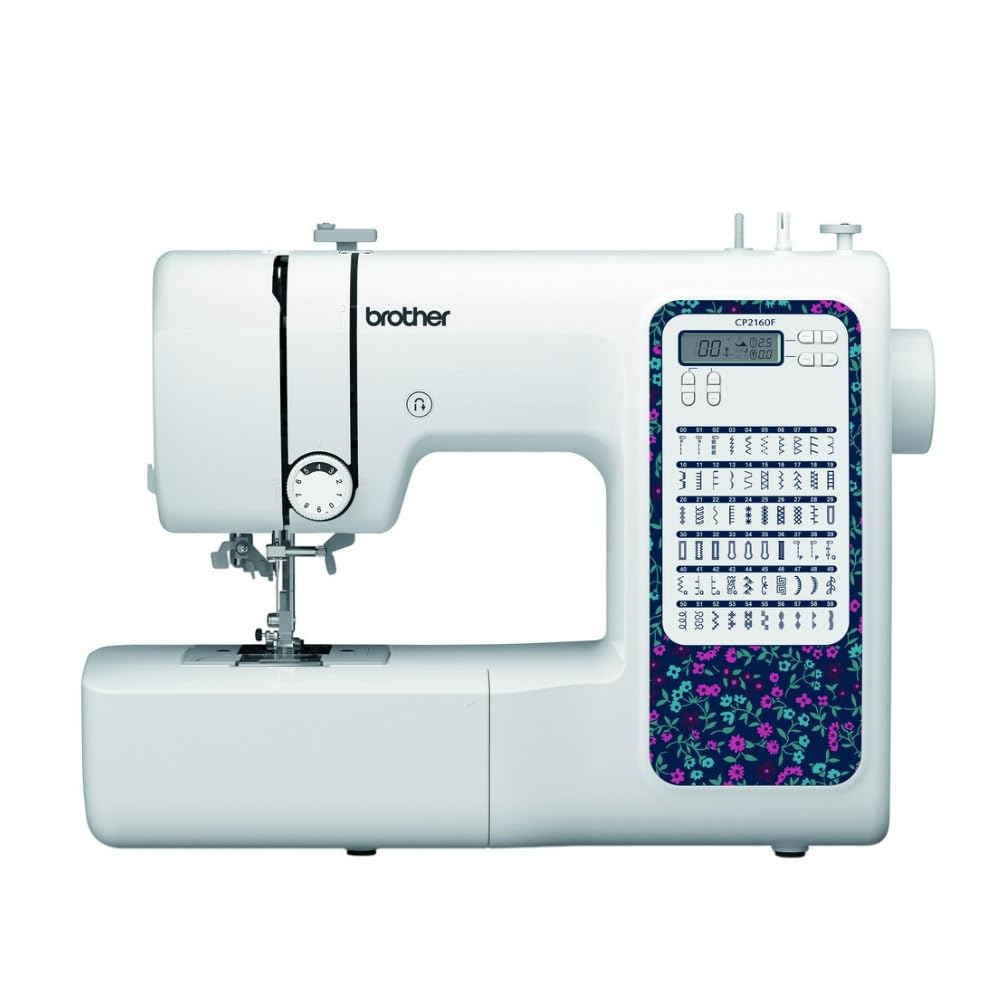
Figure 1: Brother CP2160F Computerized Sewing Machine. This image shows the overall view of the sewing machine, highlighting its compact design and the LCD screen for stitch selection.
2. Arahan Keselamatan Penting
Apabila menggunakan perkakas elektrik, langkah berjaga-jaga keselamatan asas hendaklah sentiasa dipatuhi, termasuk yang berikut:
- Baca semua arahan sebelum menggunakan mesin jahit ini.
- Jauhkan jari dari semua bahagian yang bergerak. Penjagaan khas diperlukan di sekitar jarum mesin jahit.
- Sentiasa gunakan plat jarum yang betul. Plat yang salah boleh menyebabkan jarum patah.
- Matikan mesin jahit apabila membuat sebarang pelarasan pada kawasan jarum, seperti memasukkan benang ke dalam jarum, menukar jarum, memasukkan benang ke dalam gelendong atau menukar kaki penekan.
- Sentiasa cabut plag mesin jahit daripada saluran keluar elektrik apabila menanggalkan penutup, pelincir, atau semasa membuat sebarang pelarasan servis pengguna lain yang dinyatakan dalam manual arahan.
- Jangan sekali-kali menjatuhkan atau memasukkan sebarang objek ke dalam mana-mana bukaan.
- Jangan gunakan di luar rumah.
- Jangan beroperasi di tempat produk aerosol (semburan) digunakan atau di mana oksigen diberikan.
- Untuk memutuskan sambungan, matikan semua kawalan ke kedudukan mati, kemudian tanggalkan palam dari alur keluar.
3. Kandungan Pakej
Sahkan bahawa semua komponen terdapat dalam pakej:
- Brother CP2160F Computerized Sewing Machine
- Kord Kuasa
- Pengawal Kaki
- Accessory Bag (containing bobbins, needle set, twin needle, screwdriver, spool caps, extra spool pin, seam ripper, cleaning brush)
- 7 Sewing Feet: Buttonhole foot, Zipper foot, Blind stitch foot, Button sewing foot, Overcasting foot, Monogramming foot, Zigzag foot (on machine)
- Manual Arahan (dokumen ini)
4. Persediaan
4.1 Sambungan Kuasa
- Letakkan mesin pada permukaan yang stabil dan rata.
- Insert the machine plug into the jack on the right side of the machine.
- Insert the power supply plug into a standard electrical outlet.
- Turn on the main power switch, located on the right side of the machine. The LCD screen will illuminate.
4.2 Penggulungan Bobbin
- Letakkan gelendong benang pada pin gelendong.
- Guide the thread through the upper thread guide and around the pre-tension disc.
- Place an empty bobbin onto the bobbin winder shaft and push it to the right.
- Wrap the thread clockwise around the bobbin a few times.
- Press the foot controller (or Start/Stop button) to begin winding. The machine will stop automatically when the bobbin is full.
- Cut the thread, push the bobbin winder shaft to the left, and remove the wound bobbin.
4.3 Threading the Machine (Upper Thread)
- Naikkan tuas kaki penekan.
- Letakkan gelendong benang pada pin gelendong.
- Pandu benang melalui panduan benang atas.
- Follow the numbered threading path indicated on the machine, ensuring the thread passes through the tension discs and takes up lever.
- Use the advanced needle threading system: Lower the presser foot, lower the needle, then push down the needle threader lever to engage it. Guide the thread through the hook and release the lever.
- Pull the thread loop through the needle eye.
4.4 Pemasangan Jarum
- Matikan kuasa mesin.
- Longgarkan jarum clamp screw by turning it counter-clockwise.
- Tanggalkan jarum lama.
- Masukkan jarum baharu dengan bahagian rata menghadap bahagian belakang mesin, tolak ke atas sejauh yang boleh.
- Ketatkan jarum clamp skru dengan selamat.
5. Operasi
5.1 Pemilihan Jahitan
The CP2160F features 60 built-in stitches. Use the stitch selector buttons (usually '+' and '-') to navigate through the stitch patterns displayed on the LCD screen. The recommended stitch length and width will be displayed automatically, but can be adjusted if desired.
5.2 Automatic Buttonholes
This machine includes 7 auto-size buttonhole styles. Attach the buttonhole foot. Place the button you wish to match into the buttonhole foot's holder. Select the desired buttonhole stitch. The machine will automatically sew a buttonhole to the correct size.
5.3 Free-Arm Sewing
To convert to free-arm sewing, slide off the accessory box located at the front of the machine. This exposes the free arm, ideal for sewing cylindrical items like cuffs, sleeves, and pant hems.
5.4 Menjahit Fabrik Tebal
The CP2160F's robust feed system and fixed needle bar are designed to handle thick materials such as denim and tweed. Ensure you use the correct needle type and size for the fabric thickness to prevent needle breakage and ensure smooth feeding.
5.5 Using Included Sewing Feet
The machine comes with seven specialized sewing feet. Refer to the specific stitch instructions for which foot to use. To change a presser foot:
- Naikkan jarum dan kaki penekan.
- Press the black lever at the back of the presser foot holder to release the current foot.
- Align the new foot with the pin on the presser foot holder and lower the presser foot lever until it snaps into place.
6. Penyelenggaraan
6.1 Membersihkan Mesin
Regular cleaning helps maintain optimal performance. Always unplug the machine before cleaning.
- Memberi makan anjing: Remove the needle plate and use the cleaning brush to remove lint and dust from the feed dogs and bobbin area.
- Hook Race: Carefully remove the bobbin case and clean the hook race area with the brush.
- Luaran: Wipe the exterior surfaces with a soft, dry cloth. Do not use liquid cleaners or harsh chemicals.
Note: This machine does not require user lubrication.
7. Penyelesaian masalah
Sebelum menghubungi khidmat pelanggan, silaview isu-isu biasa ini dan penyelesaiannya:
| Masalah | Kemungkinan Punca | Penyelesaian |
|---|---|---|
| Jarum pecah | Incorrect needle size/type for fabric; bent needle; needle not fully inserted; pulling fabric while sewing. | Use correct needle; replace bent needle; re-insert needle correctly; guide fabric gently. |
| Jahitan yang dilangkau | Needle bent or dull; incorrect needle insertion; improper threading; wrong needle for fabric. | Replace needle; re-insert needle; re-thread machine; use appropriate needle. |
| Thread jams | Improper threading; lint in bobbin case; bobbin wound unevenly. | Re-thread machine; clean bobbin area; re-wind bobbin evenly. |
| Mesin tidak dihidupkan | Power cord not connected; power switch off; electrical outlet issue. | Check power cord connections; ensure switch is ON; test outlet with another appliance. |
8. Spesifikasi
- model: Brother CP2160F
- Bilangan Jahitan: 60 jahitan terbina dalam
- Lubang butang: 7 One-step auto-size buttonholes
- Pengulir Jarum: Advanced Needle Threading System
- paparan: Skrin LCD
- Sewing Area: Free-arm capability
- Sistem Suapan: Exceptional feed for thick fabrics
- Included Feet: 7 (Buttonhole, Zipper, Blind Stitch, Button Sewing, Overcasting, Monogramming, Zigzag)
- warna: putih
- Bahan: Logam, Plastik
- Dimensi Produk (D x W x H): 6.65" x 12.2" x 16.26"
- Berat Barang: 226 Ounces (approx. 14.1 lbs)
- Sumber Kuasa: Elektrik Bertali
- UPC: 196271536956
9. Sokongan Pelanggan dan Waranti
For technical assistance, warranty information, or service inquiries, please contact Brother customer support. Refer to the official Brother weblaman web atau dokumentasi yang disertakan dengan pembelian anda untuk butiran hubungan dan terma jaminan terkini.
Sokongan dalam talian: www.brother-usa.com/support
Nota: Terma jaminan mungkin berbeza mengikut wilayah dan peruncit. Simpan bukti pembelian anda untuk tuntutan jaminan.