
1. Pengenalan
This manual provides detailed instructions for the installation, operation, and maintenance of the QUASAR X99 H5 Motherboard. The X99 H5 is a robust solution designed for workstations and servers, supporting LGA 2011-3 socket processors, including Intel Xeon V3/V4 series. It features DDR4 REG ECC memory support in a Dual Channel configuration, ensuring reliable stability and high performance for demanding applications such as rendering, virtualization, and intensive data processing.
Key features include PCIe 16X slots for expansion, an M.2 NVMe slot for high-speed storage, and multiple SATA 3.0 ports for additional drives. High-speed USB 3.0 ports are also integrated for rapid data transfer and peripheral connectivity. Its well-planned layout simplifies system assembly and maintenance, while quality components contribute to operational longevity and stability.
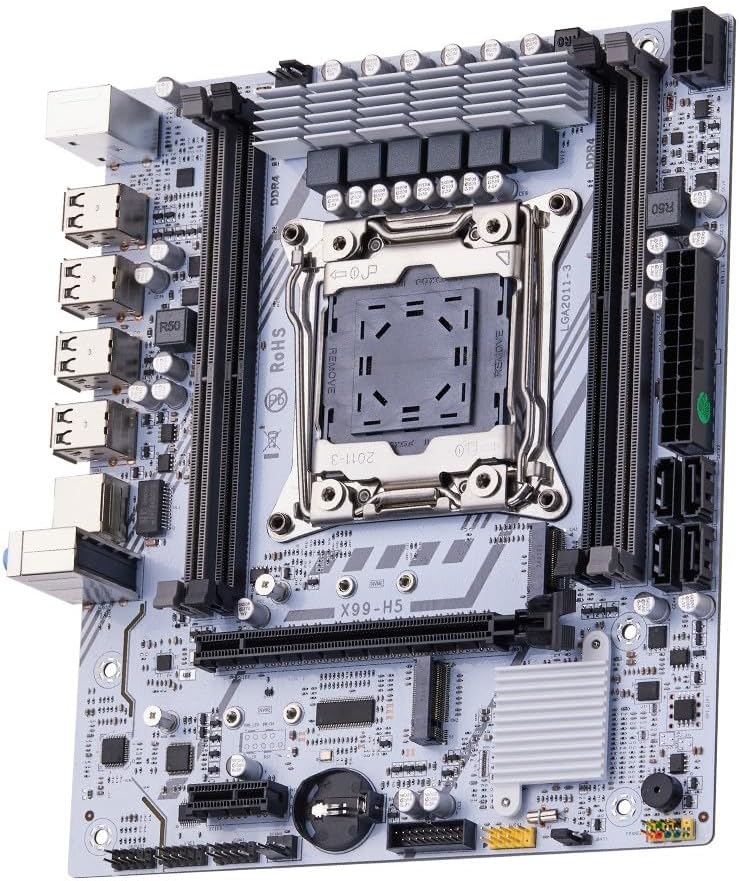
Gambar 1.1: Lebihview of the QUASAR X99 H5 Motherboard. This image displays the full motherboard, highlighting its compact and efficient design, including the CPU socket, memory slots, and various expansion ports.
2. Maklumat Keselamatan
Please read all safety instructions carefully before installing or operating the motherboard. Failure to follow these guidelines may result in personal injury, damage to the product, or damage to other components.
- Sentiasa putuskan sambungan bekalan kuasa daripada soket dinding sebelum memasang atau menanggalkan sebarang komponen.
- Wear an anti-static wrist strap or frequently touch a grounded metal object to discharge static electricity before handling the motherboard or other components.
- Kendalikan papan induk di tepinya untuk mengelak daripada menyentuh komponen sensitif.
- Ensure proper ventilation within the computer case to prevent overheating.
- Jangan dedahkan papan induk kepada kelembapan atau suhu yang melampau.
- Jauhkan daripada kanak-kanak.
3. Persediaan dan Pemasangan
3.1. Pengenalan Komponen
Familiarize yourself with the various components and connectors on the motherboard before beginning installation.

Figure 3.1: Labeled diagram of the QUASAR X99 H5 Motherboard. This image indicates the location of key components such as the CPU socket, DDR4 memory slots, PCIe slots, M.2 NVMe slot, SATA ports, USB ports, and power connectors.
- LGA 2011-3 CPU Socket: For Intel Xeon V3/V4 processors.
- DDR4 Memory Slots (4x): Supports DDR4 REG ECC memory up to 128GB.
- PCIe 16X Slots: Untuk kad grafik dan kad pengembangan lain.
- Slot M.2 NVMe: For high-speed solid-state drives.
- SATA 3.0 Ports: For connecting traditional hard drives and SSDs.
- Penyambung Kuasa ATX 24-pin: Main power input.
- 8-pin CPU Power Connector: Additional power for the CPU.
- Port USB 3.0/2.0: For peripheral connectivity.
- Port Ethernet Gigabit: Untuk sambungan rangkaian.
- Bicu Audio: Untuk input/output audio.
- Pelabuhan PS/2: Untuk papan kekunci dan tetikus legasi.
3.2. Senarai Semak Prapemasangan
- Compatible CPU (Intel Xeon V3/V4 series, LGA 2011-3 socket).
- Compatible DDR4 REG ECC memory modules.
- ATX power supply unit.
- Computer case with ATX form factor support.
- Storage devices (M.2 NVMe SSD, SATA SSD/HDD).
- Graphics card (if CPU does not have integrated graphics or for dedicated performance).
- Screwdriver set, anti-static wrist strap.
3.3. Langkah Pemasangan
- Sediakan Kes: Pasang perisai I/O ke dalam bukaan belakang sarung komputer anda.
- Pasang CPU:
- Buka mekanisme pengekalan soket CPU.
- Selaraskan CPU dengan soket dengan berhati-hati, pastikan tanda segi tiga pada CPU sepadan dengan tanda pada soket.
- Perlahan-lahan letakkan CPU ke dalam soket tanpa memaksanya.
- Tutup mekanisme pengekalan untuk menjamin CPU.
- Pasang Penyejuk CPU: Sapukan pes terma (jika belum disapu terlebih dahulu) dan pasang penyejuk CPU mengikut arahan pengilangnya. Sambungkan kabel kipas CPU ke pengepala CPU_FAN pada papan induk.
- Pasang Modul Memori:
- Open the clips on the DDR4 memory slots.
- Align the notch on the memory module with the key in the slot.
- Press down firmly on both ends of the module until the clips snap into place. For Dual Channel configuration, refer to the motherboard's silkscreen for recommended slot pairing (e.g., A1 and B1).
- Pasang Papan Induk: Carefully place the motherboard into the computer case, aligning it with the standoffs. Secure the motherboard with screws.
- Pasang Peranti Storan:
- For M.2 NVMe SSDs: Insert the M.2 SSD into the M.2 slot and secure it with the provided screw.
- For SATA drives: Connect SATA data cables from the motherboard's SATA ports to your drives. Connect power cables from the PSU to your drives.
- Pasang Kad Pengembangan: Insert graphics cards or other PCIe expansion cards into the appropriate PCIe slots and secure them with the case's retention mechanism.
- Sambungkan Bekalan Kuasa:
- Connect the 24-pin ATX power cable from the PSU to the motherboard.
- Connect the 8-pin CPU power cable from the PSU to the motherboard.
- Sambungkan Kabel Panel Depan: Connect the power button, reset button, HDD LED, power LED, and front panel USB/audio cables to their respective headers on the motherboard. Refer to the motherboard's silkscreen or a detailed diagram for correct pin assignments.
- Sambung Peranti: Sambungkan monitor, papan kekunci, tetikus dan peranti persisian lain anda ke port I/O belakang.

Rajah 3.2: Jarak dekat view of the rear I/O panel of the QUASAR X99 H5 Motherboard. This image shows the PS/2 ports for keyboard and mouse, multiple USB ports, the Ethernet port, and the audio jacks.
4. Arahan Operasi
4.1. But Pertama dan Persediaan BIOS
- After connecting all components and power, press the power button on your computer case.
- Semasa proses but, tekan berulang kali DEL or F2 key (common BIOS entry keys) to enter the BIOS/UEFI setup utility. The exact key may vary; check your screen for prompts.
- In the BIOS, verify that all installed components (CPU, RAM, storage drives) are detected correctly.
- Configure boot order to prioritize your operating system installation media (USB drive or DVD).
- Simpan perubahan dan keluar dari BIOS. Sistem akan dimulakan semula.
4.2. Pemasangan Sistem Pengendalian
Follow the instructions provided with your operating system (e.g., Windows, Linux) to complete the installation process. Ensure you install all necessary drivers for the motherboard's chipsets, network adapter, audio, and any other integrated components. Drivers are typically available on the manufacturer's website or included on a driver disc.
4.3. Pemasangan Pemandu
For optimal performance and stability, install the latest drivers for your motherboard. These typically include:
- Pemacu Chipset
- Pemacu LAN (Ethernet)
- Pemacu Audio
- USB Drivers (if specific ones are required)
- SATA/NVMe Storage Drivers
Visit the manufacturer's support website for the X99 H5 motherboard to download the most current drivers.
5. Penyelenggaraan
Penyelenggaraan berkala membantu memastikan jangka hayat dan prestasi optimum papan induk dan sistem anda.
- Penyingkiran habuk: Periodically clean dust from inside your computer case, especially from fans, heatsinks, and the motherboard surface. Use compressed air or a soft brush. Ensure the system is powered off and unplugged before cleaning.
- Kemas Kini BIOS/UEFI: Semak pengeluar weblaman web untuk kemas kini BIOS/UEFI. Kemas kini boleh meningkatkan keserasian, kestabilan dan prestasi. Ikuti arahan kemas kini dengan teliti untuk mengelakkan kerosakan pada papan induk.
- Kemas Kini Pemandu: Keep your system drivers updated to the latest versions.
- Pengurusan Kabel: Pastikan kabel dalaman disalurkan dengan kemas untuk meningkatkan aliran udara dan mengelakkan gangguan.
- Kawalan Alam Sekitar: Operate the system in a clean, dry, and well-ventilated environment. Avoid extreme temperatures and humidity.
6. Penyelesaian masalah
Bahagian ini menyediakan penyelesaian kepada isu biasa yang mungkin anda hadapi.
| Masalah | Kemungkinan Punca | Penyelesaian |
|---|---|---|
| Sistem tidak dihidupkan. | No power, loose connections, faulty PSU. | Check power cable, 24-pin and 8-pin power connectors. Ensure PSU switch is ON. Test PSU if possible. |
| Tiada paparan pada monitor. | Loose graphics card, faulty RAM, incorrect monitor input. | Reseat graphics card and RAM modules. Check monitor cable and input source. Test with one RAM stick. |
| Sistem but semula secara tidak dijangka. | Overheating, unstable power, faulty components. | Check CPU cooler installation. Ensure adequate case ventilation. Verify PSU stability. Run memory diagnostic. |
| Operating system not found. | Incorrect boot order, unformatted drive, faulty drive. | Check BIOS boot order. Ensure storage drive is properly connected and formatted with an OS. |
| Peranti USB tidak dikenali. | Missing drivers, faulty port, device issue. | Install/update USB drivers. Try different USB ports. Test device on another system. |
If issues persist, consult the manufacturer's support resources or a qualified technician.
7. Spesifikasi
| Ciri | Perincian |
|---|---|
| Jenama | Generic (Manufactured by Machinist) |
| Siri Model | X99 H5 |
| Soket CPU | LGA 2011-3 |
| Pemproses yang Serasi | Intel Xeon V3/V4 series |
| Teknologi Memori | DDR4 REG ECC |
| Slot memori | 4 x slot DIMM DDR4 (Saluran Dwi) |
| Memori Maks Disokong | 128 GB |
| Kelajuan Jam Memori | Up to 3200 MHz (actual speed depends on CPU and memory modules) |
| Antaramuka Penyimpanan | 1 x M.2 NVMe slot, Multiple SATA 3.0 ports |
| Slot Pengembangan | PCIe 16X slots (number not specified, but typically at least one) |
| Rangkaian | 1 x Gigabit Ethernet Port |
| Port USB | USB 3.0 and USB 2.0 ports (number not specified, but typically multiple) |
| Audio | Integrated Audio Jacks |
| Faktor Bentuk | ATX (Dimensions: 30.5 x 24.4 cm) |
| Berat Produk | 1 Kilogram |
8. Waranti dan Sokongan
For warranty information and technical support, please refer to the documentation provided with your purchase or visit the manufacturer's official webtapak. Simpan bukti pembelian anda untuk tuntutan waranti.
Typical support resources include:
- Online FAQs and Knowledge Base
- Driver and BIOS Download Section
- Customer Service Contact Information (Email/Phone)
When contacting support, please have your motherboard model (X99 H5) and any relevant error messages or system configurations ready.