
1. Pengenalan
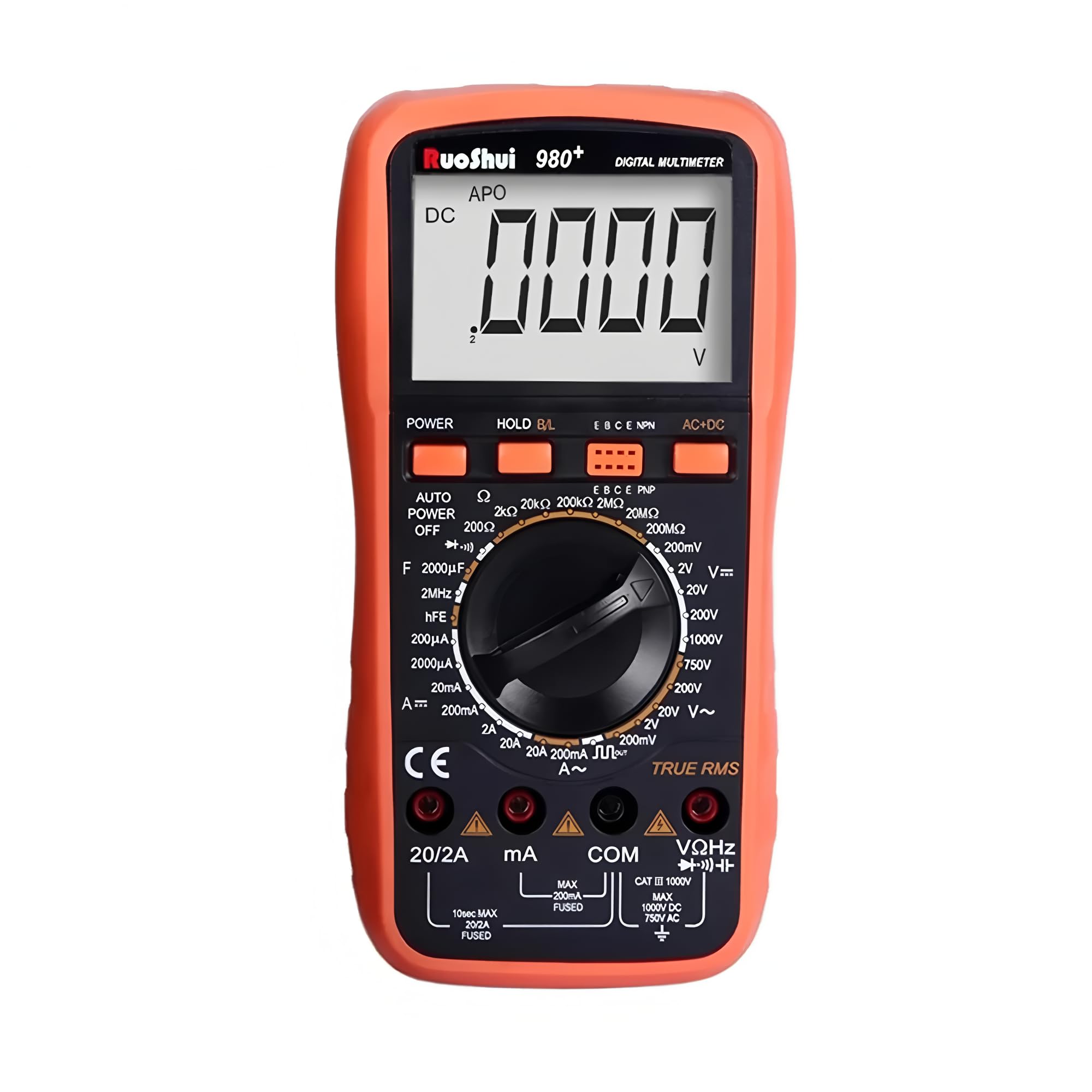
The RuoShui VC980+ is a stable and high-performance digital multimeter designed for accurate electrical measurements. Featuring a large 19999-count LCD display with a 42mm-high figure, it ensures clear readability. This instrument incorporates intelligent protection and overload protection, making it a reliable tool for various applications. It is capable of measuring DC voltage (DCV), AC voltage (ACV), DC current (DCA), AC current (ACA), resistance, capacitance, frequency, and includes functions for diode, triode (hFE), and continuity testing. The VC980+ utilizes a dual-integral A/D converter for precision measurements.
2. Maklumat Keselamatan
To ensure safe operation and to avoid damage to the meter, please read this manual carefully before use and observe all safety warnings. Keep this manual for future reference.
- Sentiasa pastikan petunjuk ujian disambungkan dengan betul dan suis fungsi ditetapkan pada julat yang betul sebelum membuat sebarang ukuran.
- Jangan gunakan voltage atau arus yang melebihi had maksimum yang ditentukan untuk setiap julat.
- Sentiasa berhati-hati apabila bekerja dengan litar hidup. vol tinggitages boleh berbahaya.
- Jangan gunakan meter jika ia kelihatan rosak atau jika penebat pada wayar ujian terjejas.
- Gantikan bateri dengan segera apabila penunjuk bateri lemah muncul untuk memastikan bacaan yang tepat.
- Always disconnect the test leads from the circuit before changing the function switch.
- The meter is equipped with overload protection. However, avoid intentional overloading.
3. Produk Lebihview
The RuoShui VC980+ Digital Multimeter is designed for versatility and ease of use. Key features include:
- 19999 Display Counts: Memberikan resolusi tinggi untuk pengukuran yang tepat.
- RMS Benar: Pengukuran tepat AC voltage and current, especially for non-sinusoidal waveforms.
- Paparan Lampu Belakang: Meningkatkan keterlihatan dalam persekitaran yang malap.
- Pegangan Data: Membekukan bacaan yang dipaparkan untuk rakaman yang mudah.
- Auto Matikan: Menjimatkan hayat bateri dengan menutup secara automatik selepas tempoh tidak aktif.
- Petunjuk Bateri Rendah: Alerts the user when the battery needs replacement.
- Petunjuk Pelbagai Julat: Notifies the user when the measured value exceeds the selected range.
- Perlindungan Lebihan: Safeguards the meter against damage from excessive input.
- Intelligent Anti-Burn Protection Circuit: Enhances safety and durability.
4. Persediaan
4.1 Pemasangan Bateri
The VC980+ multimeter operates on a 9V battery. To install or replace the battery:
- Ensure the multimeter is powered off and all test leads are disconnected.
- Cari penutup petak bateri di bahagian belakang unit.
- Gunakan pemutar skru untuk menanggalkan skru yang mengikat penutup bateri.
- Tanggalkan penutup dengan lembut.
- Connect a new 9V battery to the battery clip, observing correct polarity.
- Place the battery into the compartment and replace the cover, securing it with the screw.

4.2 Sambungan Plumbum Ujian
Connect the red test lead to the "VΩHz" or "mA" or "20A" input jack, depending on the measurement type. Connect the black test lead to the "COM" (common) input jack for all measurements.
5. Arahan Operasi
Before taking any measurement, ensure the meter is set to the correct function and range. Refer to the markings on the rotary switch and the display for guidance.
5.1 Mengukur DC Voltage (DCV)
- Set the rotary switch to the "V=" (DCV) range.
- Connect the red test lead to the "VΩHz" jack and the black test lead to the "COM" jack.
- Sambungkan prob ujian merentasi komponen atau litar yang hendak diukur, dengan memerhatikan kekutuban.
- Baca voltagnilai e pada paparan.
5.2 Mengukur Vol ACtage (ACV)
- Set the rotary switch to the "V~" (ACV) range.
- Connect the red test lead to the "VΩHz" jack and the black test lead to the "COM" jack.
- Sambungkan prob ujian merentasi komponen atau litar yang hendak diukur.
- Baca voltagnilai e pada paparan.
5.3 Mengukur Arus DC (DCA)
- Set the rotary switch to the "A=" (DCA) range (e.g., 200mA, 20A).
- For currents up to 200mA, connect the red test lead to the "mA" jack. For currents up to 20A, connect the red test lead to the "20A" jack. Connect the black test lead to the "COM" jack.
- Awas: To measure current, the meter must be connected in series with the circuit. Never connect the meter in parallel across a voltage source when measuring current, as this can blow the fuse or damage the meter.
- Open the circuit where current is to be measured and insert the meter in series.
- Baca nilai semasa pada paparan.
5.4 Mengukur Arus AC (ACA)
- Set the rotary switch to the "A~" (ACA) range (e.g., 200mA, 20A).
- Connect the red test lead to the appropriate current jack ("mA" or "20A") and the black test lead to the "COM" jack.
- Awas: Sambungkan meter secara siri dengan litar.
- Open the circuit and insert the meter in series.
- Baca nilai semasa pada paparan.
5.5 Mengukur Rintangan (Ω)
- Tetapkan suis berputar kepada julat "Ω" (Rintangan).
- Connect the red test lead to the "VΩHz" jack and the black test lead to the "COM" jack.
- Pastikan litar atau komponen dinyahtenagakan sebelum mengukur rintangan.
- Sambungkan kuar ujian merentasi komponen.
- Baca nilai rintangan pada paparan.
5.6 Mengukur Kapasitansi (F)
- Set the rotary switch to the "F" (Capacitance) range.
- Connect the red test lead to the "VΩHz" jack and the black test lead to the "COM" jack.
- Pastikan kapasitor dinyahcas sepenuhnya sebelum pengukuran untuk mengelakkan kerosakan pada meter.
- Sambungkan kuar ujian merentasi kapasitor.
- Baca nilai kapasitans pada paparan.
5.7 Measuring Frequency (Hz)
- Set the rotary switch to the "Hz" (Frequency) range.
- Connect the red test lead to the "VΩHz" jack and the black test lead to the "COM" jack.
- Sambungkan prob ujian merentasi sumber isyarat.
- Baca nilai kekerapan pada paparan.
5.8 Ujian Diod
- Tetapkan suis berputar kepada simbol "Diod".
- Connect the red test lead to the "VΩHz" jack and the black test lead to the "COM" jack.
- Sambungkan kuar merah ke anod dan kuar hitam ke katod diod.
- Paparan akan menunjukkan vol ke hadapantage drop. Reverse the probes; the display should show "OL" (open loop) for a good diode.
5.9 Ujian Kesinambungan
- Set the rotary switch to the "Continuity" symbol (often shared with resistance or diode).
- Connect the red test lead to the "VΩHz" jack and the black test lead to the "COM" jack.
- Sambungkan kuar ujian merentasi litar atau komponen.
- If the resistance is below a certain threshold (typically <50Ω), the buzzer will sound, indicating continuity. The display will also show the resistance value.
5.10 Ujian hFE (Ujian Transistor)
- Tetapkan suis berputar ke kedudukan "hFE".
- Insert the transistor leads (Emitter, Base, Collector) into the corresponding holes in the hFE socket on the meter, ensuring correct NPN or PNP type selection.
- Read the hFE (DC current gain) value on the display.
6. Penyelenggaraan
6.1 Penggantian Bateri
When the "BAT" symbol appears on the display, the battery voltage is low and needs to be replaced. Follow the steps outlined in Section 4.1 Battery Installation.
6.2 Penggantian Fius
If the current measurement function fails, the fuse may be blown. To replace the fuse:
- Ensure the multimeter is powered off and all test leads are disconnected.
- Remove the battery compartment cover and the battery.
- Buka bahagian belakang dengan berhati-hatiasing of the multimeter (this may require removing additional screws).
- Locate the blown fuse(s). The VC980+ typically uses a 250mA fuse for lower current ranges and a 20A fuse for higher current ranges.
- Replace the blown fuse with a new fuse of the exact same type and rating. Using an incorrect fuse can damage the meter or pose a safety hazard.
- Pasang semula casing and battery cover.

6.3 Pembersihan
Lap kes dengan iklanamp kain dan detergen lembut. Jangan gunakan bahan kasar atau pelarut. Pastikan terminal input bebas daripada kotoran dan kelembapan.
7. Penyelesaian masalah
| Masalah | Kemungkinan Punca | Penyelesaian |
|---|---|---|
| Tiada paparan atau paparan samar | Bateri rendah atau mati | Replace the 9V battery (refer to Section 4.1). |
| Bacaan yang salah | Fungsi/julat yang dipilih salah; sambungan petunjuk ujian lemah; bateri lemah | Verify function and range; ensure leads are firmly connected; replace battery. |
| Pengukuran arus tidak berfungsi | Blown fuse; incorrect connection (not in series) | Check and replace fuse (refer to Section 6.2); ensure meter is connected in series. |
| "OL" (Lebihan) dipaparkan | Measured value exceeds selected range; open circuit (for continuity/resistance) | Select a higher range; check for open circuit in the component/wire. |
| Tiada bip kesinambungan | Open circuit; resistance too high | Check the circuit for breaks; ensure resistance is below the continuity threshold. |
8. Spesifikasi
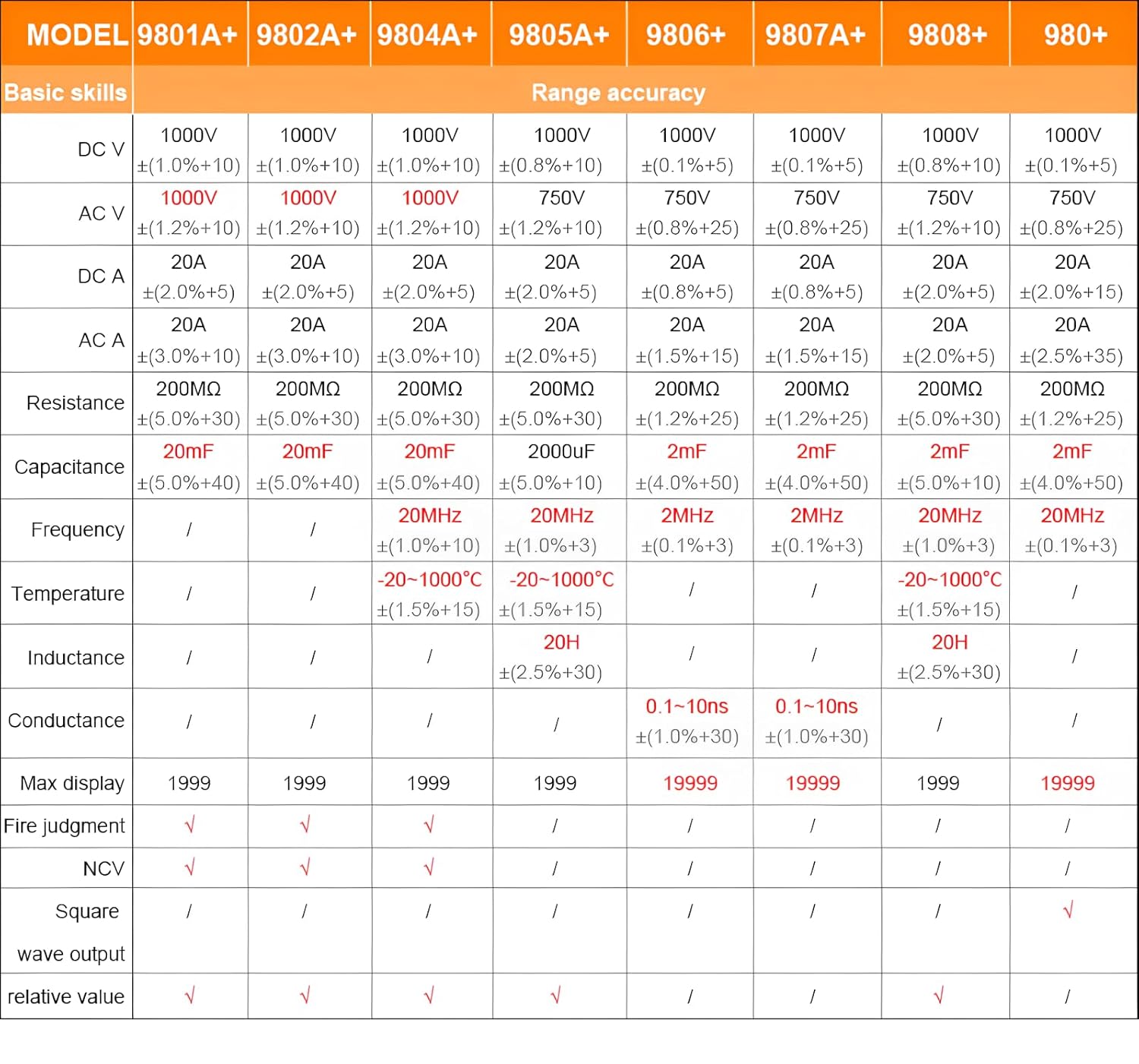
The following table details the general and measurement specifications for the RuoShui VC980+ Digital Multimeter.
| Ciri | Spesifikasi |
|---|---|
| Kiraan Paparan | 19999 |
| RMS sebenar | ya |
| Paparan Lampu Latar | ya |
| Pegangan Data | ya |
| Auto Matikan | ya |
| Petunjuk Bateri Rendah | ya |
| Petunjuk Pelbagai Julat | ya |
| Perlindungan Lebihan | ya |
| Ujian Diod | ya |
| Ujian hFE | ya |
| Ujian Kesinambungan | ya |
| Sumber Kuasa | 9V Battery (Battery Powered) |
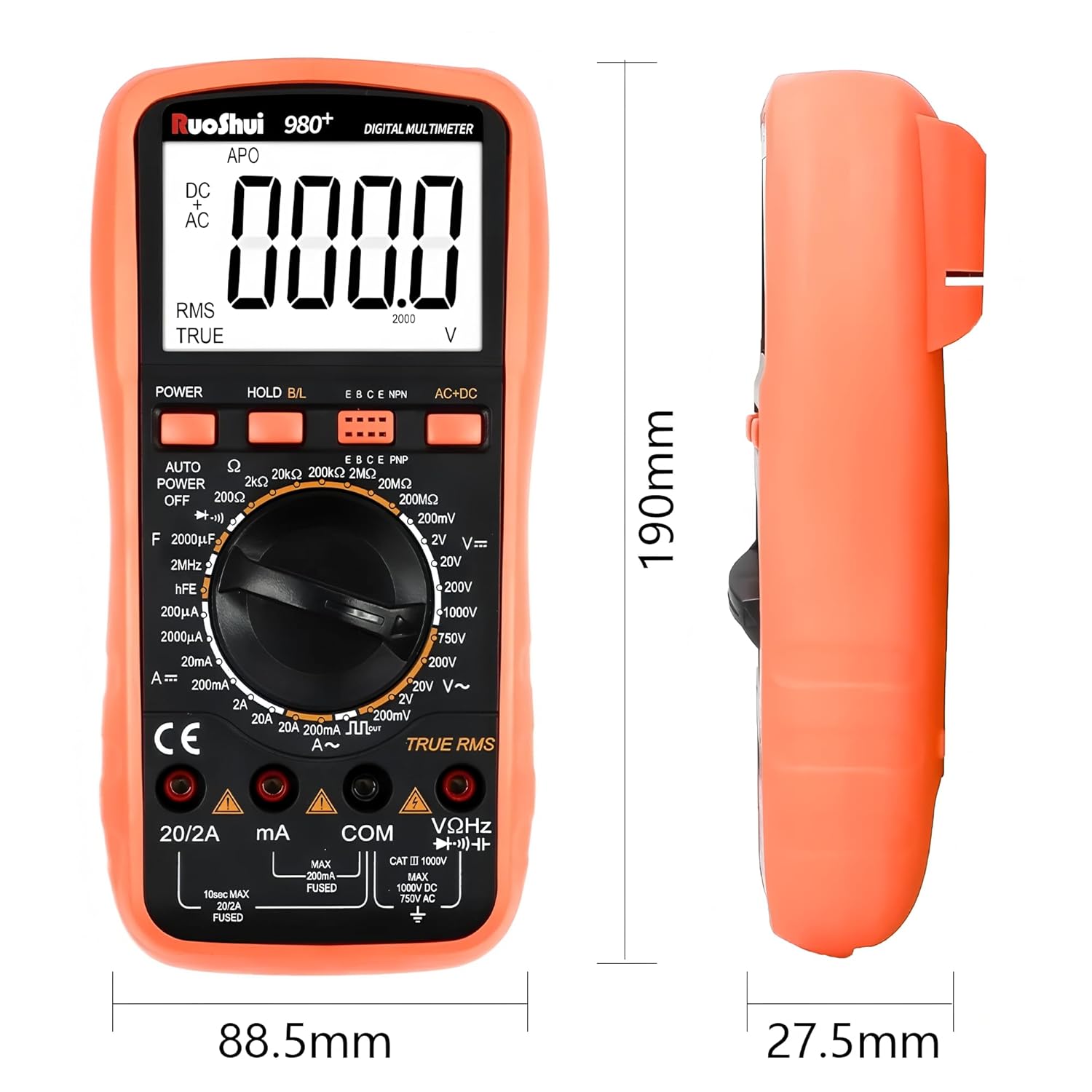
| Dimensi (L x W x H) | 7.87 x 5.91 x 7.09 inci (lebih kurang 190 x 88.5 x 27.5 mm) |
| Berat Barang | 2.2 paun (lebih kurang 1 Kilogram) |
| Suhu Operasi | Sehingga 60 Darjah Celcius |
| Pensijilan | CE, RoHS, UL |
For detailed range accuracy, please refer to the following table:
9. Waranti dan Sokongan
The RuoShui VC980+ Digital Multimeter is manufactured by Xi'an Beicheng Electronics Co.Ltd (RUOSHUI). For support or warranty inquiries, please contact the manufacturer or your point of purchase. EU spare part availability duration is 1 year.
For further assistance, please visit the official RuoShui store or contact customer service through the retailer where the product was purchased.