
3588B6-2S
Civhomy Replacement 3588B6-2S Battery User Manual
Model: 3588B6-2S
pengenalan
This user manual provides essential information for the safe and effective use of your Civhomy Replacement 3588B6-2S Li-ion Battery. Please read this manual thoroughly before installation and operation, and retain it for future reference. This battery is designed as a replacement for compatible Gateway laptop models.
Produk Selesaiview
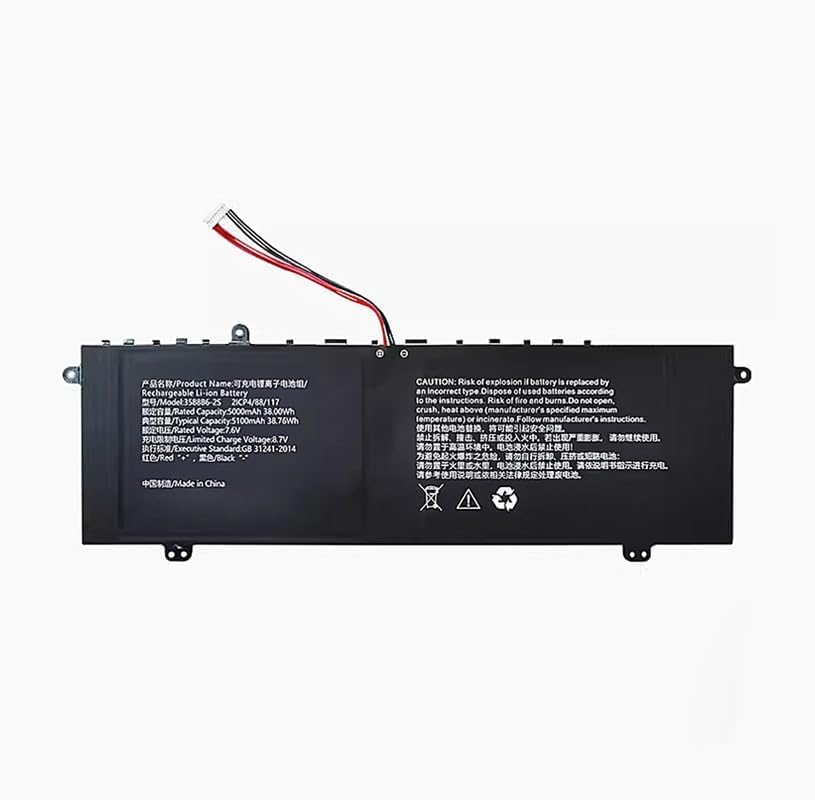
This image displays the Civhomy Replacement 3588B6-2S Li-ion battery. The battery is black with a white connector and red and black wires. The label on the battery provides product name, model number (3588B6-2S, 2ICP4/88/117), rated and typical capacities (5000mAh/38.00Wh, 5100mAh/38.76Wh), rated voltage (7.6V), limited charge voltage (8.7V), executive standard (GB 31241-2014), and wire color coding (Red '+', Black '-'). A prominent warning section in English and Chinese advises on safe handling, disposal, and risks associated with incorrect use.
The Civhomy 3588B6-2S is a high-quality replacement Li-ion battery designed for specific Gateway laptop models. It features a 7.6V rated voltage and a 5000mAh (38Wh) rated capacity, with a typical capacity of 5100mAh (38.76Wh). The battery is equipped with a 10-pin, 7-line connector for proper integration.
Maklumat Keselamatan dan Langkah berjaga-jaga
Your safety is paramount. Please adhere to the following safety guidelines to prevent injury, damage, or fire.
- Risiko Letupan: Replacing the battery with an incorrect type may lead to an explosion. Always use the specified replacement battery.
- Pelupusan: Dispose of used batteries according to local regulations and manufacturer's instructions. Improper disposal can be hazardous.
- Fire and Burns: This battery poses a risk of fire and burns if mishandled. Do not open, crush, or heat the battery above the manufacturer's specified maximum temperature. Do not incinerate.
- Kerosakan Fizikal: Do not disassemble, impact, squeeze, or short-circuit the battery. If the battery appears severely swollen, discontinue use immediately.
- Pendedahan Suhu: Do not expose the battery to high-temperature environments.
- Pendedahan Air: Jangan gunakan bateri jika ia telah direndam dalam air.
- mengecas: Always charge the battery according to the instructions provided in this manual and by your device manufacturer.
- Keserasian: Before purchase and installation, ensure all technical specifications and the model number match your device's requirements.
Persediaan dan Pemasangan
Installation of the replacement battery typically involves opening your laptop's casing. It is recommended that this procedure be performed by a qualified technician if you are not comfortable with internal hardware installation.
- Matikan dan Putuskan Sambungan: Ensure your laptop is completely powered off and disconnected from all power sources, including the AC adapter.
- Discharge Static Electricity: Before handling internal components, discharge any static electricity from your body by touching a grounded metal object.
- Akses Petak Bateri: Carefully open your laptop's back cover or access panel to locate the existing battery. Refer to your laptop's specific service manual for detailed instructions on accessing the battery.
- Putuskan Sambungan Bateri Lama: Gently disconnect the old battery's connector from the motherboard. Note the orientation of the connector and wires (Red '+' and Black '-').
- Keluarkan Bateri Lama: Unscrew any retaining screws holding the old battery in place and carefully remove it.
- Pasang Bateri Baharu: Place the new Civhomy 3588B6-2S battery into the compartment, ensuring it aligns correctly with the screw holes. Secure it with the retaining screws.
- Sambungkan Bateri Baharu: Carefully connect the new battery's 10-pin, 7-line connector to the corresponding port on the motherboard, ensuring a firm and correct connection.
- Pasang semula Komputer Riba: Replace the laptop's back cover or access panel and secure it.
- Caj Permulaan: Connect your laptop to the AC adapter and allow the new battery to fully charge before its first use.
Nota: Always refer to your specific laptop model's service manual for precise disassembly and reassembly instructions.
Arahan Operasi
Once installed, the Civhomy 3588B6-2S battery operates like your original laptop battery. Follow these general guidelines for optimal performance:
- Penggunaan Pertama: For the first use, it is recommended to fully charge the battery, then discharge it to about 10-15%, and then fully recharge it. This helps calibrate the battery's charge indicator.
- Pengecasan Biasa: Charge the battery using your laptop's original or a compatible AC adapter. Avoid using unapproved chargers.
- Elakkan Pelepasan Dalam: While Li-ion batteries do not suffer from "memory effect," frequent deep discharges (letting the battery run to 0%) can reduce its lifespan. Try to recharge before the battery level drops too low.
- Suhu: Operate your laptop within normal room temperatures. Extreme cold or heat can negatively affect battery performance and lifespan.
Penyelenggaraan
Proper maintenance can extend the life of your battery:
- Storan: If storing the battery for an extended period, ensure it is charged to about 50-60% and stored in a cool, dry place. Avoid storing fully charged or fully discharged batteries.
- Pembersihan: Keep the battery contacts clean. Use a dry, soft cloth to wipe away any dust or debris.
- Elakkan Tekanan Fizikal: Do not drop, bend, or apply excessive pressure to the battery.
- Kemas Kini Perisian: Keep your laptop's operating system and drivers updated, as power management software can impact battery performance.
Menyelesaikan masalah
If you encounter issues with your Civhomy 3588B6-2S battery, consider the following:
| Masalah | Kemungkinan Punca | Penyelesaian |
|---|---|---|
| Bateri tidak dicas. | Loose connection, faulty charger, software issue, or battery defect. |
|
| Battery not detected. | Incorrect installation, driver issue, or battery defect. |
|
| Hayat bateri pendek. | High power consumption, background processes, or battery degradation. |
|
| Bateri bengkak. | Internal cell failure, overcharging, or manufacturing defect. | Hentikan penggunaan dengan segera. Remove the battery carefully if safe to do so, and dispose of it properly according to local regulations. Do not attempt to puncture or repair a swollen battery. |
If troubleshooting steps do not resolve the issue, contact the seller or a qualified technician for further assistance.
Spesifikasi
| Ciri | Perincian |
|---|---|
| Nama Produk | Bateri Li-ion yang boleh dicas semula |
| Nombor Model | 3588B6-2S, 2ICP4/88/117 |
| Nombor Bahagian yang Serasi | 3588B6-2S, 3576127P-2S1P |
| Model yang Serasi | Gateway GWNC21524-BL BK GR RD |
| Kapasiti Dinilai | 5000mAh / 38.00Wh |
| Kapasiti Biasa | 5100mAh / 38.76Wh |
| Dinilai Voltage | 7.6V |
| Caj Terhad Voltage | 8.7V |
| Jenis Penyambung | 10 Pins, 7 Lines |
| Komposisi Sel Bateri | Polimer Litium (Li-ion) |
| Standard Eksekutif | GB 31241-2014 |
| Pengeluar | Shenzhen Wenxin Technology Co.,Ltd |
| asal usul | Buatan China |
Ask a question about this manual
Ask about setup, troubleshooting, compatibility, parts, safety, or missing instructions. Manuals+ will review the question and use this page’s manual context to help answer it.