
RadioShack 1202265
RadioShack AM/FM 2-Jalur VintagManual Pengguna Radio
Model: 1202265
Produk Selesaiview
The RadioShack AM/FM 2-Band Vintage Radio with Bluetooth Function and USB/TF Ports (Black) is a versatile audio device designed for both classic radio listening and modern digital media playback. It features a vintage aesthetic combined with contemporary functionalities like Bluetooth connectivity and USB/TF card support.

Depan view of the RadioShack Vintage Radio, showcasing its classic design and LED display.
Apa yang ada dalam Kotak
- 1 x RadioShack Vintage Radio (Model 1202265)
- 1 x Kabel Pengecas USB Jenis-C

The package includes the RadioShack Vintage Radio and its Type-C charging cable.
Ciri-ciri Produk
- AM/FM 2-Band Radio with LED Display: For clear reception of radio stations.
- Fungsi Bluetooth: Penstriman audio tanpa wayar daripada peranti yang serasi.
- Main Balik Media Serbaguna: Menyokong MP3 files via USB/TF ports and AUX-in.
- High Power Dual Speakers: Delivers rich sound with preset EQ function.
- Reka Bentuk Mudah Alih: Features a rechargeable battery, built-in antenna, and carry handle.

Key features of the radio include a rechargeable battery, Bluetooth connectivity, AM/FM radio, and AUX input.
Persediaan
1. Mengecas Bateri
Before first use, fully charge the radio's internal rechargeable battery. Connect the supplied Type-C USB cable to the radio's charging port and the other end to a compatible USB power adapter (not included) or a computer USB port. The LED indicator will show charging status.
2. Persediaan Antena
For optimal radio reception, extend the telescopic antenna fully. Adjust its direction to improve signal clarity for both AM and FM bands.
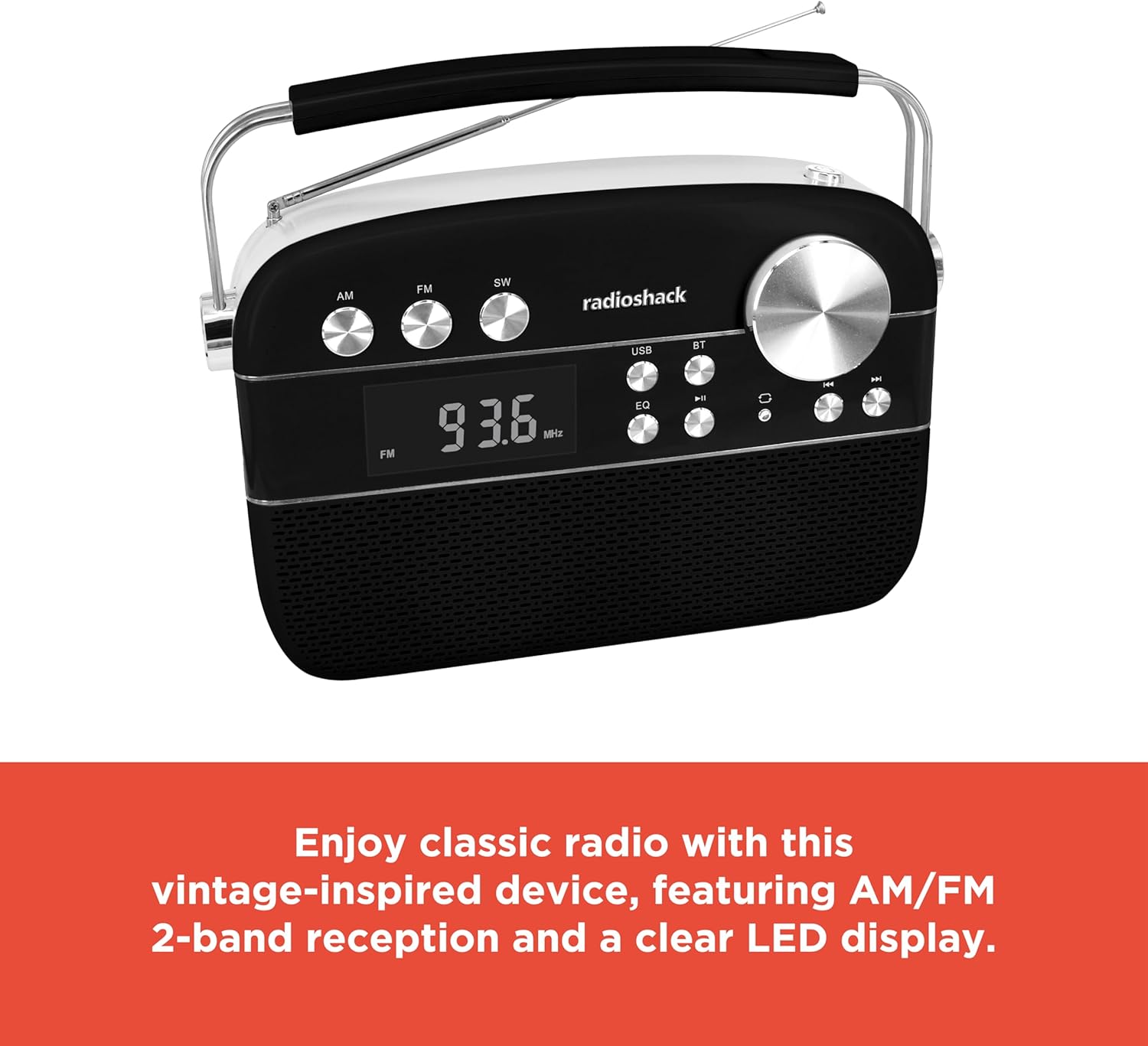
The radio features an extendable antenna for improved reception and a clear LED display for tuning.
Arahan Operasi
Hidupkan/Mati Kuasa
Press the Power button to turn the radio on or off.
Pemilihan Mod
Use the Mode button to switch between FM, AM, Bluetooth (BT), USB/TF, and AUX input modes. The LED display will indicate the current mode.
Operasi Radio (AM/FM)
- Switch to FM or AM mode using the Mode button.
- Rotate the Tuning knob to scan for available radio stations. The frequency will be displayed on the LED screen.
- Adjust the Volume knob to your desired listening level.
Berpasangan Bluetooth
- Switch the radio to Bluetooth (BT) mode. The display will show "BLUE" and the Bluetooth indicator will flash, indicating it's ready for pairing.
- Pada telefon pintar atau tablet anda, dayakan Bluetooth dan cari peranti yang tersedia.
- Select "RadioShack" from the list of devices. Once paired, the Bluetooth indicator will stop flashing and remain solid.
- You can now stream audio wirelessly from your device to the radio.
Main Semula Kad USB/TF
- Insert a USB flash drive or TF (microSD) card containing MP3 audio files ke pelabuhan masing-masing.
- Switch the radio to USB/TF mode. The radio will automatically detect and begin playing the audio files.
- Gunakan butang Sebelumnya/Seterusnya untuk menavigasi antara trek.
- Press the Play/Pause button to pause or resume playback.
- The "ONE/ALL/RND" button allows you to cycle through playback modes (single track repeat, all tracks repeat, random playback).
- The "FOLDER" button allows navigation through folders on the storage device.
Mod AUX-in
Connect an external audio device (e.g., MP3 player, smartphone) to the radio's AUX-in port using a 3.5mm audio cable (not included). Switch the radio to AUX mode to play audio from the connected device.
Fungsi Penyama (EQ).
Press the EQ button to cycle through preset equalizer modes, adjusting the audio output to suit different music genres or personal preferences.

Terperinci view of the control panel, highlighting the various buttons and the tuning knob for different playback options.
Video Demonstrasi Produk
This video demonstrates the key features and operation of the RadioShack Vintage Radio, including tuning to FM stations and connecting via Bluetooth.
Penyelenggaraan
Pembersihan
Wipe the exterior of the radio with a soft, dry cloth. Do not use abrasive cleaners, waxes, or solvents as they may damage the finish. Avoid getting moisture into any openings.
Penjagaan Bateri
To prolong battery life, avoid fully discharging the battery frequently. If the radio will not be used for an extended period, charge it periodically (e.g., every 3 months) to maintain battery health.
Menyelesaikan masalah
| Masalah | Kemungkinan Punca | Penyelesaian |
|---|---|---|
| Tiada kuasa | Bateri dinyahcas. | Charge the radio using the supplied Type-C USB cable. |
| Tiada bunyi | Kelantangan terlalu rendah atau diredam. Mod yang dipilih salah. | Increase the volume. Ensure the correct input mode (FM, AM, BT, USB/TF, AUX) is selected. |
| Penerimaan radio yang lemah | Antenna not extended or positioned incorrectly. Weak signal area. | Fully extend and adjust the telescopic antenna. Try moving the radio to a different location. |
| Bluetooth tidak bersambung | Radio not in pairing mode. Device too far. Previously paired device connected. | Ensure radio is in BT mode and "BLUE" is flashing. Move device closer. Disconnect from other Bluetooth devices. |
| USB/TF playback not working | tak betul file format. USB/TF card not inserted correctly or corrupted. | pastikan files are in MP3 format. Reinsert the USB/TF card. Try a different USB/TF card. |
Spesifikasi
| Ciri | Perincian |
|---|---|
| Jenama | RadioShack |
| Nombor Model | 1202265 |
| Dimensi Produk | 4.53 x 11.42 x 7.36 inci |
| Berat Barang | 3.41 paun |
| Sumber Kuasa | Rechargeable Battery (included), Corded Electric |
| Pancaragam Radio Disokong | AM/FM 2-Band |
| Teknologi Ketersambungan | Bluetooth, USB, Kad TF, AUX-in |
| warna | Hitam |
Waranti dan Sokongan
For warranty information and customer support, please refer to the documentation provided with your purchase or visit the official RadioShack webtapak. Simpan bukti pembelian anda untuk sebarang tuntutan waranti.
Ask a question about this manual
Ask about setup, troubleshooting, compatibility, parts, safety, or missing instructions. Manuals+ will review the question and use this page’s manual context to help answer it.