
pengenalan
This manual provides essential information for the safe operation, setup, maintenance, and troubleshooting of your SYMA REVOLT AEROLUME HELICOPTER RC. Please read this manual thoroughly before operating the helicopter to ensure proper function and to prevent damage or injury.
Maklumat Keselamatan
- Penggunaan Dalaman Sahaja: This helicopter is designed for indoor use. Do not fly outdoors.
- Pengawasan Dewasa: Recommended for users aged 8 and above. Adult supervision is advised for younger users.
- Kawasan Jernih: Ensure a clear flying area, free from obstacles, people, and pets.
- Elakkan Halangan: Do not fly near electrical wires, lamps, or other fragile objects.
- Keselamatan Bateri: Use only the provided charging cable. Improper charging can lead to overheating or fire hazards. Do not overcharge or short-circuit batteries.
- Propeller Warning: Keep hands, face, and hair away from rotating propellers.
- Pendedahan Air: Keep the helicopter and remote control away from water and moisture.
Kandungan Pakej
Sahkan bahawa semua item terdapat dalam pakej anda:
- REVOLT AEROLUME HELICOPTER RC
- Alat Kawalan Jauh (memerlukan 4 bateri AA, disertakan)
- Rechargeable Li-ion Battery (3.7V/400mAh)
- Kabel Pengecas USB
- Replacement Tail Propeller
- Manual Arahan
Persediaan
1. Charging the Helicopter Battery
The helicopter is powered by a rechargeable Li-ion battery. Before first use, fully charge the battery.
- Sambungkan kabel pengecas USB ke port pengecasan helikopter.
- Plug the USB end of the cable into a USB power source (e.g., computer USB port, USB wall adapter).
- The indicator light on the USB charging cable will illuminate during charging and turn off or change color when charging is complete. Refer to the charger's specific instructions for exact indicator behavior.
- Charging typically takes approximately 60-90 minutes. Do not leave unattended during charging.
Penting: Use only the original charging cable provided with the helicopter. Utilizing other charging cables may result in overheating or fire hazards.

Image: The REVOLT AEROLUME HELICOPTER RC being charged via its USB cable. The charging indicator light is visible.
2. Memasang Bateri Kawalan Jauh
The remote control requires 4 AA batteries (included).
- Buka petak bateri di belakang alat kawalan jauh.
- Masukkan 4 bateri AA, pastikan kekutuban (+/-) betul.
- Tutup petak bateri dengan selamat.
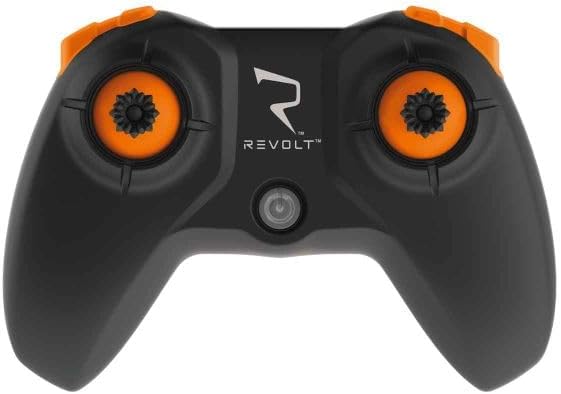
Image: The remote controller for the REVOLT AEROLUME HELICOPTER RC.
Arahan Operasi
1. Kuasa Hidup dan Berpasangan
- Ensure the helicopter battery is fully charged and the remote control has fresh batteries.
- Letakkan helikopter di atas permukaan yang rata dan rata.
- Turn on the helicopter's power switch (usually located on the underside or side of the helicopter).
- Hidupkan suis kuasa alat kawalan jauh.
- The remote control and helicopter will automatically pair. This may involve moving the throttle stick up and then down. Refer to the remote control's specific instructions for pairing sequence.
2. Kawalan Asas Penerbangan
The REVOLT AEROLUME HELICOPTER RC features user-friendly controls for an enjoyable flying experience.
- Satu Butang Berlepas dan Mendarat: Press the designated button on the remote control to initiate automatic take-off or landing. The helicopter will ascend to a stable hover or descend gently.
- Auto-Hover (Altitude Hold): The helicopter maintains its altitude automatically, allowing you to focus on directional control.
- Tongkat Pendikit: Controls the helicopter's ascent and descent (when not in auto-hover) or forward/backward movement.
- Directional Stick: Controls forward, backward, left, and right movement.
- 2 Kelajuan: Switch between two speed modes for beginners and more experienced pilots.
3. Preprogrammed Flight Maneuvers (5 Stunts)
The helicopter includes 5 preprogrammed flight maneuvers for dynamic aerial displays:
- Ascending Descending Corkscrew Flight
- Expanding Spiral Flight
- Bunny Hops
- (Other two maneuvers not specified in product description, refer to remote control manual for full list)
4. Multi-Color Light Effects
The Aerolume features mesmerizing multi-color light effects with 7 light patterns, enhancing visibility and aesthetic appeal during flight.

Image: The REVOLT AEROLUME HELICOPTER RC showcasing its multi-color light effects during flight.
5. Flight Video Demonstration
Watch this video for a visual guide on operating the REVOLT AEROLUME HELICOPTER RC, including its features and flight maneuvers.
Video: Demonstration of the REVOLT AEROLUME HELICOPTER RC's features, including light patterns, one-button take-off/landing, altitude hold, 5 stunts (corkscrew, spiral, bunny hops), 2 speeds, 17-minute flight time, and USB charging.
Penyelenggaraan
1. Tail Propeller Replacement
If the tail propeller becomes damaged, it can be replaced:
- Carefully remove the damaged tail propeller from its shaft.
- Align the new tail propeller with the shaft and gently press it into place. Ensure it is secure but not overly tight.
2. Penjagaan Am
- Clean the helicopter with a soft, dry cloth. Do not use solvents or harsh chemicals.
- Store the helicopter and remote control in a cool, dry place when not in use.
- Remove batteries from the remote control if storing for extended periods to prevent leakage.
Menyelesaikan masalah
If you encounter issues with your helicopter, refer to the following common problems and solutions:
- Helicopter does not respond:
- Ensure both helicopter and remote control are powered on.
- Check if batteries in both devices are charged/fresh.
- Re-pair the helicopter and remote control.
- Helicopter flies erratically or drifts:
- Perform a calibration as per the remote control's instructions (if available).
- Periksa kipas yang rosak dan gantikan jika perlu.
- Ensure there are no strong air currents or drafts in the flying area.
- Helicopter does not take off:
- Sahkan bateri telah dicas sepenuhnya.
- Ensure propellers are installed correctly and not obstructed.
- Confirm the one-button take-off function is activated correctly.
Spesifikasi
| Ciri | Perincian |
|---|---|
| Nombor Model | SYM-S9 |
| Jenama | SYMA |
| Borang Kenderaan Mainan | Helikopter |
| bahan | plastik |
| warna | Pelbagai warna |
| Julat Umur (Perihalan) | Kid (Manufacturer Minimum Age: 108 months) |
| Sumber Kuasa | Bateri |
| Bateri Helikopter | Rechargeable Li-ion Battery; 3.7V/400mAh |
| Bateri Kawalan Jauh | 4 bateri AA (termasuk) |
| Ciri Khas | Multi-Color Light Effects (7 patterns), 5 Preprogrammed Flight Maneuvers, One-Button Take-Off and Landing, Auto-Hover, 2 Speeds |
| Masa Penerbangan | Lebih kurang 17 minit |
| Penggunaan Dalaman/Luar | Dalaman |
| Berat Barang | 0.38 Kilogram |
| Dimensi Item (L x W x H) | 10 x 5 x 8 sentimeter |
Waranti dan Sokongan
For warranty information, technical support, or replacement parts, please refer to the contact details provided with your purchase or visit the official SYMA webtapak. Simpan bukti pembelian anda untuk tuntutan waranti.