
1. Pengenalan
Thank you for choosing the Kuulaa Magsafe Power Bank 5000mAh. This portable magnetic wireless charger is designed to provide convenient and efficient power for your compatible devices, featuring both wireless and wired charging capabilities, along with a versatile folding swivel stand. Please read this manual carefully before use to ensure optimal performance and safety.
2. Maklumat Keselamatan
- Jangan dedahkan bank kuasa kepada suhu yang melampau, cahaya matahari langsung atau api.
- Elakkan menjatuhkan, membuka atau cuba membaiki peranti sendiri.
- Jauhkan bank kuasa daripada air dan cecair lain.
- Gunakan hanya kabel pengecasan dan penyesuai yang diperakui.
- Jauhkan daripada kanak-kanak.
- Buang produk secara bertanggungjawab mengikut peraturan tempatan.
3. Kandungan Pakej
Sila semak pakej untuk item berikut:
- Kuulaa Magsafe Power Bank 5000mAh
- Kabel Pengecas USB-C
- Manual Pengguna
4. Ciri dan Komponen Produk
The Kuulaa Magsafe Power Bank is designed for convenience and efficiency:
- Kapasiti 5000mAh: Provides reliable power for your devices.
- Pengecasan Wayarles Magnetik: Securely attaches to compatible iPhone models (12/13/14/15 series) for 7.5W wireless charging.
- Port USB-C PD 20W: Supports fast wired charging for input and output, charging an iPhone to 50% in approximately 30 minutes.
- Penunjuk Bateri LED: Four small LED lights display the remaining power level.
- Folding Swivel Stand: Pendirian bersepadu untuk bebas tangan viewing in various orientations.
- Reka Bentuk Nipis & Mudah Alih: Ergonomic, lightweight, and travel-friendly.
- Ciri Keselamatan Lanjutan: Built-in protection against overcharging, overcurrent, short circuit, and high temperature.
Produk Selesaiview

Rajah 1: Sisi view of the power bank, illustrating its slim and portable design (0.8cm thickness, 110g weight).

Figure 2: The power bank magnetically attached to a smartphone, showcasing the secure and efficient magnetic connection.

Figure 3: Illustration of both wireless (top) and wired (bottom) charging methods supported by the power bank.
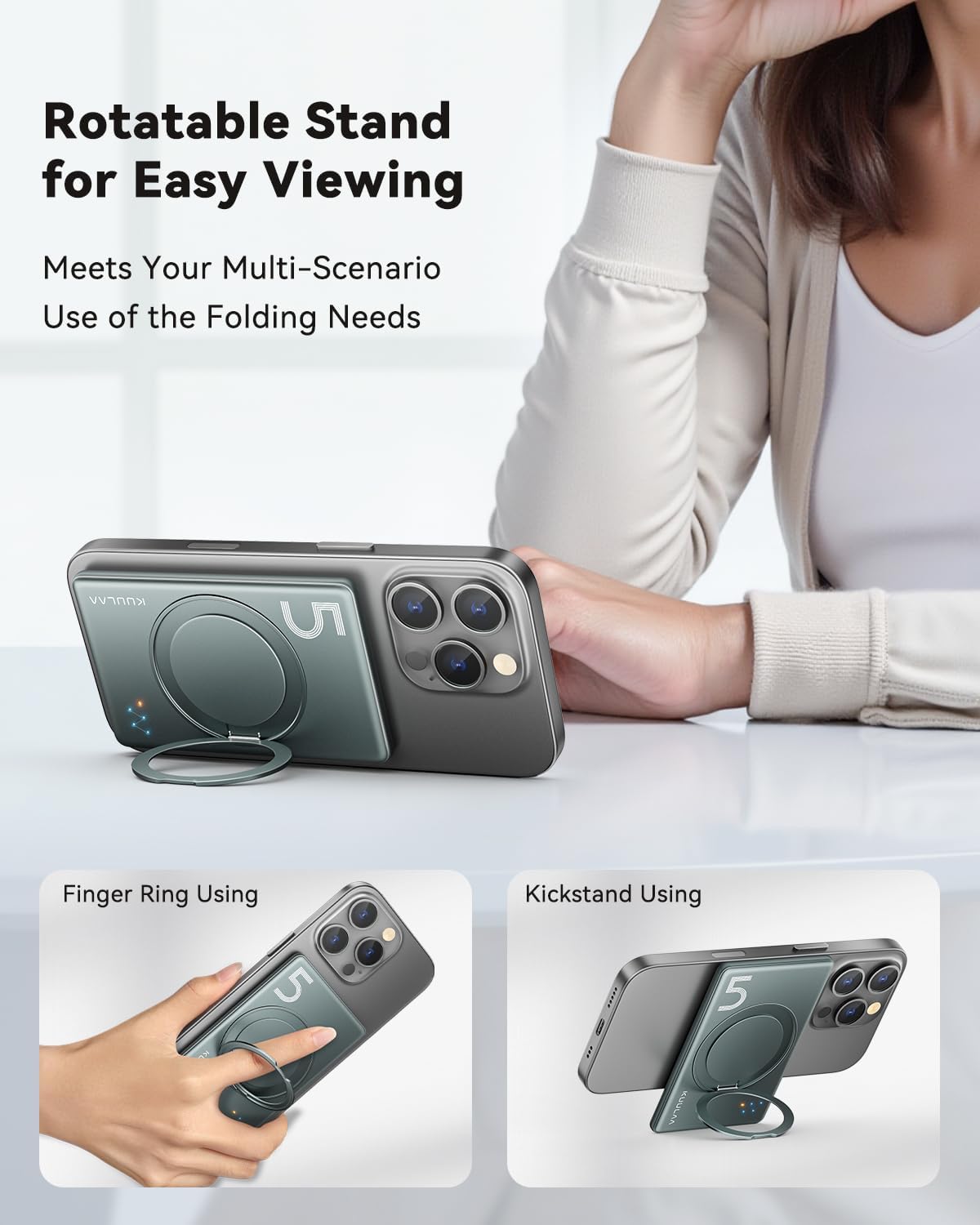
Gambar 4: Cthamples of the integrated folding swivel stand being used as a kickstand and a finger ring for enhanced usability.
5. Persediaan
Pengecasan Awal Bank Kuasa
- Sambungkan kabel USB-C yang disediakan ke port USB-C pada power bank.
- Sambungkan hujung kabel USB-C yang satu lagi kepada penyesuai kuasa USB yang serasi (tidak disertakan).
- The LED indicators will light up to show the charging status. All four LEDs will be solid when fully charged.
- For optimal performance, fully charge the power bank before its first use.
6. Arahan Operasi
6.1. Pengecasan Tanpa Wayar
- Ensure your device is compatible with MagSafe wireless charging (iPhone 12/13/14/15 series).
- Align the power bank with the back of your iPhone. The magnets will automatically snap it into place.
- Wireless charging will begin automatically. The LED indicators on the power bank will illuminate to confirm charging.
- For best results, ensure there are no foreign objects between the power bank and your device.
6.2. Pengecasan Berwayar
- Connect one end of a USB-C cable (or your device's charging cable) to the USB-C port on the power bank.
- Connect the other end of the cable to your smartphone, smartwatch, or headphones.
- Bank kuasa akan mula mengecas peranti anda secara automatik.
6.3. Using the Folding Swivel Stand
- Gently pull out the integrated stand from the back of the power bank.
- The stand can be rotated 360 degrees to achieve your desired viewsudut ing.
- It can be used as a kickstand for hands-free viewing or as a finger ring for a more secure grip on your phone.
6.4. Menyemak Tahap Bateri
The four LED indicators on the power bank display the remaining battery capacity:
- 4 LEDs Solid: 75% - 100% dicaj
- 3 LEDs Solid: 50% - 75% dicaj
- 2 LEDs Solid: 25% - 50% dicaj
- 1 LED Solid: 0% - 25% dicaj (caj semula tidak lama lagi)
7. Penyelenggaraan
- Pembersihan: Lap bank kuasa dengan kain lembut dan kering. Jangan gunakan bahan kimia yang keras atau bahan yang melelas.
- Storan: Store the power bank in a cool, dry place away from direct sunlight and extreme temperatures. If storing for extended periods, charge it to about 50% every three months to prolong battery life.
- Elakkan Kesan: Lindungi peranti daripada jatuh dan hentaman.
8. Penyelesaian masalah
| Masalah | Penyelesaian yang Mungkin |
|---|---|
| Power bank tidak dicas |
|
| Peranti tidak dicas secara wayarles |
|
| Device not charging via USB-C cable |
|
| Penunjuk LED tidak berfungsi |
|
9. Spesifikasi
| Ciri | Perincian |
|---|---|
| Nombor Model | KL-YD68 |
| Kapasiti Bateri | 5000 mAh |
| Output Pengecasan Tanpa Wayar | 7.5W (for iPhone 12/13/14/15 series) |
| Input/Output USB-C | PD 20W Maks |
| Dimensi Produk | 10L x 6.6W x 0.8Sentimeter |
| Berat Barang | 170 g |
| Bilangan Pelabuhan | 2 (1x USB-C, 1x Wireless) |
| Peranti Serasi | Smartphone, Smartwatch, Headphone |
| Pengeluar | Shenzhen Kula Technology Co.,Ltd. |

Gambar 5: Lebihview of the power bank's sophisticated security features and certifications.
10. Waranti dan Sokongan
The Kuulaa Magsafe Power Bank comes with a standard manufacturer's warranty. For detailed warranty information, please refer to the warranty card included in your package or visit the official KUULAA webtapak.
If you encounter any issues or have questions regarding your product, please contact KUULAA customer support through the retailer where you purchased the product or via the contact information provided on the official KUULAA webtapak.