
1. Pengenalan
Welcome to the user manual for the SIRUI 20mm T1.8 1.33X Anamorphic Lens. This document provides essential information for the proper setup, operation, and maintenance of your new lens. Please read this manual thoroughly before using the product to ensure optimal performance and longevity.
2. Ciri-ciri Utama
- 1.33X Immersive Cinematic View: This lens features a 1.33x squeeze factor, enabling a 2.35:1 widescreen aspect ratio when shooting in 16:9 mode. This creates a cinematic visual experience without the need for cropping.
- Selectable Manual and Autofocus: Equipped with a precision STM stepping motor, the lens offers smooth, accurate, and quiet autofocus capabilities. It includes eye-tracking support, an AF/MF switch for quick mode changes, and autofocus lock (available for E/Z/L Mounts), providing comprehensive control over your focusing.
- Super 35 Coverage: The SIRUI 20mm T1.8 lens is designed with a 37mm image circle, optimized for APS-C or Super 35 sensors. This ensures excellent coverage and image clarity across compatible camera systems.
- T1.8 Ultra-Fast Aperture: The wide T1.8 aperture allows for significant light intake, which reduces the need for high ISO settings in low-light conditions. This results in clearer night scenes, sharper subject focus, and a pleasing soft bokeh effect, enhancing both low-light performance and depth of field control.
- 20mm Broaden Perspective: This 20mm wide-angle lens provides a horizontal field of view equivalent to a 22mm full-frame lens. It is well-suited for capturing expansive landscapes, detailed starry skies, and navigating tight indoor spaces with ease.
- Reka Bentuk Padat & Ringan: Weighing approximately 480g (1.06lb), the lens is designed to be compact and lightweight. This form factor integrates advanced technology and visual quality, making it ideal for handheld shooting, gimbal use, and run-and-gun productions.
3. Persediaan
3.1 Membongkar dan Pemeriksaan
Upon receiving your SIRUI 20mm T1.8 1.33X Anamorphic Lens, carefully unpack all components. Verify that the following items are present:
- SIRUI 20mm T1.8 1.33X Anamorphic Lens
- Cap Lensa Depan
- Cap Lensa Belakang
- Tudung Lensa
- Beg Simpanan
- tali
- Kotak Pakej
- Service Card & Warranty Card
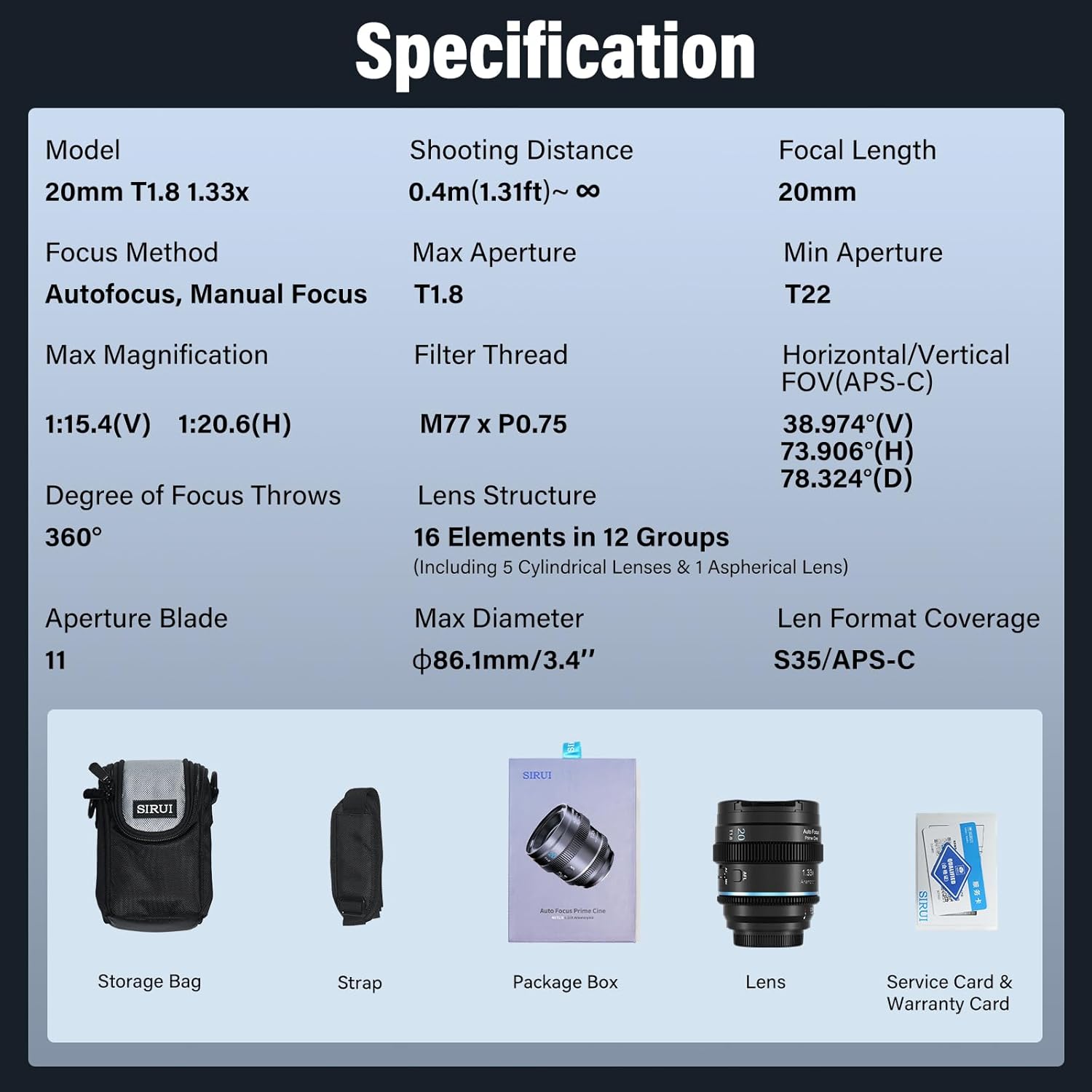
Image: Package contents of the SIRUI 20mm T1.8 1.33X Anamorphic Lens, showing the lens, storage bag, strap, package box, and service card.
Inspect the lens for any signs of damage during transit. If any issues are found, contact your retailer immediately.
3.2 Memasang Kanta pada Kamera Anda
- Pastikan kamera anda dimatikan.
- Remove the rear lens cap from the SIRUI lens and the body cap from your camera.
- Align the mounting index (usually a white dot or line) on the lens with the corresponding index on your Fujifilm X-mount camera body.
- Masukkan kanta dengan lembut ke dalam tempat letak kanta kamera.
- Putar kanta mengikut arah jam sehingga ia klik pada tempatnya, menunjukkan ia telah dikunci dengan selamat.
- Attach the front lens cap when the lens is not in use to protect the front element.
3.3 Initial Camera Settings
After mounting the lens, power on your camera. Depending on your camera model, you may need to adjust settings such as:
- Shoot Without Lens: Enable this option in your camera's menu if the camera does not detect the lens.
- Nisbah Aspek: For the full anamorphic effect, ensure your camera is set to a 16:9 aspect ratio. The lens will then squeeze the image, which can be de-squeezed in post-production to achieve the 2.35:1 cinematic widescreen.
- Crop Mode: If using a full-frame camera with an adapter (not recommended for optimal performance), switch to APS-C/S35 mode to minimize vignetting.
4. Operasi
4.1 Focus Modes (AF/MF)
The SIRUI 20mm T1.8 lens supports both autofocus (AF) and manual focus (MF). You can switch between these modes using the dedicated AF/MF switch located on the lens barrel.

Image: The AF/MF switch and AFL button on the lens barrel, illustrating the selectable focus modes and autofocus capabilities.
- Autofokus (AF): Slide the switch to 'AF'. The lens will use its STM stepping motor to automatically focus on your subject. This mode supports advanced features like eye-tracking on compatible camera bodies.
- Fokus Manual (MF): Slide the switch to 'MF'. Rotate the focus ring on the lens barrel to adjust focus manually. This provides precise control for critical focusing situations.
- Autofocus Lock (AFL): Press the AFL button (if present on your lens variant) to temporarily lock the autofocus at its current position.
4.2 Kawalan Apertur
The lens features a fast T1.8 aperture, which can be controlled via your camera's settings. A wider aperture (smaller T-number) allows more light to enter the lens, resulting in:
- Improved low-light performance.
- Shallower depth of field, creating a pleasing latar belakang kabur (bokeh).

Image: Visual comparison demonstrating the superior low-light capability and bokeh of a T1.8 fast aperture lens.
4.3 Anamorphic Effect and De-squeeze
The 1.33X squeeze factor of this anamorphic lens horizontally compresses the image onto your camera's sensor. When shooting in a 16:9 aspect ratio, the captured footage will appear stretched vertically. To achieve the intended cinematic 2.35:1 widescreen look, the footage must be 'de-squeezed' in post-production using video editing software.

Image: Illustration of the 1.33X immersive cinematic view, comparing a standard 16:9 frame with the wider 2.35:1 aspect ratio achieved using the SIRUI 20mm anamorphic lens.
4.4 Wide-Angle Perspective
The 20mm focal length provides an ultra-wide-angle perspective, equivalent to a 22mm full-frame lens in terms of horizontal field of view. This makes it suitable for capturing broad scenes.

Image: The 20mm ultra-wide angle perspective of the lens, suitable for expansive scenes.
4.5 Flare Characteristics
This specific variant of the SIRUI 20mm T1.8 1.33X Anamorphic Lens produces a Neutral Flare. Anamorphic lenses are known for their distinct oval bokeh and horizontal lens flares. The neutral flare is designed to be subtle and less distracting, offering a clean cinematic look.
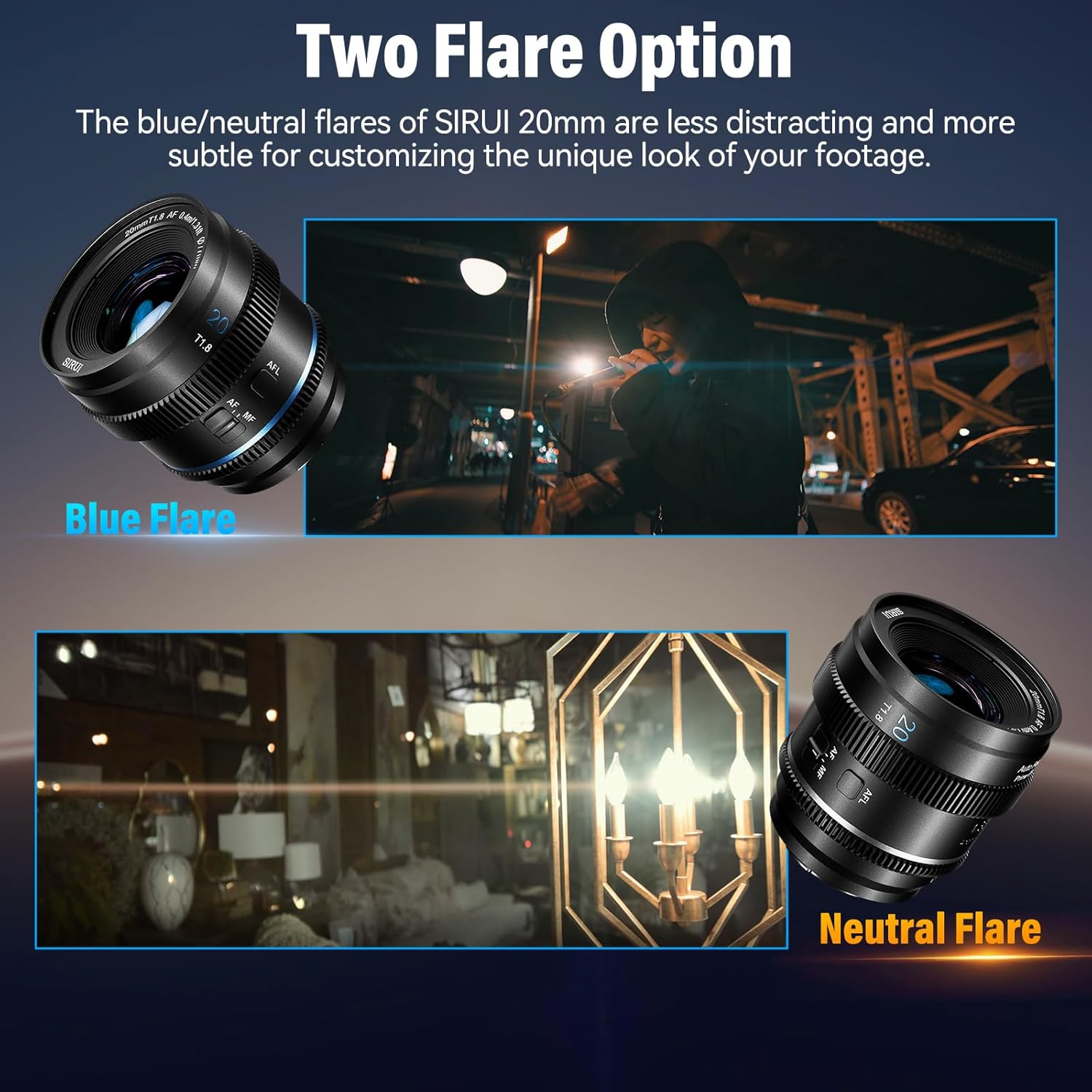
Imej: Cthample of Neutral Flare produced by the lens, offering a subtle and clean aesthetic.
5. Penyelenggaraan
5.1 Membersihkan Lensa
Proper cleaning helps maintain image quality and extends the life of your lens.
- Elemen Kanta: Use a blower brush to remove dust and loose particles. For smudges or fingerprints, use a clean, soft microfiber lens cloth and a small amount of lens cleaning solution. Apply the solution to the cloth, not directly to the lens. Wipe gently in a circular motion from the center outwards.
- Badan Lensa: Wipe the lens barrel with a clean, dry, soft cloth. Avoid using harsh chemicals or solvents.
- Never touch the lens elements with your fingers.
5.2 Penyimpanan
When not in use, store your lens in a cool, dry place away from direct sunlight and extreme temperatures. Use the provided lens caps to protect the front and rear elements. For long-term storage, consider using a dehumidifying cabinet or silica gel packets to prevent mold and mildew growth.
6. Penyelesaian masalah
6.1 Isu dan Penyelesaian Biasa
- Camera does not recognize the lens:
- Ensure the lens is securely mounted and clicked into place.
- Check your camera's menu for a setting like "Shoot Without Lens" or "Release Shutter Without Lens" and enable it.
- Clean the electronic contacts on both the lens and camera body with a clean, dry cloth.
- Vignetting (dark corners) in images:
- This lens is optimized for APS-C/Super 35 sensors. If used on a full-frame camera, vignetting may occur. Switch your camera to APS-C/S35 crop mode or correct in post-editing.
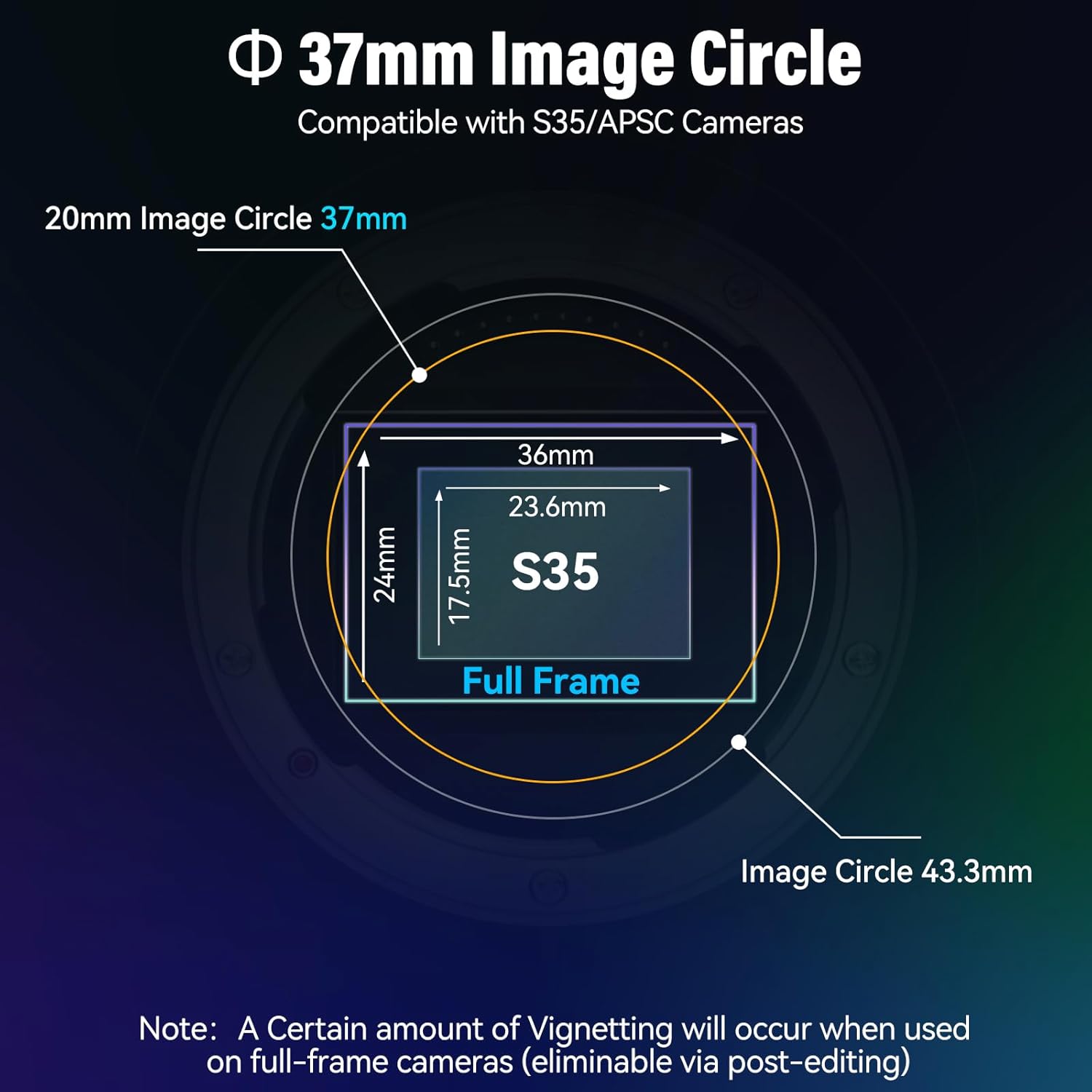
Image: Diagram showing the 37mm image circle and its compatibility with S35/APSC sensors, with a note on vignetting for full-frame cameras.
- Autofokus perlahan atau tidak tepat:
- Ensure there is sufficient light for the autofocus system.
- Check your camera's autofocus settings.
- Clean the lens elements and camera sensor.
- Try switching to manual focus (MF) for precise control.
- Image appears stretched vertically:
- This is the intended anamorphic effect. The image needs to be de-squeezed in post-production to achieve the correct 2.35:1 widescreen aspect ratio.
7. Spesifikasi
| Ciri | Perincian |
|---|---|
| Model | 20mm T1.8 1.33X |
| Panjang Fokus | 20mm |
| Apertur Maks | T1.8 |
| Min Aperture | T22 |
| Kaedah Fokus | Autofocus, Manual Focus |
| Jarak Menembak | 0.4m (1.31ft) ~ ∞ |
| Pembesaran Maksimum | 1:15.4(V) 1:20.6(H) |
| Benang Penapis | M77 x P0.75 |
| Degree of Focus Throws | 360° |
| Struktur Kanta | 16 Elements in 12 Groups (Including 5 Cylindrical Lenses & 1 Aspherical Lens) |
| Bilah Apertur | 11 |
| Diameter Maks | Φ86.1mm / 3.4" |
| Lens Format Coverage | S35 / APS-C |
| Horizontal/Vertical FOV (APS-C) | 38.974°(V) 73.906°(H) 78.324°(D) |
8. Keserasian
This SIRUI 20mm T1.8 1.33X Anamorphic Lens is designed for Fujifilm X-mount cameras. It is compatible with a wide range of Fujifilm X-series camera models:

Image: Compatibility chart for SIRUI 20mm T1.8 lens with Fujifilm X-mount cameras.
| Model Kamera | Keserasian | Model Kamera | Keserasian |
|---|---|---|---|
| X-A1 | ✓ | X-PRO3 | ✓ |
| X-A2 | ✓ | X-T1 | ✓ |
| X-A3 | ✓ | X-T2 | ✓ |
| X-A5 | ✓ | X-T3 | ✓ |
| X-A7 | ✓ | X-T4 | ✓ |
| X-A10 | ✓ | X-T10 | ✓ |
| X-A20 | ✓ | X-T20 | ✓ |
| X-E1 | ✓ | X-T30 | ✓ |
| X-E2 | ✓ | X-T30II | ✓ |
| X-E2S | ✓ | X-T100 | ✓ |
| X-E3 | ✓ | X-T200 | ✓ |
| X-E4 | ✓ | X-S10 | ✓ |
| X-H1 | ✓ | X-S20 | ✓ |
| X-M1 | ✓ | X-H2 | ✓ |
| X-PRO1 | ✓ | X-H2S | ✓ |
| X-PRO2 | ✓ | X-T5 | ✓ |
Note: For full-frame cameras, please switch to APS-C/S35 mode or use post-editing to mitigate vignetting.
9. Waranti dan Sokongan
SIRUI products are manufactured to high-quality standards and are covered by a limited warranty. Please refer to the included Service Card and Warranty Card for specific terms and conditions regarding your product's warranty period and coverage.
For technical support, service, or warranty claims, please contact SIRUI customer service or your authorized SIRUI dealer. Contact information can typically be found on the official SIRUI webtapak atau pada kad jaminan anda.