
Warm Audio WA-C1
Warm Audio WA-C1 Analog Chorus Vibrato Pedal User Manual
Model: WA-C1
pengenalan
The Warm Audio WA-C1 is an all-analog chorus and vibrato pedal designed to deliver classic modulated tones. This manual provides detailed instructions for setting up, operating, and maintaining your WA-C1 pedal to ensure optimal performance.
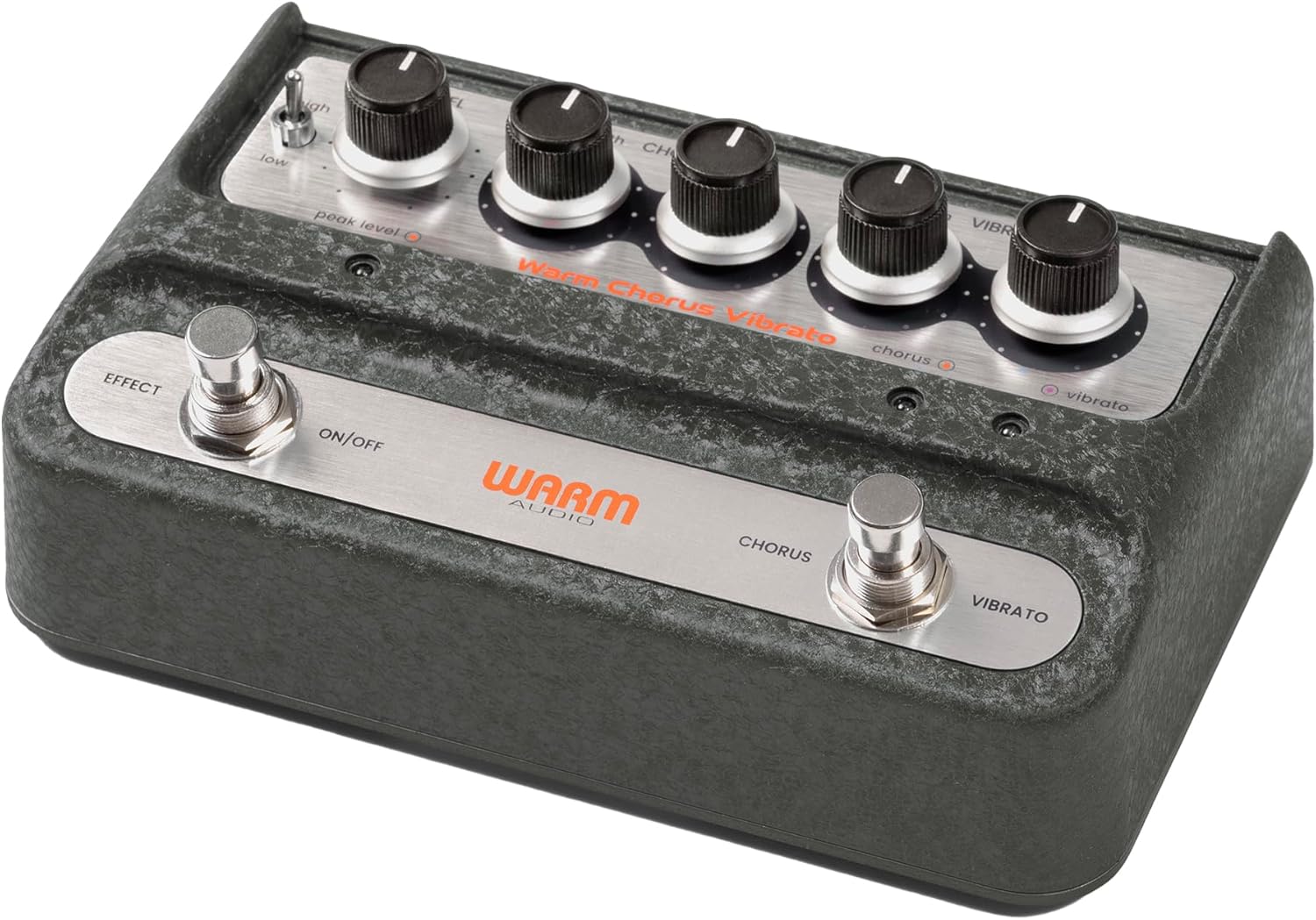
Imej: Keseluruhan view of the Warm Audio WA-C1 Analog Chorus Vibrato pedal.
Arahan Keselamatan Penting
- Baca arahan ini dengan teliti sebelum digunakan.
- Simpan arahan ini untuk rujukan masa hadapan.
- Patuhi semua amaran pada produk dan dalam manual ini.
- Jangan gunakan alat ini berhampiran air.
- Bersihkan hanya dengan kain kering.
- Jangan sekat sebarang bukaan pengudaraan. Pasang mengikut arahan pengilang.
- Jangan pasang berhampiran mana-mana sumber haba seperti radiator, daftar haba, dapur, atau radas lain (termasuk amppenghidup) yang menghasilkan haba.
- Hanya gunakan lampiran/aksesori yang ditentukan oleh pengilang.
- Cabut plag radas ini semasa ribut petir atau apabila tidak digunakan untuk tempoh yang lama.
- Rujuk semua servis kepada kakitangan perkhidmatan yang berkelayakan. Servis diperlukan apabila radas telah rosak dalam apa jua cara, seperti kord bekalan kuasa atau palam rosak, cecair telah tertumpah atau objek jatuh ke dalam radas, radas telah terdedah kepada hujan atau lembapan, tidak beroperasi seperti biasa. , atau telah digugurkan.
Ciri-ciri
- Faithful recreation of a classic all-analog chorus/vibrato circuit.
- Premium all-analog preamp for responsive tone.
- Independent Depth and Rate controls for Chorus.
- Authentic Vibrato section.
- Switchable Hi-Z input for optimizing guitar clarity.
- Mono and Stereo output options.
Kawalan dan Sambungan
Kawalan Panel Hadapan

Imej: Atas ke bawah view of the WA-C1 pedal's front panel, showing all control knobs and footswitches.
- Tombol TAHAP: Melaraskan kelantangan output keseluruhan pedal.
- DEPTH (Chorus) Knob: Controls the intensity or sweep range of the chorus effect.
- RATE (Chorus) Knob: Controls the speed of the chorus modulation.
- DEPTH (Vibrato) Knob: Controls the intensity or sweep range of the vibrato effect.
- RATE (Vibrato) Knob: Controls the speed of the vibrato modulation.
- EFFECT ON/OFF Footswitch: Engages or bypasses the entire pedal effect. The associated LED indicates the effect status.
- CHORUS/VIBRATO Footswitch: Toggles between Chorus and Vibrato modes when the effect is active. The associated LEDs indicate the selected mode.
- HIGH/LOW Switch: A two-position switch that adjusts the input gain, allowing for optimal signal handling from various instruments.
- PEAK LEVEL LED: Illuminates to indicate signal clipping or excessive input level. Adjust the HIGH/LOW switch or input signal to prevent clipping.
Sambungan Panel Belakang

Imej: Belakang view of the WA-C1 pedal, showing the power input, Hi-Z switch, input jack, and output jacks.
- POWER 9V Input: Connect a standard 9V DC power adapter (center negative, 2.1mm barrel connector). Ensure the power supply meets the pedal's requirements.
- HI-Z Switch: This switch adjusts the input impedance. Set to 'ON' for higher impedance instruments like guitars to enhance clarity in the high-end. Set to 'OFF' for lower impedance sources like keyboards.
- INPUT Jack: Connect your instrument (guitar, keyboard, etc.) to this 1/4-inch mono input.
- STEREO OUTPUT Jack: Use this 1/4-inch output for a stereo signal path, typically connecting to two amplifiers or a stereo effects loop.
- MONO OUTPUT Jack: Use this 1/4-inch output for a mono signal path, connecting to a single amplifier or the next pedal in your chain.
Persediaan
- Sambungan Kuasa: Connect a compatible 9V DC (center negative) power adapter to the POWER 9V input on the rear panel. Do not use an incompatible power supply.
- Sambungan Instrumen: Connect your instrument to the INPUT jack on the rear panel using a standard 1/4-inch instrument cable.
- Sambungan Output:
- For mono operation, connect the MONO OUTPUT jack to your amplampu isyarat atau pedal seterusnya dalam rantai isyarat anda.
- For stereo operation, connect both the MONO OUTPUT and STEREO OUTPUT jacks to two separate amplifiers or a stereo input device.
- Hi-Z Switch: If using a guitar, set the HI-Z switch to 'ON' for optimal high-end clarity. For other instruments like keyboards, set it to 'OFF'.
- Tetapan Awal: Start with all DEPTH and RATE knobs at their minimum (fully counter-clockwise) and the LEVEL knob at noon (12 o'clock) for initial sound adjustments.
Arahan Operasi
- Melibatkan Kesan: Press the EFFECT ON/OFF footswitch to activate the pedal. The corresponding LED will illuminate.
- Memilih Mod: With the effect active, press the CHORUS/VIBRATO footswitch to toggle between Chorus and Vibrato modes. The respective LED will indicate the active mode.
- Adjusting Chorus: In Chorus mode, use the DEPTH (Chorus) and RATE (Chorus) knobs to dial in your desired modulation intensity and speed.
- Adjusting Vibrato: In Vibrato mode, use the DEPTH (Vibrato) and RATE (Vibrato) knobs to dial in your desired modulation intensity and speed.
- Tahap Output: Use the LEVEL knob to adjust the overall output volume of the pedal. Ensure it matches or slightly boosts your bypassed signal level.
- Keuntungan Input: If your instrument's signal is too hot or too weak, use the HIGH/LOW switch to optimize the input gain. Monitor the PEAK LEVEL LED to avoid clipping.
Penyelenggaraan
- Pembersihan: Clean the pedal's exterior with a soft, dry cloth. Do not use liquid cleaners or solvents.
- Storan: Store the pedal in a dry, cool environment away from direct sunlight and extreme temperatures.
- Bekalan Kuasa: Always use the correct 9V DC (center negative) power supply. Incorrect power can damage the unit and void the warranty.
- Footswitches and Jacks: Periodically check connections for any loose cables or debris.
Menyelesaikan masalah
| Masalah | Kemungkinan Punca | Penyelesaian |
|---|---|---|
| Tiada bunyi apabila pedal ditekan. |
|
|
| Kesannya terlalu halus atau terlalu kuat. |
|
|
| Distortion or unwanted noise. |
|
|
Spesifikasi
- model: WA-C1
- Jenis Kesan: Analog Chorus / Vibrato
- Format Isyarat: Analog
- Keperluan Kuasa: 9V DC, Center Negative (Power adapter not included)
- Input: 1/4-inch Mono Jack
- Keluaran: 1/4-inch Mono Jack, 1/4-inch Stereo Jack
- Kawalan: Level, Chorus Depth, Chorus Rate, Vibrato Depth, Vibrato Rate, High/Low Switch, Hi-Z Switch
- Dimensi: Kira-kira 8 x 5.25 x 4 inci (Saiz Pakej)
- Berat: Approximately 2 pounds (Item Weight)
Waranti dan Sokongan
Warm Audio products are designed for reliability and performance. For warranty information and technical support, please refer to the official Warm Audio webtapak atau hubungi pengedar sah anda. Simpan resit pembelian anda sebagai bukti pembelian untuk tuntutan waranti.
Untuk bantuan lanjut, layari: www.warmaudio.com/support