
CUSHYBITE FVG52K-A95MB02
CUSHYBITE FVG52K-A95MB02 USB Lithium Cordless Compact Detail Scrubber Kit User Manual
Model: FVG52K-A95MB02 | Brand: CUSHYBITE
1. Arahan Keselamatan Penting
Baca semua amaran dan arahan keselamatan sebelum mengendalikan produk ini. Kegagalan mematuhi amaran dan arahan boleh mengakibatkan renjatan elektrik, kebakaran dan/atau kecederaan serius.
- Keselamatan Bateri: Use only the specified USB Lithium 2Ah battery. Do not attempt to open or modify the battery. Do not expose the battery to water, fire, or extreme temperatures.
- mengecas: Use only the provided charging cable. Ensure the charging port is dry before connecting the cable.
- Tahan Air: The scrubber is IPX7 water-resistant, allowing submersion in up to 3 feet of water for 30 minutes. However, ensure the battery compartment is securely closed before exposing to water. Do not charge the device while wet.
- Lampiran: Ensure attachments are securely fastened before operation. Do not use damaged attachments.
- Keselamatan Diri: Keep hands, hair, and loose clothing away from moving parts. Wear appropriate eye protection when operating.
2. Kandungan Pakej
Sahkan bahawa semua item yang disenaraikan di bawah disertakan dalam pakej anda:
- USB Lithium Cordless Compact Detail Scrubber
- USB Lithium 2Ah Battery
- Kabel Pengecas USB
- Medium Bristle Detail Brush
- Hard Bristle Grout Brush
- Scour Pad Attachment

Image: All components included in the CUSHYBITE FVG52K-A95MB02 USB Lithium Cordless Compact Detail Scrubber Kit, including the main scrubber unit, various brush and scour pad attachments, the USB Lithium 2Ah battery, and the USB charging cable.
3. Produk Lebihview
Familiarize yourself with the key features and components of your detail scrubber.

Imej: A terperinci view of the CUSHYBITE FVG52K-A95MB02 scrubber with key parts labeled, including the attachment connection point, LED battery indicator, IPX7 water resistance rating, lightweight design, and the medium bristle detail brush.
4. Persediaan
4.1 Mengecas Bateri
- Connect the small end of the USB charging cable to the USB-C port on the USB Lithium 2Ah battery.
- Connect the large end of the USB charging cable to a standard USB power adapter (not included) or a powered USB port.
- The LED fuel gauge on the battery will indicate charging status. A full charge is indicated when all LEDs are solid.
4.2 Memasang/Membuang Bateri
- To install, align the battery with the battery compartment at the base of the scrubber handle. Push the battery firmly until it clicks into place.
- To remove, press the battery release button (if present) and pull the battery out of the compartment.

Image: A hand inserting the USB Lithium 2Ah battery into the base of the CUSHYBITE FVG52K-A95MB02 cordless detail scrubber, demonstrating the battery installation process.
4.3 Attaching/Removing Accessories
- To attach an accessory (brush or scour pad), align the accessory with the attachment connection point on the scrubber head. Push and twist gently until it locks securely.
- To remove, twist the accessory in the opposite direction and pull it off.
5. Arahan Operasi
5.1 Menghidupkan/Mematikan
Press the power button located on the handle to turn the scrubber on. Press it again to turn the scrubber off.
5.2 Using the Scrubber
- Pilih alat tambahan yang sesuai untuk tugas pembersihan anda:
- Medium Bristle Detail Brush: Ideal for general cleaning of surfaces like tile, fiberglass, and delicate areas.
- Hard Bristle Grout Brush: Designed for aggressive cleaning of grout lines and stubborn stains.
- Scour Pad Attachment: Suitable for tough scrubbing tasks on durable surfaces.
- Apply a small amount of appropriate cleaning solution to the surface or the attachment, if desired.
- Turn on the scrubber and gently apply pressure to the surface you are cleaning. Allow the 6,300 oscillations per minute to do the work.
- Move the scrubber slowly and steadily over the area.
- After cleaning, turn off the scrubber and rinse the cleaned area and the attachment thoroughly.
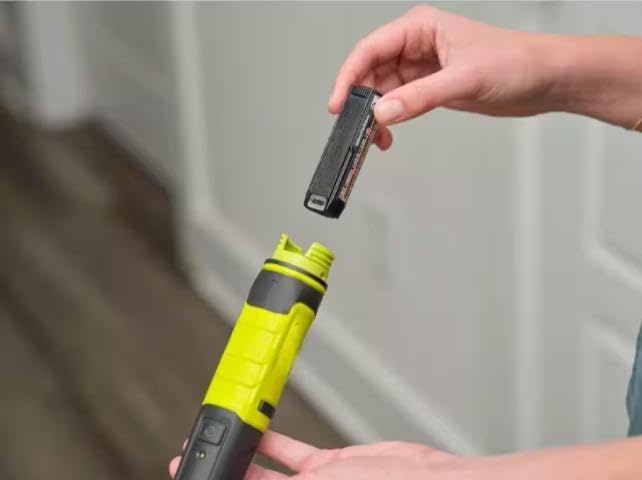
Image: A hand holding the CUSHYBITE FVG52K-A95MB02 detail scrubber, equipped with a blue scour pad attachment, actively cleaning around a sink drain, demonstrating its use in wet conditions.
6. Penyelenggaraan
6.1 Cleaning the Scrubber and Attachments
- After each use, remove the attachment and rinse it thoroughly under running water. Allow it to air dry completely before storing.
- Wipe the body of the scrubber with a damp cloth to remove any residue. Ensure the battery compartment is dry before closing.
- Do not use harsh chemicals or abrasive cleaners on any part of the scrubber.
6.2 Penjagaan dan Penyimpanan Bateri
- Simpan bateri di tempat yang sejuk dan kering jauh dari cahaya matahari langsung dan suhu yang melampau.
- Untuk storan jangka panjang, cas bateri kepada lebih kurang kapasiti 50%.
- Do not store the battery fully discharged or fully charged for extended periods.
- The USB Lithium 2Ah battery can also be used to charge mobile devices via its USB-C port.
7. Penyelesaian masalah
If you encounter issues with your scrubber, refer to the following common problems and solutions:
| Masalah | Kemungkinan Punca | Penyelesaian |
|---|---|---|
| Scrubber does not turn on. | Bateri tidak dicas atau tidak dipasang dengan betul. | Ensure battery is fully charged and securely inserted into the compartment. |
| Prestasi pembersihan yang lemah. | Incorrect attachment for the task; attachment is worn; insufficient cleaning solution. | Select appropriate attachment. Replace worn attachments. Apply suitable cleaning solution. |
| Bateri tidak dicas. | Charging cable or power source issue; battery too hot/cold. | Check cable connections and power source. Ensure battery is at room temperature. |
8. Spesifikasi
- Nombor Model: FVG52K-A95MB02
- Jenama: CUSHYBITE
- Oscillations Per Minute: 6,300 OPM
- Penilaian Ketahanan Air: IPX7 (boleh tenggelam sehingga 3 kaki selama 30 minit)
- Jenis Bateri: USB Lithium 2Ah
- Berat: Less than 1 pound (tool only)
9. Waranti dan Sokongan
This CUSHYBITE FVG52K-A95MB02 USB Lithium Cordless Compact Detail Scrubber Kit is backed by a Waranti pengilang selama 2 tahun.
For warranty claims, technical support, or replacement parts, please contact CUSHYBITE customer service. Refer to your purchase documentation for specific contact information or visit the official CUSHYBITE webtapak.
Dokumen Berkaitan - FVG52K-A95MB02
 |
Ryobi Holiday Gift Guide 2025: Deals on Power Tools and Accessories Discover the Ryobi Holiday Gift Guide 2025 featuring discounted power tools, tool kits, accessories, and home preparation items. Find great deals on 18V tools, impact wrenches, drills, saws, and more, perfect for DIY enthusiasts. Available at Home Depot Canada. |
 |
Ryobi 2025 Holiday Gift Guide: Power Tools & Home Improvement Gifts Explore the Ryobi 2025 Holiday Gift Guide featuring a wide selection of power tools, accessories, and home improvement gifts. Discover deals on impact drivers, drills, saws, vacuums, and more, available exclusively at The Home Depot. |
Ask a question about this manual
Ask about setup, troubleshooting, compatibility, parts, safety, or missing instructions. Manuals+ will review the question and use this page’s manual context to help answer it.